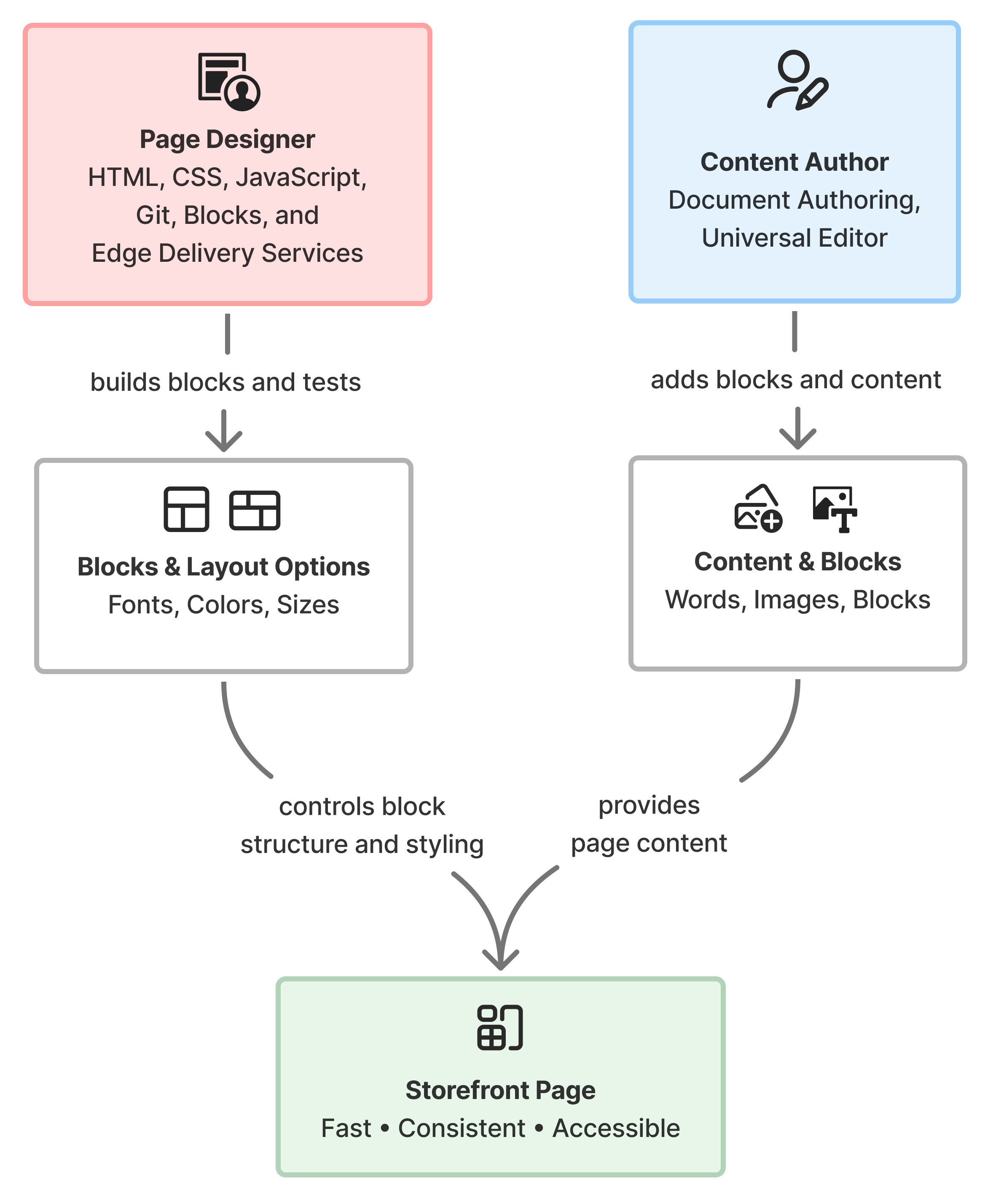
Building a page on your storefront takes two roles working together: a content author and a page designer. A content author works in Document Authoring, choosing the words, images, and blocks a page needs. A page designer works in the storefront’s code, defining how those blocks appear, including layouts, fonts, colors, and sizes.
How the Page Designer's presentation and the Content Author's content combine to create a storefront page.
This split lets a content author choose a page’s content, while a page designer builds its presentation. Pre-built, tested layouts keep pages fast, consistent, and accessible in ways that page-by-page styling can’t guarantee. The consistent markup they produce is also easier to optimize for search engines.
Builds and modifies both content blocks and commerce blocks, including a block’s styling, spacing, and behavior across devices, and wiring an existing drop-in into a new commerce block. This role requires HTML, CSS, Git, and JavaScript skills, and a working knowledge of Edge Delivery Services component design. A developer steps in for new drop-in packages or changes to a drop-in’s own internal behavior. See Blocks Reference for the blocks already available to extend, or Create commerce blocks to build a new one.
Content Author
Starts from the template closest to their needs, then adds text, images, and the right pre-built blocks to assemble the page in Document Authoring. Content authors choose from the layout options that a page designer has already built. They also own block settings, placeholders, metadata, publishing, and scheduling. This role maps to the “author” role described in Author and developer tasks.
A layout option must exist before a content author can pick it.
A hero banner, for example, might offer a two-column layout and a full-width layout, each built and tested ahead of time.
When a content author needs a layout option that doesn’t exist yet, or an entirely new kind of block, the request goes to the page designer. If that need is a new drop-in, live catalog data, or a change to existing behavior, it becomes a developer task outside the page designer’s scope. See Author and developer tasks for how to file that request.
Page designers create templates for common content pages, such as a landing page or a category page, so content authors can start from the right baseline instead of starting from an empty page. A content author selects the template that most closely matches their needs and builds from there.
If you’re a content author ready to build a page, start with Create your first commerce page. It walks through assembling a page from an existing template in Document Authoring.
If you have the front-end skills to build a new block or layout option, start with Blocks Reference to see what already exists, then Create commerce blocks to build something new.