Auf dieser Seite Erfahren Sie, wie Sie eine Kanalkonfiguration für einen benutzerdefinierten Kanal in Adobe Journey Optimizer erstellen und mit API-Anmeldeinformationen, einer optionalen Subdomain und Payload-Standardwerten verknüpfen, damit Marketing-Experten ihn beim Erstellen von Kampagnen und Journeys auswählen können.
Eine Kanalkonfiguration verknüpft Ihren benutzerdefinierten Kanal mit einer benannten, wiederverwendbaren Vorgabe, die Marketing-Experten beim Erstellen von Kampagnen und Journey auswählen.
Gehen Sie wie folgt vor, um eine Kanalkonfiguration für einen benutzerdefinierten Kanal zu erstellen.
-
Gehen Sie zu Administration > Kanäle > Kanalkonfigurationen und klicken Sie auf Kanalkonfiguration erstellen. Weitere Informationen finden Sie unter Erstellen einer Kanalkonfiguration.
-
Wählen in der Dropdown Liste Kanal auswählen einen der aktivierten benutzerdefinierten Kanäle aus.
-
Wenn der ausgewählte Kanal eine Authentifizierung verwendet (der Typ ist nicht None), wird das Feld API-" angezeigt. Wählen Sie die für diese Konfiguration zu verwendenden Anmeldeinformationen aus. Weitere Informationen zu API-Anmeldeinformationen
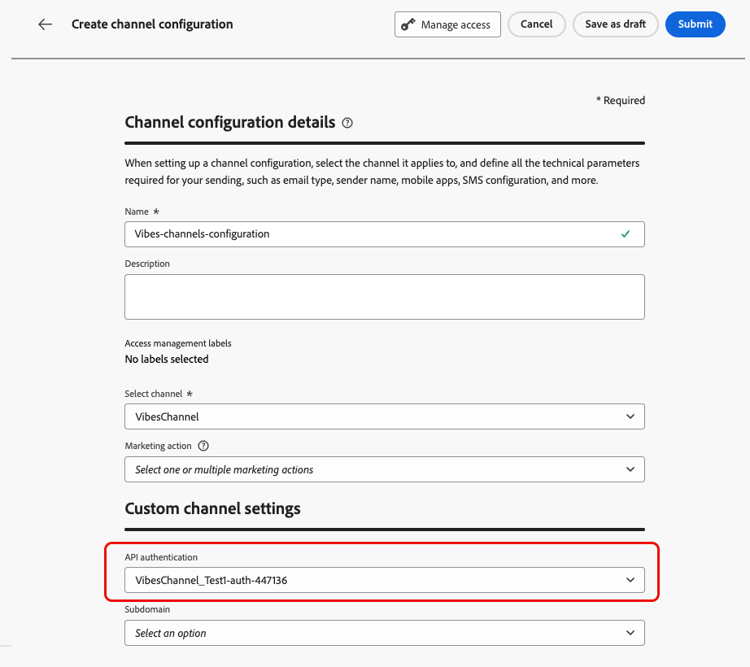
-
Wenn Sie in Journey Optimizer Subdomains für benutzerdefinierte Kanäle eingerichtet haben, können Sie eine delegierte Subdomain auswählen, die für das Tracking von Links verwendet wird, die in der Payload für diese Konfiguration vorhanden sind. Erfahren Sie, wie Sie eine Subdomain delegieren
-
Wenn der ausgewählte Kanal für die Endpunkt-URL Kopfzeilen oder Abfrageparameter (als definiert) hat, der Abschnitt Dynamische Parameter“ angezeigt.
Geben Sie den Wert für jeden Parameter ein. Sie können den Personalisierungseditor verwenden, um dynamische Werte einzufügen (z. B. eine aus dem Profil gelöste Benutzerkennung). Auf diese Weise können Sie die Anfrage für jede Empfängerin und jeden Empfänger auf der Grundlage ihrer Profildaten anpassen.

-
Wenn für den benutzerdefinierten Kanal Payload-Felder mit aktiviertem Kontrollkästchen Kanalkonfiguration vorhanden sind, werden diese Felder im Abschnitt Payload-Konfiguration angezeigt. Weitere Informationen

Konfigurieren Sie für jedes Feld einen Wert, der für diese Konfiguration geeignet ist. Dies ist nützlich für Felder, die je nach Kontext der Kampagne oder Journey variieren können, z. B. Absenderinformationen oder Nachrichtenvorlagen.
- Klicken Sie Senden, um die Kanalkonfiguration zu speichern und zu aktivieren.
Nächste Schritte next-steps
Ihr benutzerdefinierter Kanal ist jetzt vollständig konfiguriert. Marketing-Experten können damit beginnen, Kundenerlebnisse zu schaffen:
This section contains structured knowledge intended to support interpretation, retrieval, and question answering related to this topic.
For complete understanding, this information should be combined with the documentation on this page. Neither source is intended to stand alone; the page describes the feature, while this section provides additional context that helps disambiguate terminology, intent, applicability, and constraints.
- TL;DR: This page explains how to create a channel configuration that links a custom channel to a named, reusable preset, including API credentials, an optional subdomain, dynamic parameters, and payload defaults, so that marketers can select it when building campaigns and journeys.
Intents:
- Create a channel configuration for an activated custom channel
- Select the API credentials to use for the configuration
- Select a delegated subdomain for tracking links in the payload
- Provide values for dynamic parameters and payload fields
- Save and activate the channel configuration for marketers to select
Glossary:
- Channel configuration: A named, reusable preset that links a custom channel to credentials, a subdomain, and payload defaults, which marketers select when building campaigns and journeys (product-specific)
- Dynamic parameters: The section that appears when the channel has headers or query parameters defined as variable, where a value is entered for each parameter (product-specific)
- Payload configuration: The section that displays payload fields whose Channel config checkbox is enabled, where a value is configured for each field (product-specific)
- Delegated subdomain: A subdomain that can be selected to track links present in the payload for this configuration (product-specific)
Guardrails:
- Only activated custom channels can be selected in the Select channel drop-down.
- The API credentials field appears only if the selected channel uses an authentication type other than None.
- The Dynamic parameters section appears only if the channel has headers or query parameters defined as variable.
- The Payload configuration section appears only for payload fields that have the Channel config checkbox enabled.
- In custom channel configurations, you cannot select a message type, so all messages sent through custom channels are treated as Marketing messages at send time; custom channels are not supported in Transactional campaigns (action or API-triggered).
- Selecting a delegated subdomain is possible only if you have set up subdomains for custom channels in Journey Optimizer.
- Clicking Submit saves and activates the channel configuration.
Terminology:
- Canonical name: channel configuration — Acronym: n/a — variants: custom channel configuration, named preset
- Do not confuse: “channel configuration” (the reusable preset) ≠ “custom channel” (the activated custom channel selected from the Select channel drop-down)
- Do not confuse: “Dynamic parameters” (values for variable headers or query parameters) ≠ “Payload configuration” (values for payload fields enabled for the channel config)
FAQ:
- Q: What does a channel configuration do? — It links a custom channel to a named, reusable preset that marketers select when building campaigns and journeys.
- Q: When does the API credentials field appear? — When the selected channel uses an authentication type other than None.
- Q: When does the Dynamic parameters section appear? — When the channel has headers or query parameters defined as variable.
- Q: Which channels can I select? — Only your activated custom channels.
- Q: How do I save a channel configuration? — Click Submit to save and activate it.