在此頁面上:透過同意原則來記錄並尊重客戶的頻道和主題偏好設定,以便只將目標鎖定在想要收到您訊息的人。
在現代行銷自動化生態系統中,品牌與各個接觸點的客戶互動,面對不相關或過度通訊、導致脫離、垃圾郵件投訴和合規風險的風險。 這就是為什麼他們需要管理客戶的偏好設定,以便獲得對受眾的即時見解,並提供個人化、尊重的溝通。
透過Adobe Journey Optimizer,使用同意原則,您可以尊重客戶的偏好設定。 這可確保Journey Optimizer僅根據客戶的選擇來鎖定客戶,同時尊重他們的同意。
若要使用Journey Optimizer管理您的使用者偏好設定,您可以:
記錄與執行喜好設定 manage-preferences
使用Journey Optimizer中的同意原則,您可以集中管理客戶的偏好設定。 這可讓您確保僅根據客戶選取的主題來鎖定客戶,同時尊重他們的同意選擇。 請依照下列步驟以執行此操作。
假設您想要根據客戶在多個訂閱主題(電子報、優惠和新產品上市)的通訊偏好設定,透過歷程和行銷活動鎖定客戶。
-
在設定檔層級使用布林運運算元定義偏好設定屬性。 例如,您可以指定:
- Newsletter_Email — 布林值(true/false)
- Offers_Push — 布林值(True/False)
- 新產品啟動 — 布林值(True/False)
這些屬性是在啟用設定檔的資料集的結構描述中擷取,並對應至整合式客戶設定檔。
note NOTE 客戶同意和聯絡人偏好設定是複雜的主題。 若要瞭解如何在Experience Platform中收集、處理和篩選同意與內容偏好設定,建議您閱讀下列檔案: -
建立頁面以擷取您客戶的偏好設定。 請使用下列其中一種方法:
-
使用Adobe Experience Platform Web SDK建立網頁以記錄客戶的偏好設定。
-
使用包含表單的Journey Optimizer 登陸頁面,透過設定檔資料擷取客戶的偏好設定。 進一步瞭解表單
note NOTE 確定使用的登入頁面網域屬於上層品牌,而非子品牌。 事實上,收集的偏好設定會儲存在設定檔資料中,而且位於品牌的最高級別。
-
-
在此頁面上,客戶可以選取或取消選取核取方塊來更新其偏好設定,例如依主題訂閱。
每個動作會透過將資料擷取至啟用設定檔的資料集結構描述,觸發針對對應設定檔屬性(
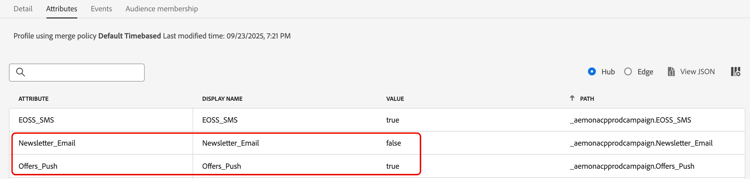
true針對選擇加入,false針對選擇退出)儲存的同意事件。例如,使用者同意接收推播優惠,但不想接收電子郵件電子報。 對應的設定檔會更新如下:
-
在 Adobe Experience Platform 中,建立自訂原則 (從隱私>政策選單)。 了解作法
note availability AVAILABILITY 同意原則目前僅適用已購買 Adobe Healthcare Shield 與 隱私權與安全性防護 附加產品的組織。 進一步瞭解同意原則 若要使用同意原則,設定檔資料中必須存在偏好設定屬性。 這就是您必須在設定檔層次定義這些屬性的原因(如步驟1所述)。
-
選擇 同意原則 按如下所示輸入並設定條件。 瞭解如何設定同意原則
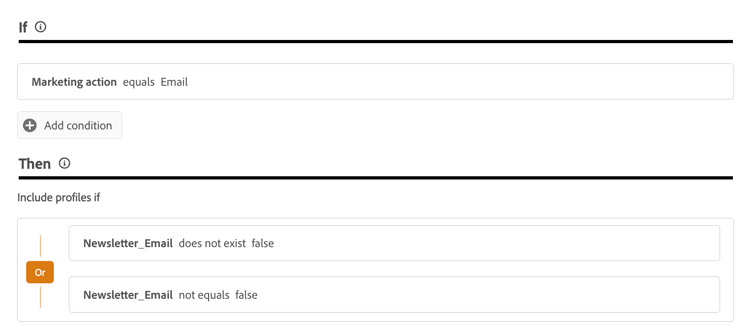
例如,若要僅傳送通訊給未選擇退出接收電子郵件電子報的客戶,請建立自訂原則並定義下列條件:
-
如果 行銷動作 等於電子郵件
-
那麼 Newsletter_Email 不存在 false 或 Newsletter_Email 不等於false
note tip TIP 啟用設定檔的資料集必須包含設定檔屬性Newsletter_Email,其值設定為 true(如步驟1所述)。 -
-
現在,您可以在歷程及行銷活動中使用這些管道設定或自訂動作,以確保您的客戶偏好設定獲得尊重。
This section contains structured knowledge intended to support interpretation, retrieval, and question answering related to this topic.
For complete understanding, this information should be combined with the documentation on this page. Neither source is intended to stand alone; the page describes the feature, while this section provides additional context that helps disambiguate terminology, intent, applicability, and constraints.
- TL;DR: This page explains how to record and honor your customers’ channel and topic preferences through consent policies so that Journey Optimizer only targets customers based on their choices.
Intents:
- Retrieve customer consent to opt in or out for native outbound channels
- Ask customers which topics they wish to subscribe to
- Define preference attributes at the profile level using the Boolean operator
- Create a page, using the Web SDK or a landing page, to capture customer preferences
- Create a consent policy in Experience Platform and leverage it in Journey Optimizer
Glossary:
- Preference attribute: A Boolean (true/false) attribute defined at the profile level, such as Newsletter_Email, captured in a Profile-enabled dataset schema and mapped to the unified customer profile (product-specific)
- Consent policy: A policy created in Experience Platform, applied in Journey Optimizer through channel configurations or journey custom actions, used to honor preferences (product-specific)
- Consent event: The event triggered when a customer selects or deselects a preference, saved against the profile attributes as true for opted-in and false for opted-out (product-specific)
- Subscription topic: A category of communication a customer can subscribe to, such as Newsletters, Offers, and New Product Launches (product-specific)
Guardrails:
- This capability is currently only available for organizations that have purchased the Adobe Healthcare Shield or Privacy and Security Shield add-on offerings.
- Consent takes precedence over preferences: a customer who opted out from receiving any communications cannot be targeted even if a preferred channel and topic are indicated.
- The supported channels are Email, Push, Mobile messages and InApp.
- Preference attributes must be present in the profile data, which is why they must be defined at the profile level.
- The domain of the landing page being used must belong to the upper brand and not to a sub-brand, because the preferences collected are stored in the profile data which is at the upper-brand level.
Terminology:
- Canonical name: Preference — Acronym: n/a — variants: contact preference, communication preference, subscription preference
- Synonyms: “opted-in” = “true”; “opted-out” = “false”
- Do not confuse: “consent” (whether a customer agreed to receive communications) ≠ “preference” (the channels and topics a customer selected); consent takes precedence over preferences
FAQ:
- Q: Which channels are supported for retrieving consent? — The supported channels are Email, Push, Mobile messages and InApp.
- Q: What takes precedence when consent and preferences conflict? — Consent takes precedence over preferences; a customer who opted out from all communications cannot be targeted regardless of their preferred channel or topic.
- Q: How are preference attributes defined? — Define them with the Boolean operator (true/false) at the profile level; they are captured in a Profile-enabled dataset schema and mapped to the unified customer profile.
- Q: How can I capture customer preferences? — Create a web page using the Adobe Experience Platform Web SDK, or use a Journey Optimizer landing page that includes forms to capture preferences through profile data.
- Q: Why must the landing page domain belong to the upper brand? — Because the preferences collected are stored in the profile data, which is at the upper-brand level.