在此頁面上:瞭解如何存取、建立和治理 Adobe Experience Platform 資料集,以便儲存和探索 Adobe Journey Optimizer 中支援歷程、行銷活動和報告的資料。
所有擷取至 Adobe Experience Platform 的資料都會以資料集的形式保留在資料湖。 資料集是資料集合的儲存和管理結構,通常是包含方案 (欄) 和欄位 (列) 的表格。
護欄 & 限制
存取資料集 access
Adobe Journey Optimizer 使用者介面中的 資料集 工作區可讓您探索資料和建立資料集。 若要開啟資料集儀表板,請在左側導覽中選取資料集。
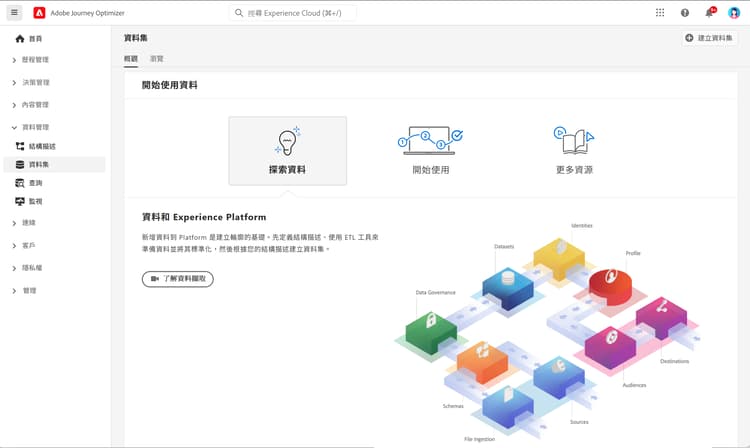
選取 瀏覽 索引標籤,顯示貴組織所有可用資料集的清單。 系統會顯示每個列出資料集的詳細資訊,包括其名稱、資料集所遵守的結構描述,以及最新攝取執行的狀態。 預設情況下,只會顯示您已將資料攝取至其中的資料集。 如果要查看系統產生的資料集,請從篩選器啟用 顯示系統資料集 切換。

選取資料集名稱,以存取其資料集活動畫面,並查看所選取資料集的詳細資訊。 活動索引標籤包含將訊息耗用速率視覺化的圖表,以及成功和失敗批次的清單。
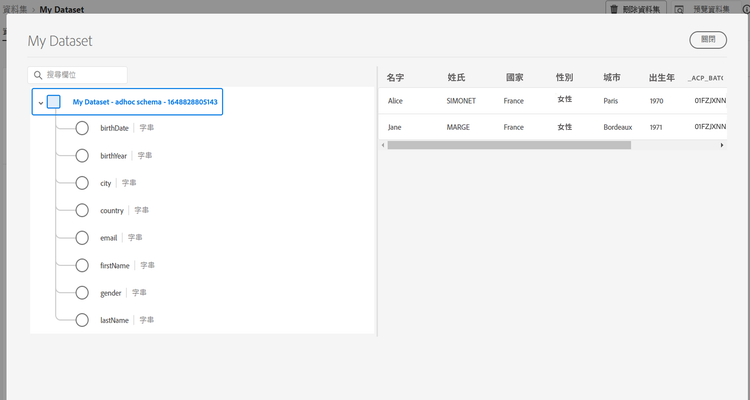
若要預覽資料集,請選取畫面右上角附近的預覽資料集,預覽此資料集最新成功的批次資料。 當資料集空白時,預覽連結會停用。
Journey Optimizer 系統資料集 system-datasets
本節列出 Journey Optimizer 使用的系統資料集。 若要檢視每個結構描述的完整欄位和屬性清單,請參閱Adobe Journey Optimizer結構描述參考。
-
報告
- 報告 - 訊息意見事件資料集:訊息傳遞記錄檔。 有關用於報告與客群建立目的,而從 Journey Optimizer 傳遞之所有訊息的資訊。 電子郵件 ISP 對退回郵件的意見也會記錄在此資料集。 此資料集使用批次擷取,預期最多有 2 小時的資料延遲。 如需欄位層級定義與路徑,請參閱 Adobe Journey Optimizer 結構描述參考。 如需 SQL 報告範例,請參閱資料集查詢範例。
- 報告 - 電子郵件追蹤體驗事件資料集:電子郵件管道的互動記錄,以及
whatsAppChannelContext欄位群組下的 WhatsApp 管道內容資料。 用於報告和建立客群。 儲存的資訊包含終端使用者在電子郵件和 WhatsApp 互動中執行的動作 (開啟、按一下等)。 - 報告 - 推播追蹤體驗事件資料集:用於報告與客群建立目的使用之推播通知頻道的互動記錄。 儲存的資訊會說明終端使用者在推播通知上執行的動作。
- 報告 - 歷程步驟事件:擷取從 Journey Optimizer 產生的所有歷程步驟體驗事件,供報告等服務使用。 對於在 Customer Journey Analytics 建立 YoY 分析也很重要。 繫結至歷程中繼資料。
- 報告 - 歷程:包含歷程每個步驟資訊的中繼資料資料集。
- 報告 - 密件副本:用於儲存密件副本電子郵件的傳遞記錄意見事件資料集。 用於報告用途。
- AJO 管道追蹤事件資料集:擷取所有傳入的 WhatsApp 回應,包括透過 WhatsApp 流程範本提交的回應。
-
同意
同意服務資料集:儲存輪廓的同意資訊。
-
訊息匯出
AJO訊息匯出資料集:儲存已傳送電子郵件和行動訊息的內容,以供匯出。 從擷取之日起,記錄會保留 7 天。 僅適用於已購買訊息匯出附加元件的組織。 了解更多
-
Intelligent Services
傳送時間最佳化分數 / 參與分數:輸出 Journey AI 的分數。
-
傳入
AJO 傳入活動事件資料集:儲存在 Journey Optimizer 中接收的傳入訊息的傳入活動事件。
建立資料集 create-datasets
將資料新增至 Adobe Experience Platform 是建立輪廓的基礎。 然後,您將能夠善用 Adobe Journey Optimizer 的輪廓。 首先定義結構描述,使用 ETL 工具準備和標準化資料,然後根據您的結構描述建立資料集。
您可以從結構描述或 CSV 檔案建立資料集。 有關如何建立資料集的詳細資訊,請參閱 Adobe Experience Platform 文件:
觀看此影片,了解如何建立資料集、將資料對應至結構描述、新增資料,以及確認資料已擷取。
為輪廓啟用資料集 profile-datasets
當您建立資料集時,可以啟用它來貢獻即時客戶輪廓。 這允許其包含的資料用於Journey Optimizer中的細分、個人化和歷程條件。
在啟用之前,請牢記以下事項:
- 結構描述啟用是永久性的。 為輪廓啟用資料集基礎的結構描述後,便無法還原,無法停用或刪除結構描述。 只能單獨停用或刪除資料集本身。
- 停用資料集會有後果。 您可以停用或刪除輪廓的資料集,而不受其結構描述影響,但這麼做會移除關聯的輪廓記錄,並可能干擾細分和啟動工作流程。
- 在啟用之前先規劃您的設定。 啟用輪廓後,身分識別欄位和欄位群組選取專案變得更難以變更。 先完成您的結構描述設計。
如需詳細指引,請參閱 Adobe Experience Platform 文件:
- 輪廓啟用計劃 — 預先啟用檢查清單,涵蓋身分識別設定、欄位群組選取和資料集用途驗證。
- 管理已啟用輪廓的結構描述 — 有關淘汰已啟用輪廓的結構描述 (包括重新命名策略) 的指南。
資料治理
在資料集中,瀏覽 資料控管 索引標籤來檢查資料集和欄位層級的標籤。 資料治理會根據套用的原則類型來分類資料。
Adobe Experience Platform 的核心功能之一是將來自多個企業系統的資料彙整在一起,讓行銷人員更能識別、了解並吸引客戶。 此資料可能受貴組織或法律法規所定義的使用限制所約束。 因此,務必確保您的資料操作符合資料使用原則。
Adobe Experience Platform Data Governance 可讓您管理客戶資料,並確保符合適用於資料使用的法規、限制與原則。 它在 Experience Platform 的各個層面發揮關鍵作用,包括編目、資料譜系、資料使用標籤、資料使用原則和控制資料在行銷活動的使用。
深入了解資料控管及資料使用標籤,請參閱資料治理文件
範例與使用案例 samples
- 教學課程 - 將資料擷取至 Adobe Experience Platform
- 端到端使用案例 - 建立結構描述、資料集和擷取資料以在 Adobe Journey Optimizer 中新增測試輪廓
- 查詢範例 - Adobe Journey Optimizer資料集和相關使用案例。
This section contains structured knowledge intended to support interpretation, retrieval, and question answering related to this topic.
For complete understanding, this information should be combined with the documentation on this page. Neither source is intended to stand alone; the page describes the feature, while this section provides additional context that helps disambiguate terminology, intent, applicability, and constraints.
- TL;DR: This page explains how to access, create, and govern Adobe Experience Platform datasets in Journey Optimizer, including system-generated datasets and enabling a dataset for Real-Time Customer Profile.
Intents:
- Access and preview datasets in the Datasets workspace.
- Reveal and identify Journey Optimizer system-generated datasets.
- Create a dataset from a schema or from a CSV file.
- Enable a dataset for Real-Time Customer Profile.
- Review data governance labels at the dataset and field level.
Glossary:
- Dataset: a storage and management construct for a collection of data, typically a table, that contains a schema (columns) and fields (rows) (product-specific)
- Data Lake: where all data ingested into Adobe Experience Platform is persisted as datasets
- System dataset (system-generated dataset): a dataset used by Journey Optimizer; the page lists system datasets under Reporting, Consent, Message Export, Intelligent Services, and Inbound (product-specific)
- Show system datasets: toggle in the Datasets workspace filter that reveals system-generated datasets; by default, only the datasets that you have ingested into are shown (product-specific)
- Enable for Profile: enabling a dataset to contribute to Real-Time Customer Profile (product-specific)
- Data Governance: dataset and field-level labels that categorize data according to applicable usage policies
Guardrails:
- System datasets must not be modified; any change is automatically reverted with every product update.
- Enabling the schema underlying a dataset for Profile is permanent: once enabled, the schema cannot be disabled or deleted. Only the dataset itself can be disabled or deleted separately.
- Disabling or deleting a Profile-enabled dataset removes the associated profile records and may disrupt segmentation and activation workflows.
- As of November 1, 2024, streaming segmentation no longer supports send and open events from Journey Optimizer tracking and feedback datasets; use Business Rules for frequency capping or fatigue management instead.
- As of February 2025, a time-to-live (TTL) guardrail is being rolled out to Journey Optimizer system-generated datasets.
- The AJO Message Export Dataset retains records for 7 calendar days from ingestion and is available only to organizations that purchased the Message Export add-on.
- The Message Feedback Event Dataset uses batch ingestion; expect a data latency of up to 2 hours.
- When a dataset is empty, the Preview dataset link is deactivated.
Terminology:
- Do not confuse: disabling or deleting a “dataset” (possible independently) ≠ disabling the underlying “schema” for Profile (permanent, cannot be reversed)
FAQ:
- Q: How do I see system-generated datasets? — Enable the Show system datasets toggle in the Datasets workspace filter, on the Browse tab.
- Q: Can I edit a system dataset? — No; any change is automatically reverted with every product update.
- Q: Is enabling a dataset for Profile reversible? — The schema enablement is permanent and cannot be reversed; the dataset can be disabled or deleted separately, but doing so removes the associated profile records.
- Q: How do I create a dataset? — From an existing schema or by mapping a CSV file to an XDM schema.
- Q: Why is the Preview dataset link deactivated? — The dataset is empty; preview shows the most recent successful batch.