在此頁面上:瞭解如何使用Adobe Campaign v7和v8整合,透過Campaign交易訊息從您的歷程傳送電子郵件、推播通知和行動訊息。
如果您有 Adobe Campaign v7 或 v8,則可整合。 這可讓您使用 Adobe Campaign 交易型訊息功能傳送電子郵件、推播通知及行動訊息。
Journey Optimizer 和 Campaign 執行個體之間的連線在佈建時由 Adobe 設定。 聯絡Adobe。
何時使用:當您的傳訊依賴Campaign交易範本、Campaign特定資料模型或現有的Campaign傳遞工作流程時,請使用Campaign v7/v8動作。
先決條件
- 已布建您的Adobe Campaign v7/v8執行個體,並透過Adobe連線至Journey Optimizer。
- 您有權存取Campaign異動訊息及必要的許可權。
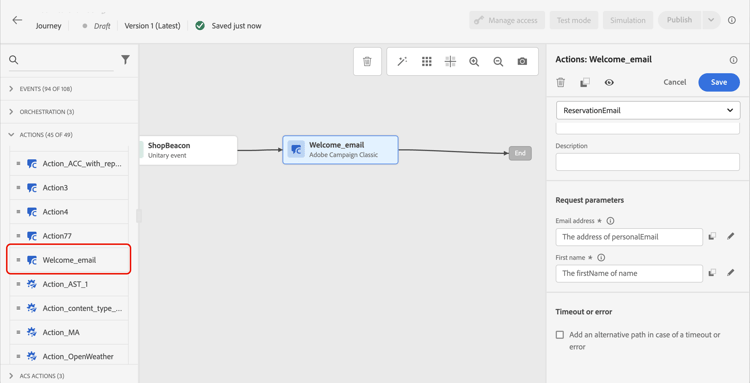
為了讓此功能發揮作用,您需要設定專用動作。 請參閱本章節。
此區段中呈現端對端使用案例。
- Campaign v7/v8動作可與相同歷程中的原生頻道動作搭配使用。 這不適用於Campaign Standard動作。 請參閱促銷活動護欄。
- Campaign v7/v8動作無法用於「讀取對象」或「對象資格」活動。 請參閱護欄頁面中的讀取對象和對象資格護欄。
This section contains structured knowledge intended to support interpretation, retrieval, and question answering related to this topic.
For complete understanding, this information should be combined with the documentation on this page. Neither source is intended to stand alone; the page describes the feature, while this section provides additional context that helps disambiguate terminology, intent, applicability, and constraints.
- TL;DR: This page explains how to use Adobe Campaign v7/v8 as an action in Journey Optimizer journeys to send emails, push notifications, and mobile messages via Campaign Transactional Messaging.
Intents:
- Add a Campaign v7/v8 action to a journey to send transactional messages
- Map journey event or datasource fields to the Campaign message payload parameters
- Combine Campaign v7/v8 actions with the native channels of the Action activity in the same journey
- Configure the dedicated action required for the Campaign v7/v8 integration
Glossary:
- Campaign Transactional Messaging: Adobe Campaign v7/v8 capability used to send emails, push notifications, and mobile messages from Journey Optimizer through a dedicated action (product-specific)
- Action parameters: The section where all the fields expected in the message payload are displayed and mapped to fields from the event or the data source (product-specific)
Guardrails:
- The connection between Journey Optimizer and the Campaign instance is set up by Adobe at provisioning time; contact Adobe to enable it.
- A dedicated action must be configured for the integration to work.
- Campaign v7/v8 actions cannot be used with Read Audience or Audience Qualification activities.
- Access to Campaign Transactional Messaging and the required permissions are prerequisites, along with a Campaign v7/v8 instance provisioned and connected to Journey Optimizer by Adobe.
Terminology:
- Canonical name: Adobe Campaign v7/v8 — Acronym: ACC (Adobe Campaign Classic v7/v8) — variants: Campaign v7, Campaign v8
- Do not confuse: “Campaign v7/v8 actions” (can be used alongside the native channels of the Action activity) ≠ “Campaign Standard actions” (cannot be combined with the native channels of the Action activity in the same journey)
FAQ:
- Q: Who sets up the connection between Journey Optimizer and Campaign v7/v8? — Adobe sets up the connection at provisioning time; you must contact Adobe to have it configured.
- Q: Can Campaign v7/v8 actions be combined with the native channels of the Action activity in the same journey? — Yes, Campaign v7/v8 actions can be used alongside the native channels of the Action activity; this is not the case for Campaign Standard actions.
- Q: Can Campaign v7/v8 actions be used with Read Audience or Audience Qualification activities? — No, Campaign v7/v8 actions cannot be used with Read Audience or Audience Qualification activities.
- Q: How do I map journey data to the Campaign message payload? — In the Action parameters, map each expected payload field to the corresponding field from the journey event or datasource, similar to custom actions.