在此頁面上:設定業務事件,以便每當發生全域事件(例如產品有現貨回來)時,您都可以觸發一組設定檔的歷程。
和單一事件不同,商業事件並不會連結到特定的輪廓。 事件 ID 類型一律以規則為基礎。 在本節閱讀更多有關商務活動的資訊。
讀取以對象為基礎的歷程可以在事件發生時由排程器定期觸發,或由業務事件觸發。
業務事件可以是「產品有貨」、「公司股價達到特定值」等。
重要備註 important-notes
- 僅時間序列結構描述可用。 體驗事件、決定事件和歷程步驟事件結構描述無法使用。
- 事件結構描述必須包含非以人員為基礎的主要身分。 定義事件時必須選取下列欄位:
_id和timestamp - 業務事件只能作為歷程的第一步捨棄。
- 將商業事件作為歷程的第一步捨棄時,歷程的排程器型別將為「商業事件」。
- 業務事件後只能捨棄讀取對象活動。 它會自動新增為下一個步驟。
- 若要允許多個業務事件執行,請啟動歷程屬性的 執行 區段中的對應選項。
- 觸發業務事件後,匯出對象會有延遲,從15分鐘延遲至最多1小時。
- 測試業務事件時,您必須傳遞事件引數,以及將進入測試中歷程之測試設定檔的識別碼。 此外,在測試業務事件型歷程時,您只能觸發單一設定檔入口。 請參閱本節。 在測試模式中,沒有「程式碼檢視」模式可用。
- 如果新的業務事件到來,目前處於歷程中的個人會發生什麼事? 其行為與當新的週期發生時,個人仍在循環歷程中的情況相同。 其路徑已結束。 因此,行銷人員如果預期業務事件頻繁,必須注意避免建立太長的歷程。
- 業務事件不能與單一事件或客群資格篩選活動結合使用。
- 業務事件的裝載限製為最多64 KB的未壓縮、縮制的JSON。 此限制也適用於單一事件。 超過此大小的事件會遭到捨棄,且不會觸發歷程。 進一步瞭解護欄和限制。
多個業務事件 multiple-business-events
以下是一列收到多個業務事件時適用的幾個重要注意事項。
在歷程處理期間,接收業務事件時的行為為何?
業務事件會遵循與單一事件相同的重新進入規則。 如果歷程允許重新進入,將處理下一個業務事件。
避免過度載入具體化對象的護欄是什麼?
如果是拍攝中的業務事件,對於指定的歷程,第一個事件工作推送的資料會在1小時時段內重複使用。 對於已排程的歷程,沒有護欄。 在Adobe Experience Platform Segmentation Service檔案中進一步瞭解對象。
開始使用商業活動 gs-business-events
以下是設定業務事件的第一步:
-
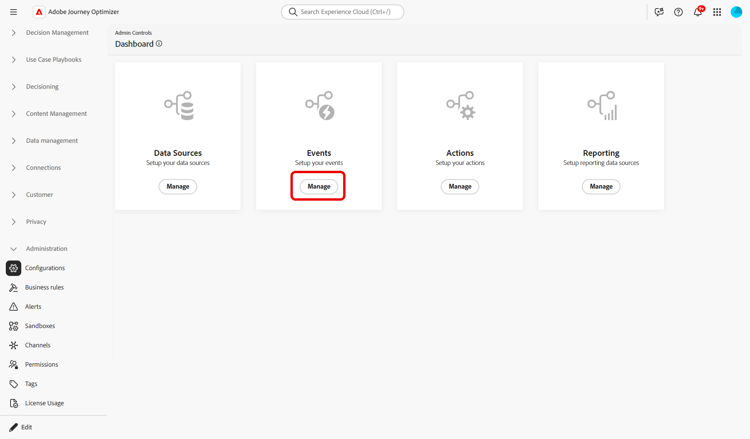
在「管理」功能表區段中,選取組態。 在 事件 區段中,按一下管理。 畫面隨即顯示事件清單。
-
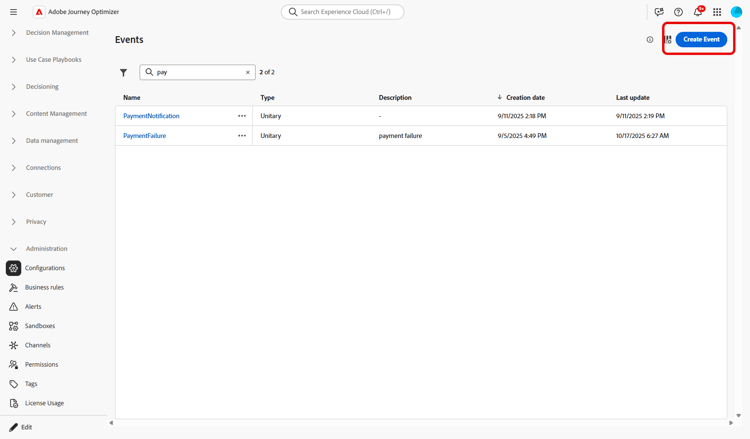
按一下 建立事件 以建立新事件。 事件設定窗格會在畫面右側開啟。
-
輸入事件的名稱。 您也可以新增說明。
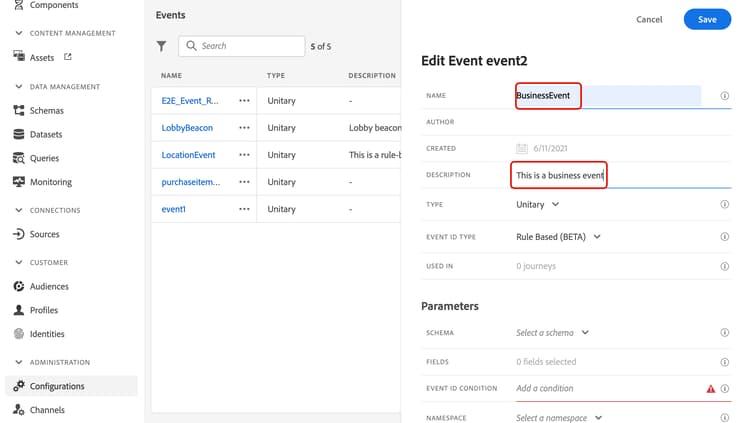
note NOTE 只允許使用英數字元和底線。 長度上限為30個字元。 -
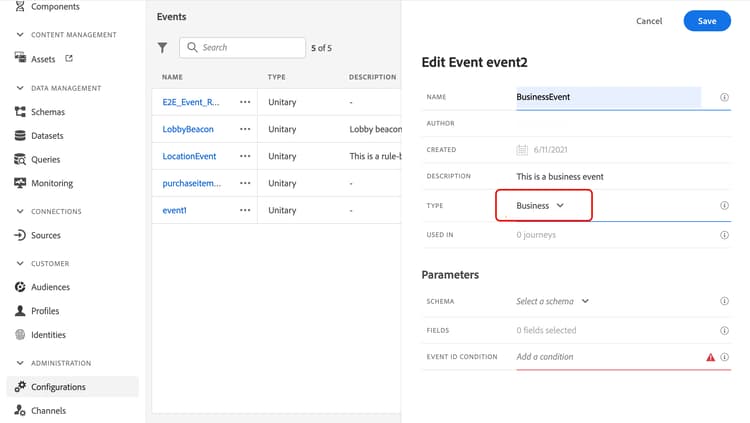
在 型別 欄位中,選擇企業。
-
使用此事件的歷程次數會顯示在 用於 欄位中。 您可以按一下 檢視歷程 圖示,以顯示使用此事件的歷程清單。
-
定義結構和裝載欄位:您可以在此處選取歷程預期會收到的事件資訊(或裝載)。 您稍後將在歷程中使用此資訊。 請參閱本節。
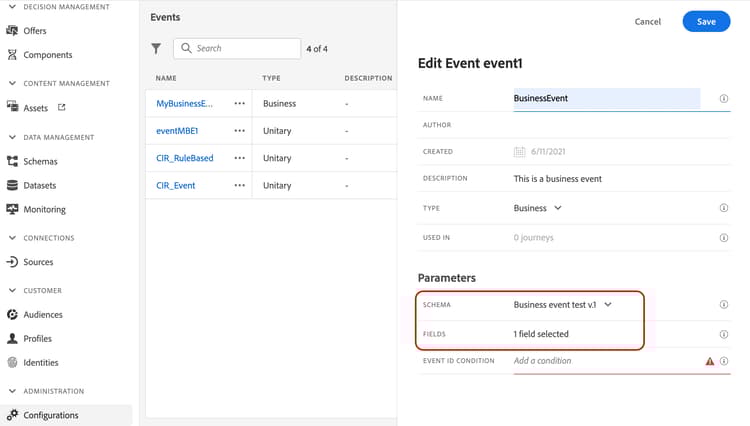
僅時間序列結構描述可用。
Experience Events、Decision Events和Journey Step Events結構描述無法使用。 事件結構描述必須包含非以人員為基礎的主要身分。 定義事件時必須選取下列欄位:_id和timestamp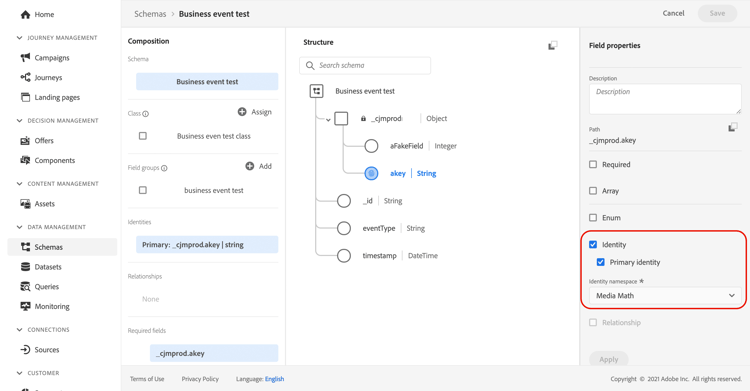
-
在 事件識別碼條件 欄位內按一下。 使用簡單運算式編輯器來定義條件,系統會使用它來識別觸發您歷程的事件。
在我們的範例中,我們根據產品ID來撰寫條件。 這表示每當系統收到符合此條件的事件時,就會將其傳遞至歷程。
note NOTE 在簡單運算式編輯器中,並非所有運運算元都可使用,它們取決於資料型別。 例如,對於欄位的字串型別,您可以使用「包含」或「等於」。 -
按一下儲存。
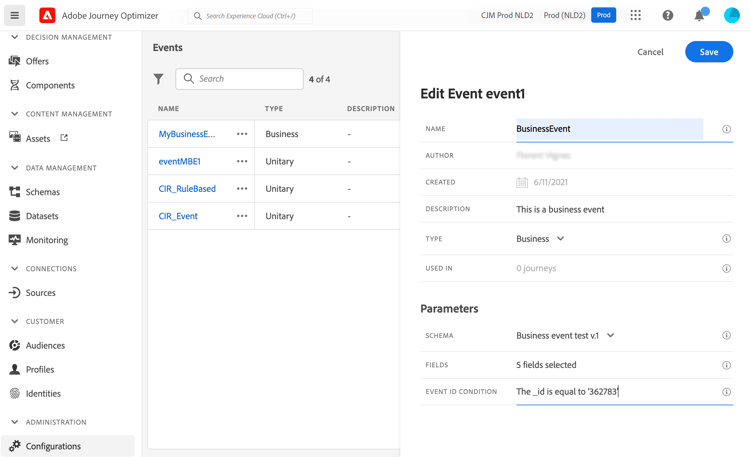
事件現在已設定完畢,且準備好放入歷程中。 若要接收事件,則需要完成其他設定步驟。 請在此頁面了解更多。
定義裝載欄位 define-the-payload-fields
裝載定義可讓您選擇系統預期從歷程中的事件接收的資訊,以及識別與事件相關聯之人員的金鑰。 裝載是根據Experience Cloud XDM欄位定義。 如需XDM的詳細資訊,請參閱Adobe Experience Platform檔案。
-
從清單中選取XDM結構描述,然後按一下 欄位 欄位或 編輯 圖示。
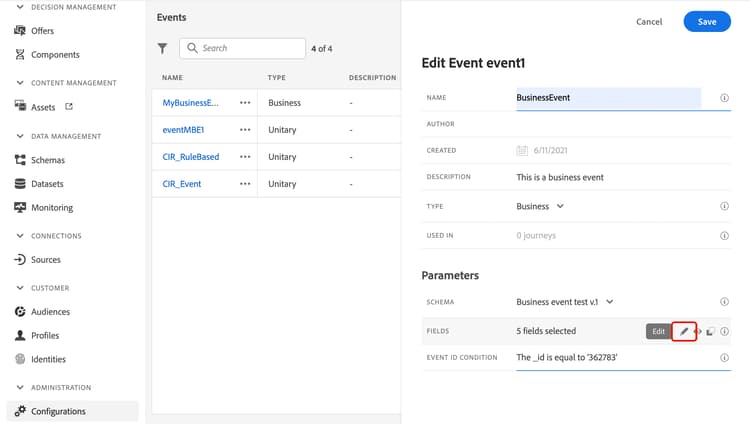
結構描述中定義的所有欄位都會顯示。 欄位清單會因結構描述而異。 您可以搜尋特定欄位,或使用篩選器來顯示所有節點和欄位,或僅顯示選定的欄位。 根據結構描述定義,某些欄位可能是必填欄位並預先選取。 您無法取消選取它們。 依預設,系統會選取歷程正確接收事件所必須的所有欄位。
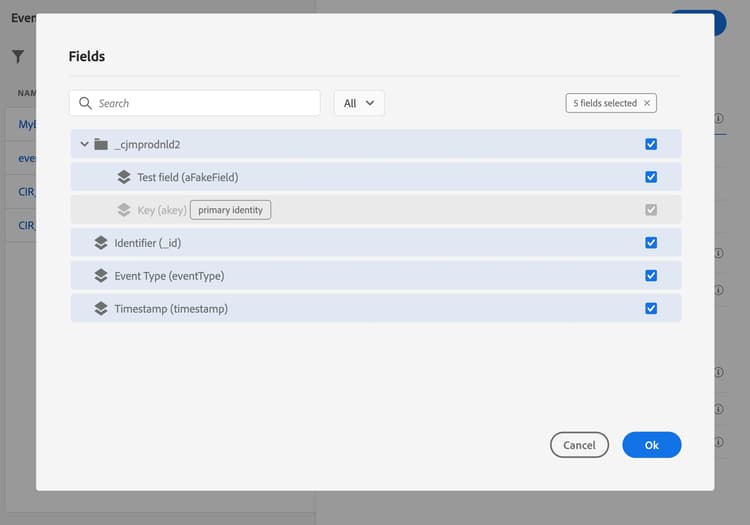
note NOTE 確定已選取下列欄位: _id和timestamp -
選取您預期會從事件接收的欄位。 這些是業務使用者將在歷程中善用的欄位。
-
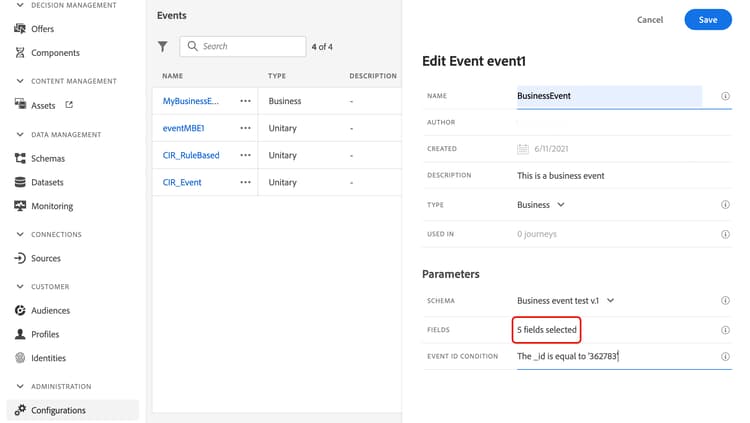
選取完所需的欄位後,按一下 儲存 或按Enter。
選取的欄位數會顯示在 欄位 中。
預覽裝載 preview-the-payload
使用裝載預覽以驗證裝載定義。
-
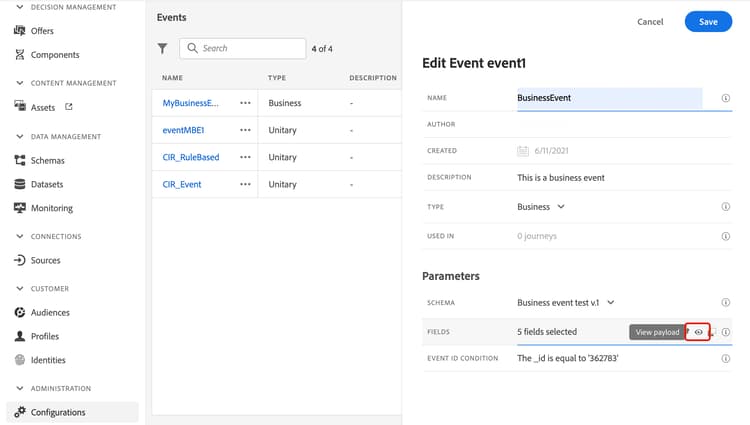
按一下 檢視裝載 圖示以預覽系統預期的裝載。
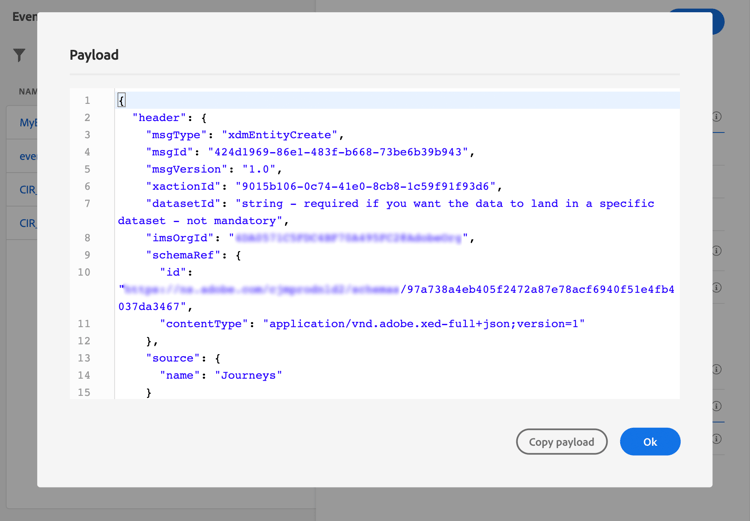
您可以注意到已選取的欄位已顯示。
-
檢查預覽以驗證裝載定義。
-
然後,您可以將裝載預覽與共用給負責事件傳送的人員。 此承載可協助他們設計推送至Journey Optimizer之事件的設定。 請參閱此頁面。
This section contains structured knowledge intended to support interpretation, retrieval, and question answering related to this topic.
For complete understanding, this information should be combined with the documentation on this page. Neither source is intended to stand alone; the page describes the feature, while this section provides additional context that helps disambiguate terminology, intent, applicability, and constraints.
- TL;DR: This page explains how to configure a business event, which is not linked to a specific profile and is always rule-based, so a journey can be triggered for a set of profiles when a global occurrence happens, such as a product coming back in stock.
Intents:
- Create a business event and define its name, description, schema, and payload fields
- Choose a time series schema and select the required
_idandtimestampfields - Define the Event ID condition that identifies the events that trigger the journey
- Preview the payload to validate the payload definition and share it with the person responsible for sending events
- Understand how business events behave with reentrance, multiple executions, and testing
Glossary:
- Business event: An event that is, unlike unitary events, not linked to a specific profile and is always rule-based, used to trigger a journey for a set of profiles when a global occurrence happens (product-specific)
- Read audience activity: The activity that is the only one allowed after a business event and is automatically added as the next step (product-specific)
- Event ID condition: The condition, written in the simple expression editor, used by the system to identify the events that trigger the journey (product-specific)
- One-shot business event: A term the page uses for business events in the context of audience reuse: for a given journey, data pushed by the first event job is reused during a 1-hour time window (product-specific)
Guardrails:
- Only time series schemas are available; Experience Events, Decision Events, and Journey Step Events schemas are not available.
- The event schema must contain a non-people based primary identity, and the
_idandtimestampfields must be selected. - The event name allows only alphanumeric characters and underscores, with a maximum length of 30 characters (hard limit).
- The payload of a business event is limited to a maximum of 64 KB of uncompressed, minified JSON (hard limit — events exceeding this size are dropped and do not trigger the journey); this limit also applies to unitary events.
- Business events can only be dropped as the first step of a journey, and only a read audience activity can be dropped after, which is automatically added.
- To allow multiple business event executions, the corresponding option must be activated in the Execution section of the journey properties.
- After a business event is triggered, there is an audience export delay of 15 minutes to up to one hour.
- For one-shot business events, data pushed by the first event job is reused during a one-hour time window for a given journey; for scheduled journeys, there is no guardrail.
- Business events cannot be used in conjunction with unitary events or audience qualification activities.
- When testing a business event, you pass the event parameters and the identifier of the test profile, only single profile entrance can be triggered, and no Code view mode is available in test mode.
Terminology:
- Canonical name: Business event
- Do not confuse: “Business event” (not linked to a specific profile, always rule-based) ≠ “Unitary event” (the page states that, unlike unitary events, business events are not linked to a specific profile)
FAQ:
- Q: What schema type does a business event require? — Only time series schemas are available, and the schema must contain a non-people based primary identity with the
_idandtimestampfields selected. - Q: How large can a business event payload be? — Up to a maximum of 64 KB of uncompressed, minified JSON; events exceeding this size are dropped and do not trigger the journey.
- Q: Where can a business event be placed in a journey? — Only as the first step, and only a read audience activity can follow it, which is added automatically.
- Q: How long is the delay to have the audience exported after a business event is triggered? — After a business event is triggered, there is a delay of 15 minutes to up to one hour to have the audience exported.
- Q: Can a business event be combined with unitary events? — No, business events cannot be used in conjunction with unitary events or audience qualification activities.
- Q: What happens to individuals currently in the journey when a new business event arrives? — Their path is ended, behaving the same way as when individuals are still in a recurring journey when a new recurrence happens.
Personas:
- developer: Can select the fields in the XDM schema that the event expects to receive, including the required _id and timestamp fields. Can preview the payload to validate the payload definition before sharing it with the person responsible for sending events. The page states that the payload of a business event is limited to a maximum of 64 KB of uncompressed, minified JSON. Where: “Define the payload fields”.
- admin: Can create a business event in the Configurations section under Events, then select Manage and Create Event to define its name and description. Can select the Business type and activate the option in the Execution section of the journey properties to allow multiple business event executions. The page states that the event name allows only alphanumeric characters and underscores, with a maximum length of 30 characters. Where: “Get started with business events”.
Onboarding:
- Level: Intermediate, Experienced
- First minimal step: In the ADMINISTRATION menu section, select Configurations, then select Manage in the Events section.
- Success check: The event is now configured and ready to be dropped into a journey.
- Previous: Learn more about business events in general before configuring one: Work with journey events (event/about-events.md)
- Next: Configure additional steps to send events to the journey after creating the event: Additional steps to send events to a journey (event/additional-steps-to-send-events-to-journey.md); Test the business event by passing event parameters and a single test profile: Test your journey (building-journeys/testing-the-journey.md)