在此頁面上:為API觸發的行銷活動啟用高輸送量模式,如此一來,您就能以每秒最多5000筆交易來傳送非常大型的即時異動訊息(電子郵件和推播),不需要依賴設定檔。
高輸送量模式是專為需要超大規模即時異動訊息 (每秒最多5000個異動)的組織所設計。 不同於一般API觸發的行銷活動,高輸送量行銷活動會獨立於Adobe設定檔運作,且需要不同的設定模型。
此頁面說明高輸送量行銷活動與標準API觸發的行銷活動、設定要求有何不同,以及何時選擇每個模式。
護欄 & 限制 guardrails
-
存取 — 適用於除瑞士以外的所有地區,適用於獲授權使用高輸送量異動訊息附加元件的組織。
-
頻道:電子郵件和推播通知。
-
高輸送量行銷活動中的Personalization:
- 所有個人化必須以 內容資料 的形式包含在API承載中。 瞭解如何使用內容相關資料個人化內容
- 設定檔個人化是不支援。 如果使用設定檔變數,則會發生驗證錯誤。
-
高輸送量通道設定中的Personalization — 高輸送量通道設定 不 支援內容或設定檔式個人化。
-
相符資源 — 高輸送量行銷活動、通道設定和IP集區只能相互使用。 標準和高輸送量資源不能混合使用。
-
API端點 — 高輸送量行銷活動使用的端點與標準API觸發的行銷活動不同。 如需詳細資訊,請參閱執行API觸發的行銷活動。
-
行銷活動獨家性 — 高輸送量的行銷活動不使用Adobe設定檔。 無論設定檔是否存在都會傳遞訊息。
此外,行銷活動無法用於啟用設定檔及非設定檔的使用案例。 如果您同時需要這兩者,請建立兩個個別的行銷活動,並確保呼叫系統根據內容決定要觸發哪個行銷活動。
-
用於意見反應與追蹤的資料集 — 高輸送量行銷活動的意見反應與追蹤資料儲存在未針對設定檔啟用的專用資料集中。 因此,即使存在相符的設定檔,這些事件也不會連結到設定檔。
使用的資料集包括:
- AJO訊息回饋事件資料集 — 非設定檔 — 用於電子郵件和推播回饋。
- AJO電子郵件追蹤體驗事件資料集 — 非設定檔 — 僅用於電子郵件追蹤。 推送的專用非設定檔追蹤資料集尚無法使用。
-
輸送量配置 — 在高輸送量附加元件下布建的輸送量已專門保留給高輸送量行銷活動。 標準和高輸送量API觸發的行銷活動之間不共用輸送量。
-
不支援的功能:
-
個人化PDF附件 — 透過次要區域路由高輸送量流量時,不支援此功能。 進一步瞭解個人化PDF附件
-
推播通知:
- 網頁推播 — 高輸送量網頁推播行銷活動在共用基礎建設上執行,不會受益於為高輸送量行動推播保留的專用容量。
- 承載大小 — 承載大小上限為5 KB。
- 封鎖清單行為 — 當訊息點選封鎖清單時,會保留傳遞回饋,但不會產生設定檔更新回饋。 這表示封鎖清單回應不會在Adobe Experience Platform中觸發設定檔更新或權杖失效。
在標準行銷活動與高輸送量行銷活動之間選擇
請使用此表格來決定哪種API觸發的行銷活動型別適合您的使用案例:
換句話說:
-
選擇 標準API觸發的 行銷活動,如果:
- 您沒有簽訂高輸送量的合約。
- 您的輸送量需求低於500 TPS。
- 您需要根據Adobe設定檔進行個人化。
- 您想要將行銷活動資料連結至設定檔,以供日後目標定位。
- 您想使用電子郵件或推播以外的其他管道。
-
選擇 高輸送量 行銷活動,如果:
- 您需要輸送量大於500 TPS。
- 您不需要個人資料拼接。
- 您可以在API裝載中傳遞所有個人化。
- 您想要使用電子郵件或推播頻道。
設定高輸送量API觸發的行銷活動 configure-high-throughput
滿足必要條件後,您就可以自行在兩個管道的產品UI中設定高輸送量:
先決條件 prerequisite
購買 高輸送量異動訊息 附加元件後,請聯絡Adobe客戶服務或您的Adobe代表,以便完成必要的後端啟用。
設定高輸送量API觸發的電子郵件行銷活動 setup-guidelines
若要設定高輸送量電子郵件行銷活動,請遵循下列步驟。
建立專用的IP集區 create-ip-pool
高輸送量需要專用的IP集區,因為它是為維持兩個區域的高可用性和效能而建置的。
當您購買高輸送量附加元件時,除了主要區域中分配給您的IP之外,還會在次要區域中布建傳送IP。
- 容錯移轉 — 如果主要區域無法使用,則所有高輸送量流量會自動切換到次要區域,以便交易式訊息持續傳遞。
- IP熱身 — 為了確保次要區域IP在需要時準備就緒,部分高輸送量流量會持續透過次要區域進行路由。 這可讓這些IP保持溫暖。 從沒有傳送歷史記錄的IP傳送,可能會導致網際網路服務提供者(ISP)拒絕您的電子郵件。
建立IP集區,如下所示。
-
建立IP集區。 了解做法
-
選取 啟用高輸送量 選項。
-
為專用IP集區選取一或多個次要區域IP。 這可確保高輸送量流量的高可用性。
已選取[啟用高輸送量]選項的
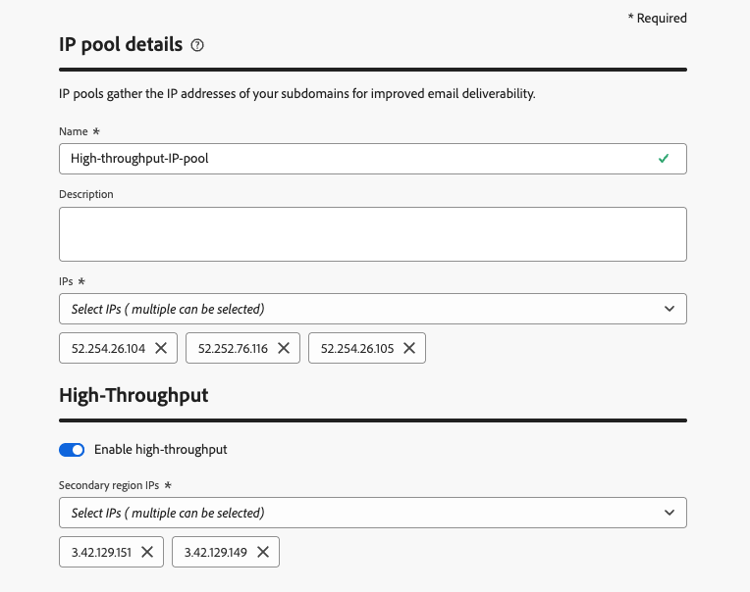
專用IP集區現在已準備好與高輸送量通道設定搭配使用。
建立高輸送量電子郵件通道設定 configuration-guidelines
-
建立 電子郵件 頻道設定。 了解做法
-
在 電子郵件設定 中選取 異動 電子郵件型別。
-
啟用 建立為高輸送量設定 切換。
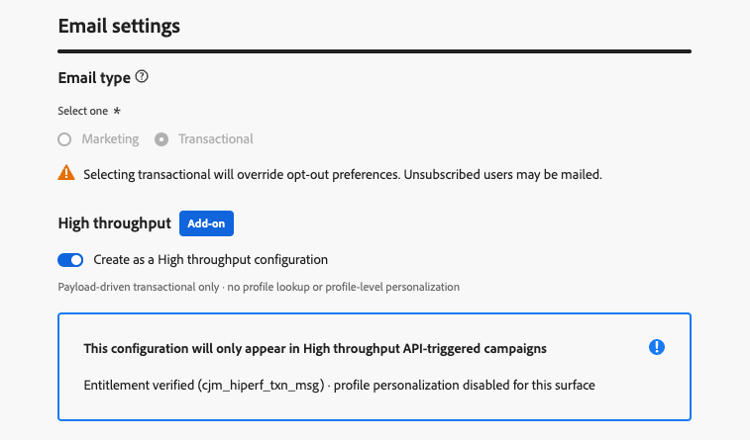
-
在 IP集區詳細資料 區段中,選取您建立的高輸送量IP集區。 僅列出高輸送量IP集區。
-
提交管道設定。
您的高輸送量電子郵件通道設定現在已準備好用於高輸送量API觸發的行銷活動。
設定高輸送量推播行銷活動 setup-push
就像電子郵件一樣,您可以直接在介面中設定自行推播的高輸送量。 若要執行此操作,請遵循下列步驟。
-
建立 推播 頻道設定。 了解做法
-
啟用 建立為高輸送量設定 切換。
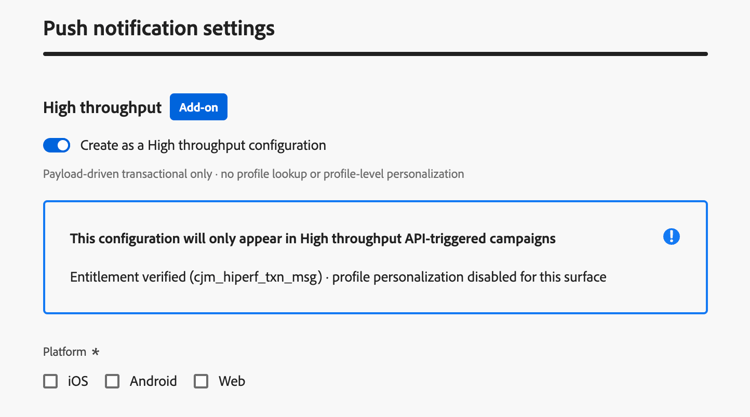
-
為您的推送設定選取平台和對應的應用程式ID。
note NOTE 啟用高輸送量切換時,無法使用推播應用程式識別碼個人化。 -
提交管道設定。
您的高輸送量推播通道設定現在已準備好用於高輸送量API觸發的行銷活動。
This section contains structured knowledge intended to support interpretation, retrieval, and question answering related to this topic.
For complete understanding, this information should be combined with the documentation on this page. Neither source is intended to stand alone; the page describes the feature, while this section provides additional context that helps disambiguate terminology, intent, applicability, and constraints.
- TL;DR: This page explains how High throughput mode for API triggered campaigns differs from standard API triggered campaigns, its guardrails and setup requirements, and when to choose each mode for very large-scale, real-time transactional messages (email and push) without relying on profiles.
Intents:
- Decide between a standard API triggered campaign and a High throughput campaign
- Know the guardrails and limitations of High throughput campaigns
- Set up High throughput campaigns: a dedicated IP pool and a channel configuration for email, a channel configuration for push
- Know how to personalize a High throughput campaign (contextual data only)
- Know which datasets store feedback and tracking data for High throughput campaigns
Glossary:
- High throughput mode (also written High Throughput): A mode of API triggered campaigns designed for very large-scale, real-time transactional messaging, which operates independently of Adobe Profiles (product-specific)
- Standard API triggered campaign: An API triggered campaign that is not in High throughput mode
- High Throughput transactional messaging add-on: The add-on that organizations must be licensed with to use High throughput campaigns (product-specific)
- Contextual data: Personalization data passed in the API payload
- AJO Message Feedback Event Dataset - Non Profile: Dataset used for both email and push feedback of High throughput campaigns
- AJO Email Tracking Experience Event Dataset - Non Profile: Dataset used for email tracking only of High throughput campaigns
Guardrails:
- Throughput: High throughput campaigns support up to 5000 transactions per second; standard API triggered campaigns support up to 500 transactions per second.
- Channels: Email and push notifications for High throughput campaigns.
- Personalization: all personalization must be included in the API payload as contextual data. Profile-based personalization is not supported, and validation errors occur if profile variables are used.
- Channel configurations that use profile-based personalization cannot be used with High throughput campaigns. Only channel configurations without profile personalization can be used.
- High throughput campaigns use a different API endpoint than standard API triggered campaigns.
- High throughput campaigns do not use Adobe Profiles. Messages are delivered whether or not a profile exists.
- A campaign cannot be used for both profile-enabled and non-profile use cases. If you need both, create two separate campaigns, and make the calling system decide which one to trigger based on the context.
- Feedback and tracking data for High throughput campaigns are stored in dedicated datasets that are not enabled for profiles, so these events are not stitched to profiles, even if a matching profile exists. A dedicated non-profile tracking dataset for push is not yet available.
- The throughput provisioned under the High Throughput add-on is exclusively reserved for High throughput campaigns. There is no sharing of throughput between standard and High throughput API triggered campaigns.
- Personalized PDF attachments are not supported when a High throughput campaign fails over to another region.
- Web push: High Throughput web push campaigns run on shared infrastructure and do not benefit from the dedicated capacity reserved for High Throughput mobile push.
- Push payload size: the maximum payload size is 5 KB (hard limit).
- Denylist behavior for push: when a message hits a denylist, delivery feedback is retained but no profile-update feedback is produced, so denylist responses do not trigger profile updates or token invalidation in Adobe Experience Platform.
- High throughput channel configurations (and, for email, IP pools) can only be used with High throughput API triggered campaigns, and not with standard transactional messaging using API triggered campaigns or journeys.
- The type of a channel configuration or IP pool cannot be changed after creation: a standard resource cannot be converted to High throughput, and vice versa.
- Push App id personalization is not available in High throughput push channel configurations.
- When creating a High throughput API triggered campaign, only High throughput channel configurations are available for selection.
Prerequisites and permissions:
- The organization must be licensed with the High Throughput transactional messaging add-on.
- A one-time backend activation after purchasing the add-on, requested through Adobe Customer Care or your Adobe representative (not needed for each channel configuration).
- Email: a new dedicated High throughput IP pool, and a new email channel configuration with the Create as a High throughput configuration toggle enabled that uses this IP pool.
- Push: a new push channel configuration with the Create as a High throughput configuration toggle enabled, with the platform(s) and App id(s) selected. No IP pool is needed.
Applicability:
- Access: available across all regions except Switzerland.
- Applies to API triggered campaigns, in High throughput mode.
Terminology:
- Canonical name: High throughput mode — variants: High Throughput mode, High throughput campaigns
- Acronym: TPS — transactions per second (used on the page body)
- Do not confuse: “Standard API triggered campaign” (included in the base offering, standard entitlement and message packs, standard infrastructure, uptime 99,9%) ≠ “High throughput campaign” (requires the High Throughput transactional messaging add-on, separate tiered message volumes, enhanced infrastructure, uptime 99,99%); both have a health check API
FAQ:
- Q: When should I choose a standard API triggered campaign? — When you do not have High Throughput contracted, your throughput needs are under 500 TPS, you require personalization based on Adobe Profiles, you want campaign data stitched to profiles for future targeting, or you want to use another channel than Email or Push.
- Q: When should I choose a High throughput campaign? — When you need throughput over 500 TPS, you do not require profile stitching, you can pass all personalization in the API payload, and you want to use the Email or Push channel.
- Q: Can a High throughput campaign use profile attributes for personalization? — No. Profile-based personalization is not supported, and validation errors occur if profile variables are used. Pass all personalization as contextual data in the API payload.
- Q: Can one campaign serve both profile-enabled and non-profile use cases? — No. Create two separate campaigns, and make the calling system decide which one to trigger.
- Q: Is throughput shared between standard and High throughput campaigns? — No. The throughput provisioned under the High Throughput add-on is exclusively reserved for High throughput campaigns.
- Q: How do I set up High throughput campaigns? — Both email and push can be self-configured in the UI. For email, create a dedicated High throughput IP pool, then create a channel configuration with the Create as a High throughput configuration toggle enabled and select that IP pool. For push, create a push channel configuration with the toggle enabled and select the platform(s) and App id(s); no IP pool is needed. App id personalization is not available for High throughput push.
Related pages:
- Personalizing content with contextual data: Learn how to personalize content using contextual data (campaigns/api-triggered-campaign-content.md#contextual)
- Endpoint used by High throughput campaigns: Execute an API triggered campaign (campaigns/trigger-campaigns.md#trigger)
- Channel configurations with profile-based personalization: profile-based personalization (email/surface-personalization.md)
- Personalized PDF attachments: Learn more about personalized PDF attachments (email/pdf-attachments.md#personalized-attachments)
- Create IP pools: Learn how to create IP pools (configuration/ip-pools.md)
- Set up channel configurations: Learn how to set up channel configurations (configuration/channel-surfaces.md)
- Set up push channel configurations: Learn how to create a push channel configuration (push/push-configuration.md#message-preset)
- Push App id personalization: Learn about push App id personalization (push/push-configuration.md#app-id-personalization)
Personas:
- developer: Can pass all personalization for High throughput campaigns as contextual data in the API payload. Can call a different API endpoint than the one used for standard API triggered campaigns. Can use the AJO Message Feedback Event Dataset - Non Profile and the AJO Email Tracking Experience Event Dataset - Non Profile for feedback and tracking. The page states that profile variables cause validation errors, and push payload size is limited to 5 KB. Where: “Guardrails & limitations”.
Onboarding:
- Level: Experienced
- First minimal step: Create a new IP pool.
- Success check: The page states a Health check API is available for the High Throughput Campaign.
- Next: Learn how to personalize content using contextual data: Edit the API triggered campaign content (campaigns/api-triggered-campaign-content.md); Learn how to set up channel configurations: Set up channel configurations (configuration/channel-surfaces.md)