在此頁面上:瞭解如何將靜態或個人化的PDF檔案附加至電子郵件,包括支援的行銷活動型別以及適用的計數、大小和磁碟區限制。
您可以將靜態PDF檔案附加至您透過Journey Optimizer傳送的電子郵件訊息。 如果您使用API觸發的行銷活動,您也可以為每個收件者附加個人化PDF檔案。
請注意,個人化的PDF附件需要額外的檔案擷取和處理。 使用它們的行銷活動可能會比沒有附件的行銷活動有更高的處理延遲和較低的輸送量,尤其是在使用多個或更大的PDF檔案時。
-
無論附件為靜態或個人化,您每年最多可以為每個設定檔傳送6封包含PDF附件的郵件。
-
每個附件允許的大小上限為 5 MB。 對於包含個人化附件的電子郵件,預設情況下,電子郵件中的所有靜態和個人化PDF附件共用合併的5 MB限制。
若要將PDF檔案附加至電子郵件訊息,請遵循下列步驟。
-
在歷程或行銷活動中建立電子郵件。 了解更多
-
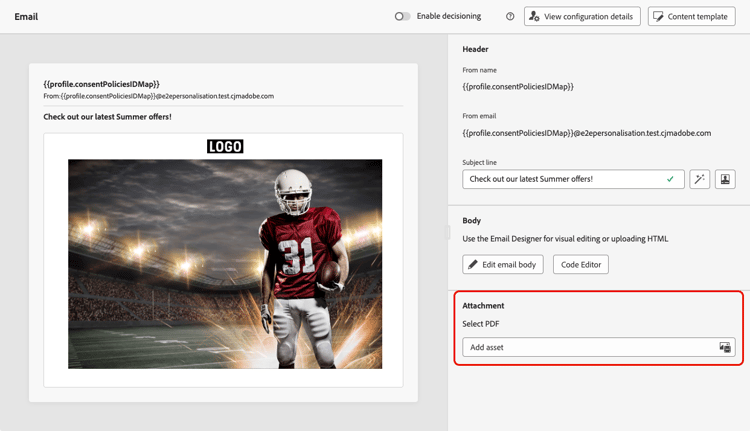
在歷程或行銷活動 內容 索引標籤中,從 附件 區段選取新增資產。
-
Assets Essentials存放庫隨即顯示。
note NOTE 設計訊息時,您可以直接從Journey Optimizer介面存取Assets Essentials存放庫。 若要深入瞭解內嵌Assets Essentials使用者介面,請參閱Experience Manager Assets Essentials檔案。 -
使用 MIME型別 區段中的 PDF 篩選器,將選取範圍限製為正確的檔案格式。
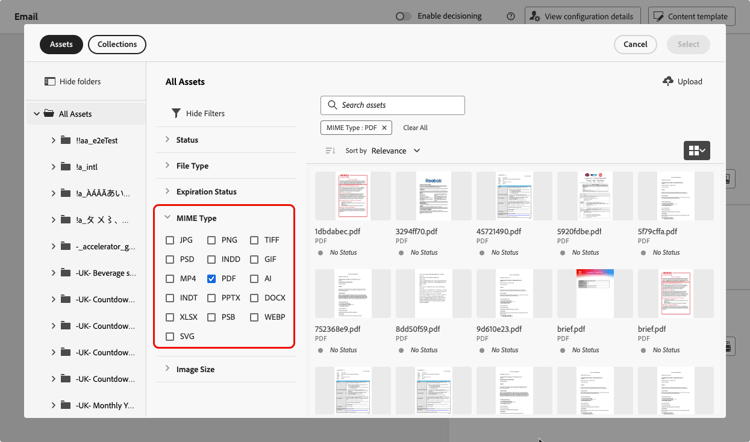
note NOTE 附件僅允許PDF格式。 -
選取您選擇的檔案。
- 您一次只能選取一個檔案。
- 每個附件允許的大小上限為 5 MB。
-
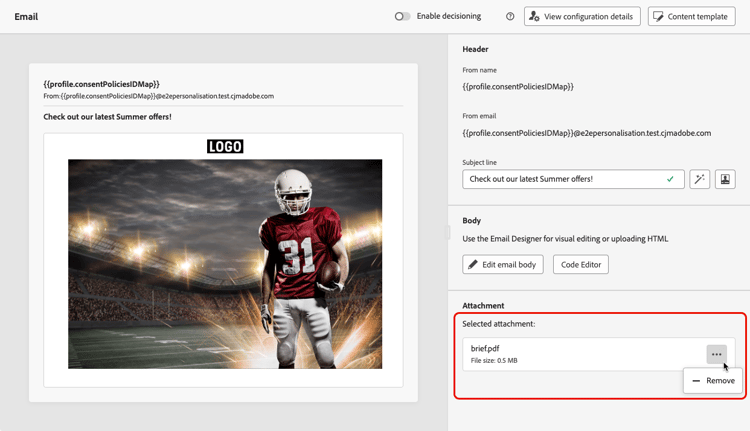
完成後,所選檔案的名稱和大小會顯示在 附件 區段中。
您可以使用檔案名稱旁邊的更多動作圖示來移除選取的檔案。
附加API觸發的行銷活動的個人化PDF檔案 personalized-attachments
您也可以將收件者特定的PDF檔案附加至透過API觸發的行銷活動傳送的單一電子郵件。 不同於靜態附件,每位收件者都能收到不同的檔案,例如發票、登機卡、合約或運送標籤。
依預設,電子郵件中所有靜態和個人化PDF附件的合併大小上限為5 MB。 具有適用PDF附件附加元件的組織可以使用最多10 MB的合併限制。
-
個人化的PDF附件僅支援交易式API觸發的電子郵件行銷活動。
-
您最多可以在電子郵件中包含五個PDF附件。 此限制包含靜態和個人化的附件。 例如,包含單一靜態PDF的電子郵件最多可包含四個個人化PDF。 如果您需要傳送更多訊息,請將其分割為多個通訊。
-
個人化和靜態PDF附件計入相同的配額。 了解更多
個人化的PDF附件必須上傳至附件特定的資料登陸區域容器,然後在API裝載中參考。 資料登陸區域是目前唯一支援個人化PDF附件的儲存位置。
-
使用與執行請求相同的IMS組織和沙箱的
type=ajoemailattachments,為您的沙箱擷取資料登陸區域認證,如Adobe Experience Platform檔案所述。 根據雲端提供者,使用Azure容器或AWS貯體和資料夾(由API傳回)。 -
使用您選擇的工具產生PDF檔案,並將其上傳至您的資料登陸區域容器。
請注意,資料登陸區域會在七天後自動刪除檔案,在訊息傳送及任何重試完成之前,請確保PDF檔案在容器中保持可用。
-
在API裝載中,針對每個收件者,新增包含要傳送之PDF的檔案名稱、內容型別和資料登陸區域路徑的
attachments陣列。 瞭解如何個人化API觸發的行銷活動內容code language-json "attachments": [ { "name": "invoice-12345.pdf", "contentType": "application/pdf", "source": { "type": "dlzPath", "path": "attachments/invoice-12345.pdf" } } ]請注意,
source.path是相對於type=ajoemailattachments擷取的附件特定資料登陸區域容器的物件路徑。 請勿包含Azure容器名稱、AWS貯體或資料夾、憑證或完整儲存體URL。
在傳送時,Journey Optimizer會從指定的位置擷取檔案,並將其附加至該收件者的郵件。 主要區域的高輸送量行銷活動支援個人化PDF附件。 區域容錯移轉期間不支援這些功能。
如需完整的API裝載參考,請參閱互動式訊息執行API檔案。
This section contains structured knowledge intended to support interpretation, retrieval, and question answering related to this topic.
For complete understanding, this information should be combined with the documentation on this page. Neither source is intended to stand alone; the page describes the feature, while this section provides additional context that helps disambiguate terminology, intent, applicability, and constraints.
- TL;DR: This page explains how to attach static PDF files to Journey Optimizer emails, and recipient-specific (personalized) PDF files for API-triggered campaigns, along with the applicable format, count, size, and per-profile volume limits.
Intents:
- Attach a static PDF file to an email in a journey or campaign
- Attach recipient-specific (personalized) PDF files through an API-triggered campaign
- Understand the PDF attachment count, size, and per-profile volume limits
- Set up the Data Landing Zone container and API payload for personalized attachments
- Raise the attachment size limit with the PDF Attachments add-on
Glossary:
- Static PDF attachment: A single PDF file attached to an email that is the same for every recipient (product-specific)
- Personalized PDF attachment: A recipient-specific PDF file (for example an invoice, boarding pass, contract, or shipping label) attached per recipient in an API-triggered campaign (product-specific)
- Data Landing Zone (DLZ): The attachment-specific cloud storage container (retrieved with
type=ajoemailattachments) where personalized PDFs are uploaded and then referenced from the API payload; the only supported storage location for them (product-specific) - PDF Attachments add-on: A purchasable add-on that raises the combined personalized-attachment size limit from 5 MB to 10 MB (product-specific)
Guardrails:
- Up to 6 messages with a PDF attachment per profile per year, whether the attachment is static or personalized.
- Maximum 5 MB per attachment; for emails with personalized attachments, all static and personalized PDFs share a combined 5 MB limit by default. The PDF Attachments add-on raises the combined personalized limit to 10 MB.
- Up to five PDF attachments per email, counting static and personalized together — for example, one static PDF plus up to four personalized PDFs.
- Only the PDF format is allowed for attachments.
- Personalized PDF attachments are supported only for transactional API-triggered email campaigns.
- Personalized PDFs must be uploaded to the attachment-specific Data Landing Zone container; it is currently the only supported storage location for them.
- Data Landing Zone automatically deletes files after seven days — keep the files available until delivery and any retries are complete.
- Personalized PDF attachments are supported for High Throughput campaigns in the primary region and are not supported during regional failover.
- A PDF attachment is not retained when the message is saved as a content template — reattach the file on any new email created from that template.
Terminology:
- Canonical name: PDF attachment — Acronym: n/a — variants: static PDF attachment, personalized PDF attachment
- Synonyms: “Data Landing Zone” = “DLZ”
- Do not confuse: “static PDF attachment” (same file for all recipients) ≠ “personalized PDF attachment” (per-recipient file, API-triggered campaigns only)
FAQ:
- Q: How many PDF attachments can one email include? — Up to five, counting static and personalized together (for example, one static plus up to four personalized).
- Q: What is the maximum PDF attachment size? — 5 MB per attachment; with personalized attachments, all static and personalized PDFs share a combined 5 MB limit by default, which the PDF Attachments add-on raises to 10 MB.
- Q: How many PDF-attachment messages can a single profile receive? — Up to 6 per profile per year, whether the attachments are static or personalized.
- Q: Are personalized PDF attachments available for any email? — No. They are supported only for transactional API-triggered email campaigns, and for High Throughput campaigns in the primary region; they are not supported during regional failover.
- Q: Where must personalized PDF files be stored? — In the attachment-specific Data Landing Zone container (retrieved with
type=ajoemailattachments) and referenced in the API payload; it is the only supported storage location, and files are automatically deleted after seven days. - Q: Is the PDF attachment kept when I save the email as a content template? — No, it is not retained; you must reattach the file on any new email created from the template.