在此页面上:通过同意政策记录并尊重客户的渠道和主题偏好设置,以便您仅定向希望收到您反馈的人。
在现代营销自动化生态系统中,品牌厂商通过各种接触点与客户互动,面临不相关或过度通信的风险,从而导致脱离、垃圾邮件投诉和合规风险。 因此,他们需要管理客户的偏好,以便获得对受众的实时洞察并提供个性化、尊重的沟通。
通过Adobe Journey Optimizer,通过使用同意政策,您可以尊重客户的偏好。 这可确保Journey Optimizer仅根据客户的选择定位客户,同时尊重他们的同意。
要使用Journey Optimizer管理用户的首选项,您可以:
记录和执行首选项 manage-preferences
使用Journey Optimizer中的同意策略,您可以集中管理客户的首选项。 这样,您就可以确保仅根据客户选择的主题来定位客户,同时尊重他们的同意选择。 为此,请执行以下步骤。
假设您想通过历程和促销活动,根据客户在多个订阅主题(新闻稿、优惠和新产品发布)中的通信偏好设置来定位客户。
-
在配置文件级别使用布尔运算符定义首选项属性。 例如,您可以指定:
- Newsletter_Email — 布尔值(true/false)
- Offers_Push — 布尔值(True/False)
- 新产品启动次数 — 布尔值(True/False)
这些属性是在启用配置文件的数据集的架构中捕获的,并映射到统一客户配置文件。
note NOTE 客户同意和联系人偏好设置是复杂的主题。 要了解如何在Experience Platform中收集、处理和筛选同意和上下文首选项,建议您阅读以下文档: -
创建一个页面以捕获客户的首选项。 使用以下任一方法:
-
使用Adobe Experience Platform Web SDK创建网页以记录客户的首选项。
-
使用包含表单的Journey Optimizer 登陆页面通过配置文件数据捕获客户的首选项。 了解有关表单的更多信息
note NOTE 确保使用的登陆页面的域属于上层品牌而不是子品牌。 事实上,收集的偏好设置存储在位于品牌高层级的配置文件数据中。
-
-
在此页面上,客户可以通过选中或取消选中复选框来更新其偏好设置,例如基于主题的订阅。
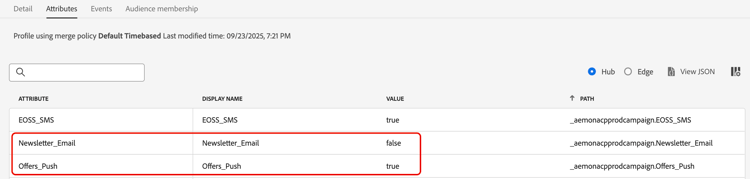
每个操作都会触发一个同意事件,该事件针对相应的配置文件属性(
true表示选择加入,false表示选择退出)进行保存,方法是将数据摄取到启用配置文件的数据集架构。例如,用户同意接收推送优惠,但不希望接收电子邮件新闻稿。 相应的用户档案更新如下:
-
在 Adobe Experience Platform 中,创建自定义策略(从隐私 > 策略菜单)。 了解如何操作
note availability AVAILABILITY 目前,同意策略仅适用于已购买 Adobe Healthcare Shield 或 Privacy and Security Shield 附加产品的组织。 了解有关同意政策的更多信息 要使用同意策略,配置文件数据中必须存在首选项属性。 这就是为什么您必须在用户档案级别定义这些属性(如步骤1中所述)。
-
选择同意策略,按以下方式键入并配置条件。 了解如何配置同意策略
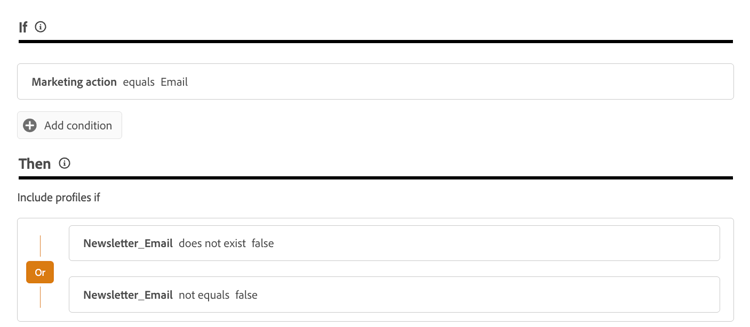
例如,要仅向未选择退出接收电子邮件新闻稿的客户发送通信,请创建自定义策略并定义以下条件:
-
如果 营销操作 等于电子邮件
-
那么 新闻稿_电子邮件 不存在 false 或 新闻稿_电子邮件 不等于false
note tip TIP 启用配置文件的数据集必须包含配置文件属性Newsletter_Email,其值设置为 true(如步骤1中所述)。 -
-
现在,您可以在历程和营销策划中使用这些渠道配置或自定义操作,以确保您的客户的偏好设置得到遵守。
This section contains structured knowledge intended to support interpretation, retrieval, and question answering related to this topic.
For complete understanding, this information should be combined with the documentation on this page. Neither source is intended to stand alone; the page describes the feature, while this section provides additional context that helps disambiguate terminology, intent, applicability, and constraints.
- TL;DR: This page explains how to record and honor your customers’ channel and topic preferences through consent policies so that Journey Optimizer only targets customers based on their choices.
Intents:
- Retrieve customer consent to opt in or out for native outbound channels
- Ask customers which topics they wish to subscribe to
- Define preference attributes at the profile level using the Boolean operator
- Create a page, using the Web SDK or a landing page, to capture customer preferences
- Create a consent policy in Experience Platform and leverage it in Journey Optimizer
Glossary:
- Preference attribute: A Boolean (true/false) attribute defined at the profile level, such as Newsletter_Email, captured in a Profile-enabled dataset schema and mapped to the unified customer profile (product-specific)
- Consent policy: A policy created in Experience Platform, applied in Journey Optimizer through channel configurations or journey custom actions, used to honor preferences (product-specific)
- Consent event: The event triggered when a customer selects or deselects a preference, saved against the profile attributes as true for opted-in and false for opted-out (product-specific)
- Subscription topic: A category of communication a customer can subscribe to, such as Newsletters, Offers, and New Product Launches (product-specific)
Guardrails:
- This capability is currently only available for organizations that have purchased the Adobe Healthcare Shield or Privacy and Security Shield add-on offerings.
- Consent takes precedence over preferences: a customer who opted out from receiving any communications cannot be targeted even if a preferred channel and topic are indicated.
- The supported channels are Email, Push, Mobile messages and InApp.
- Preference attributes must be present in the profile data, which is why they must be defined at the profile level.
- The domain of the landing page being used must belong to the upper brand and not to a sub-brand, because the preferences collected are stored in the profile data which is at the upper-brand level.
Terminology:
- Canonical name: Preference — Acronym: n/a — variants: contact preference, communication preference, subscription preference
- Synonyms: “opted-in” = “true”; “opted-out” = “false”
- Do not confuse: “consent” (whether a customer agreed to receive communications) ≠ “preference” (the channels and topics a customer selected); consent takes precedence over preferences
FAQ:
- Q: Which channels are supported for retrieving consent? — The supported channels are Email, Push, Mobile messages and InApp.
- Q: What takes precedence when consent and preferences conflict? — Consent takes precedence over preferences; a customer who opted out from all communications cannot be targeted regardless of their preferred channel or topic.
- Q: How are preference attributes defined? — Define them with the Boolean operator (true/false) at the profile level; they are captured in a Profile-enabled dataset schema and mapped to the unified customer profile.
- Q: How can I capture customer preferences? — Create a web page using the Adobe Experience Platform Web SDK, or use a Journey Optimizer landing page that includes forms to capture preferences through profile data.
- Q: Why must the landing page domain belong to the upper brand? — Because the preferences collected are stored in the profile data, which is at the upper-brand level.