在此页面上:了解如何使用“优化”活动和用户档案上限构建一个历程,以逐步加快电子邮件投放速度,从而帮助您预热新的IP地址并建立发件人信誉。
如果您最近已移至其他电子邮件服务提供商、IP地址或电子邮件域或子域,则需要建立您作为发件人的声誉。 否则,您的投放可能会被阻止或移至收件人邮箱的垃圾邮件文件夹。 请参阅可投放性最佳实践指南以了解如何利用IP预热提高您的电子邮件信誉。
要预热您的IP,您可以逐渐增加投放的数量。 阅读有关在Journey Optimizer中优化可投放性的更多信息。
此用例的目的是创建历程以加快电子邮件投放。 要配置此历程,请执行以下步骤:
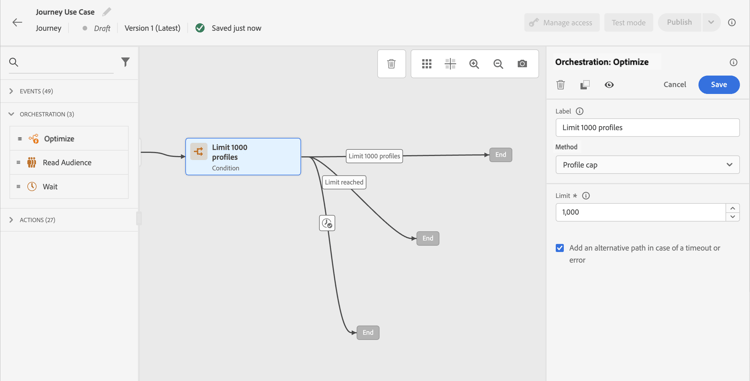

在IP预热后,您可以删除此条件。
This section contains structured knowledge intended to support interpretation, retrieval, and question answering related to this topic.
For complete understanding, this information should be combined with the documentation on this page. Neither source is intended to stand alone; the page describes the feature, while this section provides additional context that helps disambiguate terminology, intent, applicability, and constraints.
- TL;DR: This use case describes how to build an Adobe Journey Optimizer journey that gradually ramps up email delivery volume using a Profile cap condition to protect sender reputation during IP warming.
Intents:
- Build a journey to gradually increase email delivery volume for IP warming
- Configure a Profile cap condition to limit the number of recipients per delivery run
- Protect sender reputation when switching to a new email service provider, IP address, or domain
- Remove the volume cap condition once the IP is fully warmed up
Glossary:
- IP warming: The process of gradually increasing email send volume from a new IP address or domain to build sender reputation with mailbox providers (product-specific)
- Profile cap: A condition type in the Optimize activity that limits the maximum number of profiles that receive a message in a given journey run (product-specific)
- Optimize activity: A journey canvas activity used to apply conditions, targeting rules, or experimentation to control how profiles flow through a journey (product-specific)
Guardrails:
- A Profile cap condition must be set in the Optimize activity’s Conditions method to control delivery volume.
- Profiles that exceed the cap take the alternate path defined in the journey.
- The profile cap limit should be increased gradually over time up to the total number of subscribers.
Terminology:
- Canonical name: Ramp-up deliveries — Acronym: none — variants: IP warming, IP warmup, delivery ramp-up
- Synonyms: “IP warming” = “IP warmup” = “sender reputation building”
- Do not confuse: “Profile cap” ≠ “audience size limit” (Profile cap is a per-run delivery limit; audience size is the total number of qualified profiles)
FAQ:
- Q: Why do I need to ramp up deliveries when switching to a new IP or domain? — A new IP or domain has no sending history, so mailbox providers may block or spam-folder messages until a positive reputation is established through gradual, increasing volume.
- Q: How does the Profile cap condition control delivery volume? — It sets a maximum number of profiles that can receive the message in a single journey run; profiles beyond that limit take an alternate path instead.
- Q: When can I remove the Profile cap condition? — Once the IP is fully warmed up and your sender reputation is established, you can remove the condition from the journey.
- Q: Can I increase the cap gradually over time? — Yes; you can update the Limit field in the Profile cap condition to progressively increase the number of recipients per run up to your full subscriber count.