在此页面上:了解如何使用实时报告功能直接在历程画布中监视过去24小时内的关键历程量度。
发布历程后,一旦激活练习模式,实时报告将直接在历程画布中提供过去24小时的量度。
显示的事件发生在过去24小时内,事件与其显示之间至少间隔2分钟,通常在5分钟内。
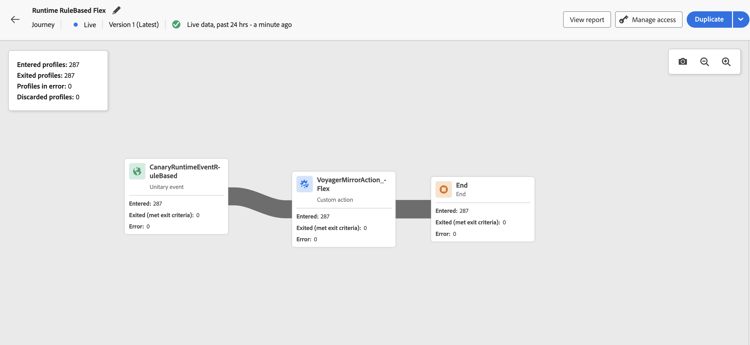
对于处于实时或练习模式的历程,您可以检查:
-
输入的配置文件:进入历程的个人总数。
-
退出配置文件:退出历程的个人总数(包括错误)。
-
有错误的配置文件:历程中遇到错误的个人总数。
-
丢弃的用户档案:由于以下原因之一从历程丢弃的个人总数:
- 对于 受众资格 活动,如果受众资格的预期动词与历程收到的动词不匹配(例如,“已退出”而不是“已实现”),则可能会发生放弃。
- 对于 事件触发的 历程,如果个人过早尝试重新进入历程或不允许重新进入,则可能发生放弃。
- 在 循环 历程中,如果个人已在历程中,并且再次进入策略未设置为“强制再次进入”,则会在每个循环中计入放弃。
- 在 读取受众 活动中,如果没有为导出的个人设置标识,或者收到的标识命名空间与历程的预期命名空间不匹配,则会发生放弃。
对于处于实时或练习模式的每个历程中的每个活动,您都可以访问:
- 已输入:进入此活动的个人总数。 对于 操作 活动,由于它们不是在练习模式下执行,因此此量度表示用户档案通过。
- 已退出(符合退出条件):由于退出条件(包括错误)而退出该活动的个人总数。
- 已退出(强制退出):由于历程从业者配置而暂停历程时退出历程的个人总数。 对于处于练习模式的历程,此量度始终等于零。
- 错误:在该活动上发生错误的个人总数。
缺少报表数据的疑难解答 troubleshooting-missing-data
如果在历程报表中未看到预期数据,请考虑以下事项:
-
历程名同步:验证Adobe Journey Optimizer中的历程名是否与报表数据集中存储的名称匹配。 这些名称之间的不匹配可能会阻止正确显示报表数据。
-
数据刷新计时:更新历程名称或配置后,为数据刷新留出足够的时间。 报表数据通常会在几分钟内显示,但在某些情况下可能需要更长时间。
-
访问权限:确保您具有查看历程报告的必要权限。 如果未看到任何数据,请与管理员确认您已启用 查看历程报告 权限。 了解有关权限的详细信息
-
历程状态:报表数据仅适用于在练习模式下运行的已发布历程或历程。 草稿历程不会生成报告数据。
如果在验证这些项目后问题仍然存在,请与Adobe管理员或Adobe支持联系以获取帮助。
This section contains structured knowledge intended to support interpretation, retrieval, and question answering related to this topic.
For complete understanding, this information should be combined with the documentation on this page. Neither source is intended to stand alone; the page describes the feature, while this section provides additional context that helps disambiguate terminology, intent, applicability, and constraints.
- TL;DR: This page explains how to view and interpret the live report embedded in the journey canvas, covering the key profile flow metrics available for published journeys and journeys in Dry run mode.
Intents:
- View real-time journey performance metrics directly in the journey canvas
- Interpret Entered, Exited, Error, and Discarded profile counts for the journey and each activity
- Understand why profiles are discarded from a journey
- Troubleshoot missing or unexpected data in journey live reports
- Verify the required permission to access journey live reports
Glossary:
- Live Reporting: Real-time metrics displayed directly on the journey canvas covering the last 24 hours (product-specific)
- Dry run mode: A journey execution mode that simulates the journey without sending real messages, in which live reporting is also available (product-specific)
- Discarded profiles: Profiles that attempted to enter the journey but were rejected due to qualification mismatches, reentry restrictions, or identity issues (product-specific)
- Exited (forced exit): Profiles that were removed from the journey while it was paused by a journey practitioner; always zero in Dry run mode (product-specific)
Guardrails:
- Live report data covers only the past 24 hours.
- Events are displayed with a minimum interval of two minutes from occurrence, typically within five minutes.
- The View journeys report permission is required to see live report data.
- Reporting data is only available for published journeys or journeys in Dry run mode; draft journeys generate no data.
- For Action activities, the Entered metric shows profiles passing through (not executed) in Dry run mode.
- The Exited (forced exit) metric is always zero in Dry run mode.
Terminology:
- Canonical name: Live report (journey canvas) — Acronym: none — variants: journey live report, in-canvas reporting
- Synonyms: “Entered profiles” = “profiles who entered the journey”
- Do not confuse: “Live report” ≠ “Journey global report” (live report is the last 24 hours in the canvas; global report covers a wider historical time range in the reporting UI)
FAQ:
- Q: How current is the data shown in the live report? — Events from the past 24 hours are shown, with a minimum display delay of two minutes and typically within five minutes.
- Q: Why can I not see any data in my journey live report? — Check that you have the View journeys report permission, that the journey is published (not in draft), and that the journey name matches the name in the reporting dataset.
- Q: What causes profiles to be discarded? — Discards can occur due to audience qualification verb mismatches, reentry policy violations on recurring or event-triggered journeys, or missing/mismatched identity namespace on Read Audience activities.
- Q: Is the live report available during Dry run mode? — Yes; live reporting is available for both published live journeys and journeys running in Dry run mode.
- Q: What does the Entered metric mean for Action activities in Dry run mode? — It indicates profiles passing through the activity, since actions are not actually executed in Dry run mode.