在此页面上:了解如何配置和分配历程量度,以根据KPI跟踪性能并实时衡量客户历程的有效性。
通过历程量度清楚地了解客户历程的有效性。 利用此功能,您可以根据定义的KPI跟踪性能、揭示对有效内容的洞察以及确定优化区域。 通过实时衡量影响,您可以推动持续改进并做出有数据根据的决策,从而提高客户参与度。
先决条件 prerequisites
在使用历程量度之前,您必须在Adobe Experience Platform中的配置>报表下添加包含Commerce Details、Web和Mobile 字段组的数据集。
这些字段组必须从内置选项中选择,而不是从自定义组中选择。 请参阅添加数据集部分。
可用量度 metrics
量度列表因数据集中包含的字段组而异。
如果未配置数据集,则只有以下量度可用: 点击、唯一点击、点进率和打开率。
请注意,使用Customer Journey Analytics许可证,您可以创建自定义成功量度。 了解详情
归因 attribution
每个量度都带有一组归因,该归因确定哪些接触点或交互对特定结果做出了贡献。
-
具有Journey Optimizer许可证的量度归因:
仅使用Journey Optimizer许可证,任何选定指标的最大可用回溯时段均设置为7天。 对于这些量度,归因模型默认设置为最近联系,即转化前的最近交互。
例如,您可以跟踪客户在过去7天内与您的历程交互后是否进行了购买。
-
具有Customer Journey Analytics许可证的量度归因:
借助Journey Optimizer和Customer Journey Analytics许可证,您可以创建具有特定归因设置的自定义量度,或更改内置量度的归因。
了解有关归因模型的更多信息
分配您的历程量度 assign
要开始跟踪历程量度,请执行以下步骤:

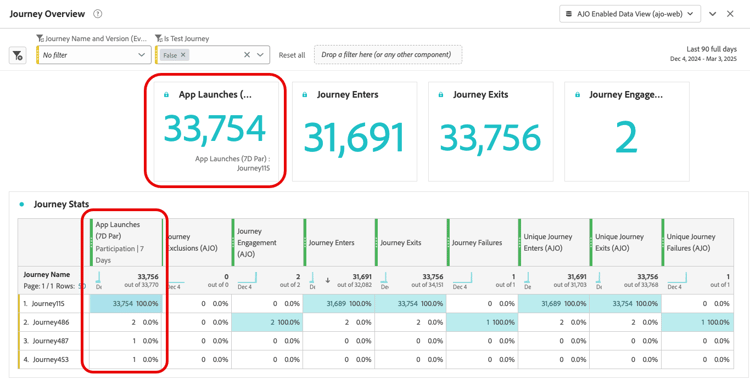
This section contains structured knowledge intended to support interpretation, retrieval, and question answering related to this topic.
For complete understanding, this information should be combined with the documentation on this page. Neither source is intended to stand alone; the page describes the feature, while this section provides additional context that helps disambiguate terminology, intent, applicability, and constraints.
- TL;DR: This page explains how to configure and track journey success metrics in Adobe Journey Optimizer by assigning a KPI to a journey and reviewing its performance in journey reports.
Intents:
- Add the required Adobe Experience Platform dataset field groups (Commerce Details, Web, Mobile) as a prerequisite for journey metrics
- Assign a journey metric (KPI) to a journey during journey creation or configuration
- Understand which metrics are available based on the configured dataset field groups
- Interpret attribution models for journey metrics under Journey Optimizer and Customer Journey Analytics licenses
- Create custom success metrics using a Customer Journey Analytics license
- Track journey performance against the assigned KPI in journey reports
Glossary:
- Journey metrics: KPIs assigned to a journey to measure its effectiveness, visible in journey reports (product-specific)
- Last Touch attribution: With Journey Optimizer license only, the default attribution model that credits the most recent interaction before a conversion
- Commerce Details field group: A built-in field group enabling commerce-related metrics such as Purchases, Checkouts, and Cart Adds (product-specific)
- Lookback window: The time range over which attribution is evaluated; set to a maximum of 7 days (hard limit) with Journey Optimizer license only
Guardrails:
- The journey must be validated before testing or publishing. Errors in the Alerts panel must be resolved and validation rerun before continuing.
- Only one journey metric is allowed per journey (hard limit)
- Dataset field groups (Commerce Details, Web, Mobile) must be selected from built-in options, not custom groups, and added under Configuration > Reporting in Adobe Experience Platform
- Without a configured dataset, only Click, Unique Click, Clickthrough Rate, and Open Rate are available
- The maximum lookback window is 7 days (hard limit) with a Journey Optimizer license only
- Custom metrics and custom attribution settings require a Customer Journey Analytics license
Terminology:
- Canonical name: Journey metrics
- Canonical name: Clickthrough rate — Acronym: CTR
- Canonical name: Clickthrough open rate — Acronym: CTOR
- Synonyms: “journey metrics” = “success metrics”
- Do not confuse: With Journey Optimizer license only, attribution defaults to Last Touch; with both Journey Optimizer and Customer Journey Analytics licenses, custom metrics can have specific attribution settings and built-in metrics’ attributions can be changed.
FAQ:
- Q: How many journey metrics can I assign to a single journey? — Only one journey metric is allowed per journey (hard limit).
- Q: What metrics are available if I have not configured a dataset with field groups? — Only Click, Unique Click, Clickthrough Rate, and Open Rate are available without a configured dataset.
- Q: What field groups do I need to enable purchase and commerce metrics? — You need to add the Commerce Details field group to your reporting dataset in Adobe Experience Platform.
- Q: What is the default attribution model for journey metrics with Journey Optimizer license only? — Last Touch, which credits the most recent interaction before conversion, with a maximum 7-day lookback window (hard limit).
- Q: Can I create custom success metrics? — Yes, but only with a Customer Journey Analytics license.
- Q: Where can I see the journey metrics results after publishing? — In the journey report’s KPIs and Journey Stats table.