在此页面上:了解如何将出站邮件投放拆分为称为批次的计划批次,以平衡负载、保护发件人信誉并提高可投放性。 波次发送可用于读取受众历程、操作营销活动和编排的营销活动。
您可以计划按名为 批次 的受控批次进行投放,而不是一次发送所有消息。 波次发送可帮助您:
- 平衡负载并保护下游系统(如呼叫中心或登陆页面)不被淹没
- 支持可投放性和发件人信誉,特别是对于高容量发送
- 在预热新IP或平台时逐步增加投放量
您可以定义批次的数量、大小(以受众百分比或绝对数字表示)以及每个批次运行的时间。
限制和防护 limitations-guardrails
以下限制适用于任何上下文中的波形发送:
- 波形发送仅适用于 出站 渠道(电子邮件、手机消息、推送)。
- 当前不支持直邮用于波动发送。 您不能分批次发送直邮消息。
- 您必须至少定义2波,并且最多可添加10波。
- 两个批次开始的最小间隔为30分钟。
- 不能在过去设置波次开始。
其他上下文特定约束适用:
- 波次发送仅适用于计划程序类型为 As soon as possible 和 一次 的读取受众历程。 了解有关历程计划的更多信息
- 波动发送不适用于定期、事件触发、业务事件、测试模式或模拟历程。
- 波次开始时间不能早于历程开始时间。
- 最后一个波次必须安排在历程开始的 6天和18小时 内。 安排此窗口之外的最后一个波次会触发验证错误,并阻止历程进入测试模式或进入实时状态。
- 将受众拆分为批次最多可能需要1小时。 在拆分完成之前,用户档案可能不会进入历程。
- 在单个历程版本中,两个批次不会同时运行。 下一波只在上一波结束后开始。 例如,如果波形间隔1小时而第一个波形运行2小时,则第二个波形在第一次结束时开始,而不是在它的原始计划时间开始。
- 当平台应用配额限制或系统容量负荷较重时,波动启动可能会延迟。
- 波次开始不能早于营销活动开始。
- 波次发送在 渠道活动级别 配置,对于营销活动中的每个渠道活动都是独立的。
- 波动发送不适用于定期或信号触发的编排活动。
- 波次开始不能早于营销活动开始。
配置批次发送 configure-wave-sending
启用波次发送的步骤取决于您的上下文 — 读取受众历程或操作营销活动。 选择下面的相关选项卡,然后参阅波形大小和计时部分以完成配置。
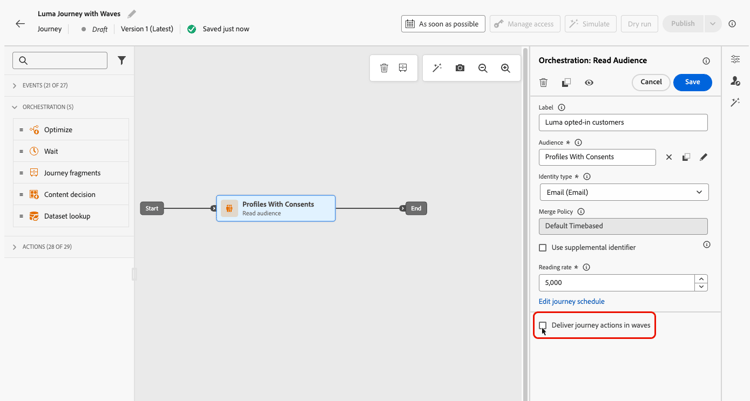
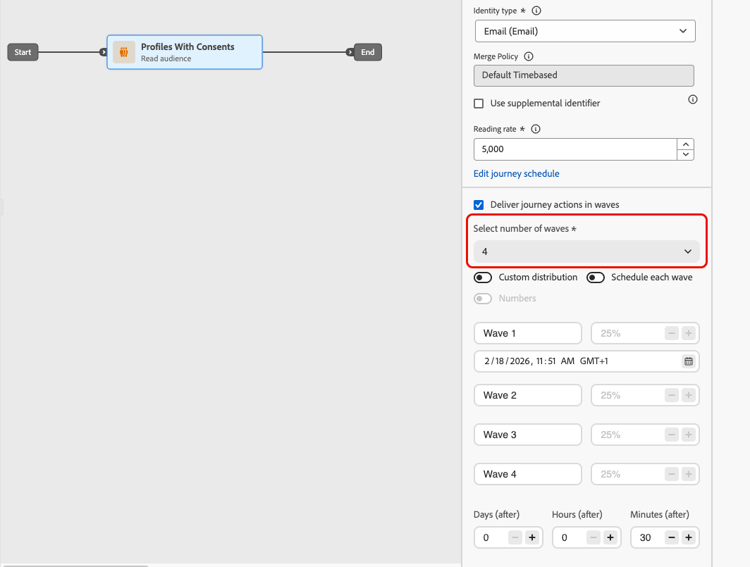
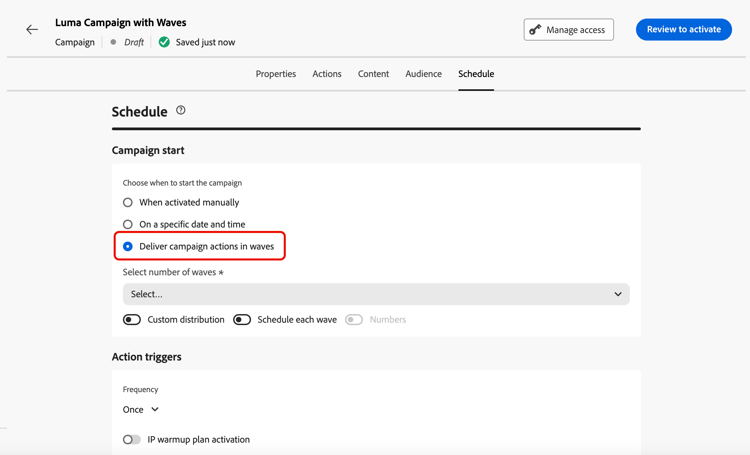
-
在编排的活动画布中打开渠道活动(电子邮件、移动消息或推送)。
-
转到渠道活动的 计划 选项卡。
-
在 批次计划 下,启用 批次投放 切换开关。
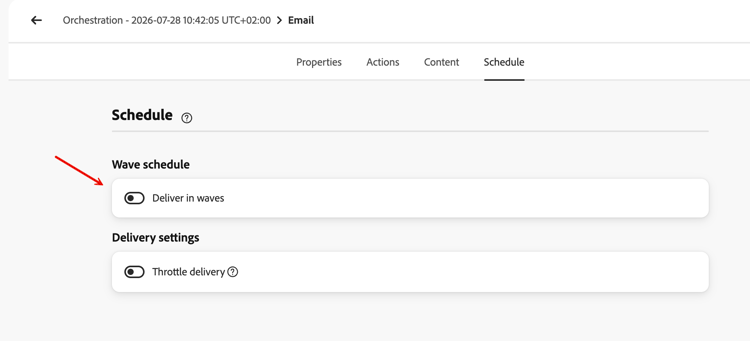
-
使用 选择波次数 下拉列表设置波次数。
note NOTE 您必须至少定义2个波段,并且最多可添加10个波段。 -
选择如何定义波次大小和时间,如下面的波次大小和时间部分所述。
波形大小和计时 wave-options
设置批次数量后,请定义受众如何在这些批次中分布以及每个批次何时运行。 提供了三个选项:
相等波段 equal-waves
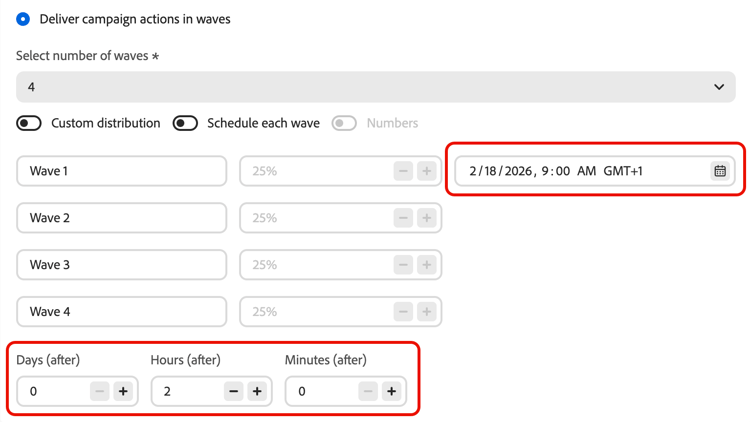
默认情况下,受众会拆分为大小相等的批次。 设置每个波次开始之间的固定间隔(例如,2小时)。 然后,系统自动安排后续波段,例如,第一个波段在早上9:00,第二个波段在晚上11:00,第三个波段在晚上1:00,第四个波段在晚上3:00。
自定义分发 custom-distribution
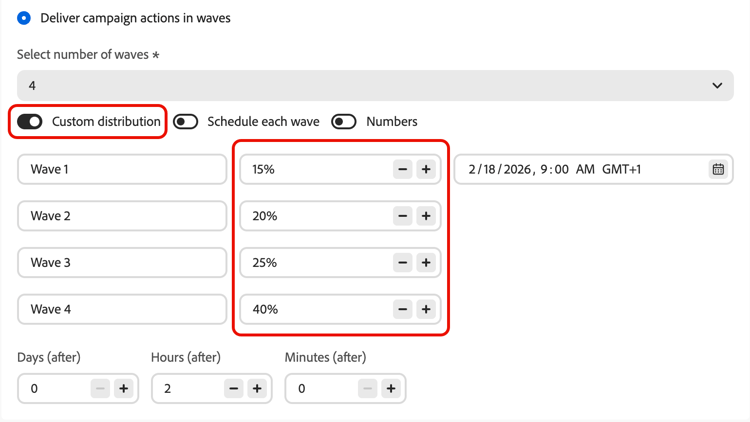
选择 自定义分布 选项,将每个波次的大小定义为总受众的百分比(例如,15%、20%、25%、40%)。
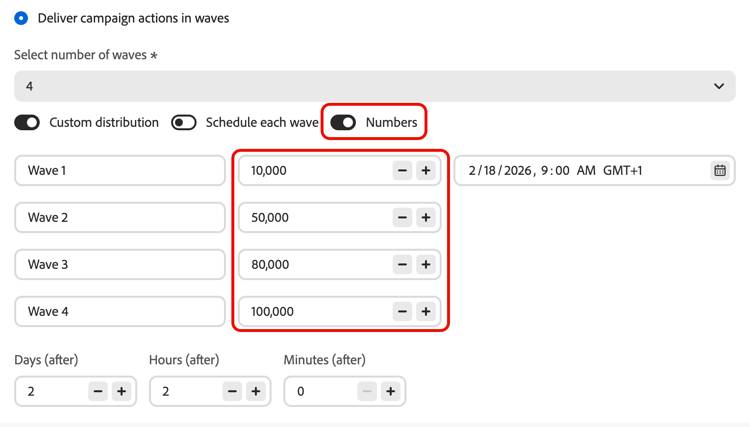
选择 数字 可将每个波次的大小定义为配置文件的绝对数(例如,10,000;50,000)。
-
使用百分比时,所有批次的总计必须为100%。 如果不是这种情况,将显示警告。
-
使用数字时,系统不会验证总覆盖率 — 确保您的波次大小涵盖目标受众。 了解详情
自定义计划 custom-schedule
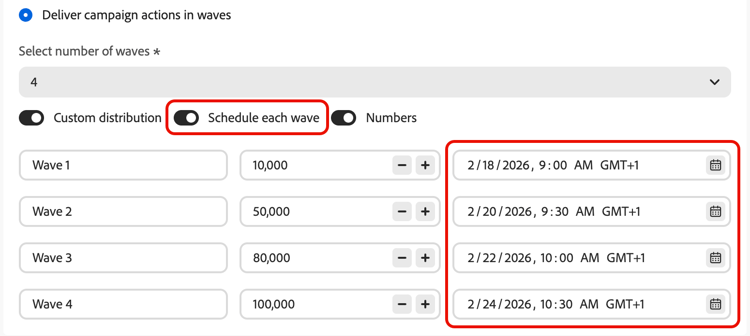
选择 计划每个波次 以定义每个波次的特定开始日期和时间。 波形不需要均匀地隔开(例如,上午9:00、上午11:00、下午5:00、晚上8:30)。
用例 use-cases
Wave Sending可帮助您控制发送消息的时间和数量,这可以提高可投放性,保护发件人信誉,并使发送与您的运营容量相一致。 考虑在以下情况下使用波段:
-
呼叫中心或响应管理:限制每天或每小时传出多少条消息,以便下游团队(例如,客户关怀团队)能够以可管理的速率处理响应。
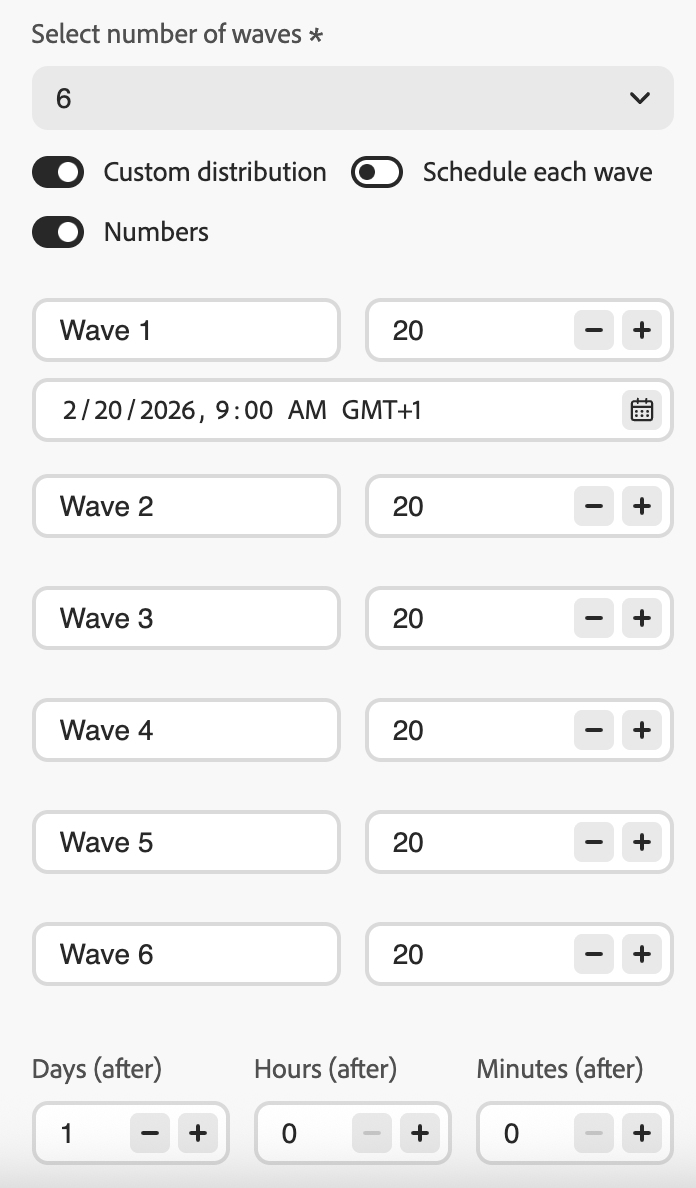
-
高音量和可投放性:避免一次发送大量受众。 随时间分散投放有助于维护发件人的信誉并降低被标记为垃圾邮件的风险。
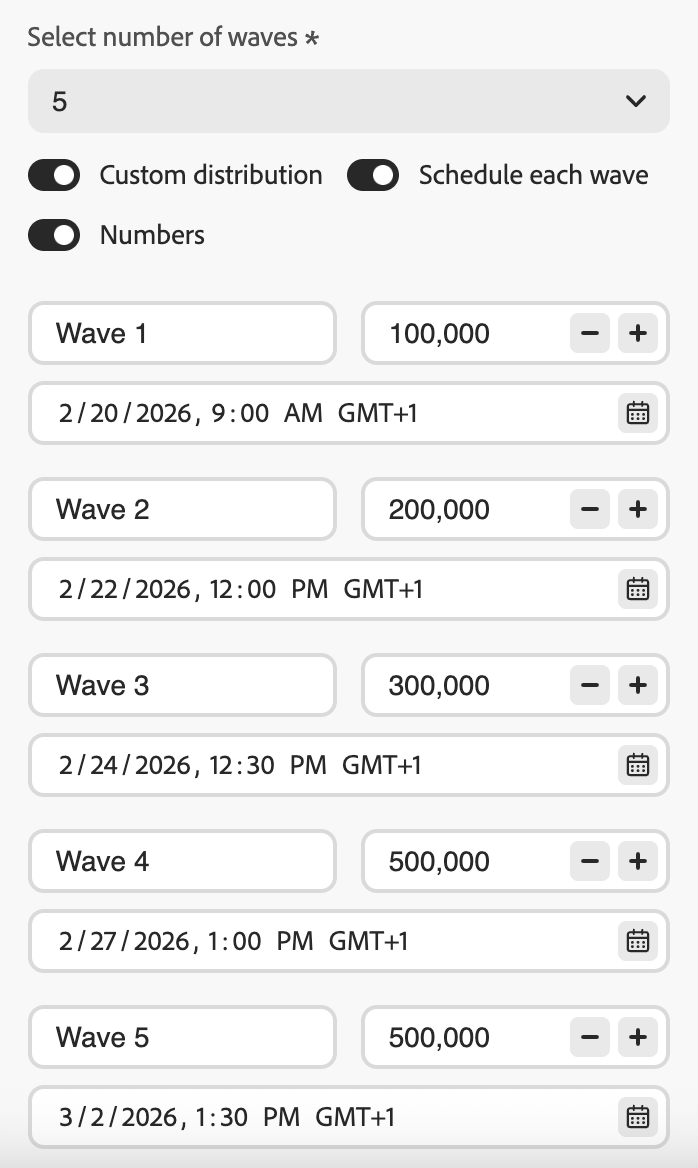
-
IP预热:使用新平台或IP地址时,逐步增加容量(例如,第一轮为10%,然后为15%、20%等)以逐步建立发送信誉。
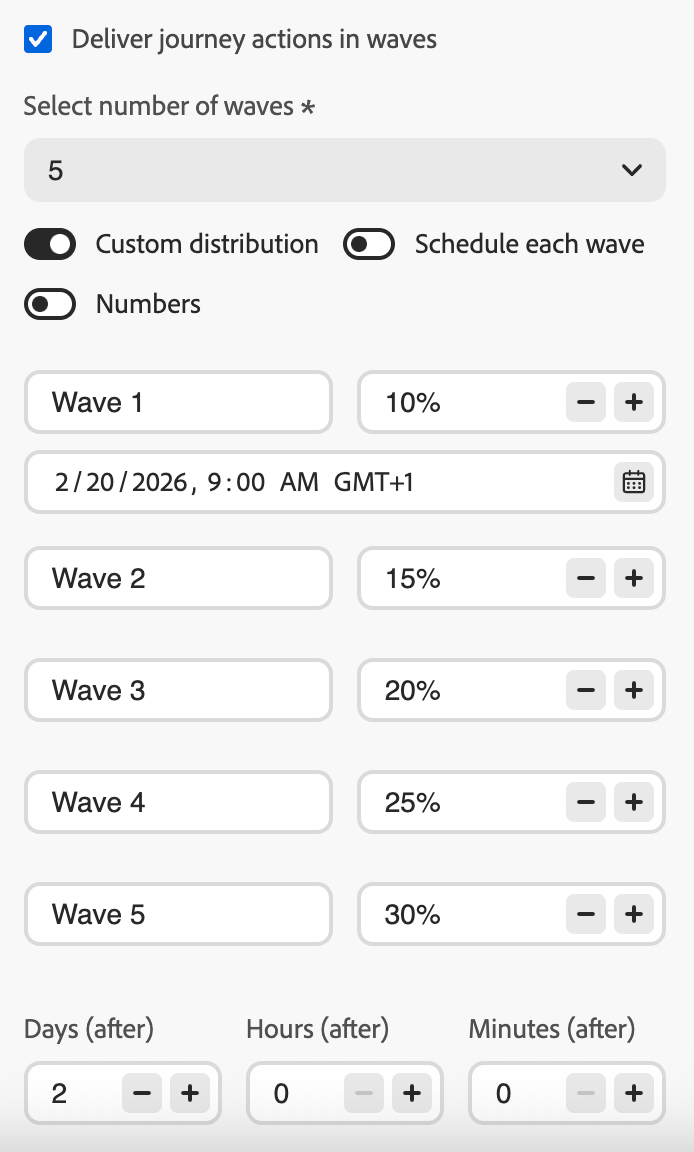
常见问题 faq
- 如果总和 超过 个受众(例如,您计划在第一轮中为80,000个受众设置100,000个受众),则第一轮将发送给所有受众,而剩余的轮次没有剩余的用户档案 — 它们不执行。
- 如果总和小于受众(例如,您为100,000的受众定义了四个批次共40,000个配置文件),则只有这些批次中包含的用户档案会收到消息。 其余用户档案不会收到通信,并且不会在后续批次中重试。
受众在激活时(触发历程或启动营销活动/活动时)为评估一次。 此时会拍摄符合条件的用户档案的快照,并在所有批次中使用 — 在后续每次批次之前不会重新评估受众成员资格。
但是,在每个批次处理 时读取 配置文件属性,而不是在激活时读取。 这意味着对于跨越多天的波段:
- Personalization属性(例如,用户档案的名字或忠诚度级别)反映用户档案在批次运行时的状态。
- 在发送时为每个批次重新应用同意和隐藏检查。 如果个人资料在两个批次之间选择退出,则它们在后续批次中不会接收消息。
总而言之,包含 谁 是预先确定的,但 用于个性化并发送到这些用户档案的数据 在处理其批次时反映其当前状态。
另请参阅 see-also
- 在历程中使用受众 — 配置读取受众活动
- 计划一个操作营销活动 — 设置开始日期、结束日期和频率
- 在协调的营销活动中渠道活动 — 在协调的画布中配置渠道活动
This section contains structured knowledge intended to support interpretation, retrieval, and question answering related to this topic.
For complete understanding, this information should be combined with the documentation on this page. Neither source is intended to stand alone; the page describes the feature, while this section provides additional context that helps disambiguate terminology, intent, applicability, and constraints.
- TL;DR: This page explains how to configure wave sending in Adobe Journey Optimizer to deliver outbound messages in controlled batches over time, improving deliverability and protecting sender reputation. Wave sending is available in read-audience journeys, action campaigns, and orchestrated campaigns.
Intents:
- Enable wave sending on a Read Audience journey, an Action campaign, or an Orchestrated campaign channel activity
- Configure equal waves with a fixed interval between each wave
- Define custom wave sizes as percentages or absolute profile counts
- Schedule each wave with a specific start date and time
- Control delivery volume to protect sender reputation or align with operational capacity
Glossary:
- Wave sending: A delivery mode that splits the audience into batches (waves) and sends messages to each batch at scheduled intervals instead of all at once (product-specific)
- Equal waves: A configuration where the audience is split into equal-sized portions with a fixed interval between wave starts (product-specific)
- Custom distribution: A configuration where each wave’s size is defined manually as a percentage or absolute number of profiles (product-specific)
- Custom schedule: A configuration where each wave has a specific start date and time, allowing non-uniform spacing (product-specific)
Contexts where wave sending is available:
- Read audience journeys (“As soon as possible” or “Once” scheduler only — not for recurring, event-triggered, business-event, test, or dry-run journeys)
- Action campaigns (outbound channel actions only)
- Orchestrated campaigns (outbound channel activities only, configured per channel activity; not for recurring or signal-triggered Orchestrated campaigns)
Common guardrails (all contexts):
- Minimum 2 waves, maximum 10 waves
- Minimum 30 minutes between the start of two consecutive waves
- Wave start cannot be in the past
- Percentage-based custom distribution must total 100%
- Number-based custom distribution does not auto-validate total coverage
Campaign guardrails (Action campaigns and Orchestrated campaigns):
- Wave start cannot be before campaign start
Journey-specific guardrails:
- Wave start cannot be before journey start
- The last wave must be scheduled within 6 days and 18 hours of the journey start; exceeding this triggers a validation error
- Audience splitting can take up to 1 hour; profiles may be delayed
- Two waves never run simultaneously within the same journey version
- Wave starts can be delayed by platform quota limits or heavy system load
FAQ:
- Q: Does wave sending apply to inbound channels? — No; outbound only (Email, Mobile message, Push).
- Q: Can I assign different content to individual waves? — No; same audience and content for all waves. Only size and timing can differ.
- Q: What is the minimum time between two waves? — 30 minutes between the start of two consecutive waves.
- Q: What happens if wave sizes exceed or fall short of the audience? — Excess: first wave sends to full audience, remaining waves do not execute. Shortfall: only profiled in defined waves receive the message; the rest are not retried.
- Q: Is the audience re-evaluated per wave? — No; the audience is snapshotted at activation. Profile attributes (personalization, consent) are read at wave processing time.