在此页面上:了解如何将GenStudio for Performance Marketing与Journey Optimizer集成以导出电子邮件模板、生成品牌内内容变体并将其导入回以用于电子邮件营销活动。
GenStudio入门 gs-genstudio
Adobe GenStudio for Performance Marketing是一个创新型人工智能优先应用程序,它允许营销团队创建自己的广告和电子邮件,以推动符合您的品牌标准并遵守企业政策的有影响力的个性化营销活动。 通过利用Adobe AI技术,它提供了一套全面的工具,可简化内容创建和管理的复杂性,以便创意人员可以专注于创新。
为了提高营销效率并维护品牌一致性,您可以将 GenStudio for Performance Marketing 体验与 Adobe Journey Optimizer 无缝集成。 这使您能够利用GenStudio的AI支持的内容创建以及Journey Optimizer的高级编排功能。
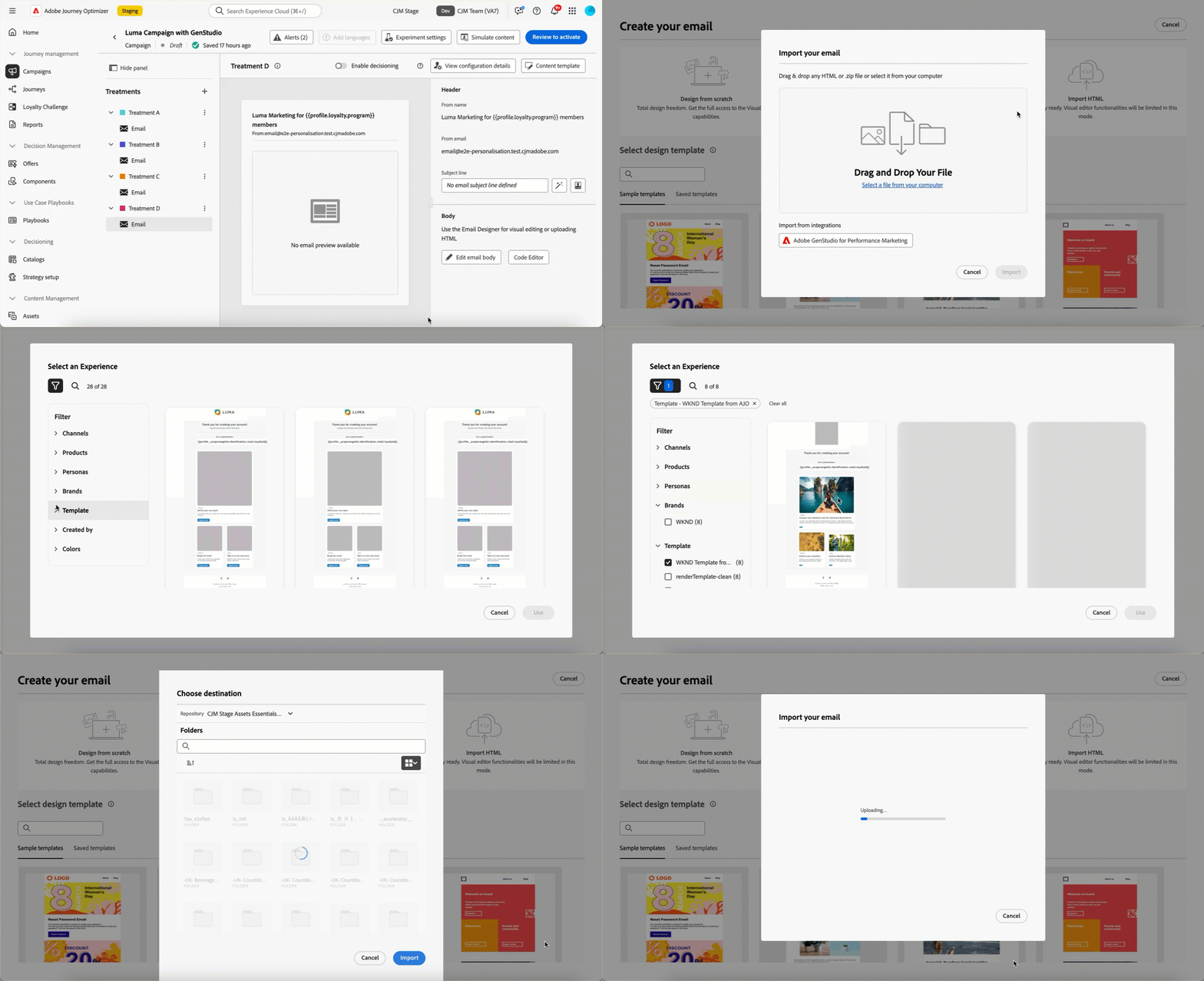
➡️ 通过观看视频了解此功能
先决条件 genstudio-prerequisites
要使用与Journey Optimizer的GenStudio for Performance Marketing集成,请确保满足以下要求:
-
您的组织必须具有有效的GenStudio for Performance Marketing许可证。
-
GenStudio for Performance Marketing和Adobe Journey Optimizer必须属于同一个IMS组织。
-
用户必须在GenStudio for Performance Marketing中至少具有 Collaborator 角色或更高角色才能利用集成功能。 进一步了解GenStudio中的用户角色
利用Journey Optimizer中的GenStudio功能 use-genstudio
通过GenStudio for Performance Marketing和Journey Optimizer集成,您可以让公司中的营销人员更好地协作以简化流程。
例如,使用Journey Optimizer开发和自动化电子邮件营销活动的技术营销人员可以与使用GenStudio创建内容的性能营销人员协作。
通过此集成,双方可以共同轻松地将GenStudio中的品牌上内容集成到Journey Optimizer中,从而提供针对特定客户细分并促进销售的引人入胜的电子邮件。
主要功能 genstudio-capabilities
此集成为您的营销组织解锁了强大的功能:
-
AI支持的内容生成:利用Adobe的创作AI,通过智能副本建议和设计元素高效地创建多个品牌内电子邮件变体。
-
无缝的工作流集成:将Journey Optimizer电子邮件模板导出到GenStudio,创建具有AI提示的变体,并通过简化的过程将它们导入回Journey Optimizer。
-
集中式资源管理:访问由Adobe Experience Manager Assets提供支持的GenStudio ContentHub,以在一个集中式位置整理、存储和检索所有数字资源。
-
内容实验:将多个GenStudio电子邮件变体导入Journey Optimizer,并利用实验功能测试和识别表现最佳的内容。
-
性能驱动的分析:通过AI支持的分析跟踪促销活动效果,以了解哪些创意元素可与受众引起共鸣并优化未来的促销活动。
常见使用案例 genstudio-use-cases
GenStudio for Performance Marketing和Journey Optimizer之间的集成支持各种营销方案:
-
产品发布促销活动:快速生成产品公告的多个电子邮件变体,使用不同的受众区段测试这些变体,并在您的客户群中扩展入选版本。
-
假日和季节性促销活动:使用GenStudio模板大规模生成时效性强的促销活动内容,确保在紧迫期限内保持品牌一致性。
-
大规模A/B测试:在GenStudio中创建大量内容变体,并在Journey Optimizer中系统地测试这些变体以持续改进电子邮件性能。
-
多区段个性化:在GenStudio中为不同的客户角色生成量身定制的内容,然后将每个变体部署到Journey Optimizer中的相应区段,以便获得最大的相关性。
使用GenStudio集成 how-to-use
集成工作流程包含两个主要步骤:将模板从Journey Optimizer导出到GenStudio,以及将GenStudio体验导入回Journey Optimizer。
将HTML模板从Journey Optimizer导出到GenStudio export-from-ajo-to-genstudio
首先,将包含您品牌准则的Journey Optimizer HTML模板导出到GenStudio for Performance Marketing。 请按照以下步骤操作。
-
在Journey Optimizer中,访问历程或营销活动中电子邮件的内容。 了解如何操作
-
在电子邮件Designer中,从 更多 按钮中选择导出HTML。
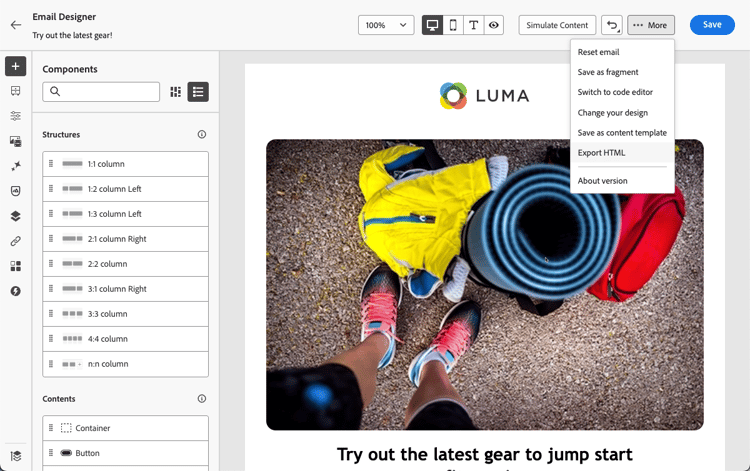
-
将此HTML导出模板上载到GenStudio for Performance Marketing。
note NOTE 在HTML用户指南专用部分中了解如何将Adobe GenStudio for Performance Marketing模板上载到GenStudio。 -
在GenStudio中,使用此模板创建多个具有AI提示的电子邮件变体并保存它们。
note NOTE 了解如何在GenStudio专用的部分中创建电子邮件体验。
在Journey Optimizer中利用GenStudio体验 leverage-genstudio-experiences
在GenStudio中创建电子邮件变体后,将其导入回Journey Optimizer以在营销活动中使用。 请按照以下步骤操作。
-
在Journey Optimizer中,向营销活动添加电子邮件。
-
在电子邮件Designer主页上,选择导入HTML,然后单击 Adobe GenStudio for Performance Marketing 按钮。
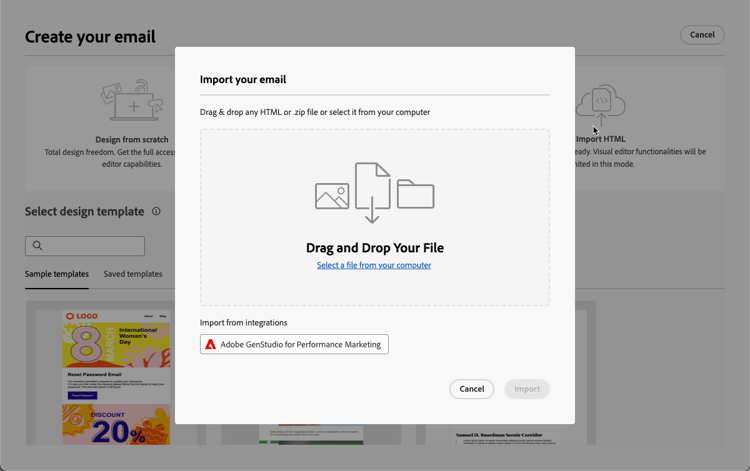
-
浏览GenStudio体验以开始构建您的内容。 您可以根据多个标准筛选体验,例如产品、角色、品牌甚至颜色。
-
选择一个体验,然后单击使用。
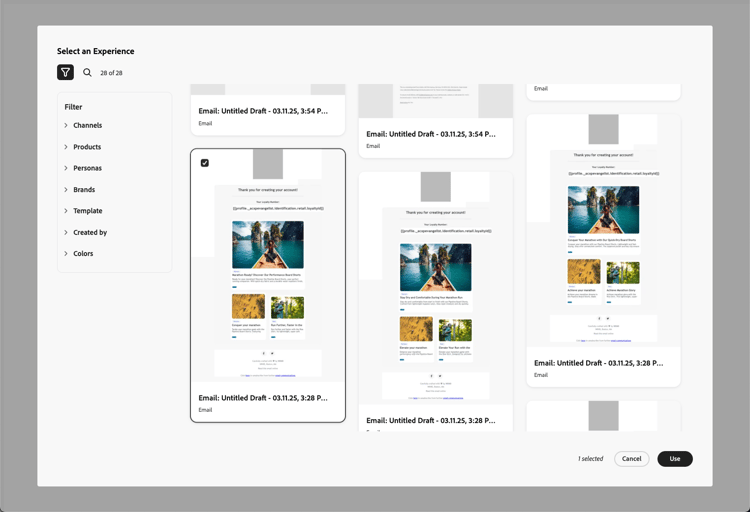
-
选择要导入GenStudio体验的文件夹。
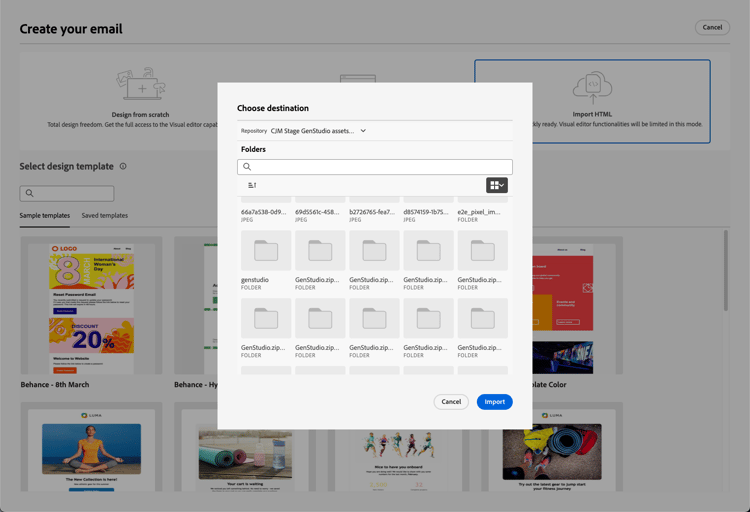
-
选定的内容显示在电子邮件Designer中。
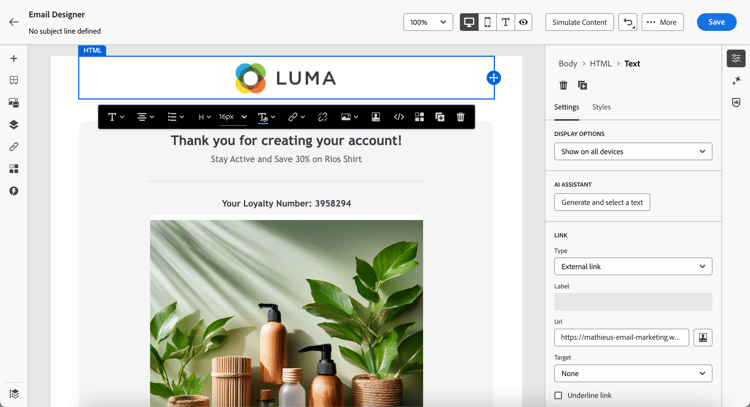
note NOTE 从 Journey Optimizer 模板🔗创建的GenStudio体验将直接导入具有完整编辑功能的电子邮件Designer中。 未使用Journey Optimizer模板创建的GenStudio体验导入到兼容模式中,该模式的编辑功能可能会受到限制。 -
根据需要使用电子邮件内容编辑工具和个性化字段编辑电子邮件。 保存您的内容。
-
返回营销活动摘要页面,然后单击 创建试验 以使用试验。 了解如何创建内容试验
-
创建多个处理并重复上述步骤以导入并快速利用您在GenStudio中创建的其他电子邮件体验变体。

-
保存更改并激活营销活动。
常见问题 genstudio-faq
查找有关GenStudio for Performance Marketing与Journey Optimizer集成的常见问题解答。
操作方法视频 video
了解如何将电子邮件模板从 Journey Optimizer 导出到 GenStudio for Performance Marketing,如何在 GenStudio 中使用模板创建符合品牌标准的电子邮件并将这些电子邮件无缝导入回 Journey Optimizer。
This section contains structured knowledge intended to support interpretation, retrieval, and question answering related to this topic.
For complete understanding, this information should be combined with the documentation on this page. Neither source is intended to stand alone; the page describes the feature, while this section provides additional context that helps disambiguate terminology, intent, applicability, and constraints.
- TL;DR: This page explains how to integrate GenStudio for Performance Marketing with Journey Optimizer to export email templates, generate on-brand content variations with AI, and import them back into the Email Designer for use in email campaigns and experiments.
Intents:
- Export an HTML template from Journey Optimizer to GenStudio using Export HTML from the More button
- Create email variations in GenStudio with AI prompts
- Import GenStudio experiences back into Journey Optimizer with Import HTML
- Filter and select GenStudio experiences by criteria such as products, personas, brands, or colors
- Create content experiment treatments from multiple GenStudio variations
- Track treatment performance with the experimentation campaign report
Glossary:
- GenStudio for Performance Marketing: A generative AI-first application for creating on-brand ads and emails that integrates with Journey Optimizer for the email channel (product-specific)
- ContentHub: GenStudio’s centralized asset location, powered by Adobe Experience Manager Assets, used to organize, store, and retrieve digital assets (product-specific)
- Compatibility mode: The import mode for GenStudio experiences created without a Journey Optimizer template, which may have limited editing functionality (product-specific)
- Collaborator role: The minimum GenStudio user role required to use the integration features (product-specific)
Guardrails:
- This capability is available for the email channel only.
- Your organization must have an active license for GenStudio for Performance Marketing.
- GenStudio for Performance Marketing and Adobe Journey Optimizer must belong to the same IMS organization.
- Users must have at least the Collaborator role or higher in GenStudio to use the integration features.
- The integration is unavailable for organizations using the Healthcare Shield or Privacy and Security Shield add-on offerings.
- GenStudio experiences created without a Journey Optimizer template are imported into compatibility mode, which may have limited editing functionality.
Terminology:
- Canonical name: GenStudio for Performance Marketing — Acronym: n/a — variants: GenStudio, Adobe GenStudio for Performance Marketing
- Do not confuse: “Export HTML” (Journey Optimizer template to GenStudio) ≠ “Import HTML” (GenStudio experiences back into Journey Optimizer)
- Do not confuse: experiences created from a Journey Optimizer template (imported with full editing capabilities) ≠ experiences created without a template (imported into compatibility mode)
FAQ:
- Q: Which channels does the GenStudio integration support? — The email channel only; support for additional channels may be added in future releases.
- Q: Is the integration available for all customers? — No; it is currently unavailable for organizations using the Healthcare Shield or Privacy and Security Shield add-on offerings.
- Q: Can I edit GenStudio content after importing it? — Yes; you can use the Email Designer’s content editing tools and add personalization fields.
- Q: What happens to experiences created without a Journey Optimizer template? — They are imported into compatibility mode rather than directly into the Email Designer with full editing.
- Q: How does GenStudio maintain brand consistency? — It uses AI-powered brand checks and applies your uploaded brand standards to all content variations created in the platform.