在此页面上:将Journey Optimizer连接到Adobe Campaign Standard,以便您的旅程通过其事务性消息传送功能发送电子邮件、推送通知和移动消息。
如果您有Adobe Campaign Standard,则可使用内置操作来允许与Adobe Campaign Standard的连接。 您可以使用Adobe Campaign Standard的事务性消息传送功能发送电子邮件、推送通知和移动消息。
必须发布Campaign Standard事务型消息及其关联的事件,才能在Journey Optimizer中使用。 如果事件已发布但消息未发布,则不会在Journey Optimizer界面中看到该消息。 如果消息已发布,但其关联事件未发布,则它将在Journey Optimizer界面中可见,但不可用。
护栏和限制 important-notes
-
为Adobe Campaign Standard操作自动定义每5分钟4000次调用的上限规则。 在Adobe Campaign Standard产品描述中阅读有关事务性消息传递SLA的更多信息。
-
Adobe Campaign Standard集成通过操作列表中的专用内置操作进行设置。 必须为每个沙盒配置此设置。
-
Campaign Standard操作不能用于“受众”资格或“读取受众”活动。
-
历程不能同时使用内置渠道操作和Campaign Standard操作。
配置操作 configure-action
在Journey Optimizer中,必须为每个事务型消息配置一个操作。
要配置Campaign Standard操作,请执行以下步骤:
-
在“管理”菜单部分中选择配置。
-
在 操作 部分中,单击管理。 将显示操作列表。
-
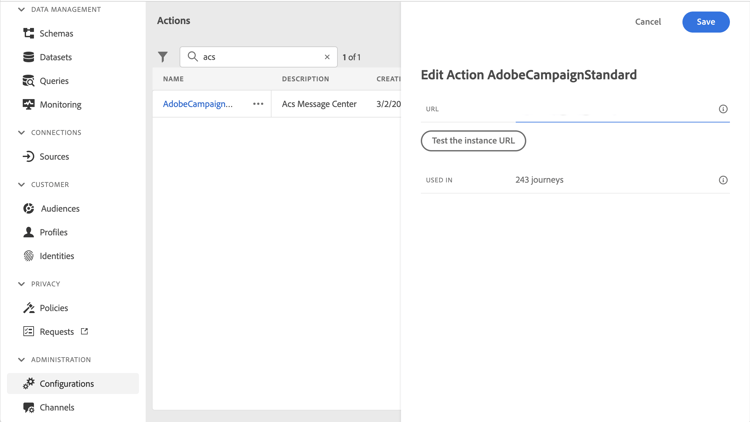
选择内置 AdobeCampaignStandard 操作。 操作配置窗格将在屏幕右侧打开。
-
复制Adobe Campaign Standard实例URL并将其粘贴到 URL 字段中。
-
单击 测试实例URL 以测试实例的有效性。
note NOTE 此测试将验证: -
主机为“.campaign.adobe.com”、“.campaign-sandbox.adobe.com”、“.campaign-demo.adobe.com”、“.ats.adobe.com”或“.adls.adobe.com”
-
URL以https开头
-
与此Adobe Campaign Standard实例关联的组织与Journey Optimizer组织相同
-
完成此配置后,在设计历程时,操作类别中有三个操作可用: 电子邮件、推送、移动消息。 了解如何使用它们。
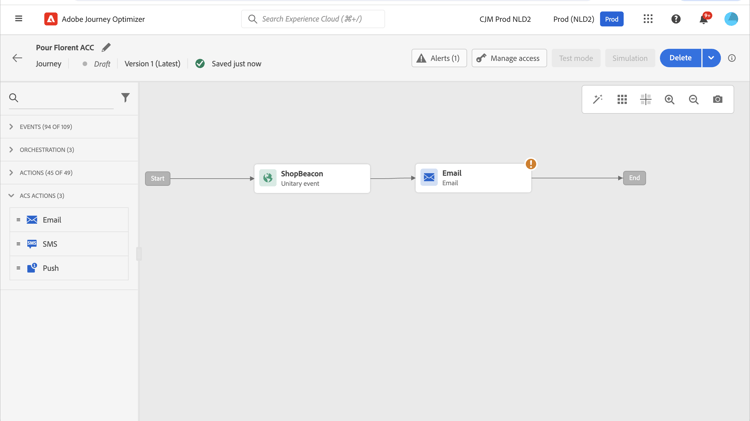
使用 反应 事件对与在同一历程中发送的Campaign Standard消息相关的跟踪数据做出反应:
-
对于推送通知,历程可以对点击、发送或失败的消息做出反应。
-
对于移动消息,历程可对已发送或失败的消息做出反应。
-
对于电子邮件,历程可以对点击、发送、打开或失败的消息做出反应。 了解有关反应事件的更多信息。
使用第三方系统发送消息时,必须添加并配置自定义操作。 了解有关自定义操作配置的更多信息。
This section contains structured knowledge intended to support interpretation, retrieval, and question answering related to this topic.
For complete understanding, this information should be combined with the documentation on this page. Neither source is intended to stand alone; the page describes the feature, while this section provides additional context that helps disambiguate terminology, intent, applicability, and constraints.
- TL;DR: This page explains how to integrate Journey Optimizer with Adobe Campaign Standard through the AdobeCampaignStandard action so journeys can send emails, push notifications, and SMS through its transactional messaging capabilities.
Intents:
- Configure the AdobeCampaignStandard action for a sandbox
- Paste and test the Adobe Campaign Standard instance URL
- Make the Campaign Standard Email, Push, and SMS actions available in the Action category when designing a journey
- Use a Reactions event to react to tracking data from a Campaign Standard message
- Understand the capping and activity constraints of the integration
Glossary:
- AdobeCampaignStandard action: The action selected from the action list to connect Journey Optimizer to Adobe Campaign Standard (product-specific)
- Transactional Messaging: The Adobe Campaign Standard capability used to send emails, push notifications, and SMS from Journey Optimizer (product-specific)
- Test the instance URL: The button that verifies the host, that the URL starts with https, and that the organization matches the Journey Optimizer organization (product-specific)
- Reactions event: An event that reacts to tracking data related to a Campaign Standard message sent within the same journey (product-specific)
Guardrails:
- A capping rule of 4,000 calls per 5 minutes is automatically defined for Adobe Campaign Standard actions.
- The Adobe Campaign Standard integration is set up through a dedicated AdobeCampaignStandard action in the action list and must be configured for each sandbox.
- You cannot use a Campaign Standard action with an Audience qualification or Read audience activity.
- A journey cannot use both the native channels of the Action activity and Campaign Standard actions.
- The transactional message and its associated event must both be published: if only the event is published the message is not visible, and if only the message is published it is visible but not usable.
Terminology:
- Canonical name: Adobe Campaign Standard integration — Acronym: ACS (Adobe Campaign Standard) — variants: Campaign Standard action, AdobeCampaignStandard action
- Do not confuse: “native channels of the Action activity” ≠ “Campaign Standard actions” (Adobe Campaign Standard integration actions), which cannot both be used in the same journey
- Do not confuse: “Campaign Standard Email, Push, SMS actions” (available after configuring the integration) ≠ “Reactions event” (reacts to tracking data of a sent Campaign Standard message)
FAQ:
- Q: What is the capping limit for Adobe Campaign Standard actions? — A capping rule of 4,000 calls per 5 minutes is automatically defined.
- Q: Why is a Campaign Standard message not visible or not usable in Journey Optimizer? — If the event is published but the message is not, it is not visible; if the message is published but the event is not, it is visible but not usable.
- Q: Does the integration need to be configured once for the whole organization? — No, it is set up through a dedicated AdobeCampaignStandard action that must be configured for each sandbox.
- Q: Which tracking reactions are available per channel? — Push can react to clicked, sent, or failed; SMS to sent or failed; email to clicked, sent, opened, or failed.
- Q: Can a journey use both the native channels of the Action activity and Campaign Standard actions? — No, a journey cannot use both.