在此页面上:了解如何通过创建SMS、MMS和RCS消息的API凭据来将Twilio与Adobe Journey Optimizer集成,以便在您的历程和营销活动中投放移动消息。
通过将Twilio与Adobe Journey Optimizer集成,您可以将移动消息投放给用户档案,作为历程和营销活动的一部分。
要将Twilio配置为您的短信提供商,请执行以下步骤:
为SMS/RCS/MMS配置API凭据 api-credential
要使用Journey Optimizer配置Twilio,您需要为Twilio创建新的API凭据:
-
在左边栏中,浏览到管理 > 渠道
>SMS设置并选择 API凭据 菜单。 单击 创建新API凭据 按钮。 -
配置您的SMS API凭据,如下所述:
-
SMS供应商: Twilio。
-
名称:为您的API凭据选择一个名称。
-
帐户SID和身份验证令牌:访问Twilio控制台仪表板页面的 帐户信息 窗格以查找你的凭据。
-
消息SID:输入分配给Twilio API创建的每个消息的唯一标识符。 请参阅Twilio文档以了解详情。
-
入站编号:添加您的独特入站编号。 这允许您在不同沙盒中使用相同的API凭据,每个沙盒具有自己的入站编号。
-
-
选择 对入站 使用自定义数据集,将此凭据的入站SMS路由到您从下拉列表选择的预创建的数据集。 了解有关对入站关键字使用自定义数据集的更多信息
note NOTE 数据集架构必须是XDM ExperienceEvent,并且至少包括以下字段组: - Adobe CJM ExperienceEvent — 消息交互详细信息
- Adobe CJM ExperienceEvent — 消息执行详细信息
- Adobe CJM ExperienceEvent — 消息配置文件详细信息
必须为配置文件启用架构和数据集。 -
完成API凭据配置后,单击提交。
-
在 API凭据 菜单中,单击bin图标以删除您的API凭据。
-
要修改现有凭据,请找到所需的API凭据,然后单击 编辑 选项以进行必要更改。
-
单击现有API凭据中的验证SMS连接,通过向指定设备发送示例消息来测试和验证SMS API凭据。
-
填写 数字 和 消息 字段,然后单击验证连接。
note important IMPORTANT 消息的结构必须与提供商的有效负荷格式保持一致。 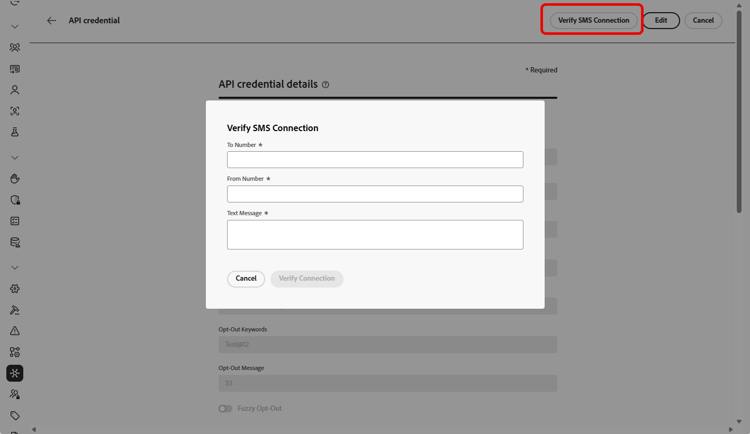
创建和配置API凭据后,现在需要为SMS和MMS消息创建渠道配置。 了解详情
为RCS配置API凭据
Adobe Journey Optimizer使用自定义SMS提供程序功能,通过Twilio支持RCS消息传递。 这允许通过经验证的业务配置文件来交付丰富的交互式消息,并整合了诸如轮播、按钮和多媒体内容之类的元素。
要通过Twilio启用RCS消息传递,必须通过自定义SMS提供商配置新的API凭据。 现有Twilio SMS凭据不兼容,因为RCS需要不同的有效负载格式。
使用Twilio配置RCS:
-
在Twilio中注册RCS消息
首先在Twilio平台中完成RCS注册流程。 这包括设置您的企业配置文件并为您的帐户启用RCS功能。
-
创建SMS Webhook
配置可以接收传入RCS消息响应或传递更新的SMS Webhook。 此webhook必须正确链接到您的Twilio设置以进行双向通信。
-
使用自定义作为SMS供应商创建API凭据
在Journey Optimizer中,使用“自定义”作为SMS供应商,专门为RCS定义新的API凭据。 使用适当的RCS端点身份验证方法、基本URL和标头。
创建和配置API凭据后,现在需要为RCS消息创建渠道配置。 了解详情
This section contains structured knowledge intended to support interpretation, retrieval, and question answering related to this topic.
For complete understanding, this information should be combined with the documentation on this page. Neither source is intended to stand alone; the page describes the feature, while this section provides additional context that helps disambiguate terminology, intent, applicability, and constraints.
- TL;DR: This page explains how to integrate Twilio with Journey Optimizer by creating API credentials for SMS, MMS, and RCS messaging so you can deliver Mobile messages in your journeys and campaigns.
Intents:
- Create Twilio API credentials for SMS and MMS
- Verify the SMS connection by sending a sample message to a designated device
- Route inbound SMS messages to a custom dataset
- Configure RCS with Twilio through a Custom SMS Provider
Glossary:
- Account SID and Auth Token: Twilio credentials found in the Account Info pane of the Twilio Console Dashboard page (product-specific)
- Message SID: The unique identifier assigned to every message created by Twilio’s API (product-specific)
- Inbound Number: A unique inbound number that lets you use the same API credentials across different sandboxes, each with its own inbound number (product-specific)
- Verify SMS connection: An action on existing API credentials that tests them by sending a sample message to a designated device (product-specific)
- Custom SMS Provider: The feature through which RCS messaging is supported with Twilio, using “Custom” as the SMS vendor (product-specific)
- Use custom dataset for inbound: An option that routes a credential’s inbound SMS to a pre-created dataset selected from a dropdown (product-specific)
Guardrails:
- RCS with Twilio requires the Custom SMS Provider feature; existing Twilio SMS credentials are not compatible because RCS requires a distinct payload format.
- RCS credentials must be defined using “Custom” as the SMS vendor, with the appropriate RCS endpoint authentication method, base URL, and headers.
- The custom dataset for inbound schema must be XDM ExperienceEvent and include at least the Message interaction details, Message Execution Details, and Message Profile Details field groups; the schema and dataset must be enabled for Profile.
- The Verify connection sample message must be structured to align with the provider’s payload format.
Terminology:
- Canonical name: Twilio provider — Acronym: n/a — variants: Twilio configuration
- Do not confuse: “Twilio SMS credentials” (for SMS/MMS) ≠ RCS credentials configured via a Custom SMS Provider (distinct payload format)
FAQ:
- Q: Can I reuse my Twilio SMS credentials for RCS? — No; existing Twilio SMS credentials are not compatible because RCS requires a distinct payload format, so new credentials must be configured through a Custom SMS Provider.
- Q: How is RCS supported with Twilio? — RCS is supported through Twilio using the Custom SMS Provider feature, which enables rich, interactive messages with elements such as carousels, buttons, and multimedia via verified business profiles.
- Q: Where do I find my Twilio Account SID and Auth Token? — In the Account Info pane of your Twilio Console Dashboard page.
- Q: How do I test my SMS API credentials? — Click Verify SMS connection, fill in the Number and Message fields, and click Verify connection to send a sample message to a designated device.