在此页面上:了解如何在Adobe Journey Optimizer中创建移动消息渠道配置,方法是设置消息类型、移动配置、发件人编号、子域和执行字段以发送短信、RCS和彩信。
配置移动消息渠道后,必须创建渠道配置才能从 Journey Optimizer 发送SMS、RCS和MMS消息。
要创建渠道配置,请执行以下步骤:
-
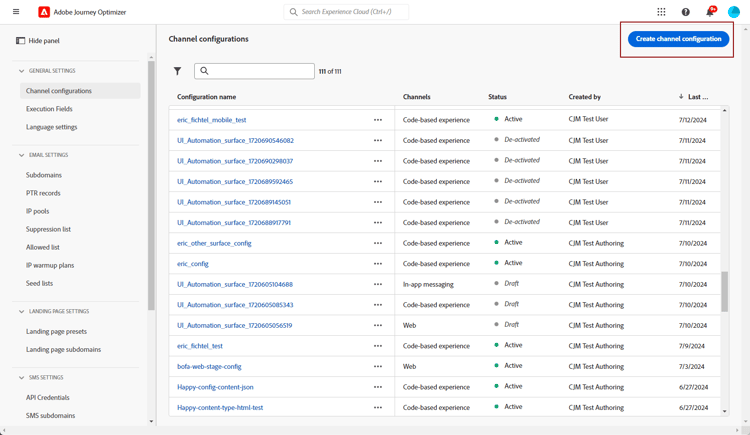
在左边栏中,浏览到管理 > 渠道并选择常规设置 > 渠道配置。 单击 创建渠道配置 按钮。
-
输入配置的名称和描述(可选),然后选择移动设备渠道。
名称必须以字母(A-Z)开头。 它只能包含字母数字字符。 您还可以使用下划线
_、点.和连字符-符号。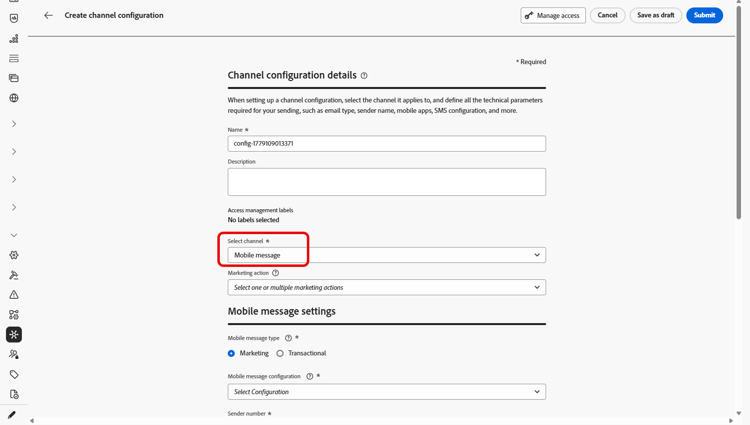
-
为此配置选择短信类型:
- 营销:对于需要用户同意的促销消息。
- 事务型:用于非商业消息,如订单确认、密码重置或投放更新。
note caution CAUTION 事务型消息可以发送给已从营销通信中取消订阅的用户档案,但只能在特定上下文中发送。 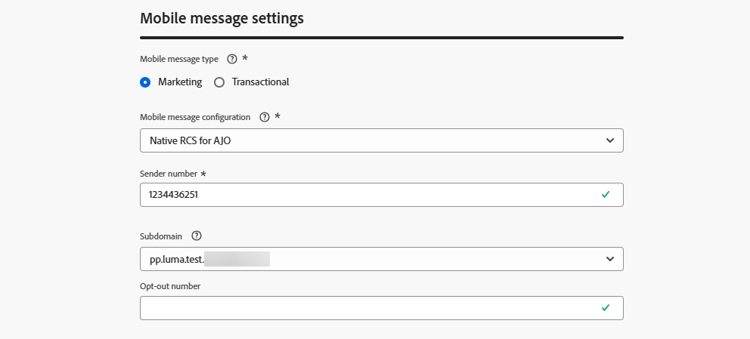
-
选择要与配置关联的移动设备配置。
有关如何配置环境以发送移动消息的更多信息,请参阅此章节。
-
输入要用于通信的发件人号码。
-
在 选择退出编号 字段中,指定用户档案向其发送选择退出请求的编号,例如,通过回复STOP。 Journey Optimizer在发送邮件之前验证为此号码记录的选择退出同意。
如果此字段留空,Journey Optimizer将改用发件人号码。 请注意,如果 发件人号码 是字母数字的发件人ID,如品牌名称,则必须在 选择退出号码 字段中指定入站电话号码。 否则,选择退出将不匹配,并且选择退出的用户档案仍可能会收到消息。
-
如果要在手机消息中使用URL缩短功能,请从 子域 列表中选择一个项目。
要能够选择子域,请确保您之前已配置至少一个SMS/RCS/MMS子域。 了解如何操作
-
在 执行维度 部分中,使用 短信执行字段 在配置文件属性中选择要优先使用的电话号码(如果数据库中有多个号码可用)。 了解详情
note NOTE 默认情况下,Journey Optimizer在沙盒级别使用常规设置中指定的电话号码。 更新此字段将覆盖使用此配置的历程和营销活动的默认值。 -
选择 对入站 使用自定义数据集,将此凭据的入站SMS路由到您从下拉列表选择的预创建的数据集。 了解有关对入站关键字使用自定义数据集的更多信息
note NOTE 数据集架构必须是XDM ExperienceEvent,并且至少包括以下字段组: - Adobe CJM ExperienceEvent — 消息交互详细信息
- Adobe CJM ExperienceEvent — 消息执行详细信息
- Adobe CJM ExperienceEvent — 消息配置文件详细信息
必须为配置文件启用架构和数据集。 -
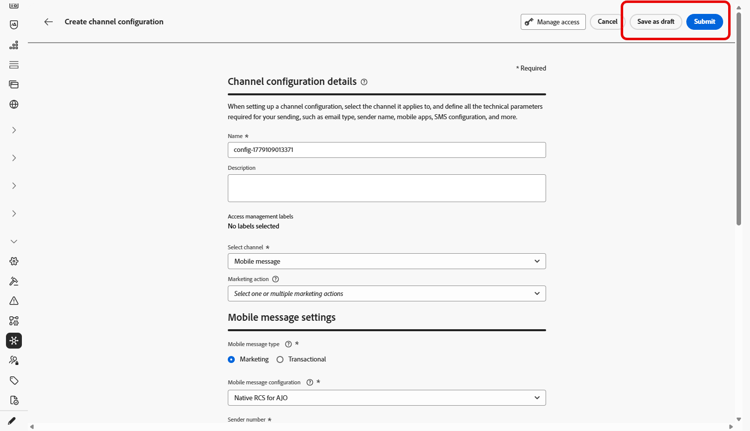
配置所有参数后,单击 提交 以确认。 您还可以将渠道配置另存为草稿,并稍后恢复其配置。
-
创建渠道配置后,它将显示在状态为 正在处理 的列表中。
如果检查不成功,请在本节中进一步了解可能的失败原因。
-
检查成功后,通道配置将获得 活动 状态。 它随时可用于投放消息。
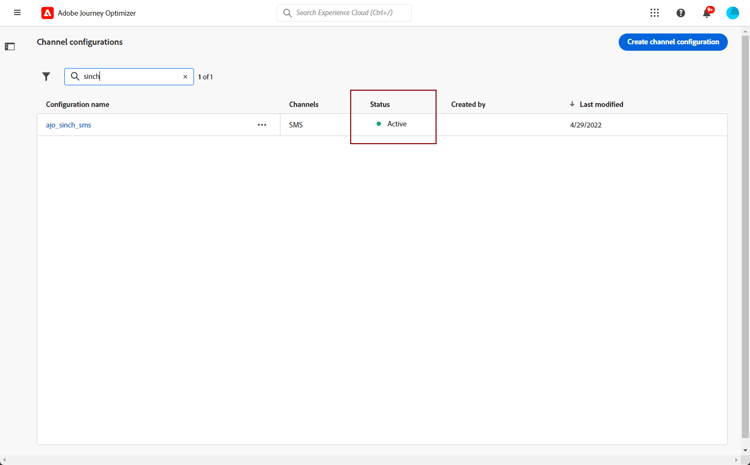
您现在可以使用Journey Optimizer发送移动消息了。
This section contains structured knowledge intended to support interpretation, retrieval, and question answering related to this topic.
For complete understanding, this information should be combined with the documentation on this page. Neither source is intended to stand alone; the page describes the feature, while this section provides additional context that helps disambiguate terminology, intent, applicability, and constraints.
- TL;DR: This page explains how to create a Mobile message channel configuration in Journey Optimizer by setting the message type, mobile configuration, sender number, subdomain, and execution field to send SMS, RCS, and MMS messages.
Intents:
- Create a Mobile message channel configuration
- Select the SMS Type (Marketing or Transactional) for the configuration
- Associate a Mobile configuration and a sender number
- Enable URL shortening by selecting a subdomain
- Override the priority phone number with the SMS Execution Field
- Save the channel configuration as draft and resume it later
Glossary:
- Channel configuration: The Mobile message configuration you create to send SMS, RCS, and MMS messages from Journey Optimizer (product-specific)
- SMS Type: The message category of the configuration, either Marketing or Transactional (product-specific)
- Marketing: SMS Type for promotional messages that require user consent (product-specific)
- Transactional: SMS Type for non-commercial messages such as order confirmations, password resets, or delivery updates (product-specific)
- Mobile configuration: The provider API credentials association selected for the channel configuration (product-specific)
- Sender number: The number used for your communications (product-specific)
- Subdomain: An item selected to use the URL shortening function in Mobile messages (product-specific)
- SMS Execution Field: A field in the Execution dimension section used to select, among profile attributes, the phone number to use in priority when several numbers are available (product-specific)
Guardrails:
- Configuration names must begin with a letter (A-Z) and can contain only alpha-numeric characters plus underscore, dot, and hyphen.
- Transactional messages can be sent to profiles who have unsubscribed from marketing communications, but only in specific contexts.
- To select a subdomain, you must have previously configured at least one SMS/RCS/MMS subdomain.
- By default, Journey Optimizer uses the phone number specified in the general settings at the sandbox level; updating the SMS Execution Field overrides the default value for the journeys and campaigns using this configuration.
- The custom dataset for inbound schema must be XDM ExperienceEvent and include at least the Message interaction details, Message Execution Details, and Message Profile Details field groups; the schema and dataset must be enabled for Profile.
Terminology:
- Canonical name: Mobile message channel configuration — variants: SMS configuration, channel configuration
- Do not confuse: “Marketing” (promotional; requires user consent) ≠ “Transactional” (non-commercial messages)
- Do not confuse: “Processing” (status while checks run) ≠ “Active” (status once checks are successful; ready to deliver messages)
- Do not confuse: “Mobile configuration” (provider API credentials association) ≠ “channel configuration” (the Mobile message configuration created on this page)
FAQ:
- Q: What is the difference between the Marketing and Transactional SMS Type? — Marketing is for promotional messages that require user consent; Transactional is for non-commercial messages such as order confirmations, password resets, or delivery updates.
- Q: Can Transactional messages reach profiles who unsubscribed from marketing? — Yes, but only in specific contexts.
- Q: Why is no subdomain available to select? — You must have previously configured at least one SMS/RCS/MMS subdomain before a subdomain can be selected.
- Q: What does the SMS Execution Field do? — It selects the phone number to use in priority among profile attributes; updating it overrides the default sandbox-level number for the journeys and campaigns using this configuration.
- Q: What do the Processing and Active statuses mean? — After you submit, the configuration displays with the Processing status; once the checks are successful it gets the Active status and is ready to deliver messages.