在此页面上:了解如何在Adobe Journey Optimizer中设置SMS子域,以缩短消息中的URL,方法是使用现有的委派子域或配置带有DNS记录的新子域。
短信子域入门 gs-sms-mms-subdomains
若要能够缩短添加到SMS/RCS/MMS消息的URL,您必须设置在创建SMS配置时将选择的子域。
您可以使用已委派给Adobe的子域,也可以配置其他子域。 在本节中了解有关将子域委派到Adobe的更多信息。
SMS子域配置在所有环境之间共享。 因此,对短信子域的任何修改也会影响其他生产沙盒。
使用现有子域 sms-use-existing-subdomain
要使用已委派给Adobe的子域,请执行以下步骤。
-
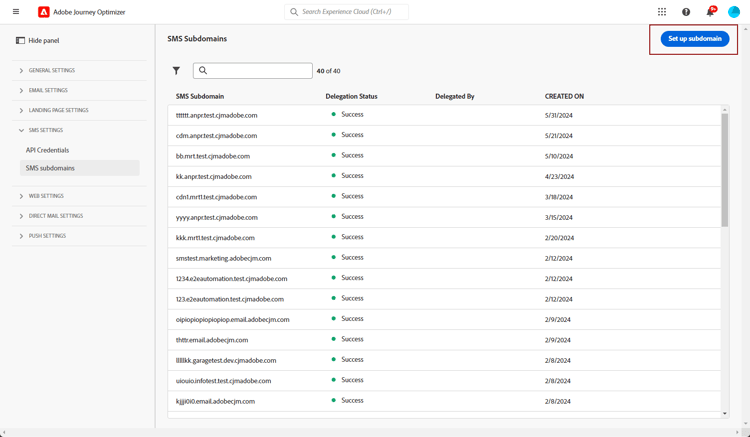
浏览到管理 > 渠道菜单,然后选择SMS设置 > SMS子域。
-
单击设置子域。
-
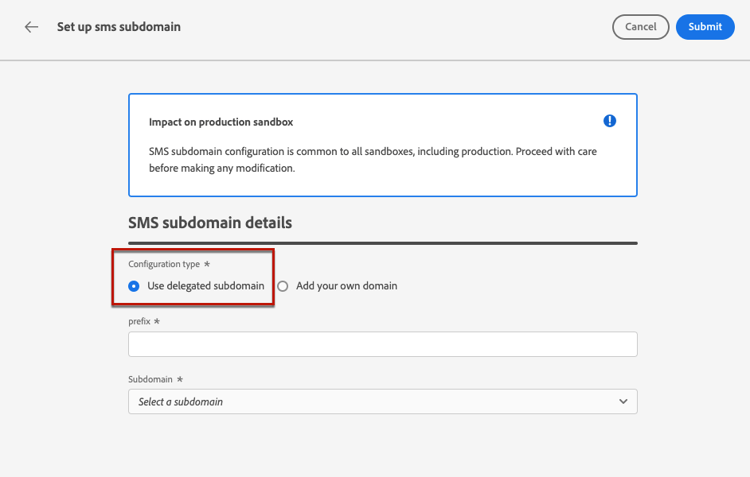
从 配置类型 部分中选择使用委派的子域。
-
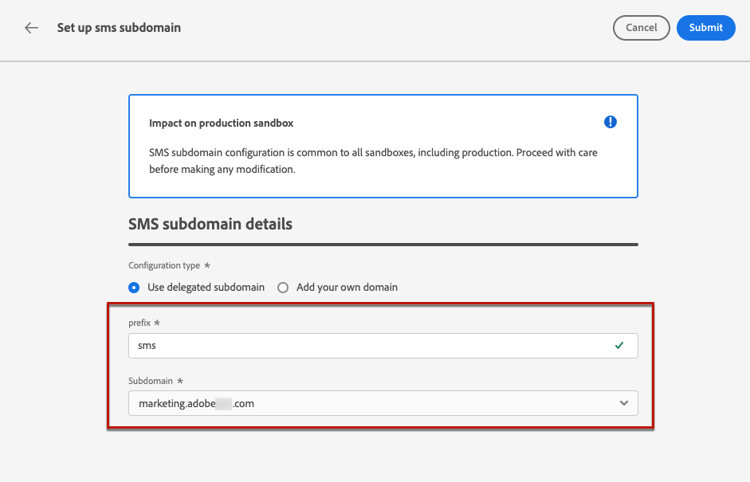
输入将在短信URL中显示的前缀。
只允许使用字母数字字符和连字符。
note caution CAUTION 请勿使用 cdn或data前缀,因为这些前缀保留供内部使用。 其他受限或保留的前缀(如dmarc或spf)也应避免。 -
从列表中选择已委派的子域。
您不能选择已用作短信子域的子域。
note caution CAUTION 如果您选择使用CNAME方法委派给Adobe的域,则必须在您的托管平台上创建DNS记录。 要生成DNS记录,此过程与配置新的短信子域时的过程相同。 在本节中了解详情。 -
单击提交。
-
提交后,子域将显示在状态为 正在处理 的列表中。 有关子域状态的详细信息,请参阅此部分.
在能够使用该子域发送邮件之前,您必须等待Adobe执行所需的检查,这可能需要最多4个小时。
-
检查成功后,子域将获得 Success 状态。 它可用于创建短信渠道配置。
配置新的子域 sms-configure-new-subdomain
要配置新子域,请执行以下步骤。
-
浏览到管理 > 渠道菜单,然后选择SMS设置 > SMS子域。
-
单击设置子域。
-
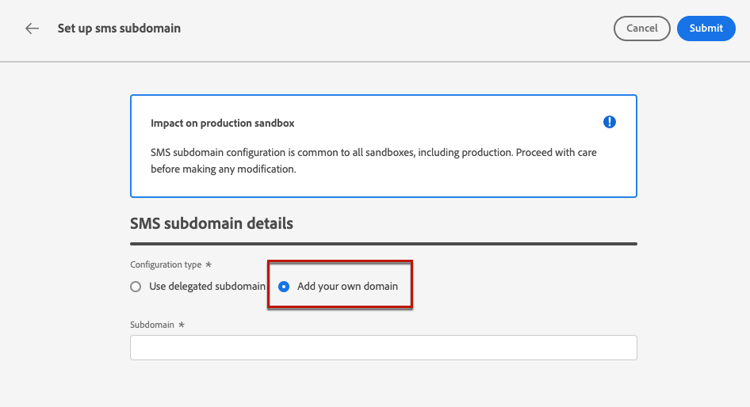
从 配置类型 部分中选择添加您自己的域。
-
指定要委派的子域。
note caution CAUTION -
您无法使用现有的短信子域。
-
子域中不允许使用大写字母。
不允许将无效子域委派给Adobe。 确保输入贵组织拥有的有效子域,如marketing.yourcompany.com。
支持(同一父域的)多级别子域。 例如,您可以使用“sms.marketing.yourcompany.com”。
-
-
将显示要放置在DNS服务器上的记录。 复制此记录或下载CSV文件,然后导航到您的域托管解决方案以生成匹配的DNS记录。
-
确保已将DNS记录生成到域托管解决方案中。 如果一切配置正确,请选中“我确认……”框,然后单击提交。
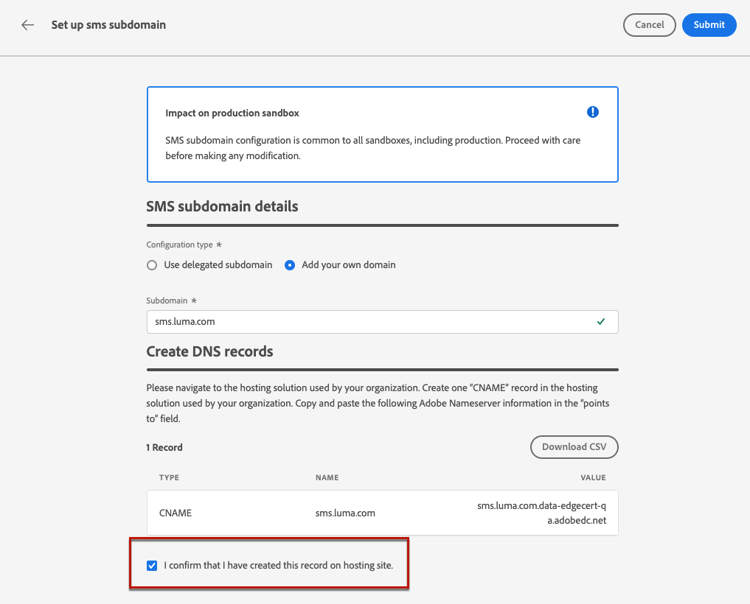
配置新的短信子域时,它始终指向CNAME记录。
-
提交子域委派后,子域将显示在状态为 正在处理 的列表中。 有关子域状态的详细信息,请参阅此部分.
在使用子域发送SMS消息之前,必须等待Adobe执行所需的检查,最多可能需要4小时。 检查成功后,子域将获得 Success 状态。 它可用于创建短信渠道配置。
请注意,如果您无法在托管解决方案上创建验证记录,则子域将标记为失败。
护栏 guardrails
当前,Journey Optimizer用户界面在设置短信子域后不支持删除或取消委派这些子域。
但是,在Journey Optimizer中测试功能时,可能需要创建短信子域。 测试完成后,这可能会导致环境混乱,产生不必要的配置,因为UI不允许删除或委派短信子域。
以下是一些建议的步骤和注意事项:
- 作为最佳实践,请仅通过创建必要的组件和配置来维护整洁的环境。
- 如果存在业务影响,请联系您的Adobe代表,该代表可能能够协助删除/取消委派短信子域。 了解详情
- 如需进一步帮助,请联系Adobe以获取有关有效管理实例的指导。
取消委派子域 undelegate-subdomain
如果要取消委派短信子域,请联系Adobe代表,告知您要取消委派的子域。
如果SMS子域指向CNAME记录,则可以从托管解决方案中删除您为SMS子域创建的CNAME DNS记录(但不会删除原始电子邮件子域,如有)。
Adobe处理您的请求后,未委派域不再显示在子域清单页面上。
This section contains structured knowledge intended to support interpretation, retrieval, and question answering related to this topic.
For complete understanding, this information should be combined with the documentation on this page. Neither source is intended to stand alone; the page describes the feature, while this section provides additional context that helps disambiguate terminology, intent, applicability, and constraints.
- TL;DR: This page explains how to set up Mobile message subdomains in Adobe Journey Optimizer to shorten URLs in messages, either by using a subdomain already delegated to Adobe or by configuring a new subdomain with a DNS record.
Intents:
- Set up a Mobile message subdomain used when creating a Mobile message configuration
- Use a subdomain that is already delegated to Adobe
- Configure a new subdomain by generating the matching DNS record
- Understand subdomain statuses and validation timing
- Undelegate a Mobile message subdomain through your Adobe representative
Glossary:
- Mobile message subdomain: The subdomain used to shorten URLs added to SMS, RCS, and MMS messages, selected when creating a Mobile message configuration (product-specific)
- Use delegated subdomain: Configuration type that reuses a subdomain already delegated to Adobe (product-specific)
- Add your own domain: Configuration type used to delegate and configure a new subdomain (product-specific)
- CNAME method: Delegation approach where the subdomain points to a CNAME record and a DNS record must be created on your hosting platform (product-specific)
- Manage SMS Subdomains permission: The permission required on the production sandbox to access and edit Mobile message subdomains (product-specific)
Guardrails:
- Mobile message subdomain configuration is shared between all environments, so any modification to a Mobile message subdomain also impacts other production sandbox.
- The Manage SMS Subdomains permission on the production sandbox is required to access and edit Mobile message subdomains.
- Subdomain prefixes may use only alpha-numeric characters and hyphens; the cdn and data prefixes are reserved for internal use, and prefixes such as dmarc or spf should be avoided.
- Capital letters are not allowed in subdomains.
- A subdomain that is already used as a Mobile message subdomain cannot be selected or reused.
- If you select a domain delegated using the CNAME method, you must create the DNS record on your hosting platform.
- Adobe performs required checks that can take up to 4 hours before a subdomain can be used to send messages.
- A new Mobile message subdomain always points to a CNAME record.
- The Journey Optimizer user interface does not support deletion or undelegation of Mobile message subdomains once they have been set up; contact your Adobe representative for removal or undelegation.
- Multi-level subdomains of the same parent domain are supported.
Terminology:
- Canonical name: Mobile message subdomain — variants: SMS subdomain, SMS/RCS/MMS subdomain
- Do not confuse: “Use delegated subdomain” (reuse a subdomain already delegated to Adobe) ≠ “Add your own domain” (delegate and configure a new subdomain)
- Do not confuse: “Processing” (checks in progress) ≠ “Success” (checks successful, ready to create Mobile message channel configurations) ≠ “Failed” (validation record was not created on your hosting solution)
FAQ:
- Q: Why do I need a Mobile message subdomain? — You must set up the subdomain to shorten URLs added to your SMS, RCS, and MMS messages and to select it when creating a Mobile message configuration.
- Q: How long does subdomain validation take? — Adobe performs the required checks, which can take up to 4 hours, before the subdomain can be used to send messages.
- Q: Can I delete a Mobile message subdomain from the interface? — No. The user interface does not support deletion or undelegation once a subdomain has been set up; contact your Adobe representative for assistance.
- Q: Does a change to a Mobile message subdomain affect other sandboxes? — Yes. Mobile message subdomain configuration is shared between all environments, so any modification also impacts other production sandbox.
- Q: What does the Failed status mean? — The subdomain is marked as Failed if you fail to create the validation record on your hosting solution.