在此页面上:了解如何通过创建API凭据、选择身份验证方法以及配置标头、有效负载和入站设置来在Adobe Journey Optimizer中集成自定义消息传递提供程序,以发送SMS和RCS消息。
此功能使您能够集成和配置自己的报文传送提供商,在默认选项(Sinch、Twilio和Infobip)之外提供灵活性。 这能够实现移动设备消息的无缝创作、交付、报告和同意管理。
通过自定义提供商配置,您可以直接在Journey Optimizer中连接第三方消息服务,自定义动态内容的消息负载,以及管理选择加入/选择退出偏好设置以确保短信和RCS渠道之间的合规性。
要配置自定义提供商,请执行以下步骤:
创建您的 API 凭据 api-credential
要在Journey Optimizer中使用Adobe提供的现成可用的自定义提供商(例如Sinch、Infobip、Twilio)发送移动设备消息,请执行以下步骤:
-
在左边栏中,导航到管理
>渠道,选择 SMS设置 下的 API凭据 菜单,然后单击 创建新API凭据 按钮。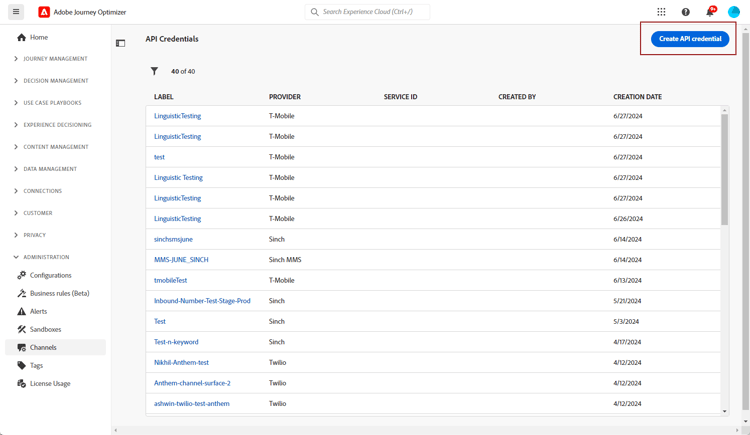
-
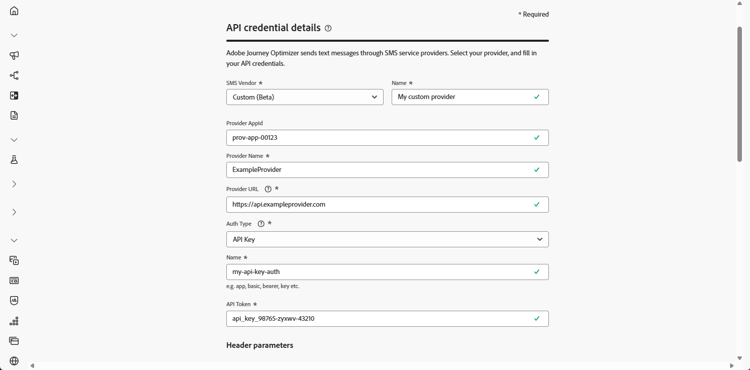
配置您的SMS API凭据,如下所述:
-
SMS供应商:自定义。
-
名称:输入API凭据的名称。
-
提供程序AppId:输入您的SMS提供程序提供的应用程序ID。
-
提供商名称:输入短信提供商的名称。
-
提供程序URL:输入短信提供程序的URL。
-
渠道类型:可选。 指示此凭据表示哪个移动渠道,即SMS、RCS或MMS。
-
身份验证类型:选择授权类型,并根据所选的身份验证方法完成相应的字段。
-
-
启用 mTLS支持 选项,该选项可确保客户端和服务器在建立安全连接之前相互进行身份验证。
要仅使用mTLS,请从 身份验证类型 下拉列表中选择无身份验证,然后启用mTLS支持。
请注意,mTLS仅适用于SMS提供商(消息发送)端点。 OAuth令牌端点不得使用mTLS。 在测试之前,请确保在令牌端点上禁用了mTLS。
note important IMPORTANT 通过从MTLS公共证书API下载公共证书并将其添加到服务器信任存储区(预期的客户端CN: ajo-sms.aep-mtls.adobe.com),将SMS发送端点配置为信任Adobe Experience Platform证书颁发机构链,否则Journey Optimizer将忽略客户端证书,SMS投放失败。 -
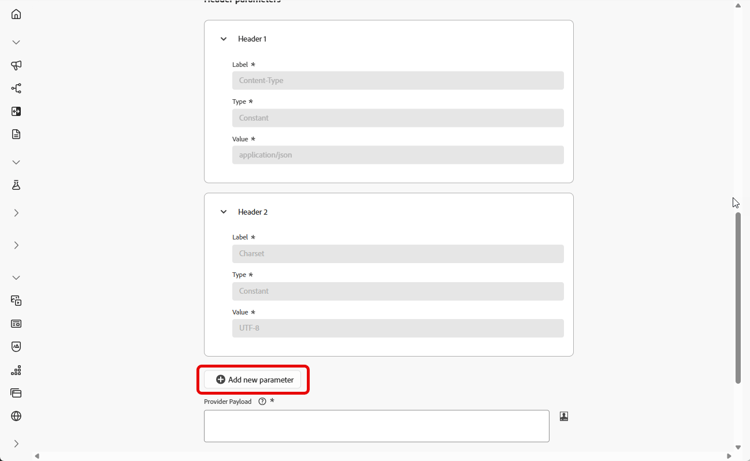
在 标头 部分中,单击 添加新参数 以指定将发送到外部服务的请求消息的HTTP标头。
默认情况下,Content-Type和 Charset 标头字段已设置,无法删除,但您可以编辑默认的 Content-Type 值。 您最多可以添加10个自定义标头参数。
-
添加您的 提供程序负载 以验证和自定义您的请求负载。
对于RCS消息,此有效负载稍后将在内容设计期间使用。
note NOTE 配置具有基本或持有者身份验证的自定义SMS提供商时,必须在JSON有效负载中包含 authOption参数。 此外,提供程序有效负载必须引用模板变量{{fromNumber}}、{{toNumber}}和{{message}}。提供程序有效负载还支持Adobe Journey Optimizer 个性化帮助程序功能,包括 encode64。 -
选择 对入站 使用自定义数据集,将此凭据的入站SMS路由到您从下拉列表选择的预创建的数据集。 了解有关对入站关键字使用自定义数据集的更多信息
note NOTE 数据集架构必须是XDM ExperienceEvent,并且至少包括以下字段组: - Adobe CJM ExperienceEvent — 消息交互详细信息
- Adobe CJM ExperienceEvent — 消息执行详细信息
- Adobe CJM ExperienceEvent — 消息配置文件详细信息
必须为配置文件启用架构和数据集。 -
完成API凭据配置后,单击提交。
-
在 API凭据 菜单中,单击

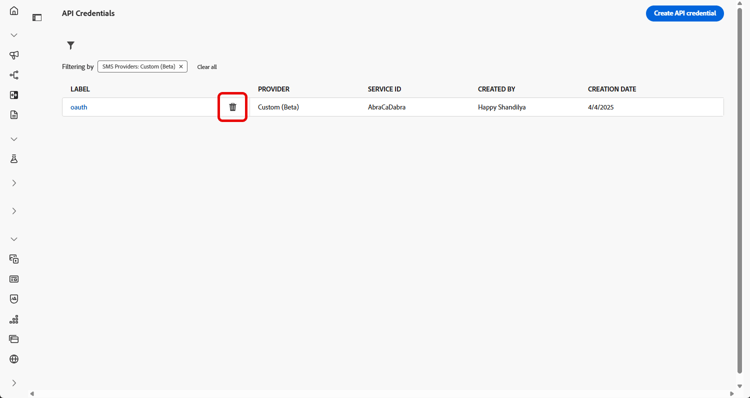
-
要修改现有凭据,请找到所需的API凭据,然后单击 编辑 选项以进行必要更改。
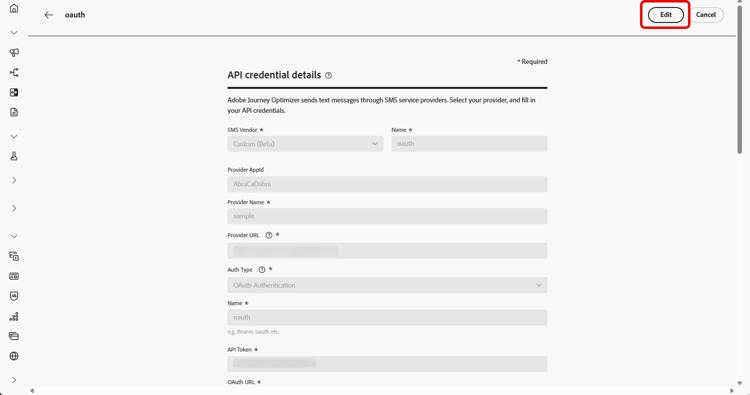
-
单击现有API凭据中的验证SMS连接,通过向指定设备发送示例消息来测试和验证SMS API凭据。
-
填写 数字 和 消息 字段,然后单击验证连接。
note important IMPORTANT 消息的结构必须与提供商的有效负荷格式保持一致。 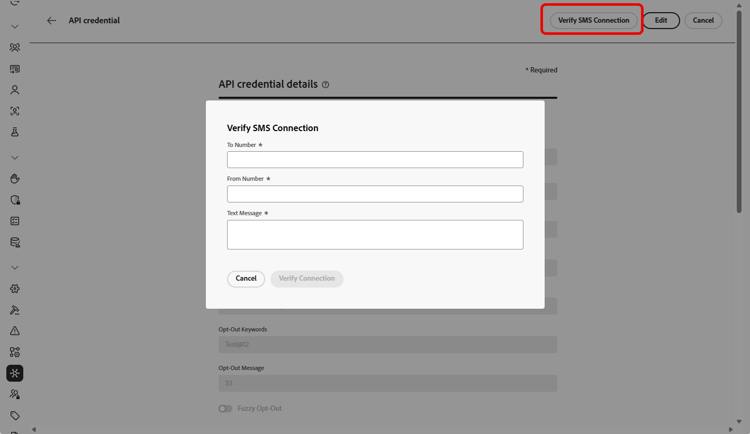
创建和配置API凭据后,现在需要为Webhook🔗设置入站设置,以发送短信消息。
自定义 SMS 提供商的身份验证选项 auth-options
创建API凭据后,完成API密钥身份验证所需的字段:
- 名称:输入API密钥配置的名称。
- API令牌:输入您的SMS提供商提供的API令牌。
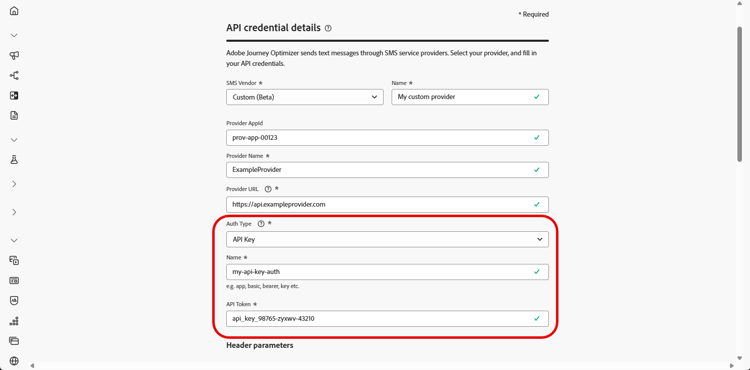
创建API凭据后,完成MAC身份验证所需的字段:
- 名称:输入MAC身份验证配置的名称。
- API令牌:输入您的SMS提供商提供的API令牌。
- API密钥:输入您的SMS提供商提供的API密钥。 此密钥用于生成MAC(消息身份验证代码)以进行安全通信。
- Mac授权哈希格式:选择MAC身份验证的哈希格式。
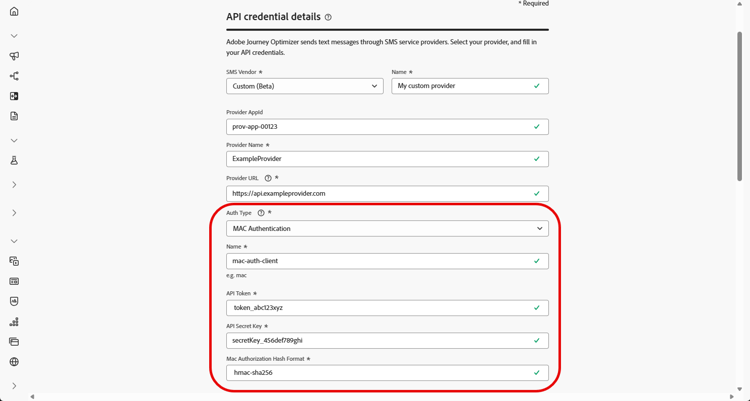
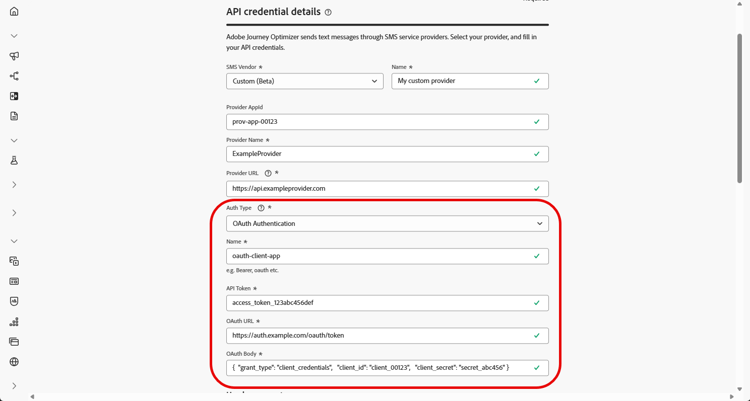
创建API凭据后,完成OAuth身份验证所需的字段:
-
名称:输入OAuth身份验证配置的名称。
-
API令牌:输入您的SMS提供商提供的API令牌。
-
OAuth URL:输入用于获取OAuth令牌的URL。
-
OAuth主体:提供JSON格式的OAuth请求主体,包括
grant_type、client_id和client_secret等参数。
Journey Optimizer会在自定义SMS连接器到期时动态刷新OAuth令牌。
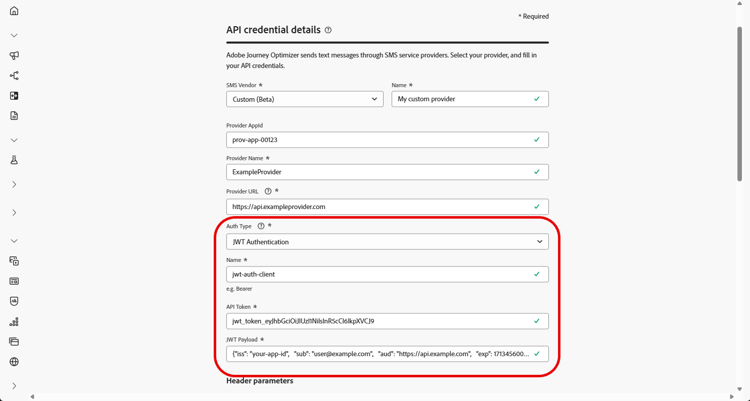
创建API凭据后,完成JWT身份验证所需的字段:
-
名称:输入JWT身份验证配置的名称。
-
API令牌:输入您的SMS提供商提供的API令牌。
-
JWT有效负载:输入包含JWT所需声明的JSON有效负载,如颁发者、主题、受众和到期日期。
操作方法视频 video
This section contains structured knowledge intended to support interpretation, retrieval, and question answering related to this topic.
For complete understanding, this information should be combined with the documentation on this page. Neither source is intended to stand alone; the page describes the feature, while this section provides additional context that helps disambiguate terminology, intent, applicability, and constraints.
- TL;DR: This page explains how to integrate a custom messaging provider in Journey Optimizer by creating API credentials, choosing an authentication method, and configuring headers, payloads, mTLS, and inbound settings to send SMS and RCS messages beyond the default Sinch, Twilio, and Infobip options.
Intents:
- Create a custom provider API credential with SMS vendor set to Custom
- Choose and complete an authentication method (API key, MAC, OAuth, or JWT)
- Configure HTTP headers and the Provider Payload for the request
- Enable mTLS support for mutual client and server authentication
- Route a credential’s inbound SMS to a custom dataset
- Verify the SMS connection by sending a sample message to a designated device
Glossary:
- Custom provider: A third-party messaging provider integrated beyond the default options (Sinch, Twilio, and Infobip) by selecting Custom as the SMS vendor (product-specific)
- Provider Payload: The request payload used to validate and customize requests, later used during RCS content design (product-specific)
- Channel Type: An optional classification (SMS, RCS, or MMS) written to XDM experience events for reporting and tracking by channel (product-specific)
- mTLS support: An option ensuring that both the client and server authenticate each other before establishing a secure connection (product-specific)
- Verify SMS connection: An action that tests and verifies the API credentials by sending a sample message to a designated device (product-specific)
Guardrails:
- You can add up to 10 custom header parameters.
- The Content-Type and Charset header fields are set by default and cannot be deleted, though the default Content-Type value can be edited.
- mTLS applies only to the Mobile message provider (message sending) endpoint; the OAuth token endpoint must not use mTLS and mTLS must be disabled on the token endpoint before testing.
- With Basic or Bearer authentication, the authOption parameter must be included in the JSON payload, and the Provider Payload must reference the template variables {{fromNumber}}, {{toNumber}}, and {{message}}.
- The custom inbound dataset schema must be XDM ExperienceEvent, include the Adobe CJM ExperienceEvent Message interaction details, Message Execution Details, and Message Profile Details field groups, and be enabled for Profile.
- Do not reuse the same API credentials, webhooks, or provider callback URLs (including RCS agents) across sandboxes; create separate agent configurations for each sandbox.
Terminology:
- Canonical name: Custom provider — Acronym: n/a — variants: custom messaging provider, custom SMS provider, Bring Your Own Provider
- Do not confuse: “Mobile message provider (message sending) endpoint” (uses mTLS) ≠ “OAuth token endpoint” (must not use mTLS)
- Do not confuse: “API key” ≠ “MAC authentication” ≠ “OAuth authentication” ≠ “JWT authentication” (the four Auth Type options)
FAQ:
- Q: How many custom header parameters can I add? — Up to 10 custom header parameters.
- Q: Which authentication types are supported? — API key, MAC authentication, OAuth authentication, and JWT authentication.
- Q: Which endpoint uses mTLS? — mTLS applies only to the Mobile message provider (message sending) endpoint; the OAuth token endpoint must not use mTLS.
- Q: What must the Provider Payload include for Basic or Bearer authentication? — The authOption parameter in the JSON payload, plus references to the template variables {{fromNumber}}, {{toNumber}}, and {{message}}.
- Q: How do I test the credential? — Click Verify SMS connection, fill in the Number and Message fields structured to align with the provider’s payload format, then click Verify connection to send a sample message to a designated device.