在此页面上:了解如何通过为SMS、MMS和RCS消息设置单独的API凭据,将Sinch配置为您在Adobe Journey Optimizer中的提供商。
在将Sinch提供程序与Journey Optimizer结合使用时,您可以找到三个不同的选项:
-
SMS配置:设置您的Sinch API凭据以无缝发送SMS消息。
-
MMS配置:对于多媒体消息(MMS),请配置Sinch MMS API凭据。 请注意,跟踪和响应入站消息由短信配置处理。 MMS设置仅用于MMS消息的出站投放。
-
RCS配置:设置您的Sinch API凭据以无缝发送RCS消息。
要配置Sinch提供程序,请执行以下步骤:
配置短信的API凭据 create-api
要配置您的Sinch提供商以使用Journey Optimizer发送短信消息和彩信,请执行以下步骤:
-
在左边栏中,浏览到管理 > 渠道
>SMS设置并选择 API凭据 菜单。 单击 创建新API凭据 按钮。 -
配置您的SMS API凭据,如下所述:
accordion 用于配置的短信凭据列表 table 0-row-2 1-row-2 2-row-2 3-row-2 4-row-2 5-row-2 配置字段 描述 SMS供应商 Sinch 名称 选择API凭据的名称。 服务ID和API令牌 访问API页面,您可以在SMS选项卡下找到凭据。 请参阅Sinch文档以了解详情。 入站编号 添加唯一的入站编号或短代码。 这允许您在不同沙盒中使用相同的API凭据,每个沙盒具有自己的入站编号或短代码。 覆盖URL 输入您的自定义URL以替换SMS投放报告、反馈数据、入站消息或事件通知的默认端点。 Sinch会将所有相关更新发送到此URL,而不是预定义的更新。
-
选择 对入站 使用自定义数据集,将此凭据的入站SMS路由到您从下拉列表选择的预创建的数据集。 了解有关对入站关键字使用自定义数据集的更多信息
note NOTE 数据集架构必须是XDM ExperienceEvent,并且至少包括以下字段组: - Adobe CJM ExperienceEvent — 消息交互详细信息
- Adobe CJM ExperienceEvent — 消息执行详细信息
- Adobe CJM ExperienceEvent — 消息配置文件详细信息
必须为配置文件启用架构和数据集。 -
完成API凭据配置后,单击提交。
-
在 API凭据 菜单中,单击bin图标以删除您的API凭据。
-
要修改现有凭据,请找到所需的API凭据,然后单击 编辑 选项以进行必要更改。
-
单击现有API凭据中的验证SMS连接,通过向指定设备发送示例消息来测试和验证SMS API凭据。
-
填写 数字 和 消息 字段,然后单击验证连接。
note important IMPORTANT 消息的结构必须与提供商的有效负荷格式保持一致。 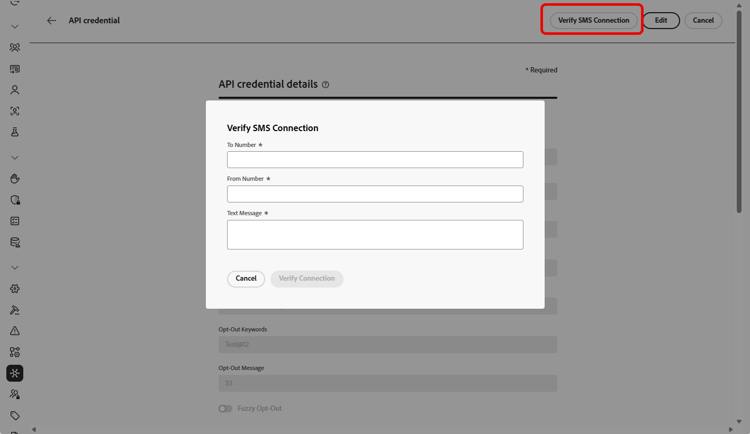
为MMS配置API凭据 sinch-mms
要配置Sinch MMS以使用Journey Optimizer发送MMS,请执行以下步骤:
-
在左边栏中,浏览到管理 > 渠道
>SMS设置并选择 API凭据 菜单。 单击 创建新API凭据 按钮。 -
配置您的MMS API凭据,如下所述:
-
完成API凭据配置后,单击提交。
-
在 API凭据 菜单中,单击bin图标以删除您的API凭据。
-
要修改现有凭据,请找到所需的API凭据,然后单击 编辑 选项以进行必要更改。
创建和配置API凭据后,您现在需要创建您的Webhook和RCS消息的通道配置。 了解详情
为RCS配置API凭据
Journey Optimizer通过Sinch支持RCS(富通信服务)消息传递,允许使用经过验证的企业个人资料以及品牌元素(如徽标和发件人名称)发送基本消息。
本地RCS创作需要Sinch RCS。 Twilio、Infobip和其他提供程序必须使用自定义提供程序集成。
请注意,当用户档案的设备不支持RCS或暂时无法通过RCS访问时,消息会自动回退到短信。
要配置Sinch RCS以使用Journey Optimizer发送RCS,请执行以下步骤:
-
在左边栏中,浏览到管理 > 渠道
>SMS设置并选择 API凭据 菜单。 单击 创建新API凭据 按钮。 -
配置您的RCS API凭据,如下所述:
-
SMS供应商: Sinch RCS。
-
名称:输入API凭据的名称。
-
项目ID、应用程序ID和API令牌:输入您Sinch RCS帐户中的项目ID、应用程序ID和API令牌。
-
服务计划ID:输入与您的Sinch帐户关联的服务计划ID。
-
SMS API令牌:输入来自Sinch帐户的SMS API令牌。

-
-
(可选)启用 为入站 使用自定义数据集选项以在自定义数据集中存储入站RCS消息。 了解详情
-
设置 API速率限制(每秒请求数) 以限制每秒最大API调用数,使用提供商的推荐值以避免限制,或者将无限制请求限制为0。
-
完成API凭据配置后,单击提交。
-
在 API凭据 菜单中,单击bin图标以删除您的API凭据。
-
要修改现有凭据,请找到所需的API凭据,然后单击 编辑 选项以进行必要更改。
创建和配置API凭据后,您现在需要创建您的Webhook和RCS消息的通道配置。 了解详情
This section contains structured knowledge intended to support interpretation, retrieval, and question answering related to this topic.
For complete understanding, this information should be combined with the documentation on this page. Neither source is intended to stand alone; the page describes the feature, while this section provides additional context that helps disambiguate terminology, intent, applicability, and constraints.
- TL;DR: This page explains how to configure Sinch as your provider in Journey Optimizer by setting up separate API credentials for SMS, MMS, and RCS messages.
Intents:
- Configure Sinch API credentials to send SMS messages
- Configure Sinch MMS API credentials for outbound MMS delivery
- Configure Sinch RCS API credentials to send RCS messages
- Verify the SMS connection by sending a sample message to a designated device
- Route inbound SMS or RCS messages to a custom dataset
- Set an API rate limit for RCS API requests
Glossary:
- SMS Configuration: The Sinch option used to set up API credentials for sending SMS messages (product-specific)
- MMS Configuration: The Sinch option for multimedia messaging; used only for outbound delivery of the MMS message, while tracking and responding to inbound messages are handled by the SMS configuration (product-specific)
- RCS Configuration: The Sinch option used to set up API credentials for sending RCS messages (product-specific)
- Inbound Number: A unique inbound number or short code that lets you use the same API credentials across different sandboxes, each with its own inbound number or short code (product-specific)
- Override URL: A custom URL that replaces the default endpoints for SMS delivery reports, feedback data, inbound messages, or event notifications (product-specific)
- API rate limit (requests per second): A cap on the maximum number of API calls per second for RCS (product-specific)
- Use custom dataset for inbound: An option that routes a credential’s inbound messages to a pre-created dataset selected from a dropdown (product-specific)
- Verify SMS connection: An action on existing API credentials that tests them by sending a sample message to a designated device (product-specific)
Guardrails:
- MMS setup is only for outbound delivery of the MMS message; tracking and responding to inbound messages are handled by the SMS configuration.
- Along with MMS setup, you must also create Sinch API credentials specifically for tracking inbound messages and managing consent requests.
- Native RCS authoring requires Sinch RCS; Twilio, Infobip, and other providers must use a custom provider integration.
- Messages automatically fall back to SMS when the profile’s device does not support RCS or is temporarily unreachable via RCS.
- API rate limit (requests per second) for RCS: use your provider’s recommended value to avoid throttling (recommended), or leave it at 0 for unlimited requests.
- The custom dataset for inbound schema must be XDM ExperienceEvent and include at least the Message interaction details, Message Execution Details, and Message Profile Details field groups; the schema and dataset must be enabled for Profile.
- The Verify connection sample message must be structured to align with the provider’s payload format.
Terminology:
- Canonical name: Sinch provider — Acronym: n/a — variants: Sinch configuration
- Do not confuse: “SMS Configuration” ≠ “MMS Configuration” ≠ “RCS Configuration” (three distinct Sinch options)
- Do not confuse: “Sinch” (SMS vendor value for SMS) ≠ “Sinch MMS” (SMS vendor value for MMS) ≠ “Sinch RCS” (SMS vendor value for RCS)
FAQ:
- Q: Which credentials handle inbound tracking for MMS? — The SMS configuration handles tracking and responding to inbound messages; MMS setup is only for outbound delivery, and you must also create Sinch API credentials specifically for tracking inbound messages and managing consent requests.
- Q: Can I author RCS natively with Twilio or Infobip? — No; native RCS authoring requires Sinch RCS, and Twilio, Infobip, and other providers must use a custom provider integration.
- Q: What happens when a recipient’s device does not support RCS? — Messages automatically fall back to SMS when the profile’s device does not support RCS or is temporarily unreachable via RCS.
- Q: How do I test my SMS API credentials? — Click Verify SMS connection, fill in the Number and Message fields, and click Verify connection to send a sample message to a designated device.
- Q: What does the API rate limit setting do for RCS? — It caps the maximum number of API calls per second; use your provider’s recommended value to avoid throttling, or leave it at 0 for unlimited requests.