在此页面上:了解如何使用现成的模块(如页眉、主页部分、产品卡和页脚)在Email Designer中加快电子邮件的创建,而无需从头开始构建结构。
Email Designer包括个模块的库:现成的完全结构化的内容块,旨在加快电子邮件汇编并提升通信中的设计一致性。
与从头开始配置的空占位符内容组件不同,模块是预建的部分,例如品牌标题、产品卡网格或带选择退出链接的页脚,您可以将这些部分直接拖放到画布上并从那里进行自定义。
访问和插入模块 access-modules
要显示和利用电子邮件Designer中的可用模块,请执行以下步骤。
-
在向Designer发送电子邮件中打开您的电子邮件。
-
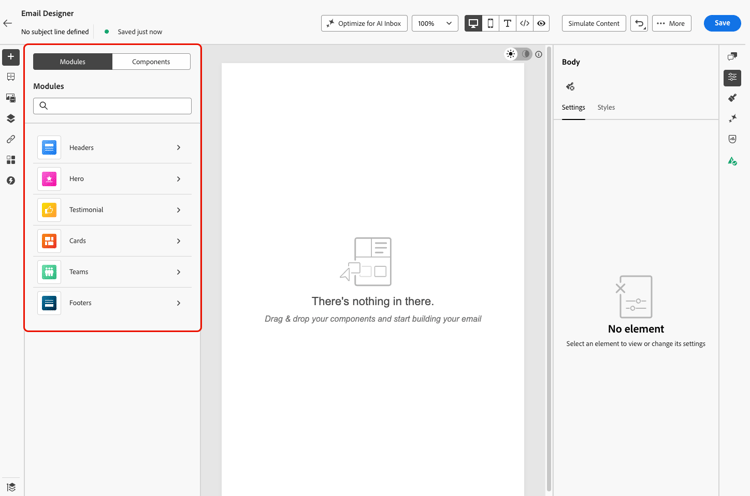
在左窗格中,单击 模块 选项卡。
-
浏览可用的模块类别,或使用搜索栏按名称进行筛选。
-
单击类别旁边的 > 箭头可展开该类别并查看可用的布局变体。
-
找到要使用的模块变体,然后将其直接拖放到电子邮件画布上。

-
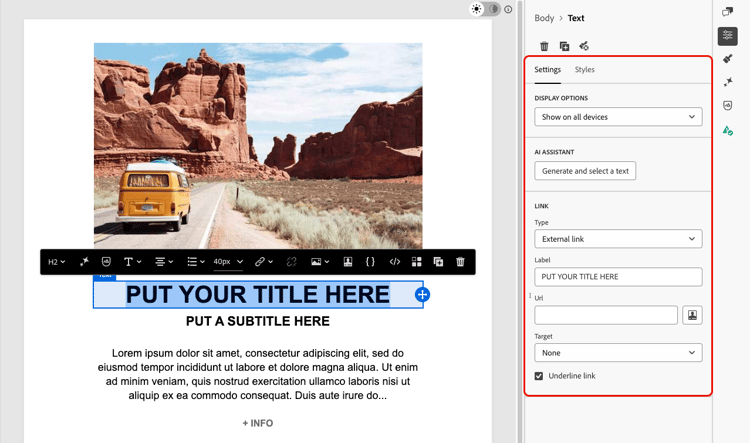
插入模块时会显示其默认内容。 单击画布上的任何元素以开始编辑内联内容。 单击任意文本区域以直接键入,或单击图像以使用资产库替换图像。
note NOTE 将电子邮件主题应用于内容时,模块会自动继承主题样式,以确保设计中的品牌一致性。 了解有关电子邮件主题的更多信息 -
使用右窗格中的 设置 和 样式 选项卡调整属性和样式,就像您对任何其他电子邮件元素所做的那样。
-
您还可以将内容组件直接添加到模块。 切换到左窗格中的 组件 选项卡,然后将组件拖放到模块中。 组件默认继承模块的样式,但您可以根据需要覆盖它。

可用模块 available-modules
以下模块类别现成可用。 每个模块都有多种布局变体可用,例如,单列、两列和三列网格。 展开模块类别以选择适合您布局的变体。
This section contains structured knowledge intended to support interpretation, retrieval, and question answering related to this topic.
For complete understanding, this information should be combined with the documentation on this page. Neither source is intended to stand alone; the page describes the feature, while this section provides additional context that helps disambiguate terminology, intent, applicability, and constraints.
- TL;DR: This page explains how to use the Email Designer’s ready-to-use modules — predefined, reusable layout blocks such as headers, hero sections, cards, and footers — to assemble emails faster and promote design consistency.
Intents:
- Access modules from the Modules tab in the left pane of the Email Designer
- Drag and drop a ready-to-use module variant onto the email canvas
- Customize a module’s content inline and adjust it from the Settings and Styles tabs
- Add content components into a module from the Components tab
- Save a customized module as a visual fragment to reuse it across other emails and messages
- Choose among the available module categories and their layout variants
Glossary:
- Module: A ready-to-use, fully structured content block — a predefined, reusable email layout block — that you drag and drop into the email canvas and customize through the WYSIWYG interface (product-specific)
- Modules tab: The tab in the left pane of the Email Designer where you browse, search, and insert modules (product-specific)
- Content component: An empty placeholder that you configure from scratch, in contrast to a pre-built module (product-specific)
- Visual fragment: A saved, reusable piece of content that a customized module can be saved as, so it can be reused across other emails and messages (product-specific)
Guardrails:
- Modules are not fragments — they exist within the email you are designing; to reuse a customized module elsewhere, save it as a visual fragment.
- When email themes are applied to your content, theme styles are inherited automatically by modules.
- Content components added to a module inherit the module’s styling by default, but you can override it as needed.
- Footers include required opt-out and mirror-page links.
Terminology:
- Canonical name: module — Acronym: n/a — variants: modules, email layout modules, layout blocks, content blocks
- Synonyms: “module” = “ready-to-use content block”
- Do not confuse: “module” (pre-built, fully structured section) ≠ “content component” (empty placeholder configured from scratch); “module” ≠ “fragment”
FAQ:
- Q: How do modules differ from content components? — Content components are empty placeholders you configure from scratch, whereas modules are pre-built sections you drop onto the canvas and customize from there.
- Q: Are modules the same as fragments? — No. Modules are not fragments and exist within the email you are designing, but you can save a customized module as a visual fragment to reuse it.
- Q: Which module categories are available out of the box? — Headers, Hero, Testimonial, Cards, Teams, and Footers, each with multiple layout variants such as single-column, two-column, and three-column grids.
- Q: Can I add content components inside a module? — Yes. Switch to the Components tab in the left pane and drag and drop a component into the module; it inherits the module’s styling by default.
- Q: Do modules follow my email theme? — Yes. When email themes are applied, theme styles are inherited automatically by modules.