Nesta página: conecte o Journey Optimizer ao Adobe Campaign Standard para que suas jornadas possam enviar emails, notificações por push e mensagens móveis por meio de seus recursos de mensagens transacionais.
Se você tiver o Adobe Campaign Standard, uma ação integrada estará disponível para permitir a conexão com o Adobe Campaign Standard. Você pode enviar emails, notificações por push e mensagens móveis usando os recursos de Mensagens transacionais do Adobe Campaign Standard.
A mensagem transacional do Campaign Standard e o evento associado devem ser publicados para serem usados no Journey Optimizer. Se o evento for publicado, mas a mensagem não for, ele não estará visível na interface do Journey Optimizer. Se a mensagem for publicada, mas o evento associado não, ela ficará visível na interface do Journey Optimizer, mas não poderá ser usada.
Medidas de proteção e limitações important-notes
-
Uma regra de limitação de 4.000 chamadas a cada 5 minutos é definida automaticamente para ações do Adobe Campaign Standard. Leia mais sobre os SLAs de mensagens transacionais em Descrição do produto Adobe Campaign Standard.
-
A integração do Adobe Campaign Standard é configurada por meio de uma ação incorporada dedicada na lista de ações. Isso deve ser configurado para cada sandbox.
-
Não é possível usar uma ação do Campaign Standard com uma atividade de qualificação de Público-alvo ou Ler público.
-
Uma jornada não pode usar ações de canal integradas e ações de Campaign Standard.
Configurar a ação configure-action
No Journey Optimizer, você deve configurar uma ação por mensagem transacional.
Para configurar uma ação do Campaign Standard, siga estas etapas:
-
Selecione Configurações na seção de menu ADMINISTRAÇÃO.
-
Na seção Ações, clique em Gerenciar. A lista de ações é exibida.
-
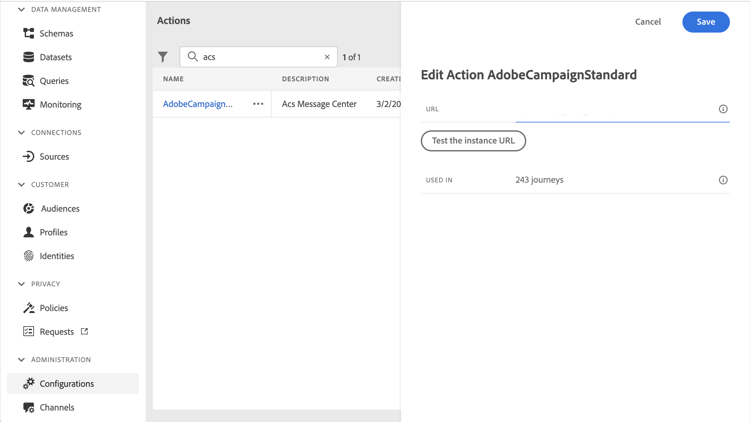
Selecione a ação AdobeCampaignStandard interna. O painel de configuração de ação é aberto no lado direito da tela.
-
Copie a URL da instância do Adobe Campaign Standard e cole no campo URL.
-
Clique em Testar o URL da instância para testar a validade da instância.
note NOTE Este teste verifica se: -
O host é ".campaign.adobe.com", ".campaign-sandbox.adobe.com", ".campaign-demo.adobe.com", ".ats.adobe.com" ou ".adls.adobe.com"
-
O URL começa com https
-
A Organização associada a essa instância do Adobe Campaign Standard é a mesma Organização da Journey Optimizer
-
Quando esta configuração for concluída, três ações estarão disponíveis na categoria Ação ao criar uma jornada: Email, Push, Mensagem móvel. Saiba como usá-los.
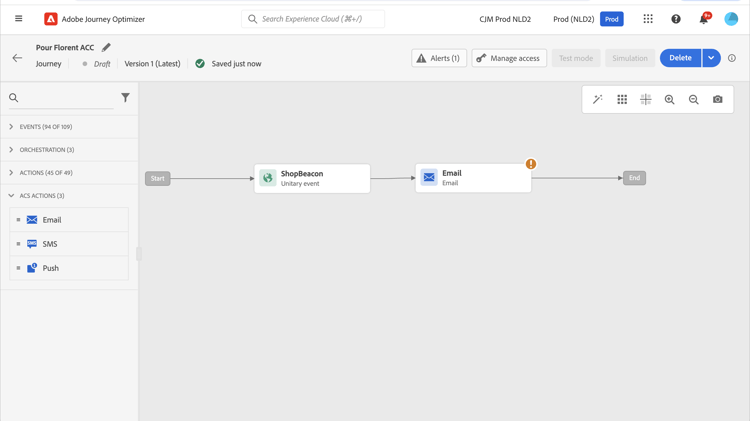
Use um evento Reações para reagir aos dados de rastreamento relacionados a uma mensagem do Campaign Standard enviada na mesma jornada:
-
Para notificações por push, as jornadas podem reagir a mensagens clicadas, enviadas ou com falha.
-
Para mensagens móveis, as jornadas podem reagir a mensagens enviadas ou com falha.
-
Para emails, as jornadas podem reagir a mensagens clicadas, enviadas, abertas ou com falha. Saiba mais sobre reações e eventos.
Ao usar um sistema de terceiros para enviar mensagens, você deve adicionar e configurar uma ação personalizada. Saiba mais sobre a configuração de ação personalizada.
This section contains structured knowledge intended to support interpretation, retrieval, and question answering related to this topic.
For complete understanding, this information should be combined with the documentation on this page. Neither source is intended to stand alone; the page describes the feature, while this section provides additional context that helps disambiguate terminology, intent, applicability, and constraints.
- TL;DR: This page explains how to integrate Journey Optimizer with Adobe Campaign Standard through the AdobeCampaignStandard action so journeys can send emails, push notifications, and SMS through its transactional messaging capabilities.
Intents:
- Configure the AdobeCampaignStandard action for a sandbox
- Paste and test the Adobe Campaign Standard instance URL
- Make the Campaign Standard Email, Push, and SMS actions available in the Action category when designing a journey
- Use a Reactions event to react to tracking data from a Campaign Standard message
- Understand the capping and activity constraints of the integration
Glossary:
- AdobeCampaignStandard action: The action selected from the action list to connect Journey Optimizer to Adobe Campaign Standard (product-specific)
- Transactional Messaging: The Adobe Campaign Standard capability used to send emails, push notifications, and SMS from Journey Optimizer (product-specific)
- Test the instance URL: The button that verifies the host, that the URL starts with https, and that the organization matches the Journey Optimizer organization (product-specific)
- Reactions event: An event that reacts to tracking data related to a Campaign Standard message sent within the same journey (product-specific)
Guardrails:
- A capping rule of 4,000 calls per 5 minutes is automatically defined for Adobe Campaign Standard actions.
- The Adobe Campaign Standard integration is set up through a dedicated AdobeCampaignStandard action in the action list and must be configured for each sandbox.
- You cannot use a Campaign Standard action with an Audience qualification or Read audience activity.
- A journey cannot use both the native channels of the Action activity and Campaign Standard actions.
- The transactional message and its associated event must both be published: if only the event is published the message is not visible, and if only the message is published it is visible but not usable.
Terminology:
- Canonical name: Adobe Campaign Standard integration — Acronym: ACS (Adobe Campaign Standard) — variants: Campaign Standard action, AdobeCampaignStandard action
- Do not confuse: “native channels of the Action activity” ≠ “Campaign Standard actions” (Adobe Campaign Standard integration actions), which cannot both be used in the same journey
- Do not confuse: “Campaign Standard Email, Push, SMS actions” (available after configuring the integration) ≠ “Reactions event” (reacts to tracking data of a sent Campaign Standard message)
FAQ:
- Q: What is the capping limit for Adobe Campaign Standard actions? — A capping rule of 4,000 calls per 5 minutes is automatically defined.
- Q: Why is a Campaign Standard message not visible or not usable in Journey Optimizer? — If the event is published but the message is not, it is not visible; if the message is published but the event is not, it is visible but not usable.
- Q: Does the integration need to be configured once for the whole organization? — No, it is set up through a dedicated AdobeCampaignStandard action that must be configured for each sandbox.
- Q: Which tracking reactions are available per channel? — Push can react to clicked, sent, or failed; SMS to sent or failed; email to clicked, sent, opened, or failed.
- Q: Can a journey use both the native channels of the Action activity and Campaign Standard actions? — No, a journey cannot use both.