이 페이지에서: 최적화 활동 및 프로필 상한선을 사용하여 전자 메일 게재를 점진적으로 늘려 나가는 여정을 만드는 방법을 알아봅니다. 이를 통해 새 IP 주소를 정리하고 보낸 사람의 신뢰도를 설정할 수 있습니다.
최근 다른 이메일 서비스 공급자, IP 주소, 이메일 도메인 또는 하위 도메인으로 이동한 경우 발신자로서의 신뢰도를 설정해야 합니다. 그렇지 않으면 게재가 차단되거나 수신자 사서함의 스팸 폴더로 이동될 수 있습니다. 게재 가능성 모범 사례 안내서에서 IP warming으로 전자 메일 신뢰도를 높이는 방법을 알아봅니다.
IP를 준비하려면 게재 수를 점차적으로 늘릴 수 있습니다. Journey Optimizer에서 게재 기능 최적화에 대해 자세히 알아보세요.
이 사용 사례의 목적은 이메일 게재를 가속화하는 여정을 만드는 것입니다. 이 여정을 구성하려면 다음 단계를 수행합니다.
-
여정 만들기 자세히 보기.
-
최적화 활동을 여정에 추가합니다. 자세히 보기.
-
조건 활동 설정에서 게재할 최대 받는 사람 수를 설정하십시오.
-
최적화 활동 설정에서 조건 메서드를 선택하고 유형 필드를 프로필 상한(으)로 설정하십시오. 자세히 보기.
-
제한 필드를 이 게재의 최대 받는 사람 수로 설정하십시오.
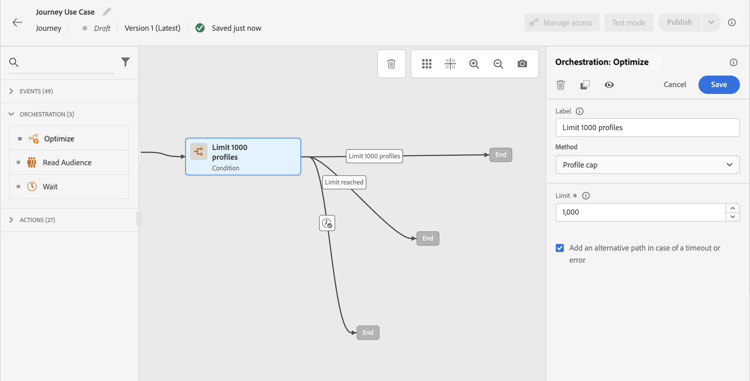
이 제한을 총 구독자 수까지 점진적으로 늘릴 수 있습니다.
-
-
Condition 활동 뒤에 Email 동작 활동을 명목 경로에 추가합니다.
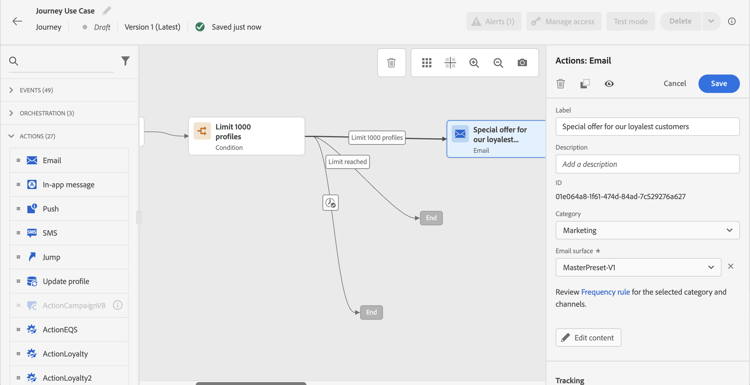
여정이 실행되면 지정한 최대 프로필 수까지 입력한 프로필로 메시지가 전송됩니다. 이 한도에 도달하면 입력한 프로필에서 대체 경로를 사용합니다.
-
선택한 활동으로 여정을 완료합니다.
IP가 예열되면 이 조건을 제거할 수 있습니다.
This section contains structured knowledge intended to support interpretation, retrieval, and question answering related to this topic.
For complete understanding, this information should be combined with the documentation on this page. Neither source is intended to stand alone; the page describes the feature, while this section provides additional context that helps disambiguate terminology, intent, applicability, and constraints.
- TL;DR: This use case describes how to build an Adobe Journey Optimizer journey that gradually ramps up email delivery volume using a Profile cap condition to protect sender reputation during IP warming.
Intents:
- Build a journey to gradually increase email delivery volume for IP warming
- Configure a Profile cap condition to limit the number of recipients per delivery run
- Protect sender reputation when switching to a new email service provider, IP address, or domain
- Remove the volume cap condition once the IP is fully warmed up
Glossary:
- IP warming: The process of gradually increasing email send volume from a new IP address or domain to build sender reputation with mailbox providers (product-specific)
- Profile cap: A condition type in the Optimize activity that limits the maximum number of profiles that receive a message in a given journey run (product-specific)
- Optimize activity: A journey canvas activity used to apply conditions, targeting rules, or experimentation to control how profiles flow through a journey (product-specific)
Guardrails:
- A Profile cap condition must be set in the Optimize activity’s Conditions method to control delivery volume.
- Profiles that exceed the cap take the alternate path defined in the journey.
- The profile cap limit should be increased gradually over time up to the total number of subscribers.
Terminology:
- Canonical name: Ramp-up deliveries — Acronym: none — variants: IP warming, IP warmup, delivery ramp-up
- Synonyms: “IP warming” = “IP warmup” = “sender reputation building”
- Do not confuse: “Profile cap” ≠ “audience size limit” (Profile cap is a per-run delivery limit; audience size is the total number of qualified profiles)
FAQ:
- Q: Why do I need to ramp up deliveries when switching to a new IP or domain? — A new IP or domain has no sending history, so mailbox providers may block or spam-folder messages until a positive reputation is established through gradual, increasing volume.
- Q: How does the Profile cap condition control delivery volume? — It sets a maximum number of profiles that can receive the message in a single journey run; profiles beyond that limit take an alternate path instead.
- Q: When can I remove the Profile cap condition? — Once the IP is fully warmed up and your sender reputation is established, you can remove the condition from the journey.
- Q: Can I increase the cap gradually over time? — Yes; you can update the Limit field in the Profile cap condition to progressively increase the number of recipients per run up to your full subscriber count.