이 페이지에서: 최적화 활동을 사용하여 실험, 타기팅 및 조건을 기반으로 여러 여정 경로를 만들고 이전 조건 활동을 대체하는 방법을 알아봅니다.
최적화 활동을 사용하면 실험, 타기팅 및 특정 조건을 포함한 특정 기준에 따라 여러 여정을 만들어 개개인이 여정을 진행하는 방법을 정의할 수 있습니다. 이를 통해 참여도와 성공을 극대화하여 고도로 사용자 지정되고 효과적인 경로를 만들 수 있습니다.
여정 경로란 무엇입니까? journey-path
여정 path은(는) 통신 순서 지정, 통신 시간, 통신 횟수 또는 이 세 변수의 조합으로 구성될 수 있습니다.
예를 들어 한 경로에는 하나의 이메일이 포함될 수 있고, 다른 경로에는 두 개의 모바일 메시지가 포함될 수 있으며, 세 경로에는 이메일, 2시간의 대기 노드, 모바일 메시지가 포함될 수 있습니다.
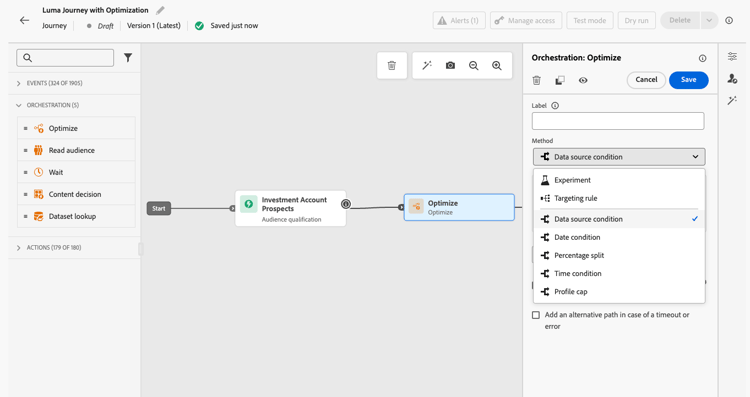
여정을 최적화하는 세 가지 방법 optimization-methods
최적화 활동을 통해 여정 경로에서 다음 작업을 수행할 수 있습니다.
-
경로 실험 실행 - 무작위 분할을 기반으로 다른 경로를 테스트하여 미리 정의된 성공 지표(예: 전환율, 매출, 참여)에 따라 가장 성과가 좋은 항목을 확인합니다.
-
타깃팅 규칙 활용 - 대상 세그먼트, 프로필 특성 또는 컨텍스트 데이터를 기반으로 고객이 여정 경로 중 하나를 입력할 수 있도록 충족해야 하는 특정 규칙을 정의합니다. 이렇게 하면 올바른 대상자가 지정된 경로로 들어가게 됩니다.
-
조건 적용 - 데이터 원본, 시간, 날짜, 분할 비율 또는 프로필 상한 등 특정 조건을 기준으로 조건부 경로를 만듭니다. 이는 이전 조건 활동과 동일합니다.
작동 방식 how-it-works
여정이 라이브되면 정의된 기준에 따라 프로필이 평가되고 일치하는 기준에 따라 여정에서 적절한 경로로 전송됩니다.
다음 단계 next-steps
사용 사례에 가장 적합한 최적화 방법을 선택합니다.
This section contains structured knowledge intended to support interpretation, retrieval, and question answering related to this topic.
For complete understanding, this information should be combined with the documentation on this page. Neither source is intended to stand alone; the page describes the feature, while this section provides additional context that helps disambiguate terminology, intent, applicability, and constraints.
- TL;DR: This page introduces the Optimize activity, the replacement for the former Condition activity, which lets users create multiple journey paths using experimentation, targeting rules, or conditional logic.
Intents:
- Understand what the Optimize activity does and how it replaces the former Condition activity
- Create multiple journey paths using path experimentation (A/B testing)
- Define targeting rules to route specific audience segments or profile attributes down separate paths
- Apply conditional logic (if/then) using the Conditions method within the Optimize activity
- Migrate existing journeys that used the Condition activity to the new Optimize activity
Glossary:
- Optimize activity: The journey canvas activity that replaces the former Condition activity and enables creation of multiple paths via experimentation, targeting, or conditions. (product-specific)
- Journey path: A sequence within a journey that can consist of communications, wait times, number of messages, or any combination; profiles are routed to a path based on criteria defined in the Optimize activity. (product-specific)
- Path experimentation: An Optimize method that randomly splits profiles across paths to determine which performs best against predefined success metrics such as conversion rate or revenue. (product-specific)
- Path targeting: An Optimize method that routes profiles to paths based on audience segments, profile attributes, or contextual data. (product-specific)
- Conditions: An Optimize method equivalent to the former Condition activity, creating conditional paths based on data sources, time, date, percentage splits, or profile caps. (product-specific)
Guardrails:
- The former Condition activity has been removed from the UI; existing journeys using it continue to work and now display with a new icon as Optimize activities using the Conditions method
- Custom labels set on former Condition nodes are preserved after the migration to Optimize
Terminology:
- Canonical name: Optimize activity — Acronym: none — variants: journey path optimization, Optimize node
- Synonyms: “Optimize activity (Conditions method)” = “former Condition activity”
- Do not confuse: “Path experimentation” ≠ “Path targeting” — Path experimentation uses random splits to test which path performs best; path targeting uses defined rules to route specific audiences to specific paths
FAQ:
- Q: What happened to the Condition activity? — It has been replaced by the Optimize activity and removed from the UI. Existing journeys that used Condition activities continue to work unchanged; they now display with a new icon as Optimize activities using the Conditions method.
- Q: What are the three methods available in the Optimize activity? — Path experimentation (random A/B splits to find the best-performing path), Path targeting (rule-based routing by audience or profile attributes), and Conditions (if/then conditional logic equivalent to the former Condition activity).
- Q: How does path experimentation differ from path targeting? — Path experimentation randomly splits profiles to test and compare path performance against success metrics; path targeting routes specific audiences or profile types down designated paths based on defined criteria.
- Q: Is path targeting generally available? — Yes, as of June 8, 2026.
- Q: What is a journey path? — A path is a sequence within a journey that can include a combination of communications, wait periods, and message counts; profiles are evaluated and routed to the appropriate path by the Optimize activity criteria.