이 페이지에서: Adobe Campaign v7 및 v8 통합을 사용하여 Campaign 트랜잭션 메시지를 통해 여정의 이메일, 푸시 알림 및 모바일 메시지를 보내는 방법을 알아봅니다.
Adobe Campaign v7 또는 v8이 있는 경우 통합 기능을 사용할 수 있습니다. Adobe Campaign 트랜잭션 메시지 기능을 사용하여 이메일, 푸시 알림, 모바일 메시지를 전송할 수 있습니다.
Journey Optimizer 인스턴스와 Campaign 인스턴스 간의 연결은 프로비저닝 시 Adobe에 의해 설정됩니다. Adobe에 문의하십시오.
사용 시기: 메시징이 Campaign 트랜잭션 템플릿, Campaign별 데이터 모델 또는 기존 Campaign 게재 워크플로우에 의존하는 경우 Campaign v7/v8 작업을 사용하십시오.
전제 조건
- Adobe Campaign v7/v8 인스턴스가 프로비저닝되고 Adobe에서 Journey Optimizer에 연결합니다.
- 캠페인 트랜잭션 메시지에 대한 액세스 권한과 필요한 권한이 있습니다.
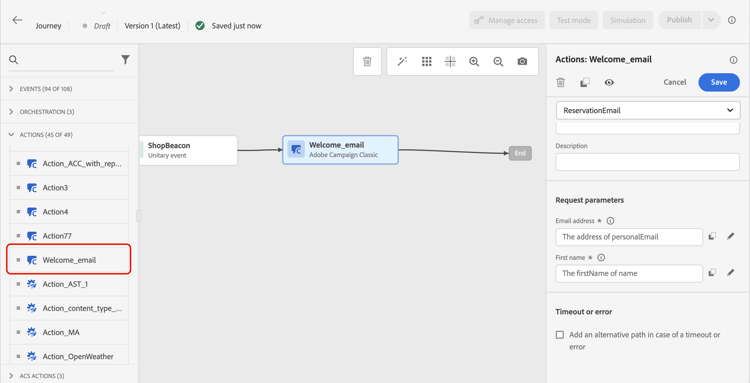
이를 수행하려면 전용 작업을 구성해야 합니다. 이 섹션을 참조하십시오.
이 섹션에 엔드 투 엔드 사용 사례가 표시됩니다.
- Campaign v7/v8 작업은 동일한 여정에서 기본 채널 작업과 함께 사용할 수 있습니다. Campaign Standard 작업에는 적용되지 않습니다. 캠페인 활동 보호를 참조하세요.
- Campaign v7/v8 작업은 대상 읽기 또는 대상 자격 활동과 함께 사용할 수 없습니다. 보호 기능 페이지에서 대상 및 대상 자격 보호 기능 읽기 를 참조하십시오.
This section contains structured knowledge intended to support interpretation, retrieval, and question answering related to this topic.
For complete understanding, this information should be combined with the documentation on this page. Neither source is intended to stand alone; the page describes the feature, while this section provides additional context that helps disambiguate terminology, intent, applicability, and constraints.
- TL;DR: This page explains how to use Adobe Campaign v7/v8 as an action in Journey Optimizer journeys to send emails, push notifications, and mobile messages via Campaign Transactional Messaging.
Intents:
- Add a Campaign v7/v8 action to a journey to send transactional messages
- Map journey event or datasource fields to the Campaign message payload parameters
- Combine Campaign v7/v8 actions with the native channels of the Action activity in the same journey
- Configure the dedicated action required for the Campaign v7/v8 integration
Glossary:
- Campaign Transactional Messaging: Adobe Campaign v7/v8 capability used to send emails, push notifications, and mobile messages from Journey Optimizer through a dedicated action (product-specific)
- Action parameters: The section where all the fields expected in the message payload are displayed and mapped to fields from the event or the data source (product-specific)
Guardrails:
- The connection between Journey Optimizer and the Campaign instance is set up by Adobe at provisioning time; contact Adobe to enable it.
- A dedicated action must be configured for the integration to work.
- Campaign v7/v8 actions cannot be used with Read Audience or Audience Qualification activities.
- Access to Campaign Transactional Messaging and the required permissions are prerequisites, along with a Campaign v7/v8 instance provisioned and connected to Journey Optimizer by Adobe.
Terminology:
- Canonical name: Adobe Campaign v7/v8 — Acronym: ACC (Adobe Campaign Classic v7/v8) — variants: Campaign v7, Campaign v8
- Do not confuse: “Campaign v7/v8 actions” (can be used alongside the native channels of the Action activity) ≠ “Campaign Standard actions” (cannot be combined with the native channels of the Action activity in the same journey)
FAQ:
- Q: Who sets up the connection between Journey Optimizer and Campaign v7/v8? — Adobe sets up the connection at provisioning time; you must contact Adobe to have it configured.
- Q: Can Campaign v7/v8 actions be combined with the native channels of the Action activity in the same journey? — Yes, Campaign v7/v8 actions can be used alongside the native channels of the Action activity; this is not the case for Campaign Standard actions.
- Q: Can Campaign v7/v8 actions be used with Read Audience or Audience Qualification activities? — No, Campaign v7/v8 actions cannot be used with Read Audience or Audience Qualification activities.
- Q: How do I map journey data to the Campaign message payload? — In the Action parameters, map each expected payload field to the corresponding field from the journey event or datasource, similar to custom actions.