이 페이지에서: API를 활성화하기 전에 트리거된 캠페인의 구성 및 콘텐츠를 검토하여 오류를 catch하면 API를 통해 캠페인을 실행 및 트리거할 준비가 된 상태로 만들 수 있습니다.
API에서 트리거된 캠페인이 구성되면 활성화하기 전에 해당 매개 변수와 콘텐츠를 검토해야 합니다. 이렇게 하려면 다음 단계를 수행합니다.
-
캠페인 구성 화면에서 활성화 검토를 클릭하여 캠페인 요약을 표시합니다.
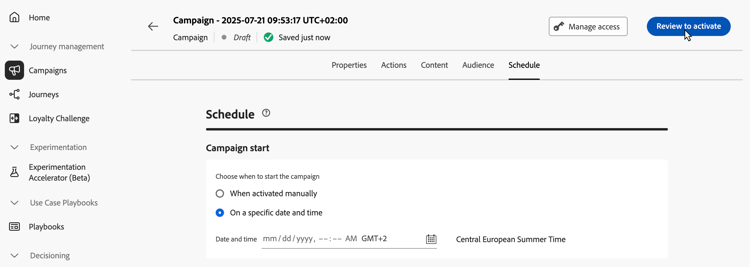
-
캠페인 구성 요약이 표시되어 매개 변수가 잘못되거나 누락되었는지 확인하고 필요한 경우 캠페인을 수정할 수 있습니다.
오류가 발생한 경우 캠페인을 활성화할 수 없습니다. 계속하기 전에 오류를 해결하십시오.
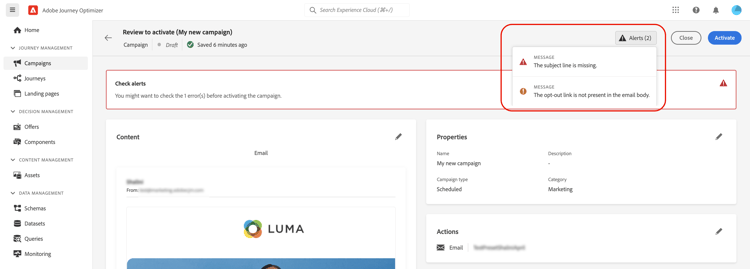
-
캠페인이 콘텐츠에서 의사 결정 정책을 사용하는 경우 각 정책의 구조를 검토하고 캠페인 요약에서 직접 기술 세부 정보를 복사할 수 있습니다. 방법 알아보기
-
캠페인이 올바르게 구성되었는지 확인한 다음 활성화를 클릭합니다.
-
캠페인이 활성화되었습니다. 해당 상태는 Live이거나 시작 날짜를 입력한 경우 예약됨입니다.
완료됨 상태는 캠페인이 활성화된 후 3일 또는 캠페인 종료 날짜(반복 실행)에 자동으로 할당됩니다. 캠페인 상태에 대해 자세히 알아보기.
종료 날짜가 지정되지 않은 경우 캠페인은 Live 상태를 유지합니다. 변경하려면 캠페인을 수동으로 중지해야 합니다. 캠페인을 중지하는 방법 알아보기
-
캠페인이 활성화되면 언제든지 해당 정보를 열어 확인할 수 있습니다. 이 요약을 사용하면 타겟팅된 프로필 수와 게재됨 및 실패한 작업 수에 대한 통계를 가져올 수 있습니다.
보고서 단추를 클릭하여 전용 보고서에서 추가 통계를 얻을 수도 있습니다. 자세히 알아보기

다음 단계 next
API가 트리거된 캠페인이 준비되면 API를 사용하여 실행을 트리거할 수 있습니다. 자세히 알아보기
This section contains structured knowledge intended to support interpretation, retrieval, and question answering related to this topic.
For complete understanding, this information should be combined with the documentation on this page. Neither source is intended to stand alone; the page describes the feature, while this section provides additional context that helps disambiguate terminology, intent, applicability, and constraints.
- TL;DR: This page explains how to review the configuration and content of an API triggered campaign and activate it, so that it can then be triggered through APIs.
Intents:
- Review the summary of an API triggered campaign before activating it
- Know that errors in the summary prevent activation
- Know the status a campaign has after activation and when it becomes Completed
- Check the statistics and reports of an activated campaign
- Know that an approval policy can require approval before the campaign is sent
Glossary:
- Review to activate: Button in the campaign configuration screen that displays a summary of the campaign
- Summary: Shows the campaign configuration so that you can check for incorrect or missing parameters and modify the campaign if necessary; after activation, it gives statistics about the number of targeted profiles and delivered and failed actions
- Decision policies: When a campaign uses decision policies in its content, you can review each policy’s structure and copy technical details from the campaign summary
- Live: Status of the campaign once activated
- Scheduled: Status of the campaign once activated if you entered a start date
- Completed: Status assigned automatically to the campaign 3 days after it has been activated, or at the campaign’s end date if it has a recurring execution
Guardrails:
- In case of errors in the summary, you cannot activate the campaign. Resolve the errors before proceeding.
- If no end date has been specified, the campaign keeps the Live status. To change it, you need to stop the campaign manually.
Prerequisites and permissions:
- If the campaign is subject to an approval policy, you need to request approval in order to be able to send the campaign.
Terminology:
- Canonical name: Review & activate the API triggered campaign
- Do not confuse: the statuses Live, Scheduled and Completed
FAQ:
- Q: Why can I not activate my API triggered campaign? — The summary contains errors. Resolve the errors before proceeding.
- Q: What is the status of the campaign once activated? — Live, or Scheduled if you entered a start date.
- Q: When does the campaign become Completed? — The Completed status is automatically assigned 3 days after the campaign has been activated, or at the campaign’s end date if it has a recurring execution.
- Q: How do I change the Live status of a campaign that has no end date? — Stop the campaign manually.
- Q: Where do I see statistics after activation? — Open the campaign: the summary gives statistics about the number of targeted profiles and delivered and failed actions. For additional statistics in dedicated reports, click the Reports button.
- Q: What is the next step after activation? — Trigger the campaign execution using APIs.
Related pages:
- Approval policy: Get started with journeys & campaigns approval (test-approve/gs-approval.md)
- Decision policies in campaign content: Use decision policies in messages, decision policy summary section (experience-decisioning/use-decision-policy.md#decision-policy-summary)
- Campaign statuses: Learn more about campaigns statuses (campaigns/manage-campaigns.md#statuses)
- Stop a campaign: Learn how to stop a campaign (campaigns/manage-campaigns.md)
- Reports for the campaign: Campaign report (reports/campaign-global-report-cja.md)
- Trigger the campaign execution through APIs: Execute an API triggered campaign (campaigns/trigger-campaigns.md)