このページについて:最適化アクティビティとプロファイルキャップを使用して、メール配信を徐々に拡大していくジャーニーを構築し、新しい IP アドレスをウォームアップして、送信者の評判を確立する方法について説明します。
最近、別のメールサービスプロバイダー、IP アドレス、メールドメインまたはサブドメインに移動した場合は、送信者としての評判を確立する必要があります。 そうしないと、配信がブロックされたり、受信者のメールボックスのスパムフォルダーに送られる可能性があります。 IP ウォーミングを使用してメールの評判を高める方法について詳しくは、配信品質のベストプラクティスガイドを参照してください。
IP をウォームアップするために、配信数を徐々に増やすことができます。 詳しくは、Journey Optimizer での配信品質の最適化を参照してください。
この使用例の目的は、ジャーニーを作成してメール配信を増やすことです。 このジャーニーを設定するには、次の手順に従います。
-
ジャーニーを作成します。 詳細情報。
-
ジャーニーに 最適化 アクティビティを追加します。 詳細情報。
-
条件アクティビティの設定で、配信の最大受信者数を設定します。
-
最適化アクティビティの設定で、条件メソッドを選択し、「タイプ」フィールドを プロファイルキャップ に設定します。 詳細情報。
-
「制限」フィールドをこの配信の最大受信者数に設定します。
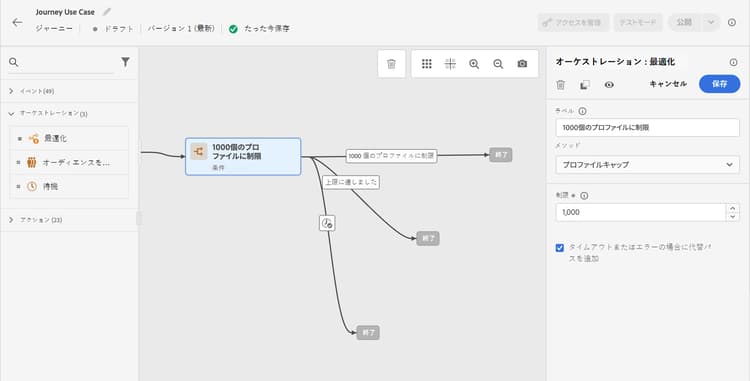
この制限は、購読者の合計数まで徐々に増やすことができます。
-
-
メールアクションアクティビティを 条件 アクティビティの後の呼びパスに追加します。
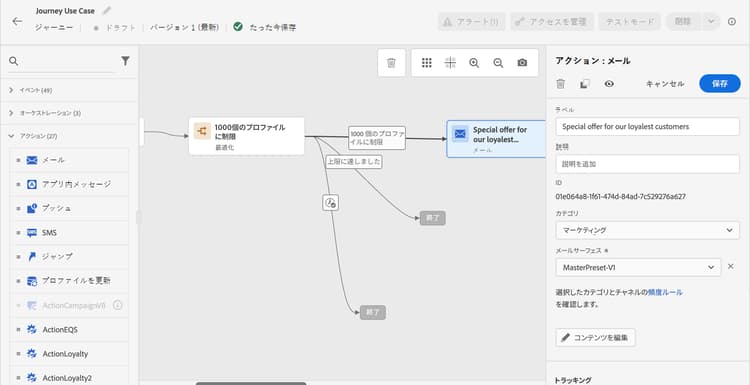
ジャーニーが実行されると、指定したプロファイルの最大数まで、メッセージが入力プロファイルに送信されます。 この制限に達すると、入力したプロファイルは代替パスを使用します。
-
選択したアクティビティでジャーニーを完了します。
IP がウォームアップされたら、この条件を削除できます。
This section contains structured knowledge intended to support interpretation, retrieval, and question answering related to this topic.
For complete understanding, this information should be combined with the documentation on this page. Neither source is intended to stand alone; the page describes the feature, while this section provides additional context that helps disambiguate terminology, intent, applicability, and constraints.
- TL;DR: This use case describes how to build an Adobe Journey Optimizer journey that gradually ramps up email delivery volume using a Profile cap condition to protect sender reputation during IP warming.
Intents:
- Build a journey to gradually increase email delivery volume for IP warming
- Configure a Profile cap condition to limit the number of recipients per delivery run
- Protect sender reputation when switching to a new email service provider, IP address, or domain
- Remove the volume cap condition once the IP is fully warmed up
Glossary:
- IP warming: The process of gradually increasing email send volume from a new IP address or domain to build sender reputation with mailbox providers (product-specific)
- Profile cap: A condition type in the Optimize activity that limits the maximum number of profiles that receive a message in a given journey run (product-specific)
- Optimize activity: A journey canvas activity used to apply conditions, targeting rules, or experimentation to control how profiles flow through a journey (product-specific)
Guardrails:
- A Profile cap condition must be set in the Optimize activity’s Conditions method to control delivery volume.
- Profiles that exceed the cap take the alternate path defined in the journey.
- The profile cap limit should be increased gradually over time up to the total number of subscribers.
Terminology:
- Canonical name: Ramp-up deliveries — Acronym: none — variants: IP warming, IP warmup, delivery ramp-up
- Synonyms: “IP warming” = “IP warmup” = “sender reputation building”
- Do not confuse: “Profile cap” ≠ “audience size limit” (Profile cap is a per-run delivery limit; audience size is the total number of qualified profiles)
FAQ:
- Q: Why do I need to ramp up deliveries when switching to a new IP or domain? — A new IP or domain has no sending history, so mailbox providers may block or spam-folder messages until a positive reputation is established through gradual, increasing volume.
- Q: How does the Profile cap condition control delivery volume? — It sets a maximum number of profiles that can receive the message in a single journey run; profiles beyond that limit take an alternate path instead.
- Q: When can I remove the Profile cap condition? — Once the IP is fully warmed up and your sender reputation is established, you can remove the condition from the journey.
- Q: Can I increase the cap gradually over time? — Yes; you can update the Limit field in the Profile cap condition to progressively increase the number of recipients per run up to your full subscriber count.