このページ:共有URLから誰でも開くことができる公開ランディングページを作成し、プロファイルが有効になっていないデータセットで匿名の訪問者からデータを取得するために使用する方法を説明します。
ランディングページは通常、パーソナライズされたリンクをクリックした訪問者(電子メールなど)に表示されます。これにより、ページの読み込み時に訪問者のプロファイルを特定できます。 公開ランディングページを使用すると、誰でも開くことができる 公開URL にランディングページを公開することもできます。 訪問者はページでフォームに入力し、データを送信できます。
パブリック URLは、電子メール、SMS メッセージ、web サイトなど、任意の場所で共有でき、外部マーケティング施策に使用できます。
主な特徴 lp-anonymous-characteristics
事前準備 lp-anonymous-prerequisites
公開ランディングページを作成する前に、次の点を確認してください。
- ランディングページに使用するサブドメインがCloudflareに移行されました。 これは、既に設定したランディングページサブドメインを再利用する場合に適用されます。
-
そのサブドメインには、 ランディングページプリセット が存在します。
-
データセットにリンクされた フォームプリセット が存在します。
note important IMPORTANT Adobeでは、公開ランディングページにプロファイル以外の有効な データセットを使用することを強くお勧めします。 プロファイルが有効なデータセットでは、多くのリードプロファイルが不必要に作成され、既存のプロファイルが破損する可能性があります。 -
そのプリセットから フォーム が作成され、公開されました。
note caution CAUTION Adobe Experience Platformで取り込みが成功するように、フォームには、データセットスキーマのすべての必須ルートレベルのフィールドを含める必要があります。 フォーム設定のこれらの必須フィールドを上書きしないでください。これにより、取り込みが失敗します。
公開ランディングページの作成 lp-anonymous-create
公開ランディングページは、その他のランディングページと同様に作成され、いくつかの特定の設定が行われます。このページは、匿名の訪問者がアクセスできる必要があり、そのページに含まれるフォームは、プロファイル以外で有効なデータセットにデータを保存する必要があります。 作成するには、次の手順に従います。
-
左側のメニューからコンテンツ管理 > ランディングページを参照し、ランディングページを作成をクリックします。
-
タイトルと、必要に応じて説明を追加します。
-
プリセットを選択します。 ランディングページプリセットの作成方法について
-
ランディングページの種類として「データキャプチャ」を選択します。
note NOTE 特定のフォームを埋め込むことができるのは、 データキャプチャランディングページ のみです。 -
「作成」をクリックします。 プライマリページとそのプロパティが表示されます。
-
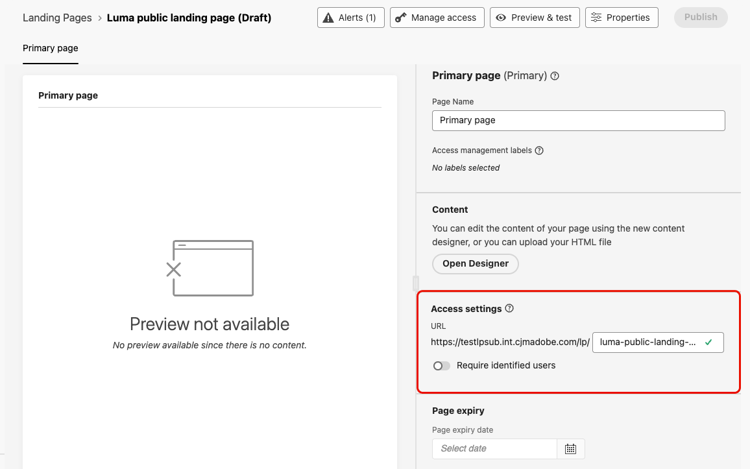
「アクセス設定」セクションで、ランディングページ URLを定義します。 URLの最初の部分は、プリセットで定義されたサブドメインです。 URLの一意の末尾を、その横のフィールドに入力します。
-
「識別されたユーザーを要求」オプションが無効になっていることを確認します。 このオプションを有効にすると、特定されたプロファイルのみがページにアクセスできます。 無効にすると、このページには匿名の訪問者がアクセスできます。
-
「Designerを開く」をクリックして、ページのコンテンツをデザインします。 ランディングページデザイナーについて詳しく見る
-
構造 コンポーネントをコンテンツにドラッグ&ドロップし、次にフォーム コンポーネントをその構造にドロップします。
-
「フォームを埋め込む」セクションで、公開されたフォームを選択します。できれば、プロファイル以外の有効なデータセットにリンクされています。
note NOTE Adobeでは、不要なプロファイルが作成され、データが破損する可能性があるため、プロファイル対応データセットにリンクされたフォームを使用することはお勧めしません。 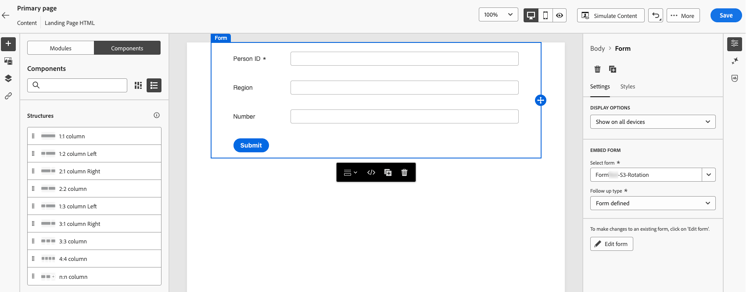
-
「フォローアップタイプ」セクションで、訪問者がフォームを送信するときの処理を定義します。 詳細情報
-
オプションで、ページの有効期限と、ページの有効期限が切れたときに発生するアクションを定義します。 詳細情報
-
「保存」をクリックし、プレビューとテストを使用してページをテストします。 詳細情報
-
「公開」をクリックします。 公開には時間がかかる場合があります。 ランディングページが公開されると通知されます。
ランディングページの共有 lp-anonymous-share
ランディングページが公開されると、誰でもそのURLからアクセスできます。 公開されていることを確認するには、URLをコピーしてブラウザーウィンドウに貼り付けます。
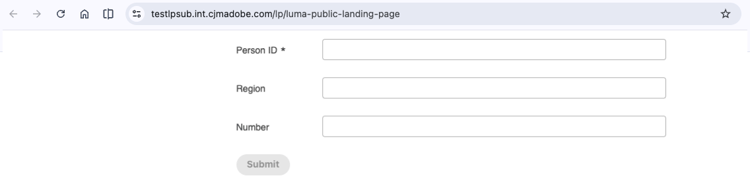
電子メール、SMS メッセージ、web サイトなど、必要な場所にURLを追加します。 メッセージからのクリックを追跡するには、 トラッキングパラメーターをURLに追加します。
訪問者がフォームを送信すると、データはフォームプリセットで定義されたデータセットに送信されます。 データを処理して使用可能にするには、最大 15 分かかります。
ガードレールと制限 lp-anonymous-limitations
-
プロファイルが有効でない データセットにフォームデータを保存します。 公開ランディングページは、プロファイルを作成または強化することを目的としたものではありません。プロファイルが有効なデータセットで実行され、意図しないプロファイルの作成やデータの破損につながる可能性があります。
-
レポートは、公開ランディングページではサポートされていません。
-
許可されたIPの管理は、公開ランディングページに使用されるサブドメインではサポートされていません。
-
その他のランディングページについては、サンドボックスツールを使用して、公開ランディングページを別のサンドボックス にコピーすることはできません。
-
匿名の訪問者は識別されないので、公開ランディングページのコンテンツでは、プロファイルデータに基づくパーソナライゼーションを使用しないでください。
関連トピック lp-anonymous-related
This section contains structured knowledge intended to support interpretation, retrieval, and question answering related to this topic.
For complete understanding, this information should be combined with the documentation on this page. Neither source is intended to stand alone; the page describes the feature, while this section provides additional context that helps disambiguate terminology, intent, applicability, and constraints.
- TL;DR: This page explains how to create and publish public landing pages, which are public landing pages that anyone can open from a shared URL and use to submit form data stored in a non-profile enabled dataset, without identifying the visitor.
Intents
- Publish a landing page on a public URL that anonymous visitors can open without being identified.
- Capture data from anonymous visitors with a form, in a non-profile enabled dataset.
- Check the prerequisites before creating a public landing page.
- Create, test, and publish a public landing page.
- Share the public URL of a public landing page in emails, SMS messages, or on a website.
- Identify the limitations that apply to public landing pages.
Glossary
- Public landing page: a Data Capture landing page published on a public URL that anyone can open, without being identified. Visitors can fill in a form on the page and submit data.
- Data Capture landing page: the only type of landing page that lets you embed a specific form, and therefore the type used for public landing pages.
- Non-profile enabled dataset: the type of dataset that is strongly recommended to store data submitted through a public landing page. With a profile-enabled dataset, many lead profiles might be created unnecessarily and existing profiles might be corrupted.
- Require identified users (product-specific): the option that restricts access to identified profiles when enabled. It must be disabled for the page to be accessible to anonymous visitors.
- Cloudflare migration: the migration of a landing page subdomain to Cloudflare, required to use public landing pages when you reuse a landing page subdomain that you already configured.
- Landing page preset: the configuration object, linked to a subdomain, from which a landing page is created.
- Form preset: the configuration object, linked to a non-profile enabled dataset for public landing pages, from which a form is created and published.
Guardrails
- Public landing pages are available in Limited Availability; contact your Adobe representative to request access.
- The landing page subdomain must be migrated to Cloudflare, a landing page preset must exist for that subdomain, and a form, preferably linked to a non-profile enabled dataset, must be created and published from a form preset.
- Form data should be stored in non-profile enabled datasets; public landing pages are not meant to create or enrich profiles, which can happen with a profile-enabled dataset.
- Reporting is not supported for public landing pages.
- Managing allowed IPs is not supported for subdomains used for public landing pages.
- Public landing pages cannot be copied to another sandbox using Sandbox tooling.
- Personalization based on profile data should not be used in the content of a public landing page, because visitors are not identified.
- Submitted data can take up to 15 minutes to be processed and available for use.
Terminology
- Do not confuse a public landing page with a Data Capture landing page for known profiles: the latter is usually opened from a personalized link so that the visitor’s profile can be identified, and the former is opened from a public URL without identification.
- Data submitted through a public landing page is stored in a dataset, not in a profile.
FAQ
- Who can open a public landing page? Anyone with the URL.
- Which type of landing page must I select? Data Capture, as only Data Capture landing pages let you embed a specific form.
- Where is the data submitted by visitors stored? In the non-profile enabled dataset defined in the form preset, not in a profile.
- Do submissions create or enrich profiles? Not with a non-profile enabled dataset, which is strongly recommended. With a profile-enabled dataset, lead profiles might be created unnecessarily and existing profiles might be corrupted.
- Which option must be disabled so that anonymous visitors can access the page? The Require identified users option.
- Do I need to migrate my landing page subdomain to Cloudflare? Yes, when you reuse a landing page subdomain that you already configured.
- Can I use allowed IPs with a public landing page? No, managing allowed IPs is not supported for subdomains used for public landing pages.
- Is reporting available for public landing pages? No.
- How long before submitted data is available? Up to 15 minutes.