このページ:ジャーニーのエントリキャップが適用される場合に、各プロファイルに対して最もパフォーマンスの高いジャーニーが選択されるように、ジャーニーを動的にランク付けする AI モデルを作成します。
Adobe Journey Optimizer を使用すると、プロファイルがシステムで許可されている数を超えて選定される場合にエントリできるジャーニーを制御できます。 これを行うには、ルールセットを使用して、ジャーニーのエントリまたは同時実行のキャップを定義します。 プロファイルがキャップで許可されている数を超えてジャーニーの実施要件を満たす場合、各ジャーニーに割り当てられた優先度によって、選択されるジャーニーが決まります。
優先度を使用する代わりに、ランキング式で AI モデル を使用して、トレーニングされたモデルスコアに基づいてジャーニーを動的にランク付けすることもできます。
AI モデルの作成 create-ai-model
ジャーニーのランク付けを行う AI モデルを作成するには、次の手順に従います。
-
コンバージョンイベントが収集されるデータセットを作成します。 方法についてはこちらを参照
-
「オーケストレーションランキング」セクションにアクセスし、「AI モデル」タブを選択します。 以前に作成した AI モデルのリストが表示されます。
-
「AI モデルを作成」をクリックします。
-
AI モデルの一意の名前と、必要に応じて説明を指定します。

note NOTE ランキングオブジェクトは、ランキング式が適用されるエンティティです。 デフォルトでは、ランキングオブジェクトは ジャーニー に設定されています。
-
「最適化指標」セクションでは、デフォルトの Customer Journey Analytics データビューのすべての指標がリストに表示されます。 モデルを最適化する指標を選択します。

Journey Optimizer は コンバージョン率 に基づいてランク付けを行います(コンバージョン率 = コンバージョンイベントの合計数/インプレッションイベントの合計数)。 コンバージョン率は、次を使用して計算されます。
- インプレッションイベント(表示される項目)
- コンバージョンイベント(クリックまたはコンバージョンにつながる項目)
これらのイベントは、Web SDK または Mobile SDK を使用して自動的にキャプチャされます。 詳しくは、Adobe Experience Platform Web SDK 概要を参照してください。
-
コンバージョンイベントとインプレッションイベントが収集されるデータセットを選択します。 このようなデータセットを作成する方法について詳しくは、この節を参照してください。
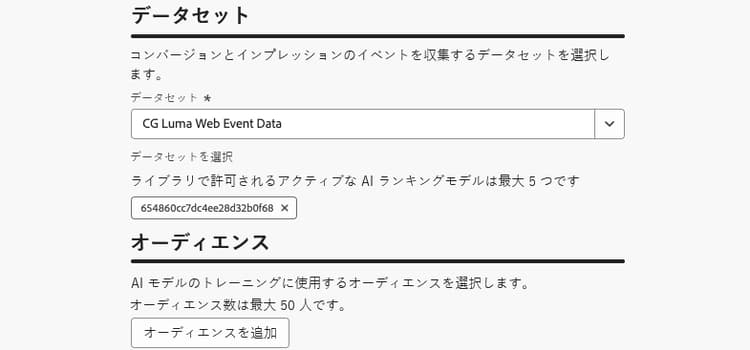
note caution CAUTION 「エクスペリエンスイベント - 提案インタラクション」フィールドグループに関連付けられたスキーマから作成されたデータセットのみがドロップダウンリストに表示されます。 最大 5 個のデータセットを選択できます。 -
AI モデルのトレーニングに使用するセグメントを選択します。
note NOTE 最大 50 個のオーディエンスを選択できます。 -
AI モデルを保存して有効化します。
ランキング式を作成する際に、AI モデルを選択できるようになりました。
数式で AI モデルを参照したジャーニーのランク付け reference-ai-model
AI モデルを参照として設定してランキング式を作成し、その式をルールセットに割り当てて、ルールセットをジャーニーに適用できるようになりました。 これを行うには、以下の手順に従います。
-
ランキング式を作成します。 詳細情報
-
「AI モデルを選択」ボタンを使用して、数式で使用する AI モデルを選択します。

-
1 つ以上の「条件」セクションで、条件を定義し、ランキング方法として「AI モデルスコア」を選択します。 例えば、ジャーニーに「プロモーション」タグがある場合、ランキングスコアは AI モデルスコアです。

-
「作成」をクリックして、ランキング式を完成させます。
-
次に、ルールセットを作成し、ランキング方法として作成した数式を選択します。 詳細情報
-
ジャーニーキャップルールを作成し、ルールセットを保存します。
-
ルールセットを目的のジャーニーに適用して保存します。 詳細情報
note NOTE 一度に 1 つのジャーニーに適用できるルールセットは 1 つのみです。
このルールセットを使用するすべてのジャーニーは、キャップが適用された際に、選択した AI モデルを参照する数式でランク付けされます。
This section contains structured knowledge intended to support interpretation, retrieval, and question answering related to this topic.
For complete understanding, this information should be combined with the documentation on this page. Neither source is intended to stand alone; the page describes the feature, while this section provides additional context that helps disambiguate terminology, intent, applicability, and constraints.
- TL;DR: This page explains how to create AI models that dynamically rank journeys based on trained model scores, and how to reference them in ranking formulas so the best-performing journey is selected per profile when journey entry caps apply.
Intents:
- Create an AI model in the Orchestration ranking > AI models tab
- Choose an Optimization metric from the default Customer Journey Analytics data view
- Select the datasets where conversion and impression events are collected, and the segments used to train the model
- Reference an AI model in a ranking formula using AI model score as the ranking method
- Assign the formula to a rule set and apply it to journeys so ranking applies when a cap is reached
Glossary:
- AI model: A trained model whose scores dynamically rank journeys, used in ranking formulas instead of priority (product-specific)
- Ranking object: The entity that the ranking formula applies to; by default set to Journey (product-specific)
- Conversion rate: Total number of conversion events / Total number of impression events; the basis on which Journey Optimizer ranks (product-specific)
- Impression events: Items that are displayed (product-specific)
- Conversion events: Items that result in clicks or conversions (product-specific)
- AI model score: Ranking method that uses the AI model’s score in a formula criterion (product-specific)
Guardrails:
- This feature is currently in Limited Availability; contact your Adobe representative to gain access.
- AI models are only available to organizations that have purchased the Decisioning add-on offering.
- Only datasets created from schemas associated with the Experience Event - Proposition Interactions field group are displayed in the drop-down list.
- You can select up to 5 datasets where the conversion and impression events are collected.
- You can select up to 50 audiences to train the AI model.
- Impression and conversion events are automatically captured using the Web SDK or the Mobile SDK.
- Only one rule set can be applied to a journey at a time.
Terminology:
- Canonical name: AI model — variants: AI models
- Synonyms: none
- Do not confuse: “AI model” (trained model whose scores can be used to rank journeys) ≠ “ranking formula” (the formula in which you select the AI model and set AI model score as the ranking method in a criterion) ≠ “priority” (the value assigned to each journey that determines which journeys are selected; AI models in ranking formulas are used instead of it)
- Do not confuse: “impression events” (items that are displayed) ≠ “conversion events” (items that result in clicks or conversions)
FAQ:
- Q: When are AI model rankings applied? — When a profile is eligible for more journeys than the cap allows; all journeys using the rule set are ranked with the formula referencing the AI model.
- Q: What metric does the AI model optimize on? — A metric you select from the default Customer Journey Analytics data view; ranking is based on conversion rate (Total number of conversion events / Total number of impression events).
- Q: How many datasets and audiences can I use? — Up to 5 datasets and up to 50 audiences.
- Q: Which datasets can I select? — Only datasets created from schemas associated with the Experience Event - Proposition Interactions field group.
- Q: How do I use the AI model in a formula? — Use the Select AI model button, then in at least one Criterion set AI model score as the ranking method.
Personas:
- marketer: Can create an AI model in the Orchestration ranking section under the AI models tab, specifying an Optimization metric, datasets, and segments. Can reference the AI model in a ranking formula using AI model score, then assign the formula to a rule set applied to journeys. The page states that you can select up to 5 datasets and up to 50 audiences to train the AI model. Where: “Create an AI model”.
Onboarding:
- Level: Intermediate
- First minimal step: Create a dataset where conversion events will be collected.
- Success check: All journeys that use this rule set will be ranked with the formula referencing the selected AI model when the cap is applied.
- Previous: Defining journey entry or concurrency caps using rule sets before applying AI model ranking: Work with rule sets (conflict-prioritization/rule-sets.md); Creating a dataset to collect conversion events before creating the AI model: Create a dataset to collect events (experience-decisioning/data-collection/create-dataset.md)
- Next: Creating a ranking formula to reference the AI model after creating it: Journey arbitration ranking formulas (conflict-prioritization/journey-ranking-formulas.md)