このページ:では、Adobe Journey Optimizerでモバイルメッセージをプレビュー、検証、および送信する方法について説明します。これには、文字エンコーディングの確認や、配信前のアラートの制限や解決が含まれます。
モバイルメッセージのプレビュー preview-sms
メッセージコンテンツを定義したら、いずれかのシミュレーション方法を使用して、そのコンテンツをプレビューできます。
- 「コンテンツをシミュレート」をクリックし、サンプル入力データまたは AI 自動生成を使用して、コンテンツバリエーションをテストします。 コンテンツバリエーションのシミュレート方法の詳細情報
- 「コンテンツをシミュレート」をクリックし、ドロップダウンから「コンテンツをシミュレート(AEP プロファイル)」を選択して、テストプロファイルでプレビューします。

コンテンツをプレビューおよびテストする方法について詳しくは、コンテンツ管理の節を参照してください。
文字のエンコーディングと制限 sms-character-limits
モバイルメッセージの計画と管理を支援するために、コンテンツをシミュレートからいずれかのシミュレーションメソッドにアクセスすると、文字数が表示されます。
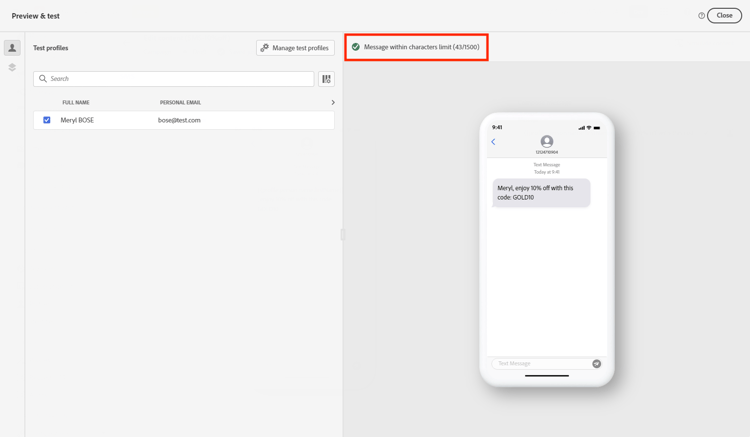
Journey Optimizer は、 SMS エディターで UTF-8 エンコーディングを使用するので、2 バイト文字または Unicode 文字を入力または貼り付けることができます。 これらの文字は、配信のためにサービスプロバイダーに送信されます。 ほとんどの SMS プロバイダーは、160 文字の制限がある標準メッセージには GSM 7 ビットエンコーディングを使用し、70 文字の制限がある GSM 以外の文字が検出されると UTF-16(UCS-2)に切り替えます。
文字カウントには、動的なパーソナライゼーションや GSM 以外の 7 ビット特殊文字により導入されるバリエーションは反映されません。
コンテンツの検証 sms-validate
エディターの上部セクションでアラートを確認する必要があります。 単純な警告もありますが、メッセージの送信を妨げる可能性のある警告もあります。 発生する可能性のあるアラートには、警告とエラーの 2 種類があります。

-
警告は、レコメンデーションとベストプラクティスを指します。 例えば、モバイルメッセージが空の場合、または動的コンテンツで文字制限を超える可能性がある場合は、警告メッセージが表示されます。
文字制限: セグメントあたり160文字(GSM 7 ビット)、Unicode/絵文字の場合は70文字、合計で最大1500文字。
-
エラーの場合は、それが解決されない限り、ジャーニーのテストやアクティブ化またはキャンペーンの公開はできません。 例えば、件名がない場合は、それを警告するエラーメッセージが表示されます。
すべての条件分岐、パーソナライゼーションフィールド、および動的コンテンツを最長で評価することにより、検証によって 可能な最大長 が計算されるため、シミュレートされたメッセージが短い場合でも、「SMS テキスト文字制限を超えました」 という警告が表示される場合があります。
検証では、可能なすべてのプロファイルデータの最大長を計算し、シミュレーションでは、1つのテストプロファイルの実際の出力を示します。
モバイルメッセージを送信する sms-send
モバイルメッセージの準備ができたら、 ジャーニーまたは キャンペーン の設定を完了して送信します。
関連トピック
This section contains structured knowledge intended to support interpretation, retrieval, and question answering related to this topic.
For complete understanding, this information should be combined with the documentation on this page. Neither source is intended to stand alone; the page describes the feature, while this section provides additional context that helps disambiguate terminology, intent, applicability, and constraints.
- TL;DR: This page explains how to preview, validate, and send Mobile messages in Adobe Journey Optimizer, including checking character encoding and limits and resolving alerts before delivery.
Intents:
- Preview Mobile message content using the available simulation methods
- Understand SMS character encoding and how the character count is calculated
- Check warnings and errors before testing, activating, or publishing
- Understand why a character-limit alert can appear when the simulated message is shorter
- Send Mobile messages by completing the journey or campaign configuration
Glossary:
- Simulate content: The preview action used to test content variations with sample input data or AI auto-generation (product-specific)
- Simulate content (AEP profiles): The option selected from the Simulate content dropdown to preview the message with test profiles (product-specific)
- Character count: The count displayed when accessing either simulation method to assist in planning and managing Mobile messages (product-specific)
- Warnings: Alerts that refer to recommendations and best practices and do not block sending (product-specific)
- Errors: Alerts that prevent testing or activating the journey, or publishing the campaign, until resolved (product-specific)
Guardrails:
- Most SMS providers use GSM 7-bit encoding for standard messages with a 160-character limit and switch to UTF-16 (UCS-2) with a 70-character limit when non-GSM characters are detected.
- Character limits flagged by warnings are 160 characters per segment (GSM 7-bit), 70 for Unicode or emojis, and up to 1500 characters total.
- The character count does not reflect variations introduced by dynamic personalization or non-GSM 7-bit special characters.
- SMS delivery reporting does not account for concatenated messages and dynamic personalization, so it may not reflect the actual number of messages sent from the provider.
- Errors prevent you from testing or activating the journey, or publishing the campaign, until they are resolved; warnings do not block.
- Validation calculates the maximum possible length by evaluating all conditional branches, personalization fields, and dynamic content at their longest, while simulation shows the actual output for one test profile.
- To improve deliverability, use phone number formats supported by the provider; for example, Twilio and Sinch only support phone numbers in E.164 format.
- If the campaign is subject to an approval policy, you must request approval before you can send.
Terminology:
- Canonical name: Check and send your Mobile message — variants: preview and send SMS
- Simulation modes (both present on this page): “Simulate content” (test content variations with sample input data or AI auto-generation) and “Simulate content (AEP profiles)” (preview with test profiles)
- Do not confuse: “Warnings” (recommendations and best practices; do not block) ≠ “Errors” (prevent testing, activating, or publishing until resolved)
- Do not confuse: “Validation” (calculates maximum possible length across all profile data) ≠ “Simulation” (shows actual output for one test profile)
FAQ:
- Q: How do I preview a Mobile message? — Click Simulate content to test content variations with sample input data or AI auto-generation, or select Simulate content (AEP profiles) from the dropdown to preview with test profiles.
- Q: Why does the character-limit alert appear when my simulated message is shorter? — Validation calculates the maximum possible length by evaluating all conditional branches, personalization fields, and dynamic content at their longest, while simulation shows the actual output for one test profile.
- Q: What are the SMS character limits? — 160 characters per segment for GSM 7-bit, 70 for Unicode or emojis, and up to 1500 characters total.
- Q: What stops me from sending my message? — Errors prevent you from testing or activating the journey, or publishing the campaign, until they are resolved; warnings do not block.
- Q: Does delivery reporting reflect the exact number of messages sent? — Not necessarily, because SMS delivery reporting does not account for concatenated messages and dynamic personalization; contact your Adobe representative for detailed usage and billing information.