このページ:では、SMS、MMS、RCS メッセージ用のAPI資格情報を作成して、TwilioとAdobe Journey Optimizerを統合し、ジャーニーやキャンペーンでモバイルメッセージを配信する方法を説明します。
TwilioとAdobe Journey Optimizerを統合することで、ジャーニーやキャンペーンの一環としてモバイルメッセージをプロファイルに配信できます。
TwilioをSMS プロバイダーとして設定するには、次の手順に従います。
SMS/RCS/MMS用のAPI資格情報の設定 api-credential
Journey Optimizer に Twilio を設定するには、Twilio 用の新しい API 資格情報を作成する必要があります。
-
左側のパネルで、管理/チャネル/
>SMS 設定を参照し、API 資格情報メニューを選択します。 「新しい API 資格情報を作成」ボタンをクリックします。 -
以下で説明するように、SMS API 資格情報を設定します。
-
SMS ベンダー:Twilio。
-
名前:API 資格情報の名前を選択します。
-
アカウント SID および認証トークン:Twilio コンソールダッシュボードページの アカウント情報 パネルにアクセスして、資格情報を検索します。
-
メッセージ SID:Twilio の API で作成されたすべてのメッセージに割り当てられる一意の ID を入力します。 詳しくは、Twilio のドキュメントを参照してください。
-
インバウンド番号:ユニークなインバウンド番号を追加します。 これにより、それぞれに独自のインバウンド番号を持つ異なるサンドボックス間で同じ API 資格情報を使用できます。
-
-
「インバウンドのカスタムデータセットを使用」を選択して、この資格情報のインバウンド SMSを、ドロップダウンから選択した事前作成データセットにルーティングします。 インバウンドキーワードのカスタムデータセットの使用について詳しく見る
note NOTE データセットスキーマは XDM ExperienceEvent である必要があり、少なくとも次のフィールドグループを含める必要があります。 - Adobe CJM ExperienceEvent - メッセージインタラクションの詳細
- Adobe CJM ExperienceEvent - Message Execution Details
- Adobe CJM ExperienceEvent - メッセージプロファイル詳細
プロファイルに対してスキーマとデータセットを有効にする必要があります。 -
API 資格情報の設定が完了したら、「送信」をクリックします。
-
API 資格情報メニューで、ごみ箱アイコンをクリックして、API 資格情報を削除します。
-
既存の資格情報を変更するには、目的の API 資格情報を見つけて、「編集」オプションをクリックして必要な変更を行います。
-
既存の API 資格情報から「SMS 接続を検証」をクリックし、指定されたデバイスにサンプルメッセージを送信して、SMS API 資格情報をテストおよび検証します。
-
「番号」フィールドと「メッセージ」フィールドに入力し、「接続を確認」をクリックします。
note important IMPORTANT メッセージは、プロバイダーのペイロード形式に合わせて構造化する必要があります。 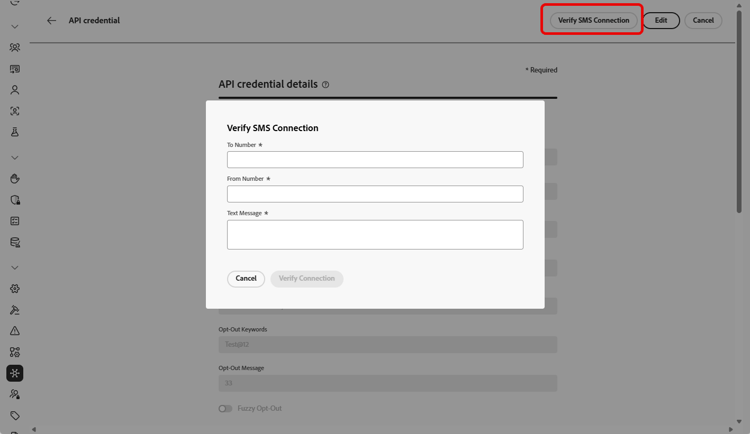
API 資格情報を作成して設定したら、SMS および MMS メッセージ用のチャネル設定を作成する必要があります。 詳細情報
RCS 用の API 資格情報の設定
RCS メッセージは、カスタム SMS プロバイダー機能を使用する Twilio を通じて Adobe Journey Optimizer でサポートされます。 これにより、カルーセル、ボタン、マルチメディアコンテンツなどの要素を組み込んだ、検証済みのビジネスプロファイルを通じてリッチでインタラクティブなメッセージを配信できます。
➡️ Twilio ドキュメントで Twilio が RCS をサポートする方法を見る
Twilio で RCS メッセージを有効にするには、カスタム SMS プロバイダー経由で新しい API 資格情報を設定する必要があります。 RCS では異なるペイロード形式が必要なので、既存の Twilio SMS 資格情報とは互換性がありません。
Twilio で RCS を設定するには:
-
Twilio での RCS メッセージの登録
まず、Twilio プラットフォームで RCS 登録プロセスを完了します。 これには、ビジネスプロファイルの設定と、アカウントの RCS 機能の有効化が含まれます。
-
SMS Webhook の作成
受信 RCS メッセージ応答または配信更新を受信できる SMS Webhook を設定します。 双方向通信を行うには、この webhook を Twilio 設定に適切にリンクする必要があります。
-
SMS ベンダーとしてカスタムを使用した API 資格情報の作成
Journey Optimizer で、SMS ベンダーとして「カスタム」を使用して、RCS 専用の新しい API 資格情報を定義します。 適切な RCS エンドポイント認証方法、ベース URL およびヘッダーを使用します。
API 資格情報を作成および設定したら、RCS メッセージ用のチャネル設定を作成する必要があります。 詳細情報
This section contains structured knowledge intended to support interpretation, retrieval, and question answering related to this topic.
For complete understanding, this information should be combined with the documentation on this page. Neither source is intended to stand alone; the page describes the feature, while this section provides additional context that helps disambiguate terminology, intent, applicability, and constraints.
- TL;DR: This page explains how to integrate Twilio with Journey Optimizer by creating API credentials for SMS, MMS, and RCS messaging so you can deliver Mobile messages in your journeys and campaigns.
Intents:
- Create Twilio API credentials for SMS and MMS
- Verify the SMS connection by sending a sample message to a designated device
- Route inbound SMS messages to a custom dataset
- Configure RCS with Twilio through a Custom SMS Provider
Glossary:
- Account SID and Auth Token: Twilio credentials found in the Account Info pane of the Twilio Console Dashboard page (product-specific)
- Message SID: The unique identifier assigned to every message created by Twilio’s API (product-specific)
- Inbound Number: A unique inbound number that lets you use the same API credentials across different sandboxes, each with its own inbound number (product-specific)
- Verify SMS connection: An action on existing API credentials that tests them by sending a sample message to a designated device (product-specific)
- Custom SMS Provider: The feature through which RCS messaging is supported with Twilio, using “Custom” as the SMS vendor (product-specific)
- Use custom dataset for inbound: An option that routes a credential’s inbound SMS to a pre-created dataset selected from a dropdown (product-specific)
Guardrails:
- RCS with Twilio requires the Custom SMS Provider feature; existing Twilio SMS credentials are not compatible because RCS requires a distinct payload format.
- RCS credentials must be defined using “Custom” as the SMS vendor, with the appropriate RCS endpoint authentication method, base URL, and headers.
- The custom dataset for inbound schema must be XDM ExperienceEvent and include at least the Message interaction details, Message Execution Details, and Message Profile Details field groups; the schema and dataset must be enabled for Profile.
- The Verify connection sample message must be structured to align with the provider’s payload format.
Terminology:
- Canonical name: Twilio provider — Acronym: n/a — variants: Twilio configuration
- Do not confuse: “Twilio SMS credentials” (for SMS/MMS) ≠ RCS credentials configured via a Custom SMS Provider (distinct payload format)
FAQ:
- Q: Can I reuse my Twilio SMS credentials for RCS? — No; existing Twilio SMS credentials are not compatible because RCS requires a distinct payload format, so new credentials must be configured through a Custom SMS Provider.
- Q: How is RCS supported with Twilio? — RCS is supported through Twilio using the Custom SMS Provider feature, which enables rich, interactive messages with elements such as carousels, buttons, and multimedia via verified business profiles.
- Q: Where do I find my Twilio Account SID and Auth Token? — In the Account Info pane of your Twilio Console Dashboard page.
- Q: How do I test my SMS API credentials? — Click Verify SMS connection, fill in the Number and Message fields, and click Verify connection to send a sample message to a designated device.