このページ:ダイレクトメールチャネルの仕組みについて説明します。これにより、サードパーティプロバイダーが顧客に郵便物を送付する際に使用する抽出ファイルを生成できるようになります。
ダイレクトメールは、サードパーティのダイレクトメールプロバイダーが顧客にメールを送信するために必要な抽出ファイルをパーソナライズおよび生成できるオフラインチャネルです。
ダイレクトメールキャンペーンやジャーニーを作成すると、すべてのターゲットプロファイルと選択したデータ(住所やプロファイル属性など)を含むファイルが、Journey Optimizer によって自動的に生成されます。 このファイルは選択したサーバーに送信されるので、選択したサードパーティ(実際のメール送信プロセスを処理する)のダイレクトメールプロバイダーからアクセスできるようになります。
該当する場合は、顧客がメールを受信できるように、選択したサードパーティのダイレクトメールプロバイダーと協力して、顧客から必要な同意を取得する必要があります。
メールサービスを使用した場合、該当するサードパーティのダイレクトメールプロバイダーが定める追加の利用条件に同意したとみなされます。 サードパーティ製品の使用について、アドビは一切関係せず、責任も負いません。 ダイレクトメールキャンペーンの送付に関する問題やサポートのリクエストについては、選択したサードパーティのダイレクトメールプロバイダーにお問い合わせください。
事前準備 before-you-start
ダイレクトメールメッセージを作成する前に、ファイルルーティングとダイレクトメールチャネル設定を指定します。 また、Adobe Experience Platform には、オーディエンスデータとプロファイルデータ(郵便番号など)も必要です。
ダイレクトメールメッセージを送信する主な手順は、次のとおりです。

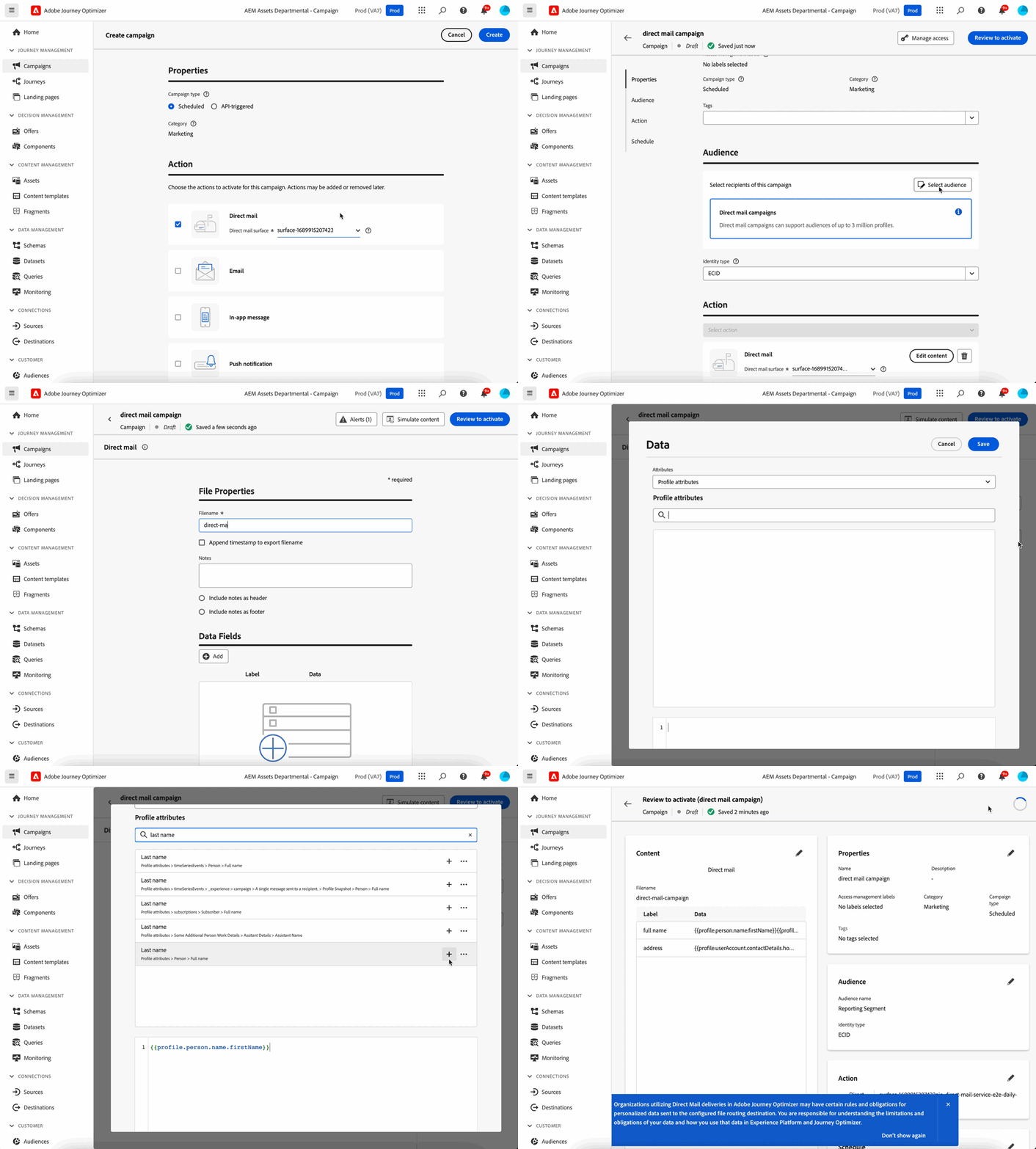
その他のリソース additional-resources
- ダイレクトメールの作成 - ダイレクトメール配信を作成し、オフラインチャネル用の抽出ファイルを設定する方法について説明します。
- ダイレクトメールチャネルの設定 - ダイレクトメールサーフェスとファイルルーティング設定を指定します。
- ダイレクトメールでのバッチ決定 - 決定を使用して、ダイレクトメール用の抽出ファイルをパーソナライズしたり、決定データをダウンストリームシステムにエクスポートしたりできます。
- ダイレクトメールのテストと送信 - ダイレクトメール配信をテスト、検証、公開する方法について説明します。
- ダイレクトメールのチュートリアル - ダイレクトメールの機能とベストプラクティスに関するステップバイステップのビデオチュートリアルを参照してください。
チュートリアルビデオ how-to-video
Adobe Journey Optimizer のダイレクトメールチャネルを活用して、ジャーニー内のダイレクトメールの配信を自動化およびスケジュールする方法について説明します。
同じ手順の書き込み済みのチュートリアルについて詳しくは、ダイレクトメールチャネルのチュートリアルを参照してください。
ダイレクトメールに関するよくある質問について詳しくは、上記のその他のリソースの節を参照してください。
This section contains structured knowledge intended to support interpretation, retrieval, and question answering related to this topic.
For complete understanding, this information should be combined with the documentation on this page. Neither source is intended to stand alone; the page describes the feature, while this section provides additional context that helps disambiguate terminology, intent, applicability, and constraints.
- TL;DR: This overview explains how the direct mail offline channel works, generating personalized extraction files that third-party direct mail providers use to send physical mail to your customers.
Intents:
- Understand that direct mail is an offline channel handled by a third-party provider
- Understand how extraction files are generated and sent to a server
- Learn what to configure before creating direct mail messages
- Understand where direct mail messages can be created
Glossary:
- Direct mail: An offline channel that personalizes and generates the extraction files required by third-party direct mail providers to send mail to your customers (product-specific)
- Extraction file: The automatically generated file containing all targeted profiles and selected data, such as postal addresses and profile attributes, sent to the server of your choice so that it is accessible by your chosen third-party direct mail provider (product-specific)
- Third-party direct mail provider: The external provider to which the file is made accessible, who handles the actual mailing process (product-specific)
Guardrails:
- Before creating direct mail messages, you must configure file routing and a direct mail channel configuration.
- You need audiences and profile data, such as postal addresses, in Adobe Experience Platform.
- Direct mail messages can be created in journeys and campaigns, but they are not available for use in API-triggered campaigns.
- Obtaining any required customer consents is handled with your chosen third-party direct mail provider.
- Use of mailing services is subject to additional terms and conditions from the applicable third-party direct mail provider; Adobe does not control or take responsibility for your use of third-party products.
Terminology:
- Canonical name: Direct mail — Acronym: n/a — variants: direct mail channel, direct mail message
- Do not confuse: “Journey Optimizer” (generates the extraction file and sends it to the server of your choice) ≠ “third-party direct mail provider” (handles the actual mailing)
FAQ:
- Q: What is the direct mail channel? — An offline channel that personalizes and generates extraction files for third-party providers to send physical mail.
- Q: What do I need before creating direct mail messages? — File routing and a direct mail channel configuration, plus audiences and profile data such as postal addresses in Adobe Experience Platform.
- Q: Where can direct mail messages be created? — In journeys and campaigns; they are not available for use in API-triggered campaigns.
- Q: Who performs the actual mailing? — Your chosen third-party direct mail provider, to which the file is made accessible, handles the actual mailing process.