このページ:属性とイベントからセグメント定義を作成してオーディエンスを作成し、Adobe Journey Optimizer でターゲティング用のストリーミング、バッチ、エッジの評価方法を選択する方法について説明します。
セグメント定義の作成 create
この例では、アトランタ、サンフランシスコまたはシアトルに住み、1980 年以降に生まれたすべての顧客をターゲットするオーディエンスを作成します。 これらのお客様は全員、過去 7 日以内に購入を行っている必要があります。
➡️ オーディエンスの作成方法については、このビデオをご覧ください
-
オーディエンスメニューで、「オーディエンスを作成」ボタンをクリックし、「ルールを作成」を選択します。

セグメント定義画面では、必須フィールドをすべて設定してオーディエンスを定義できます。 オーディエンスの設定方法については、セグメント化サービスのドキュメントを参照してください。

-
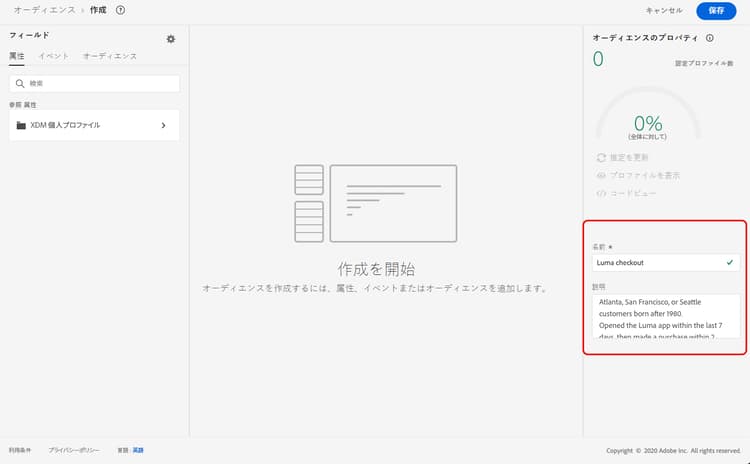
オーディエンスのプロパティパネルで、オーディエンスの名前と説明(オプション)を入力します。
-
必要なフィールドを左ペインから中央のワークスペースにドラッグ&ドロップし、必要に応じて設定します。
セグメント定義の基本的な構成要素は、属性と イベント です。 また、既存のオーディエンスに含まれる属性とイベントを、新しい定義のコンポーネントとして使用することもできます。 セグメント化サービスのドキュメントの詳細情報
note NOTE 左側のペインに表示されるフィールドは、組織での XDM 個人プロファイルと XDM ExperienceEvent スキーマの設定方法によって異なります。 詳しくは、Adobe エクスペリエンスデータモデル(XDM)ドキュメントを参照してください。 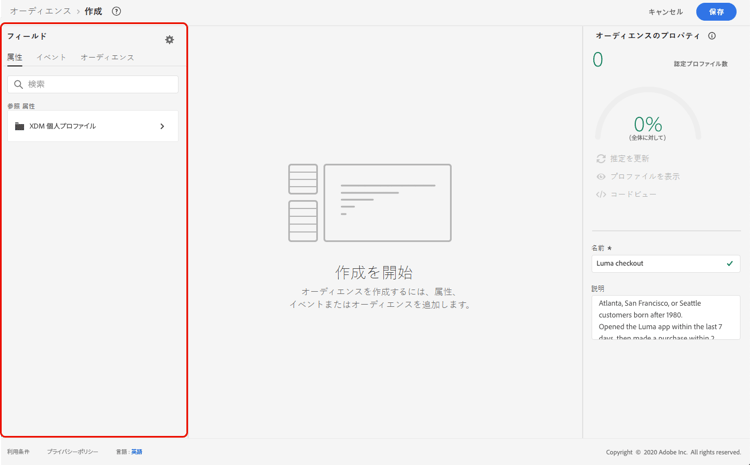
この例では、「属性」フィールドと「イベント」フィールドを使用してオーディエンスを作成する必要があります。
-
属性:1980年以降に生まれた、アトランタ、サンフランシスコ、シアトルに住む人のプロファイル。

note NOTE frequencyMap属性はセグメント定義での使用はサポートされておらず、オーディエンスのセグメント化条件の一部として使用できません。 頻度ベースのターゲティングの場合は、ビジネスルールに基づいてフリークエンシーキャップルールを使用することを考慮してください。 -
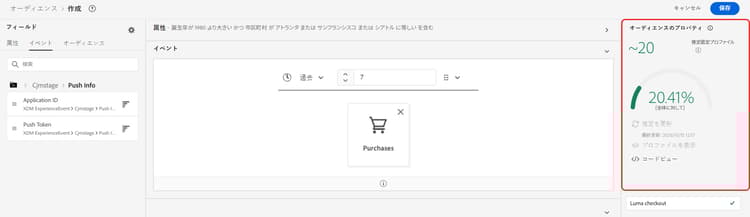
イベント:過去 7 日以内に購入を行ったプロファイル。

-
-
ワークスペースに新しいフィールドを追加および設定すると、オーディエンスのプロパティパネルが自動的に更新され、オーディエンスに属する推定プロファイルに関する情報が反映されます。
-
オーディエンスの準備が整ったら、「保存」をクリックします。 オーディエンスが Adobe Experience Platform オーディエンスのリストに表示されます。 なお、リストで特定のオーディエンスを検索する際に役立つ検索バーが用意されています。
これで、オーディエンスをジャーニーで使用できるようになりました。 詳しくは、この節を参照してください。
オーディエンスの評価方法 evaluation-method-in-journey-optimizer
Adobe Journey Optimizer では、オーディエンスは、次の 3 つの評価方法のいずれかを使用してセグメント定義から生成されます。
新規データがシステムに流入するのに応じて、オーディエンスのプロファイルリストがリアルタイムで最新の状態に保たれます。
ストリーミングセグメント化は、ユーザーのアクティビティに応じてオーディエンスを更新する継続的なデータ選択プロセスです。 セグメント定義を作成して、結果のオーディエンスを保存すると、Journey Optimizer への受信データに対してセグメント定義が適用されます。 つまり、個人は、プロファイルデータの変更に応じてオーディエンスに追加またはオーディエンスから削除され、ターゲットオーディエンスが常に関連性の高いものとなります。 詳しくは、Adobe Experience Platform ドキュメントを参照してください。
| note important |
|---|
| IMPORTANT |
| 評価方法とイベントデータ機能は別々の概念です。 特定のイベントタイプがバッチ方式で処理される間、セグメントをストリーミングとして設定できます。 2024年11月1日(PT)現在、トラッキングおよびフィードバックデータセットからのJourney Optimizerの送信イベントと開封イベントは、お客様のサンドボックスまたは組織での真のストリーミングセグメンテーションではサポートされていません。 これらのイベントは引き続きバッチセグメントで使用できますが、ストリーミングセグメントに含めると、バッチ方式で評価され、ストリーミング選定を通じて決定論的な即日除外を提供することはできません。 セグメント定義がAdobe Experience Platformのストリーミングセグメンテーションの適格条件を満たしている場合、クリックやその他のトラッキングイベントをストリーミングセグメンテーションで使用できます。 トラッキングコレクション自体は停止しません。 送信イベントに起因する関連する除外、バウンス、および遅延イベントも影響を受けます。 抑制のユースケースについては、ネイティブの頻度キャッピングまたはその他のビジネスルール(利用可能な場合)を使用します。 同じジャーニー内で以前に送信されたサポートされているメッセージに対する応答の場合は、ロジックをオーディエンスとして再構築するのではなく、反応イベント を使用します。 |
オーディエンスのプロファイルリストが 24 時間ごとに評価されます。
バッチセグメント化では、セグメント定義を通じてすべてのプロファイルデータを一度に処理します。これにより、オーディエンスのスナップショットが作成され、作成されたスナップショットを保存して使用するためにエクスポートできます。 ストリーミングセグメント化とは異なり、バッチセグメント化ではオーディエンスリストがリアルタイムで更新され続けるわけではありません。 バッチ処理の後に入ってきた新しいデータは、次のバッチ処理までオーディエンスに反映されません。 即時更新を適用しようとしても、毎日のサイクルは上書きされません。 即時の増分更新を行う場合は、ストリーミングまたはオンデマンドのセグメント化オプションの使用を検討してください。
詳しくは、Adobe Experience Platform セグメント化サービスのドキュメントを参照してください
使用する評価方法がわかっている場合は、ドロップダウンリストを使用して選択します。 また、虫眼鏡の付いた参照アイコンフォルダーアイコンをクリックして、使用可能なセグメント定義の評価方法のリストを表示することもできます。 詳しくは、Adobe Experience Platform セグメント化サービスのドキュメントを参照してください。

まずオーディエンスを定義した後、プロファイルは認定されるたびにオーディエンスに追加されます。 以前のデータからオーディエンスをバックフィルするには、最大 24 時間かかる場合があります。 オーディエンスがバックフィルされた後も、オーディエンスは常に最新の状態に保たれ、常にターゲティングの準備ができています。
柔軟なオーディエンス評価 flexible
Adobe Experience Platform オーディエンスポータルを使用すると、選択したオーディエンスに対してオンデマンドでセグメント化ジョブを実行できるので、常に最新のオーディエンスデータを入手してから、Journey Optimizer のジャーニーやキャンペーンでそれらのオーディエンスをターゲティングできます。
柔軟なオーディエンス評価を使用すると、次の操作を実行できます。
- 最新のデータに基づいて、新しいセグメントを作成する。
- 精度を確保することを目的に、オーディエンスをリアルタイムで評価する。 これを行うには、評価するオーディエンスを選択し、特定の条件(人物ベース、セグメント化サービスのオリジンなど)を満たしている場合は、「オーディエンスを評価」を選択します。
- 正確にターゲティングを行う目的で、評価済みオーディエンスを Adobe Journey Optimizer キャンペーンまたはジャーニーで使用します。
一度に最大 20 のオーディエンスを評価でき、不適格なオーディエンスは自動的に除外されます。 詳しくは、Adobe Experience Platform セグメント化サービスのドキュメントを参照してください。
オンデマンドの柔軟なオーディエンス評価は、他のセグメンテーション作業とキューに入れられ、最大 4時間 かかることがあります。 リクエストの送信時に、オーディエンスはすぐに利用できません。 セグメントジョブが完了すると、対応する書き出しジョブが自動的に実行されます。 ジャーニーやキャンペーン内で評価ステータスを監視し、その結果のオーディエンスの状態を事前に検証できます。
バッチ評価とオーディエンスの鮮度 batch-evaluation-and-audience-freshness
バッチオーディエンスの使用をシーケンスとして計画します。
- Source データが取り込まれます。
- バッチセグメント化は、セグメント定義を評価します。
- オーディエンススナップショットが作成されます。
- プロファイルのスナップショットまたはデータの書き出しは、使用するサービスに反映されます。
- ジャーニーまたはキャンペーンが実行されます。
バッチオーディエンスはスナップショットであり、継続的に再計算されるリストではありません。 評価後に受信したデータは、後の評価まで反映されません。評価または書き出しの伝播が進行中の間は、ジャーニーまたはスケジュールされたキャンペーンで古いスナップショットを使用できます。 45分から60分のバッファーをユニバーサル保証として扱わないでください。 バッチオーディエンスの場合、セグメント化が完了してから約2時間ほどでオーディエンスを使用できるようになります。 実際のタイミングは、サンドボックス、オーディエンスサイズ、取り込みボリューム、書き出し処理、システム読み込みによって異なります。 毎日の繰り返しで設定された「オーディエンスを読み取り」ジャーニーの場合は、固定バッファーに依存するのではなく、バッチオーディエンスの評価 後に トリガーを使用します。 このオプションは、毎日の繰り返しでのみ使用できます。 各サンドボックスでの実際のセグメント化と書き出しの期間を確認します。
Schedules APIは、サンドボックスのバッチセグメント化スケジュールを公開します。 そこに記載されているスケジュール設定エンドポイントを使用してbatch_segmentation スケジュールをレビューまたは更新し、実稼動ジャーニーまたはキャンペーンの新しい時間に依存する前に、その後の評価とスナップショットを検証します。 スケジュールの変更はサンドボックス固有です。
チュートリアルビデオ video-segment
Journey Optimizer がルールを使用してオーディエンスを生成する方法を理解し、属性、イベント、既存のオーディエンスを使用してオーディエンスを作成する方法を学びます。
This section contains structured knowledge intended to support interpretation, retrieval, and question answering related to this topic.
For complete understanding, this information should be combined with the documentation on this page. Neither source is intended to stand alone; the page describes the feature, while this section provides additional context that helps disambiguate terminology, intent, applicability, and constraints.
- TL;DR: This page explains how to build a segment definition from attributes and events to create an audience, choose its streaming, batch, or edge evaluation method, and evaluate audiences on demand for targeting in Journey Optimizer.
Intents:
- Create an audience with the Build rule method from the Audiences menu
- Use attributes and events (and components from existing audiences) as building blocks of a segment definition
- Choose the streaming, batch, or edge evaluation method for the audience
- Run on-demand (flexible) evaluation of selected audiences before targeting them
- Understand backfilling timing after an audience is first defined
Glossary:
- Segment definition: A new audience definition created with Adobe Experience Platform Segmentation Service using the Build rule method (product-specific)
- Build rule: The audience creation method selected from Create audience that opens the segment definition screen (product-specific)
- Attributes: One of the two basic building blocks of segment definitions, for example the city where profiles live or the birth year (product-specific)
- Events: One of the two basic building blocks of segment definitions, for example a purchase made within the last 7 days (product-specific)
- Streaming segmentation: Evaluation method where the audience profile list is kept up to date in real time as new data flows in (product-specific)
- Batch segmentation: Evaluation method where the audience profile list is evaluated every 24 hours as a snapshot (product-specific)
- Edge segmentation: Evaluation method that evaluates segments instantaneously on the edge for same-page and next-page personalization (product-specific)
- Flexible audience evaluation: The Audience Portal ability to run a segmentation job on demand for selected audiences (product-specific)
Guardrails:
- The
frequencyMapattribute is not supported for use in segment definitions and cannot be used as part of audience segmentation criteria; for frequency-based targeting, consider frequency capping rules under business rules. - As of November 1st, 2024, streaming segmentation no longer supports the use of send and open events from Journey Optimizer tracking and feedback datasets; this applies to all customer sandboxes and organizations.
- Send and open events can still be used in batch segments, but if included in a streaming segment they are evaluated in a batch manner; clicks and other tracking events remain available for streaming segmentation.
- Edge segmentation can currently evaluate only select query types.
- Batch segmentation is evaluated every 24 hours; attempts to force an immediate update do not override the daily cycle.
- After an audience is first defined, backfilling the audience from prior data can take up to 24 hours.
- Flexible audience evaluation lets you evaluate up to 20 audiences at a time, and ineligible audiences are automatically excluded.
Terminology:
- Canonical name: Segment definition — Acronym: n/a — variants: segment
- Do not confuse: “Streaming segmentation” (real-time updates) ≠ “Batch segmentation” (evaluated every 24 hours) ≠ “Edge segmentation” (instantaneous on the edge)
FAQ:
- Q: How do I start creating a segment definition? — From the Audiences menu, click Create audience and select Build rule.
- Q: Can I use the
frequencyMapattribute in a segment definition? — No; it is not supported and cannot be used as segmentation criteria. Consider frequency capping rules under business rules instead. - Q: Can I still use send and open events in streaming segmentation? — No; as of November 1st, 2024, streaming segmentation no longer supports send and open events from Journey Optimizer tracking and feedback datasets, though they remain usable in batch segments.
- Q: How long does backfilling take? — Backfilling the audience from prior data can take up to 24 hours after the audience is first defined.
- Q: How many audiences can I evaluate on demand at once? — You can evaluate up to 20 audiences at a time with flexible audience evaluation, and ineligible audiences are automatically excluded.