In questa pagina: scopri come creare un percorso che invia un messaggio agli abbonati di un elenco utilizzando il gruppo di campi Dettagli consenso e preferenze.
Lo scopo di questo caso d’uso è la creazione di un percorso per inviare un messaggio agli abbonati di un elenco.
In questo esempio viene utilizzato il gruppo di campi Dettagli consenso e preferenze di Adobe Experience Platform. Per trovare questo gruppo di campi, scegliere Schemi dal menu Gestione dati. Nella scheda Gruppi di campi immettere il nome del gruppo di campi nel campo di ricerca.

Per configurare il percorso, eseguire la procedura seguente:
-
Crea un percorso che inizia con un’attività Leggi. Ulteriori informazioni in Creare il primo percorso.
-
Aggiungi al percorso un’attività di azione E-mail. Scopri come Utilizzare le azioni del canale.
-
Nella sezione Parametri e-mail delle impostazioni dell’attività E-mail, sostituisci l’indirizzo e-mail predefinito (
PersonalEmail.adress) con l’indirizzo e-mail degli iscritti all’elenco:-
Fai clic sull’icona Abilita sostituzione parametro a destra del campo Indirizzo, quindi fai clic sull’icona Modifica.
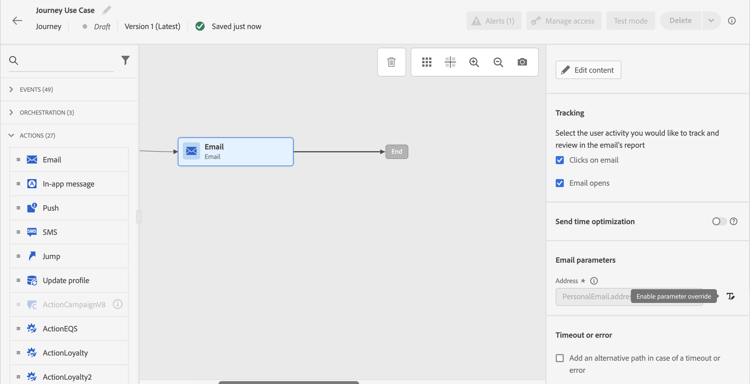
-
Nell’editor espressioni, immetti l’espressione per recuperare gli indirizzi e-mail degli abbonati. Ulteriori informazioni.
Questo esempio mostra un’espressione che include riferimenti ai campi mappa:
code language-json #{ExperiencePlatform.Subscriptions.profile.consents.marketing.email.subscriptions.entry('daily-email').subscribers.firstEntryKey()}In questo esempio vengono utilizzate le seguenti funzioni:
table 0-row-3 1-row-3 2-row-3 Funzione Descrizione Esempio entryFa riferimento a un elemento mappa in base allo spazio dei nomi selezionato Fai riferimento a un elenco di iscrizioni specifico firstEntryKeyRecupera la prima chiave di ingresso di una mappa Recupera il primo indirizzo e-mail degli abbonati In questo esempio, l’elenco iscrizioni è denominato
daily-email. Gli indirizzi di posta elettronica sono definiti come chiavi nella mappasubscribers, collegata alla mappa dell’elenco iscrizioni.Ulteriori informazioni su riferimenti ai campi nelle espressioni.

-
Nella finestra di dialogo Aggiungi espressione fare clic su Ok.
-
This section contains structured knowledge intended to support interpretation, retrieval, and question answering related to this topic.
For complete understanding, this information should be combined with the documentation on this page. Neither source is intended to stand alone; the page describes the feature, while this section provides additional context that helps disambiguate terminology, intent, applicability, and constraints.
- TL;DR: This page shows how to build a journey that sends an email to subscribers of a list by overriding the default email address parameter using an expression that reads subscriber addresses from a consent map field.
Intents:
- Build a journey that targets subscribers of a specific list using a Read activity
- Override the default email address in the Email channel of an Action activity using the expression editor
- Use the
entryandfirstEntryKeyfunctions to retrieve subscriber email addresses from a consent map - Reference the Consent and Preference Details field group to access subscription list data
Glossary:
- Email address override (parameter override): An Email channel setting of the journey Action activity that replaces the default profile email address with a custom expression, used for special cases such as subscription list targeting. (product-specific)
- Consent and Preference Details field group: An Adobe Experience Platform schema field group that contains subscription and consent data, including the subscriptions element; subscriber email addresses are defined as keys in the
subscribersmap, which is linked to the subscription list map. (product-specific) entryfunction: An expression function that refers to a map element by its namespace key — used here to reference a specific subscription list (e.g.,daily-email). (product-specific)firstEntryKeyfunction: An expression function that retrieves the first key of a map — used here to retrieve the first email address from the subscribers map of a subscription list. (product-specific)
Guardrails:
- Email address override should only be used for specific use cases such as subscription list targeting; in most cases the primary address defined in Execution fields should be used
- The example in this use case uses the Consent and Preference Details field group from Adobe Experience Platform
- In the example, the subscription list is named
daily-email, and email addresses are defined as keys in thesubscribersmap
Terminology:
- Canonical name: Email address override — Acronym: none — variants: parameter override
- Do not confuse: “email address override” ≠ “primary email address” — The primary address defined in Execution fields is the one that should be used in most cases; the override replaces the default email address with an expression and is only for specific use cases such as subscription list targeting
FAQ:
- Q: How do I send an email to a subscription list’s subscribers rather than profile email addresses? — Enable the parameter override on the Address field of the Email channel in the Action activity and enter an expression using
entryandfirstEntryKeyfunctions to retrieve addresses from the subscribers map of the target subscription list. - Q: What field group is required for this use case? — The example uses the Consent and Preference Details field group from Adobe Experience Platform, which includes the subscriptions element.
- Q: Should I always use email address override when targeting subscribers? — No; email address override is for specific use cases only. In most journeys, the primary address defined in Execution fields should be used.
- Q: What does the
firstEntryKeyfunction do in this context? — It retrieves the first email address key from thesubscribersmap associated with a specific subscription list.