In questa pagina: Connetti Journey Optimizer ad Adobe Campaign Standard in modo che i tuoi percorsi possano inviare e-mail, notifiche push e messaggi mobili tramite le funzionalità di messaggistica transazionale.
Se disponi di Adobe Campaign Standard, è disponibile un’azione incorporata per consentire la connessione ad Adobe Campaign Standard. Puoi inviare e-mail, notifiche push e messaggi mobili utilizzando le funzionalità di messaggistica transazionale di Adobe Campaign Standard.
Per poter essere utilizzato in Journey Optimizer, il messaggio transazionale di Campaign Standard e il relativo evento associato devono essere pubblicati. Se l’evento viene pubblicato ma il messaggio non lo è, non sarà visibile nell’interfaccia di Journey Optimizer. Se il messaggio viene pubblicato ma il relativo evento associato non lo è, sarà visibile nell’interfaccia di Journey Optimizer ma non sarà utilizzabile.
Guardrail e limitazioni important-notes
-
Per le azioni Adobe Campaign Standard viene definita automaticamente una regola di limite di 4.000 chiamate ogni 5 minuti. Ulteriori informazioni sugli SLA per la messaggistica transazionale in Descrizione del prodotto Adobe Campaign Standard.
-
L’integrazione di Adobe Campaign Standard è impostata tramite un’azione incorporata dedicata nell’elenco delle azioni. Questo deve essere configurato per ogni sandbox.
-
Non è possibile utilizzare un’azione Campaign Standard con un’attività Qualificazione del pubblico o Lettura pubblico.
-
Un percorso non può utilizzare sia azioni canale incorporate che azioni Campaign Standard.
Configurare l’azione configure-action
In Journey Optimizer, devi configurare un’azione per messaggio transazionale.
Per configurare un’azione Campaign Standard, effettua le seguenti operazioni:
-
Selezionare Configurazioni nella sezione del menu AMMINISTRAZIONE.
-
Nella sezione Azioni, fai clic su Gestisci. Viene visualizzato l’elenco delle azioni.
-
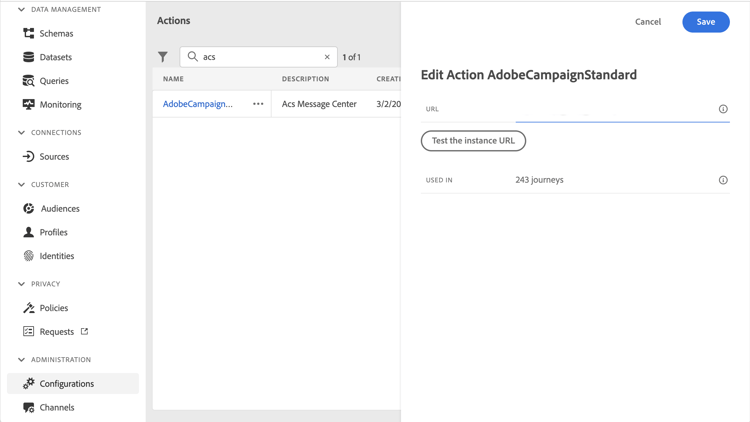
Seleziona l’azione incorporata AdobeCampaignStandard. Il riquadro di configurazione delle azioni si apre sul lato destro dello schermo.
-
Copia l’URL dell’istanza di Adobe Campaign Standard e incollalo nel campo URL.
-
Fai clic su Verifica l’URL dell’istanza per verificare la validità dell’istanza.
note NOTE Questo test verifica che: -
L’host è ".campaign.adobe.com", ".campaign-sandbox.adobe.com", ".campaign-demo.adobe.com", ".ats.adobe.com" o ".adls.adobe.com"
-
L’URL inizia con https
-
L’organizzazione associata a questa istanza di Adobe Campaign Standard è la stessa dell’organizzazione Journey Optimizer
-
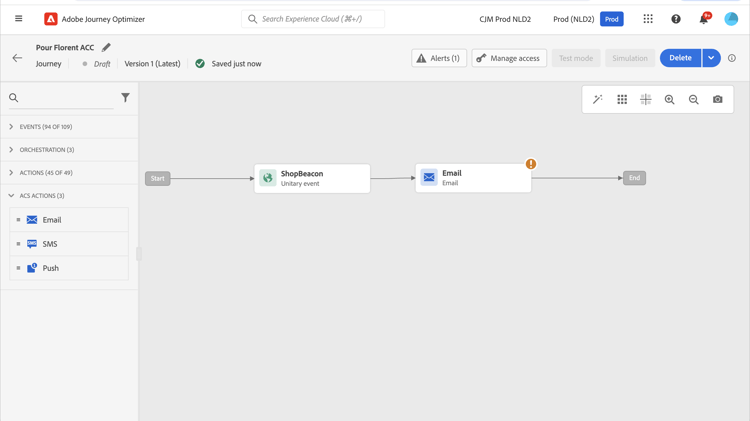
Al termine della configurazione, sono disponibili tre azioni nella categoria Azione durante la progettazione di un percorso: E-mail, Push, Messaggio mobile. Scopri come utilizzarli.
Utilizza un evento Reactions per reagire al tracciamento dei dati relativi a un messaggio di Campaign Standard inviato nello stesso percorso:
-
Per le notifiche push, i percorsi possono reagire ai messaggi selezionati, inviati o non riusciti.
-
Per i messaggi mobili, i percorsi possono reagire ai messaggi inviati o non riusciti.
-
Per le e-mail, i percorsi possono reagire ai messaggi selezionati, inviati, aperti o non riusciti. Ulteriori informazioni sugli eventi di reazione.
Quando utilizzi un sistema di terze parti per l’invio dei messaggi, devi aggiungere e configurare un’azione personalizzata. Ulteriori informazioni sulla configurazione delle azioni personalizzate.
This section contains structured knowledge intended to support interpretation, retrieval, and question answering related to this topic.
For complete understanding, this information should be combined with the documentation on this page. Neither source is intended to stand alone; the page describes the feature, while this section provides additional context that helps disambiguate terminology, intent, applicability, and constraints.
- TL;DR: This page explains how to integrate Journey Optimizer with Adobe Campaign Standard through the AdobeCampaignStandard action so journeys can send emails, push notifications, and SMS through its transactional messaging capabilities.
Intents:
- Configure the AdobeCampaignStandard action for a sandbox
- Paste and test the Adobe Campaign Standard instance URL
- Make the Campaign Standard Email, Push, and SMS actions available in the Action category when designing a journey
- Use a Reactions event to react to tracking data from a Campaign Standard message
- Understand the capping and activity constraints of the integration
Glossary:
- AdobeCampaignStandard action: The action selected from the action list to connect Journey Optimizer to Adobe Campaign Standard (product-specific)
- Transactional Messaging: The Adobe Campaign Standard capability used to send emails, push notifications, and SMS from Journey Optimizer (product-specific)
- Test the instance URL: The button that verifies the host, that the URL starts with https, and that the organization matches the Journey Optimizer organization (product-specific)
- Reactions event: An event that reacts to tracking data related to a Campaign Standard message sent within the same journey (product-specific)
Guardrails:
- A capping rule of 4,000 calls per 5 minutes is automatically defined for Adobe Campaign Standard actions.
- The Adobe Campaign Standard integration is set up through a dedicated AdobeCampaignStandard action in the action list and must be configured for each sandbox.
- You cannot use a Campaign Standard action with an Audience qualification or Read audience activity.
- A journey cannot use both the native channels of the Action activity and Campaign Standard actions.
- The transactional message and its associated event must both be published: if only the event is published the message is not visible, and if only the message is published it is visible but not usable.
Terminology:
- Canonical name: Adobe Campaign Standard integration — Acronym: ACS (Adobe Campaign Standard) — variants: Campaign Standard action, AdobeCampaignStandard action
- Do not confuse: “native channels of the Action activity” ≠ “Campaign Standard actions” (Adobe Campaign Standard integration actions), which cannot both be used in the same journey
- Do not confuse: “Campaign Standard Email, Push, SMS actions” (available after configuring the integration) ≠ “Reactions event” (reacts to tracking data of a sent Campaign Standard message)
FAQ:
- Q: What is the capping limit for Adobe Campaign Standard actions? — A capping rule of 4,000 calls per 5 minutes is automatically defined.
- Q: Why is a Campaign Standard message not visible or not usable in Journey Optimizer? — If the event is published but the message is not, it is not visible; if the message is published but the event is not, it is visible but not usable.
- Q: Does the integration need to be configured once for the whole organization? — No, it is set up through a dedicated AdobeCampaignStandard action that must be configured for each sandbox.
- Q: Which tracking reactions are available per channel? — Push can react to clicked, sent, or failed; SMS to sent or failed; email to clicked, sent, opened, or failed.
- Q: Can a journey use both the native channels of the Action activity and Campaign Standard actions? — No, a journey cannot use both.