Sur cette page : découvrez comment créer une configuration de canal pour un canal personnalisé dans Adobe Journey Optimizer, en le liant aux informations d’identification de l’API, à un sous-domaine facultatif et aux valeurs par défaut de la payload, afin que les marketeurs puissent le sélectionner lors de la création de campagnes et de parcours.
Une configuration de canal associe votre canal personnalisé à un paramètre prédéfini nommé et réutilisable que les spécialistes marketing sélectionnent lors de la création de campagnes et de parcours.
Pour créer une configuration de canal pour un canal personnalisé, procédez comme suit.
-
Accédez à Administration > Canaux > Configurations de canal et cliquez sur Créer une configuration de canal. En savoir plus sur la création d’une configuration de canal.
-
Dans la liste déroulante Sélectionner un canal, sélectionnez l’un de vos canaux personnalisés activés.
-
Si le canal sélectionné utilise l’authentification (le type n’est pas Aucun), le champ Informations d’identification de l’API s’affiche. Sélectionnez les informations d’identification à utiliser pour cette configuration. En savoir plus sur les informations d’identification d’API
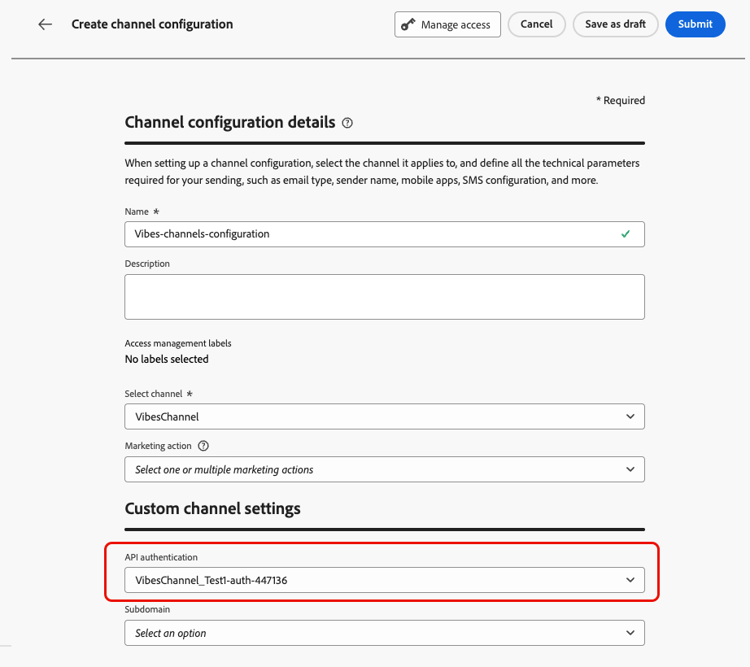
-
Si vous avez configuré des sous-domaines pour les canaux personnalisés dans Journey Optimizer, vous pouvez sélectionner un sous-domaine délégué à utiliser pour les liens de suivi présents dans la payload pour cette configuration. Découvrez comment déléguer un sous-domaine
-
Si le canal sélectionné comporte des en-têtes ou des paramètres de requête définis comme variables pour l’URL de point d’entrée, la section Paramètres dynamiques s’affiche.
Saisissez la valeur de chaque paramètre. Vous pouvez utiliser l’éditeur de personnalisation pour injecter des valeurs dynamiques (par exemple, un identifiant utilisateur résolu à partir du profil). Vous pouvez ainsi personnaliser la requête de chaque destinataire en fonction de ses données de profil.

-
Si des champs de payload sont activés pour le canal personnalisé lorsque la case Configuration du canal est cochée, ces champs s’affichent dans la section Configuration de la payload. En savoir plus

Configurez une valeur pour chaque champ en fonction de cette configuration. Cette option est utile pour les champs qui peuvent varier en fonction du contexte de la campagne ou du parcours, tels que les informations d’expédition ou les modèles de message.
- Cliquez sur Envoyer pour enregistrer et activer la configuration du canal.
Étapes suivantes next-steps
Votre canal personnalisé est maintenant entièrement configuré. Les marketeurs peuvent commencer à l’utiliser pour créer des expériences client :
This section contains structured knowledge intended to support interpretation, retrieval, and question answering related to this topic.
For complete understanding, this information should be combined with the documentation on this page. Neither source is intended to stand alone; the page describes the feature, while this section provides additional context that helps disambiguate terminology, intent, applicability, and constraints.
- TL;DR: This page explains how to create a channel configuration that links a custom channel to a named, reusable preset, including API credentials, an optional subdomain, dynamic parameters, and payload defaults, so that marketers can select it when building campaigns and journeys.
Intents:
- Create a channel configuration for an activated custom channel
- Select the API credentials to use for the configuration
- Select a delegated subdomain for tracking links in the payload
- Provide values for dynamic parameters and payload fields
- Save and activate the channel configuration for marketers to select
Glossary:
- Channel configuration: A named, reusable preset that links a custom channel to credentials, a subdomain, and payload defaults, which marketers select when building campaigns and journeys (product-specific)
- Dynamic parameters: The section that appears when the channel has headers or query parameters defined as variable, where a value is entered for each parameter (product-specific)
- Payload configuration: The section that displays payload fields whose Channel config checkbox is enabled, where a value is configured for each field (product-specific)
- Delegated subdomain: A subdomain that can be selected to track links present in the payload for this configuration (product-specific)
Guardrails:
- Only activated custom channels can be selected in the Select channel drop-down.
- The API credentials field appears only if the selected channel uses an authentication type other than None.
- The Dynamic parameters section appears only if the channel has headers or query parameters defined as variable.
- The Payload configuration section appears only for payload fields that have the Channel config checkbox enabled.
- In custom channel configurations, you cannot select a message type, so all messages sent through custom channels are treated as Marketing messages at send time; custom channels are not supported in Transactional campaigns (action or API-triggered).
- Selecting a delegated subdomain is possible only if you have set up subdomains for custom channels in Journey Optimizer.
- Clicking Submit saves and activates the channel configuration.
Terminology:
- Canonical name: channel configuration — Acronym: n/a — variants: custom channel configuration, named preset
- Do not confuse: “channel configuration” (the reusable preset) ≠ “custom channel” (the activated custom channel selected from the Select channel drop-down)
- Do not confuse: “Dynamic parameters” (values for variable headers or query parameters) ≠ “Payload configuration” (values for payload fields enabled for the channel config)
FAQ:
- Q: What does a channel configuration do? — It links a custom channel to a named, reusable preset that marketers select when building campaigns and journeys.
- Q: When does the API credentials field appear? — When the selected channel uses an authentication type other than None.
- Q: When does the Dynamic parameters section appear? — When the channel has headers or query parameters defined as variable.
- Q: Which channels can I select? — Only your activated custom channels.
- Q: How do I save a channel configuration? — Click Submit to save and activate it.