Sur cette page : sélectionnez l’audience et le type d’identité dans l’onglet Audience afin que votre campagne Action cible les personnes appropriées.
Utilisez l’onglet Audience pour définir l’audience de la campagne.
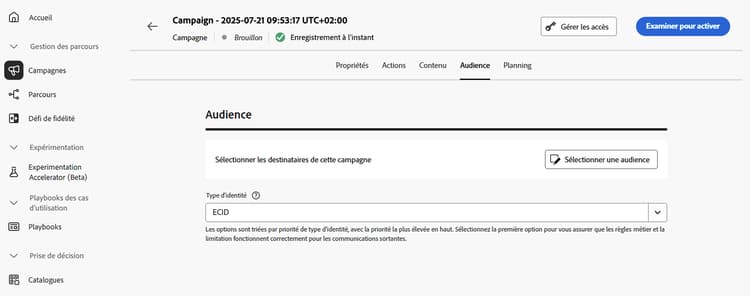
-
Sélectionner l’audience
Pour les campagnes marketing, cliquez sur le bouton Sélectionner une audience pour afficher la liste des audiences Adobe Experience Platform disponibles. En savoir plus sur les audiences.
note important IMPORTANT L’utilisation d’audiences et d’attributs de la composition d’audiences est actuellement indisponible avec Healthcare Shield ou Privacy and Security Shield. -
Sélectionner le type d’identité
Dans le champ Type d’identité, choisissez le type de clé à utiliser pour identifier les personnes dans l’audience sélectionnée. Vous pouvez soit utiliser un type d’identité existant, soit en créer un nouveau à l’aide du service d’identités Adobe Experience Platform. Les espaces de noms d’identité standard sont répertoriés dans cette page.
Un seul type d’identité est autorisé par campagne. Les personnes appartenant à un segment qui ne dispose pas du type d’identité sélectionné parmi leurs différentes identités ne seront pas ciblées par la campagne. Pour en savoir plus sur les types d’identité et les espaces de noms, consultez la documentation d’Adobe Experience Platform.
Étapes suivantes next
Une fois l’audience de votre campagne d’action prête, vous pouvez planifier la campagne. En savoir plus
This section contains structured knowledge intended to support interpretation, retrieval, and question answering related to this topic.
For complete understanding, this information should be combined with the documentation on this page. Neither source is intended to stand alone; the page describes the feature, while this section provides additional context that helps disambiguate terminology, intent, applicability, and constraints.
- TL;DR: This page explains how to define the audience of an Action campaign in the Audience tab by selecting an audience and an identity type.
Intents:
- Select the audience of a Marketing campaign with the Select audience button, which displays the list of available Adobe Experience Platform audiences
- Choose the identity type used to identify the individuals of the audience
- Know that only one identity type is allowed per campaign
- Know that audiences and attributes from audience composition are unavailable with Healthcare Shield or Privacy and Security Shield
Glossary:
- Identity type: The type of key used to identify the individuals from the selected audience. It can be an existing identity type or a new one created using the Adobe Experience Platform Identity Service. (product-specific)
- Identity namespaces: Standard Identity namespaces are listed in the Adobe Experience Platform documentation. (product-specific)
Guardrails:
- Only one identity type is allowed per campaign.
- Individuals belonging to a segment that does not have the selected identity type among their different identities cannot be targeted by the campaign.
- The use of audiences and attributes from audience composition is currently unavailable for use with Healthcare Shield or Privacy and Security Shield.
Terminology:
- Canonical name: Action campaign audience — variants: campaign audience
FAQ:
- Q: How many identity types can a campaign use? — Only one identity type is allowed per campaign.
- Q: Why can an individual of my audience not be targeted? — Individuals belonging to a segment that does not have the selected identity type among their different identities cannot be targeted by the campaign.
- Q: Can I create a new identity type? — Yes, in the Identity type field you can either use an existing identity type or create a new one using the Adobe Experience Platform Identity Service.
- Q: Can I use audiences from audience composition with Healthcare Shield or Privacy and Security Shield? — No, audiences and attributes from audience composition are currently unavailable for use with them.
Related pages:
- Audiences: Learn more about audiences (audience/about-audiences.md)
- Audience composition: audience composition (audience/get-started-audience-orchestration.md)
- Next step, schedule: Schedule the Action campaign (campaigns/campaign-schedule.md)