En esta página: Comprenda cómo encajan entre sí los elementos de decisión, las colecciones, las reglas, los métodos de clasificación, las estrategias de selección y las directivas de decisión, y qué hace Decisioning cada vez que un perfil necesita contenido para que pueda configurar decisiones con confianza.
¿Se siente perdido entre todos los términos de Decisioning? Esta página está aquí para ayudarle. No necesita memorizar nada: piense en ello como un mapa de Decisioning que muestra para qué sirve cada pieza y cómo se conectan las piezas, para que pueda encontrar el camino antes de empezar a construir.
Decisioning elige los mejores elementos de decisión para cada perfil. Puede crear elementos de decisión en el catálogo de ofertas y, a continuación, definir quién puede recibir cada elemento y cómo se clasifican los elementos. Cuando un perfil necesita contenido en un mensaje o experiencia que contenga una política de decisión, el motor de decisión evalúa la política y devuelve los elementos que se van a utilizar.
Detrás de cada decisión hay cinco preguntas. Estos son los objetos que les responden:
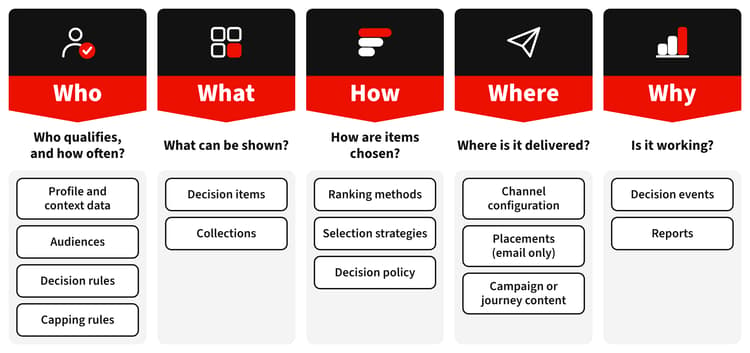
Esta página es una guía de concepto. Explica para qué sirve cada objeto el motor de decisión, cómo se conectan los objetos y qué hace el motor cuando un perfil necesita contenido. No describe cómo crear los objetos en la interfaz. Para saber por qué se seleccionó o no un elemento, consulte Resolución de problemas de decisiones.
Para configurar Decisioning, use Introducción a Decisioning. Se trata de una guía de tareas que enumera los permisos necesarios y el orden en que se van a crear los objetos, y se vincula al procedimiento de cada uno de ellos.
Los componentes básicos building-blocks
El motor de decisión no elige contenido por sí solo: aplica los objetos que configura de antemano. Estos objetos son los componentes básicos del mecanismo de toma de decisiones. Cada una de ellas responde a una pregunta que el motor debe resolver al seleccionar elementos para un perfil: qué elementos son candidatos, quién cumple los requisitos para ellos, en qué orden se presentan y cuántos se devuelven.
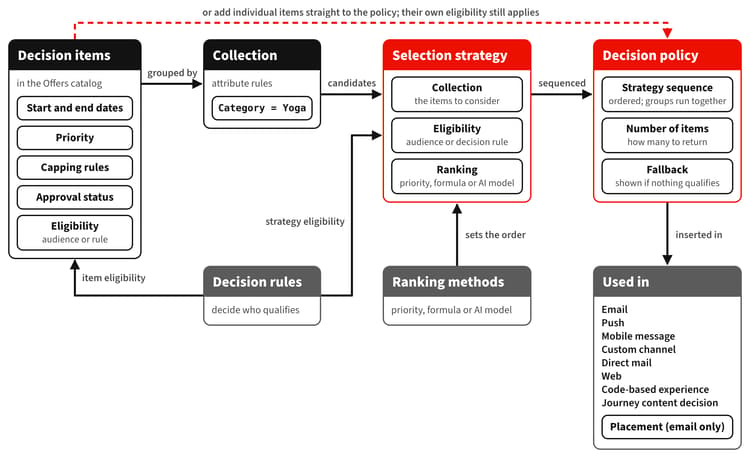
En resumen: los elementos de decisión se agrupan en colecciones. Una estrategia de selección combina una colección con una restricción de idoneidad y un método de clasificación. Una directiva de decisión pone en orden una o más estrategias de selección y devuelve los mejores elementos al contenido.
En la tabla siguiente se enumeran estos objetos en el orden en que se basan entre sí y se vinculan a la documentación de la tarea. La primera columna muestra a cuál de las cinco preguntas responde cada objeto.
Category es Yoga.Una directiva de decisión también puede incluir elementos de decisión individuales, que se agregan de uno en uno. Un elemento individual omite la colección y la estrategia de selección, pero las restricciones de idoneidad establecidas en el elemento siguen aplicándose. Aprenda a agregar elementos y estrategias a una directiva
Puede utilizar una política de decisión en experiencias basadas en código, web, correo electrónico, notificaciones push, mensajes móviles, canales personalizados y correo postal. En recorrido, la actividad de decisión de contenido devuelve elementos que puede usar en una actividad de optimización o en una acción personalizada. Su salida no se puede utilizar en actividades de canal nativas.
Qué sucede cuando se solicita una decisión decision-process
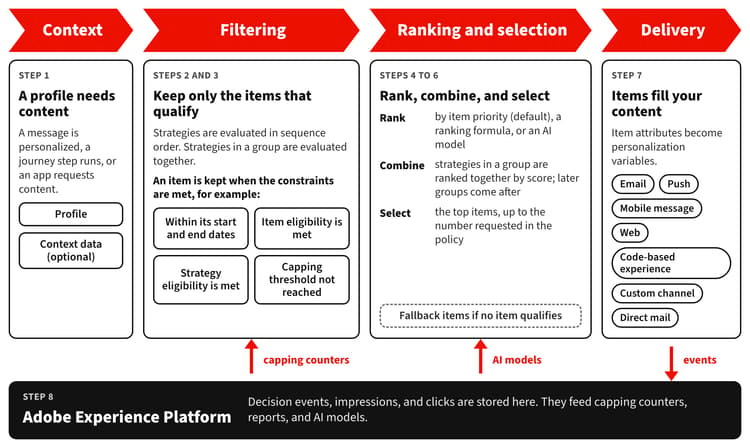
Cada vez que un perfil necesita contenido en un mensaje o experiencia que contenga una política de decisión, Decisioning evalúa la política para ese perfil. El diagrama agrupa los pasos siguientes en cuatro fases: Contexto (paso 1), Filtrado (pasos 2 y 3), Clasificación y selección (pasos 4 a 6) y Envío (paso 7). El paso 8 devuelve los resultados a Adobe Experience Platform.
-
Llega la solicitud. Decisioning recibe el perfil y, si lo utiliza, los datos de contexto. Los datos de contexto se envían en el momento de la solicitud y no incluyen datos históricos. Más información sobre los datos de contexto
-
La toma de decisiones pasa por la secuencia de estrategia en orden. La primera estrategia de selección o elemento de decisión de la secuencia tiene la prioridad más alta. Las estrategias de selección que combine en un grupo tienen la misma prioridad y se evalúan juntas.
-
Cada estrategia de selección conserva únicamente los elementos que cumplen los requisitos. La toma de decisiones comienza en los elementos de la colección de la estrategia. Un elemento se mantiene cuando el perfil cumple las restricciones establecidas, por ejemplo:
- La fecha actual se encuentra entre las fechas de inicio y finalización del elemento.
- El perfil cumple las restricciones de idoneidad del artículo (una audiencia o una regla de decisión).
- El perfil cumple las restricciones de elegibilidad de la estrategia de selección (una audiencia o una regla de decisión).
- Ninguna regla de límite del elemento ha alcanzado su umbral.
-
Se clasifican los elementos que cumplen los requisitos. El método de clasificación de la estrategia de selección establece el orden: la prioridad del elemento (predeterminada), una fórmula de clasificación o un modelo de IA. Más información sobre la clasificación
-
Se combinan las estrategias de selección. Los elementos de clasificación de las estrategias de un grupo se clasifican juntos según sus puntuaciones. Un elemento que se clasifica en varias estrategias mantiene su puntuación más alta. Los elementos de un grupo posterior se colocan después de los elementos de los grupos anteriores y un elemento que ya está clasificado no se evalúa de nuevo. Consulte el ejemplo siguiente.
-
Se han seleccionado los mejores elementos. Decisioning devuelve los primeros elementos de la lista clasificada, hasta el número de elementos solicitados en la directiva. Las notificaciones push y los mensajes móviles devuelven un elemento. Si ningún elemento cumple los requisitos, Decisioning devuelve los elementos de reserva definidos. Sin elementos de reserva, no se muestra nada. Más información sobre los elementos de reserva
-
Los elementos se utilizan en el contenido. Los atributos de los elementos devueltos están disponibles como variables de personalización. En un mensaje de correo electrónico, un elemento no se repite en las directivas de decisión del mismo mensaje. Una directiva que no tiene otro elemento para mostrar muestra su elemento de reserva o un espacio en blanco. Para mostrar el mismo elemento en varios lugares, vuelva a utilizar el resultado de una directiva de decisión existente. Personalizar con atributos de elementos de decisión
-
Eventos devueltos a Decisioning. La información sobre cada decisión se envía automáticamente a Adobe Experience Platform como evento de decisión. Las impresiones y los clics se rastrean automáticamente en los correos electrónicos creados en Journey Optimizer, pero la mayoría de los demás canales requieren su implementación para enviarlos a Experience Platform como eventos de experiencia. Los contadores de límite, los informes y los modelos de IA se basan en estos eventos. Más información acerca de la recopilación de datos
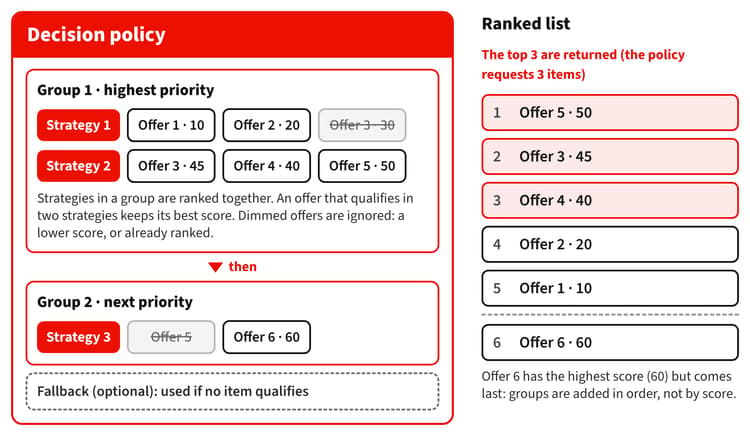
En el ejemplo siguiente, una política de decisión tiene tres estrategias de selección. La estrategia 1 y la estrategia 2 se combinan en el grupo 1. La estrategia 3 es la única del grupo 2.
| table 0-row-3 1-row-3 2-row-3 3-row-3 | ||
|---|---|---|
| Grupo | Estrategia de selección | Ofertas y puntuaciones aptas |
| Grupo 1 | Estrategia 1 | Oferta 1 (10), Oferta 2 (20), Oferta 3 (30) |
| Grupo 1 | Estrategia 2 | Oferta 3 (45), Oferta 4 (40), Oferta 5 (50) |
| Grupo 2 | Estrategia 3 | Oferta 5 (ya clasificada, por lo que se omite), Oferta 6 (60) |
-
Decisioning clasifica el Grupo 1 en su conjunto. La oferta 3 se clasifica en ambas estrategias, por lo que mantiene su puntuación más alta (45). La lista clasificada es Oferta 5 (50), Oferta 3 (45), Oferta 4 (40), Oferta 2 (20) y Oferta 1 (10).
-
A continuación, Decisioning añade el Grupo 2. La oferta 5 ya está en la lista, por lo que solo se agrega la oferta 6 al final de la lista.
La lista clasificada final es Oferta 5, Oferta 3, Oferta 4, Oferta 2, Oferta 1 y Oferta 6. Si la directiva solicita tres elementos, Decisioning devuelve Oferta 5, Oferta 3 y Oferta 4. La oferta 6 tiene la puntuación más alta (60), pero viene en último lugar, ya que pertenece al grupo con la prioridad más baja.
¿Procede de la gestión de decisiones? compare
La administración de decisiones es el marco de decisión heredado en Journey Optimizer. Los objetos de los dos marcos no siempre asignan uno a uno. La tabla muestra cómo la herramienta de migración asigna objetos de Administración de decisiones a los objetos de Toma de decisiones.
Para obtener más información sobre las ventajas de Decisioning y las herramientas de migración, consulte Ventajas de migrar a Decisioning.
Más información learn-more
This section contains structured knowledge intended to support interpretation, retrieval, and question answering related to this topic.
For complete understanding, this information should be combined with the documentation on this page. Neither source is intended to stand alone; the page describes the feature, while this section provides additional context that helps disambiguate terminology, intent, applicability, and constraints.
- TL;DR: This concept guide explains what each object that the decision engine works with is for, how decision items, collections, decision rules, ranking methods, selection strategies, and decision policies connect, and what Decisioning does each time a profile needs content, without describing how to create the objects in the interface.
Intents:
- Identify which Decisioning objects answer the five questions behind every decision.
- Explain how decision items, collections, selection strategies, ranking methods, and decision policies fit together.
- Describe what Decisioning does each time a profile needs content in a message or experience that contains a decision policy.
- Work out how groups of selection strategies and scores produce the ranked list that a decision policy returns.
- Find the page that documents each object: catalog, decision item, collection, decision rule, ranking method, selection strategy, decision policy, and placement.
- Match the Decision management objects with their Decisioning objects.
Glossary:
- Decisioning (product-specific): Chooses the best decision items for each profile. You create decision items in the Offers catalog, then define who can receive each item and how the items are ranked.
- Decision engine (product-specific): Evaluates the decision policy and returns the items to use when a profile needs content in a message or experience that contains a decision policy. It does not choose content on its own: it applies the objects that you configure in advance.
- Catalog (product-specific): The container of your decision items. A catalog is linked to a schema that defines all the attributes you can assign to an item, and you can add custom attributes to it. Where to configure it: Decisioning > Catalogs, then Edit schema in the items list.
- Decision item (product-specific): An offer or piece of content in the Offers catalog. Each item has its own start and end dates, priority, eligibility (audiences or a decision rule), and capping rules. You approve an item when it is ready to be presented to profiles. Where to configure it: Decisioning > Catalogs.
- Collection (product-specific): Groups items with attribute rules. Where to configure it: Catalogs > Collections.
- Decision rule (product-specific): A reusable condition that determines who qualifies. You can apply a rule to a decision item or to a selection strategy. Where to configure it: Decisioning > Strategy setup > Rules.
- Eligibility constraint (product-specific): The eligibility of a decision item or of a selection strategy: an audience or a decision rule.
- Ranking method (product-specific): Sets the order of the qualifying items: the item priority (default), a ranking formula, or an AI model. Where to configure it: Decisioning > Strategy setup > Formulas or AI models.
- Selection strategy (product-specific): A reusable object that combines a collection, an eligibility constraint (an audience or a decision rule), and a ranking method. Where to configure it: Decisioning > Strategy setup > Selection strategies.
- Decision policy (product-specific): Puts selection strategies in order, sets how many items to return, and defines optional fallback items. It is added to the content of a campaign or journey. A decision policy can also include individual decision items, which you add one at a time: an individual item skips the collection and the selection strategy, but the eligibility constraints set on the item still apply.
- Strategy sequence (product-specific): The sequence of selection strategies or decision items of a decision policy, which Decisioning goes through in order. The first selection strategy or decision item in the sequence has the highest priority. Selection strategies that you combine in a group have the same priority and are evaluated together.
- Qualifying item (product-specific): An item that a selection strategy keeps because the profile meets the constraints you set. For example: the current date is within the start and end dates of the item; the profile meets the eligibility constraint of the item; the profile meets the eligibility constraint of the selection strategy; no capping rule of the item has reached its threshold.
- Fallback items (product-specific): Items that you define in the decision policy. If no item qualifies, Decisioning returns the fallback items. Without fallback items, nothing is displayed.
- Placement (email only) (product-specific): A container for the items displayed in an email. When you create a placement, you associate it with a channel configuration. Placements also let you track how items perform in each location. Decisioning placements are currently available for email only. Where to configure it: Decisioning > Strategy setup.
- Context data (product-specific): Data that Decisioning receives with the profile, if you use it. Context data is sent in at the time of the request and does not include historical data.
- Decision event (product-specific): Information about each decision, sent automatically to Adobe Experience Platform. Capping counters, reports, and AI models are based on these events.
- Stages of a decision request: Context (step 1), Filtering (steps 2 and 3), Ranking and selection (steps 4 to 6), and Delivery (step 7). Step 8 sends the results back to Adobe Experience Platform.
Guardrails:
- Push notifications and mobile messages return one item.
- In an email, an item is not repeated across the decision policies of the same message. A policy that has no other item to show displays its fallback item or a blank space.
Applicability:
- Applies: a decision policy can be used in code-based experiences, web, email, push notifications, mobile messages, custom channels, and direct mail.
- Applies: in journeys, the output of the Content decision activity can be used in an Optimize activity or in a custom action.
- Does not apply: in journeys, the output of the Content decision activity cannot be used in native channel activities.
- Applies: automatic tracking of impressions and clicks in emails authored in Journey Optimizer.
- Does not apply: automatic tracking of impressions and clicks in most other channels. Most other channels require your implementation to send them to Experience Platform as experience events.
Terminology:
-
Canonical name: Adobe Experience Platform — Acronym: AEP — variants: Experience Platform
-
Canonical name: Adobe Journey Optimizer — Acronym: AJO — variants: Journey Optimizer
-
Canonical name: decision item — variants: item
-
Canonical name: decision policy — variants: policy
-
Canonical name: selection strategy — variants: strategy (as in “Strategy 1”)
-
Canonical name: Decision management — the legacy decisioning framework in Journey Optimizer. The objects of the two frameworks do not always map one to one.
-
Mapping of Decision management objects to Decisioning objects, as shown by the migration tooling:
- Offer maps to Decision item.
- Collection maps to Collection (collection qualifiers are migrated as tags).
- Rule maps to Decision rule.
- Ranking formula maps to Ranking formula.
- Decision maps to Selection strategy, decision policy, and code-based experience campaign. For each migrated decision scope, the migration tooling creates one selection strategy (a collection, an eligibility rule, and a ranking formula), one decision policy (the number of items, the selection strategy, and a fallback item), and one code-based experience campaign.
- Placement maps to Channel configuration. The migration tooling creates a channel configuration for each Decision management placement. It does not create Decisioning placements: you create them manually.
-
Do not confuse:
- “Decisioning” ≠ “Decision management” (the legacy decisioning framework).
- Decision management “Placement” ≠ Decisioning “placement”: see the mapping above.
- Decision management “Decision” ≠ “decision policy”: see the mapping above.
FAQ:
- What does Decisioning do each time a profile needs content? In a message or experience that contains a decision policy, Decisioning evaluates the policy for that profile and returns the items to use. This happens in eight steps, from the arrival of the request to the decision events sent to Adobe Experience Platform.
- What happens if no item qualifies? Decisioning returns the fallback items you defined. Without fallback items, nothing is displayed.
- Which selection strategy or decision item has the highest priority? Decisioning goes through the strategy sequence in order. The first selection strategy or decision item in the sequence has the highest priority. Selection strategies that you combine in a group have the same priority and are evaluated together.
- What happens when an item qualifies in several selection strategies? The qualifying items of the strategies in a group are ranked together according to their scores, and an item that qualifies in several strategies keeps its highest score. The items of a later group are placed after the items of the earlier groups, and an item that is already ranked is not evaluated again.
- How can I show the same item in several places of an email? In an email, an item is not repeated across the decision policies of the same message. To show the same item in several places, reuse the output of an existing decision policy.
- Where can I use the output of the Content decision activity in a journey? In an Optimize activity or in a custom action. Its output cannot be used in native channel activities.
Examples:
- Collection (Decisioning): a collection can group all the items where the
Categoryattribute isYoga. - Groups and scores (decision policy): a decision policy has three selection strategies. Strategy 1 and Strategy 2 are combined in Group 1, and Strategy 3 is alone in Group 2. Strategy 1 qualifies Offer 1 (10), Offer 2 (20), and Offer 3 (30). Strategy 2 qualifies Offer 3 (45), Offer 4 (40), and Offer 5 (50). Strategy 3 qualifies Offer 5 (already ranked, so it is skipped) and Offer 6 (60). Offer 3 keeps its highest score (45). The final ranked list is Offer 5, Offer 3, Offer 4, Offer 2, Offer 1, and Offer 6. If the policy requests three items, Decisioning returns Offer 5, Offer 3, and Offer 4. Offer 6 has the highest score (60) but comes last, because it belongs to the group with the lower priority.
Related pages:
- To set up Decisioning (a task guide that lists the permissions you need and the order in which to create the objects, and links to the procedure for each one): Get started with Decisioning (experience-decisioning/gs-experience-decisioning.md)
- To find out why an item was or was not selected: Troubleshoot Decisioning (experience-decisioning/decisioning-troubleshooting.md)
- To configure the item catalog: Configure the item catalog (experience-decisioning/catalogs.md)
- To create decision items: Create decision items (experience-decisioning/items.md)
- To manage item collections: Manage item collections (experience-decisioning/collections.md)
- To create decision rules: Create decision rules (experience-decisioning/rules.md)
- For ranking methods: Ranking methods (experience-decisioning/ranking/ranking.md)
- To create selection strategies: Create selection strategies (experience-decisioning/selection-strategies.md)
- To create decision policies: Create decision policies (experience-decisioning/create-decision-policy.md)
- To work with placements: Work with placements (experience-decisioning/placements.md)
- To add items and strategies to a policy: Learn how to add items and strategies to a policy (experience-decisioning/create-decision-policy.md)
- For the activity that returns items in journeys: Content decision activity (building-journeys/content-decision.md)
- For the activity in which the returned items can be used in journeys: Optimize activity (building-journeys/content-decision.md)
- At the step where the request arrives: Learn more about context data (experience-decisioning/context-data.md)
- At the step where each selection strategy keeps only the items that qualify: Learn more about eligibility (experience-decisioning/decisioning-troubleshooting.md)
- At the step where the qualifying items are ranked: Learn more about ranking (experience-decisioning/decisioning-troubleshooting.md)
- At the step where the best items are selected, including fallback items: Learn more about fallback items (experience-decisioning/decisioning-troubleshooting.md)
- To use the attributes of the returned items as personalization variables: Personalize with decision item attributes (experience-decisioning/use-decision-policy.md)
- At the step where events feed back into Decisioning: Learn more about data collection (experience-decisioning/data-collection/data-collection.md)
- After the example of groups and scores: Learn more about strategy sequences (experience-decisioning/create-decision-policy.md)
- For how the migration tooling maps Decision management objects to Decisioning objects: migration tooling (experience-decisioning/decisioning-migration-api.md)
- For the benefits of Decisioning and the migration tooling: Benefits of migrating to Decisioning (experience-decisioning/migrate-to-decisioning.md)
- Listed under Learn more: Decisioning FAQ (experience-decisioning/decisioning-faq.md)
- Listed under Learn more: Decisioning guardrails & limitations (experience-decisioning/decisioning-guardrails.md)
- Listed under Learn more: Coworker for Decisioning (experience-decisioning/experience-decisioning-coworker-skills.md)
- Listed under Learn more: Report on Decisioning (experience-decisioning/cja-reporting.md)
Personas:
- marketer: Can create decision items in the Offers catalog and approve an item when it is ready to be presented to profiles. Can set the eligibility of a decision item or of a selection strategy with an audience or a decision rule. Can choose the ranking method: the item priority (default), a ranking formula, or an AI model. Can add a decision policy to the content of a campaign or journey. Can put selection strategies in order in the policy, set how many items to return, and define optional fallback items. Can use a decision policy in code-based experiences, web, email, push notifications, mobile messages, custom channels, and direct mail. Can use the attributes of the returned items as personalization variables. The page states that push notifications and mobile messages return one item. Where: “The building blocks”.
Onboarding:
- Level: Beginner, Intermediate
- First minimal step: Use Get started with Decisioning to see the permissions you need and the order in which to create the objects.
- Success check: Decisioning returns the first items of the ranked list, up to the number of items requested in the policy. The attributes of the returned items are available as personalization variables.
- Next: To set up Decisioning, with a task guide that lists the permissions you need and the order in which to create the objects: Get started with Decisioning (experience-decisioning/gs-experience-decisioning.md); To find out why an item was or was not selected: Troubleshoot Decisioning (experience-decisioning/decisioning-troubleshooting.md)