2013
January 2013 january
The January release expands our social offering with Referral Offers. In addition, Marketo Lead Management users can set their time zone, language, and locale preference. Please note that features marked with an * are available only in the Select Edition.
Referral Offers referral-offers
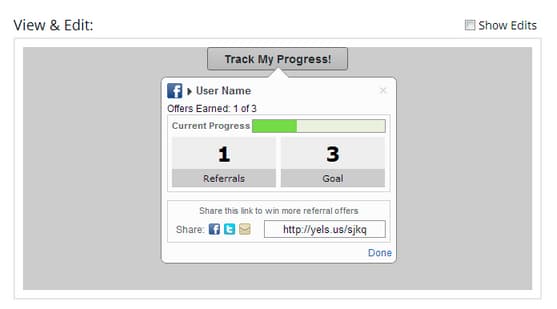
A Referral Offer gives your leads an incentive to refer their friends. Create goals and rewards for successful referrals. You can use it on landing pages, your website, and even Facebook.
Time Zone Preference time-zone-preference
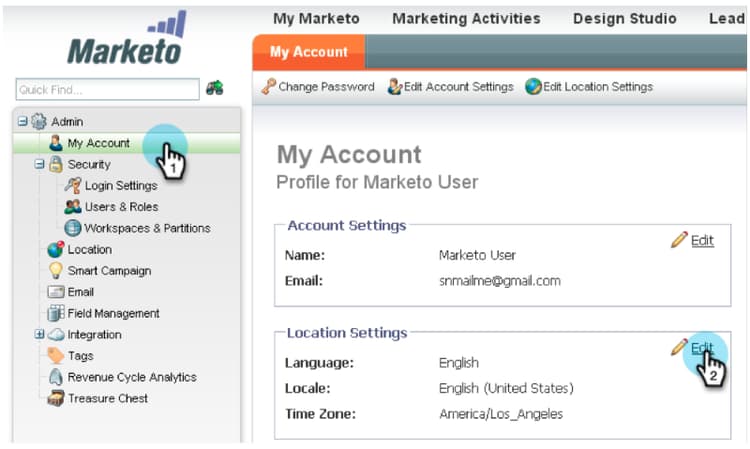
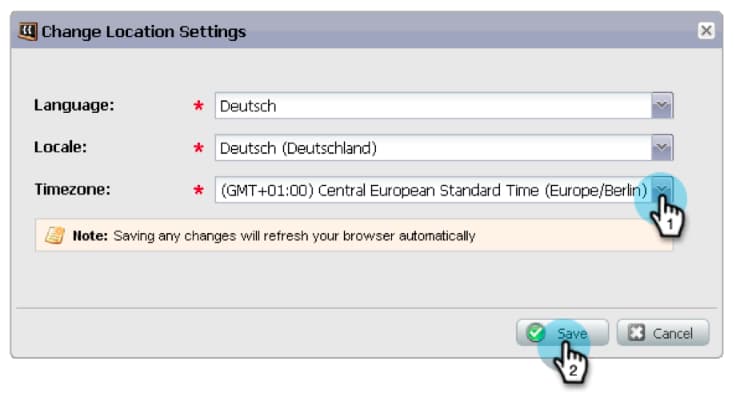
You can change the default time zone for your personal Marketo account. For example, even if the default for the subscription is Pacific Time, you can change it to Eastern Time for your own account.
Select your Marketo Lead Management Language select-your-marketo-lead-management-language
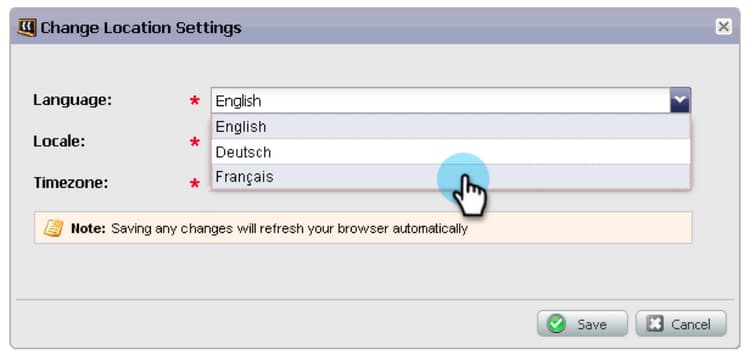
You can change the default language for your Marketo user account. Even if the default for the subscription is in English, you can change it to German or French for your own use.
Multi-Lingual Form Error Messages multi-lingual-form-error-messages
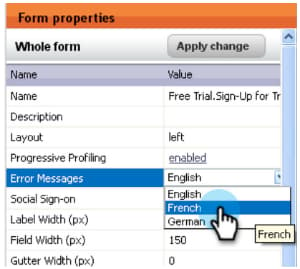
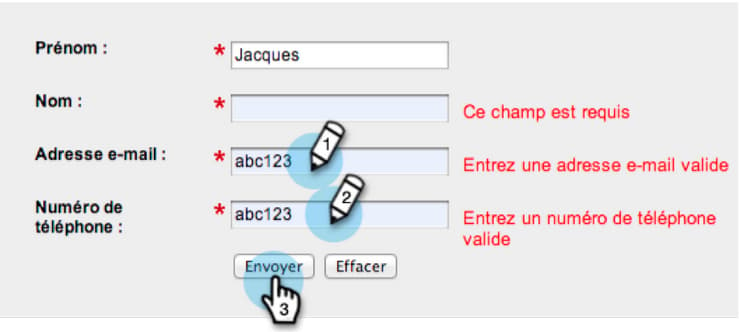
When a lead fills out a Marketo form, some validation messages are automatically built in. You may want to select a different display language for these error messages. We now support English, German, and French.
An example of a French form:
Select your Sales Insight Language (Salesforce Only) select-your-sales-insight-language-salesforce-only
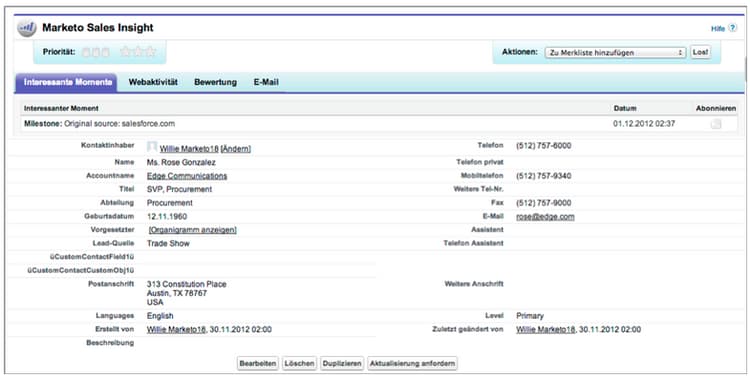
If your Salesforce language preference is set to either French or German, Marketo Sales Insight will honor this preference. Download the latest MSI package to get this functionality (available the week of January 14).
Field Display Name field-display-name
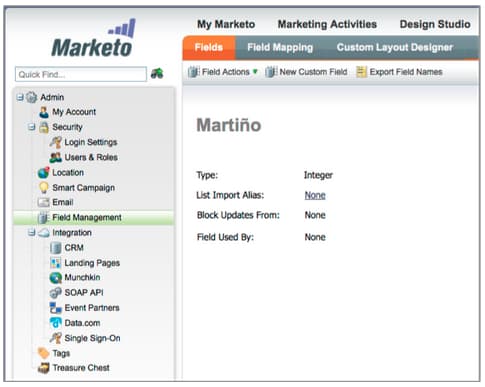
Field Display Names can display text in different languages (e.g. multi-byte characters are supported).
Change Program Data change-program-data
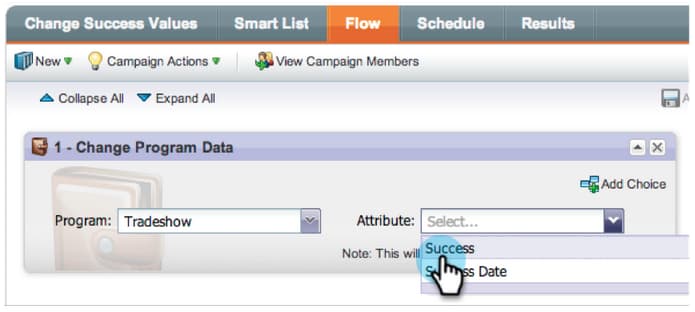
The Change Program Data flow step allows you to change the Success status and Success Date of a program member manually through a campaign. You can use this flow step to correct a mistake, or to manually change a member who may not have participated in the program as intended.
February 2013 february
The February release includes a highly requested feature, support for Apple Safari and other small enhancements.
Official Support for Apple Safari official-support-for-apple-safari
The latest versions of Apple Safari for Mac and Windows are fully supported for use with Marketo Lead Management. Note: Safari on iOS is not fully compatible.
Webhooks Enhancements webhooks-enhancements
Webhooks is enhanced to escape tokens in the URL/payload and can also update Marketo lead fields by parsing XML/JSON responses from 3rd party systems (not available in the Spark SMB Edition).
Updated SOAP API Endpoint updated-soap-api-endpoint
The preferred SOAP API endpoint has been updated, which is shown in Admin -> SOAP API. Please update your calls to use this new endpoint. API calls to the old endpoint are deprecated, but will continue to function. (SOAP API not available in the Spark SMB Edition)
Mobile Support for Facebook Tabs mobile-support-for-facebook-tabs
Facebook tabs published from Marketo will detect mobile devices and route them to a landing page. This will ensure that the user gets the right content on mobile devices on which Facebook tabs are not supported (available in Spark, Standard, Select SMB Editions and Marketo Social Marketing).
Coming Soon: Support for Multiple Models coming-soon-support-for-multiple-models
We’re laying the groundwork to support multiple revenue cycle models, voted #1 idea for RCA in the Community, in a future release. In this release, you will notice some changes including Smart List filters and Add Choices in Flow Steps to support the selection of a model and stage. We’re also moving the Lead Revenue Stage and Lead Revenue Cycle Model fields out of the Smart List Lead grid tab.
March 2013 march
The following features are included in the March release.
Marketo Calendar Files marketo-calendar-files
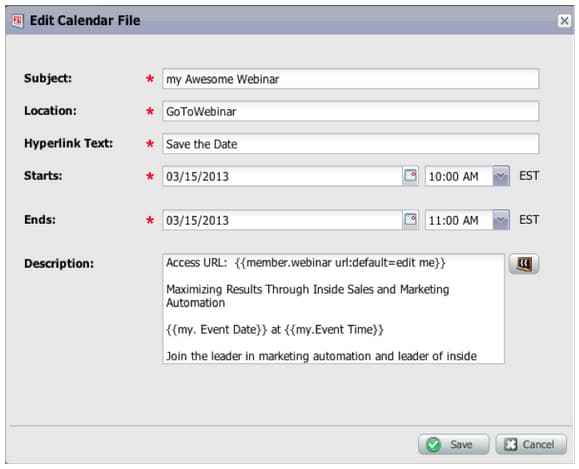
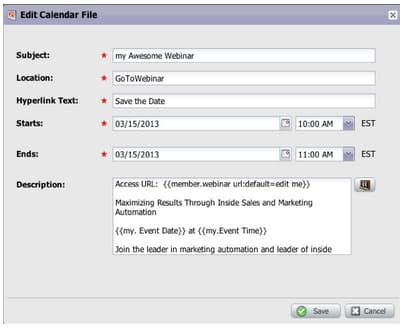
Create a calendar file as a My Token to be used in your event confirmation and reminder emails. This integrated calendar file (e.g., .ics file) will render all tokens, including My Tokens and the {{member.webinar URL}} token.
Wait Until +/- wait-until
Create Wait Steps that can execute a specified number of days before or after a date token. For example, you can create a wait step that will wait 3 days before the event date and then send a reminder!
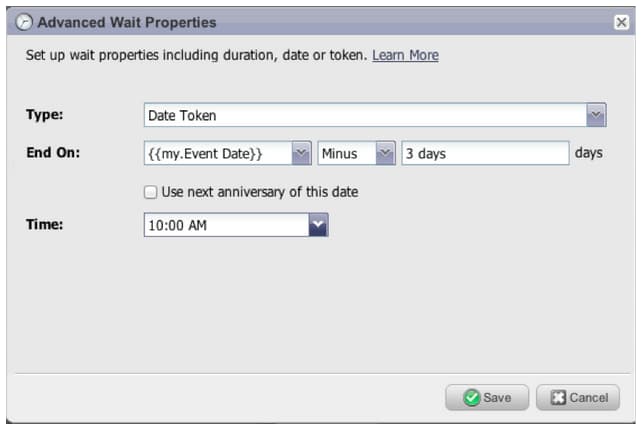
You can create a wait step that will wait 14 days before the lead’s birthday. By selecting “use next anniversary of this date” the system will automatically ignore the year associated with the date, and use the current or next calendar year instead.
Social Sweepstakes social-sweepstakes
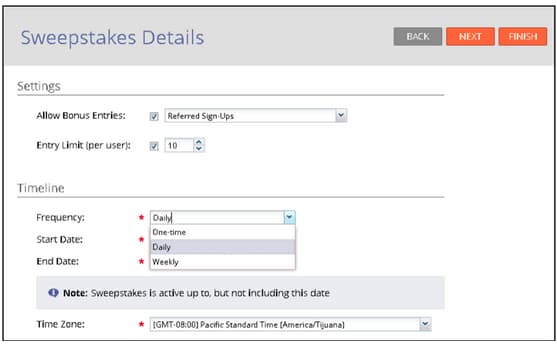
A sweepstakes gives your leads a chance to win a prize and tell their friends about you. You select random winners from the participants and send them email.
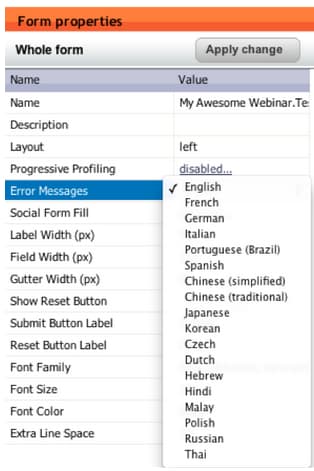
Additional Form Error Message Languages additional-form-error-message-languages
More than a dozen languages have been added to the form error messages!
Support News and Alerts support-news-and-alerts
Stay connected to Marketo Customer Support by subscribing to Support News and Alerts for P1 Alerts, Known Issues, Hints and Tips from our Support Experts, and updates from Marketo Customer Support.
April 2013 april
The following features are included in the April release.
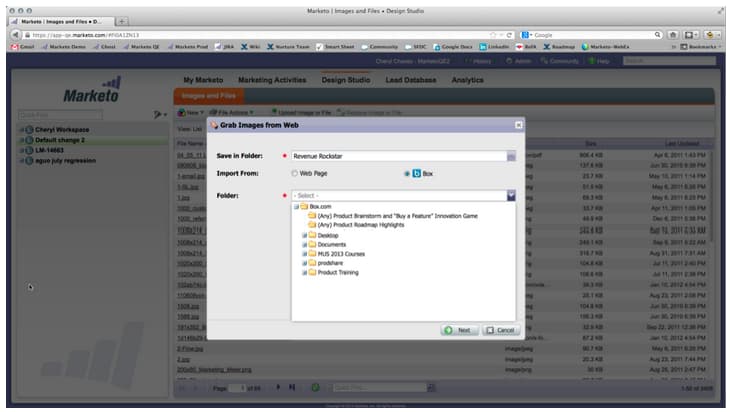
Box Integration box-integration
Connect Marketo with your Box account to easily copy files into the design studio.
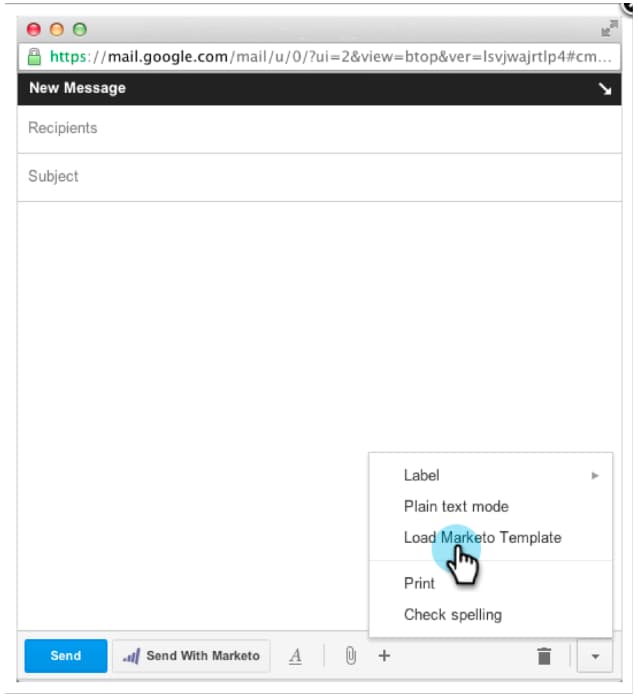
Gmail Plugin gmail-plugin
If you use Marketo Sales Insight, as well as Gmail, you can install our new Gmail plugin through the Chrome store. The plugin allows you to log messages with Marketo, load Marketo email templates, and send messages with Marketo tracking features.
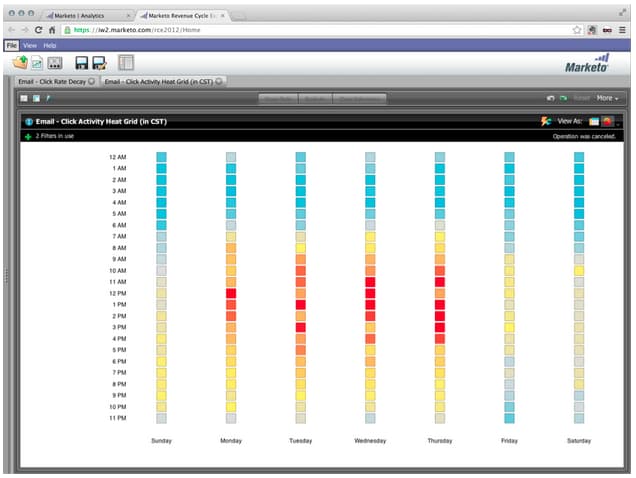
Email Analysis email-analysis
Create advanced email reports in Revenue Explorer such as the Click Activity Heat Grid report. This report will give insight into the day and time people are clicking links in your emails.
The Email Analysis feature as a whole will be turned on in phases during April and May as we migrate your 2012 and 2013 email data. In other words, some customers will have access to this feature sooner than others.
Program APIs program-apis
Support for programs in the SOAP API call, including read-only access to program data such as: program membership counts, acquired by, success, settings, channels, tags, tokens and costs. Please see the SOAP API documentation for more details.
ON24 Enhancement on-enhancement
Job Title and Company Name will sync to ON24 from your Marketo registration form.
May 2013 may
The following features are included in the May release.
Calendar Files for Landing Pages calendar-files-for-landing-pages
Create a calendar file as a My Token that can be added to your landing page. This integrated calendar file (e.g. .ics file) will render all tokens, including My Tokens on local asset landing pages.
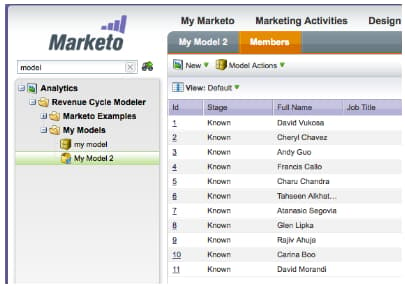
Model Membership Tab model-membership-tab
View all your model member’s data in one place in order to easily monitor and troubleshoot. The new Members Tab is a read-only view available when you select an approved Revenue Cycle Model.
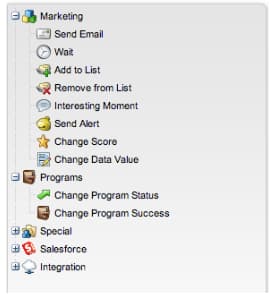
Reorganized Flow Action Tree reorganized-flow-action-tree
Find flow actions faster with the newly reorganized flow action tree.
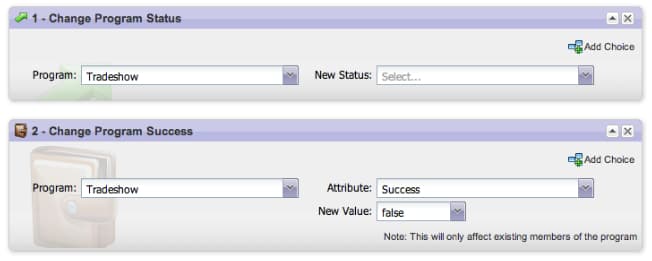
Renamed Flow Actions renamed-flow-actions
Change Progression Status is now Change Program Status. Change Program Data is now Change Program Success.
June 2013 june
The following features are included in the June release.
Additional User Languages additional-user-languages
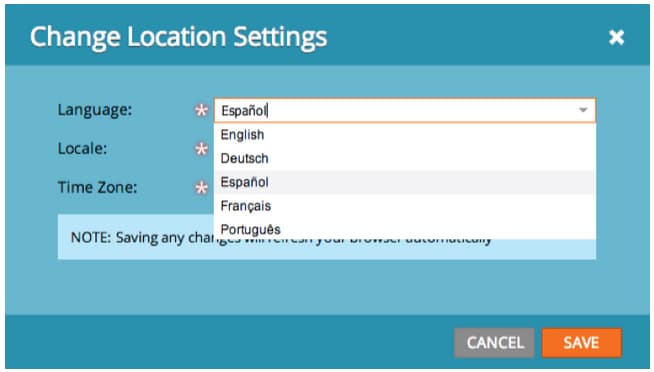
View the Marketo Lead Management interface in your preferred language – now supporting Spanish and Portuguese.
Cobalt User Interface cobalt-user-interface
Over the next few months you will notice a new theme rolled out in different parts of the application; impacting modal windows for example.
Subfolder Cloning subfolder-cloning
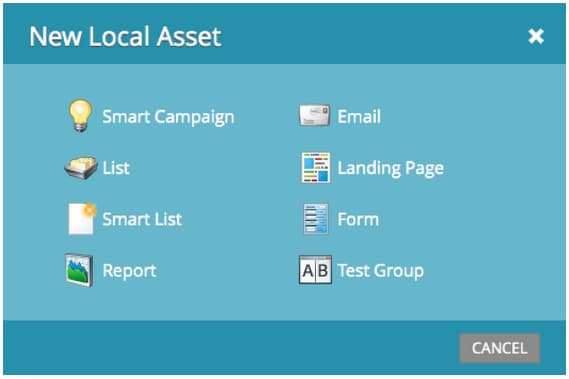
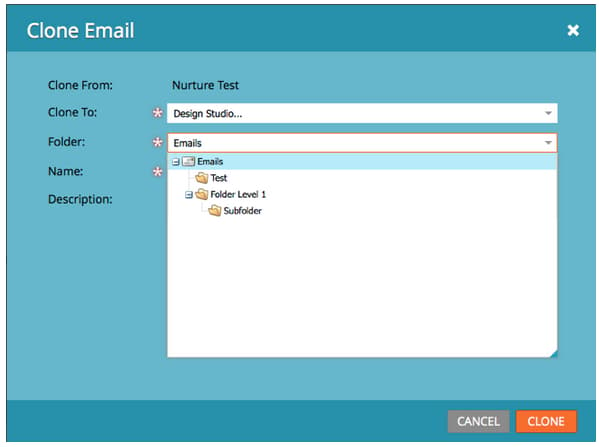
Clone assets into subfolders.
Multiple Models multiple-models
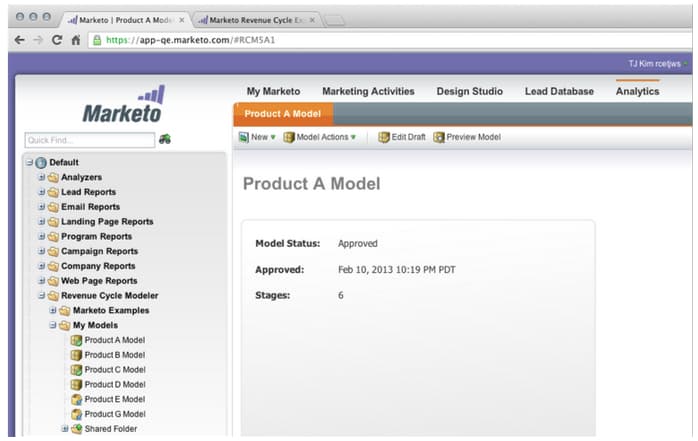
A top idea for Revenue Cycle Analytics (RCA) in the Community, this feature allows you to create multiple models to have a more detailed understanding of your revenue funnel by product line, business unit, or region. The Leads by Revenue Stage, Success Path Analyzer, Program Analyzer and Revenue Explorer reports now supports the ability to select a specific model for reporting.
By default, two models are available for Select SMB Edition and fifteen models for Enterprise Edition. You may purchase additional models also.
July 2013 july
The following features are included in the July release which is scheduled for a Friday, July 26 rollout.
Exhausted Content Widget on the Dashboard exhausted-content-widget-on-the-dashboard
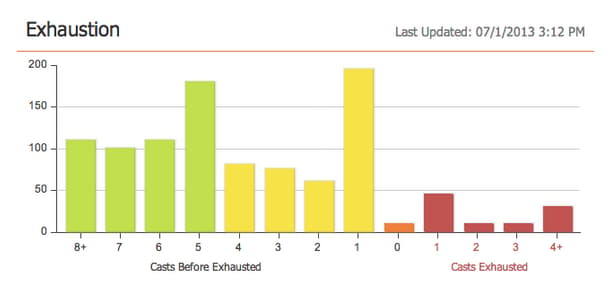
Provides information on when leads will exhaust the content within the Stream. The system will provide you with information on how many leads are about to reach exhausted content, or how long leads have been exhausted.
Communication Limits communication-limits
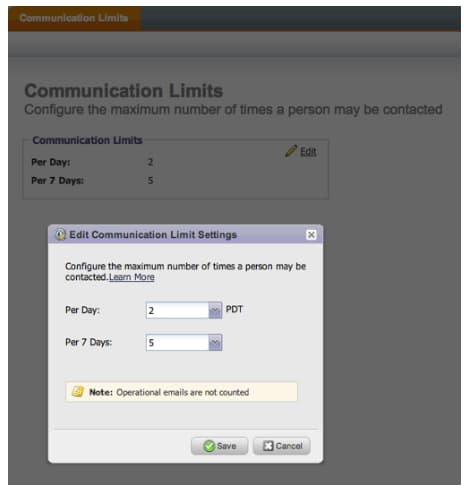
Want to stop over-emailing leads? Now it is easy to automatically limit frequency to each individual. Simply set a daily and weekly communication limit, and the system will do the rest. Available in Select, Enterprise, and with the Add-On package for Standard customers.
Cobalt User Interface cobalt-user-interface-july
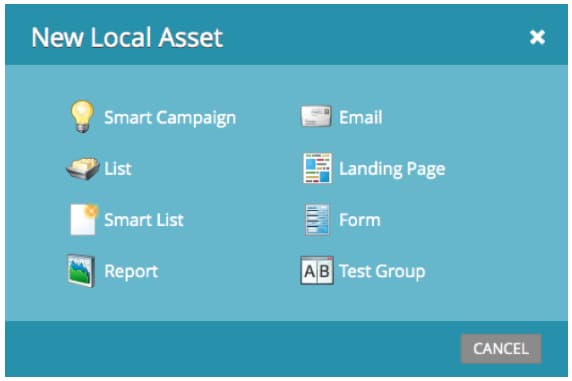
Over the next few months, you will notice more of our new theme rolling out in different parts of the application. No functionality will be moved or removed.
Program Member Date Column program-member-date-column
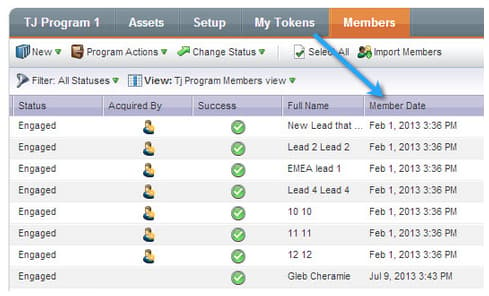
View and sort the member grid by the date that the lead was added.
Changes to Spell Check in WYSIWYG Editor changes-to-spell-check-in-wysiwyg-editor
The service utilized by the WYSIWYG editor for spell check was discontinued. We removed the Spell Check button from the editor until we find a replacement.
August 2013 august
The following features are included in the August, 2013 release.
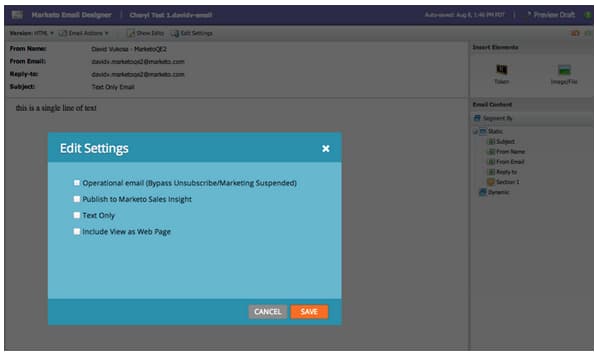
Text Only Emails
Now you may send just the text version of an email. Keep in mind, links won’t be decorated when using this option.
Customer Engagement Engine Enhancements customer-engagement-engine-enhancements
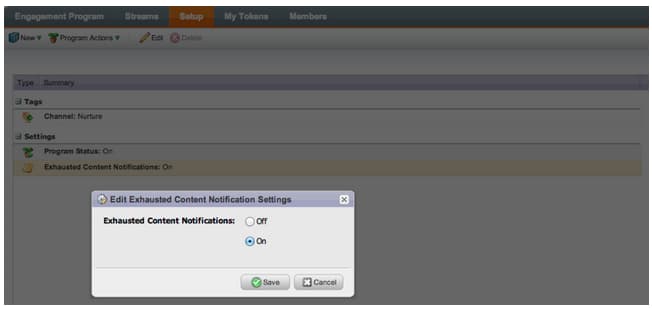
Ignore Exhausted Content ignore-exhausted-content
Configure the engagement program to ignore exhaustion, including suppression of any notifications.
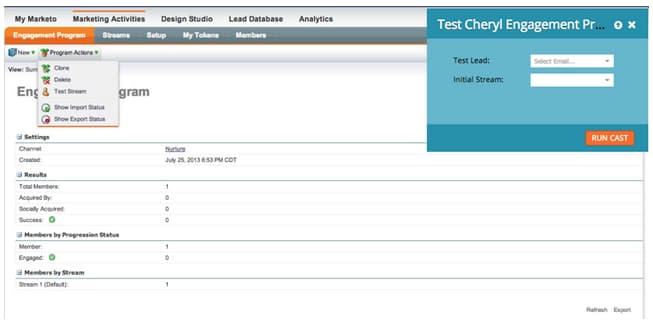
Engagement Stream Testing engagement-stream-testing
Use the new testing feature to simulate a cast, and test newly added content to a live stream.
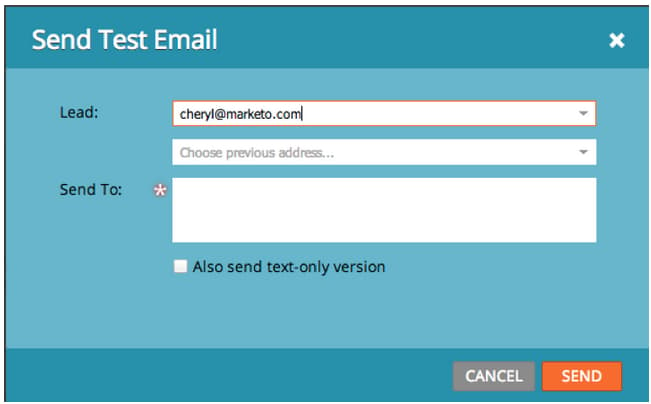
Personalized Send Test personalized-send-test
When you send an email test, you can select the name of a lead to personalize the test email.
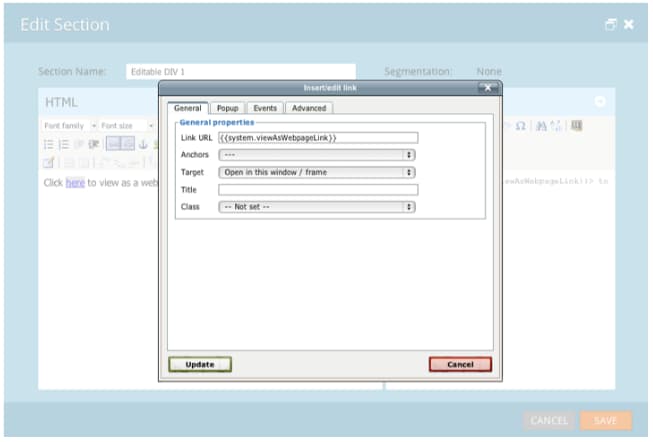
“View Email as Web Page” and “Unsubscribe” System Tokens view-email-as-web-page-and-unsubscribe-system-tokens
Utilize these new tokens to provide greater control of their placement in emails.
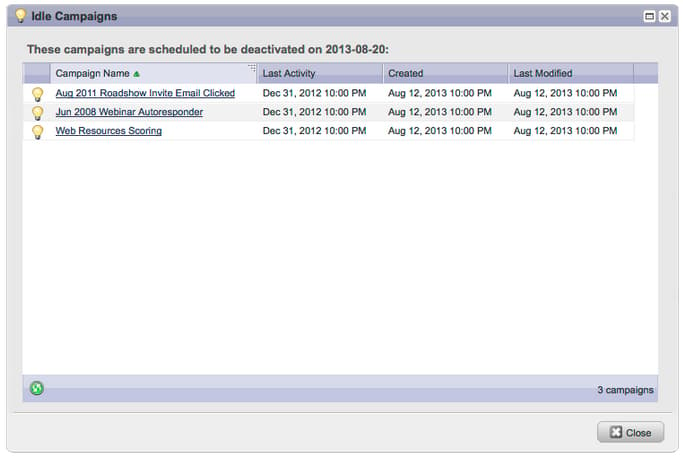
Automatic Trigger Campaign Cleanup automatic-trigger-campaign-cleanup
Marketo will now periodically notify you and automatically deactivate trigger campaigns that have not run in the past six months.
Marketo Financial Management Enhancement marketo-financial-management-enhancement
Program Cost Update program-cost-update
Program cost sync enables tracking of program cost across multiple platforms.
Cobalt User Interface cobalt-user-interface-august
We are continuing the rollout of our new Cobalt interface. This project will make everything in Marketo super snappy! The upgrade will continue through the rest of the year.
September 2013 september
The following features are included in the September release.
Shorter URLs shorter-urls
Email URLs have been given a trim to be click friendly to the recipient, while preserving all tracking functionality
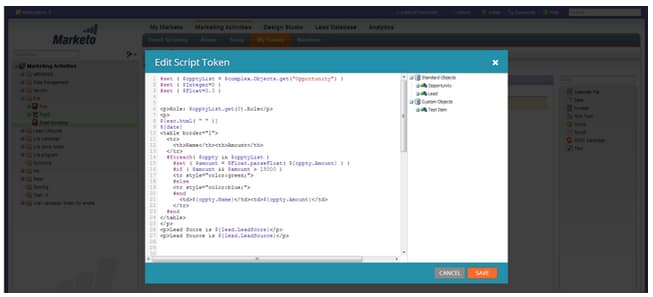
Use data from Marketo custom objects or add conditional logic to your email content using the Velocity template language.
Change Send Test to Send Sample change-send-test-to-send-sample
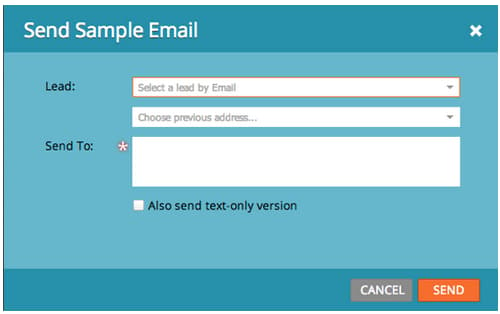
We have renamed the action Send Test to be Send Sample
Personalized Send Sample Email personalized-send-sample-email
When you send an email sample, you can select the name of a lead to personalize the sample email.
Additional Field Sync for GoToWebinar additional-field-sync-for-gotowebinar
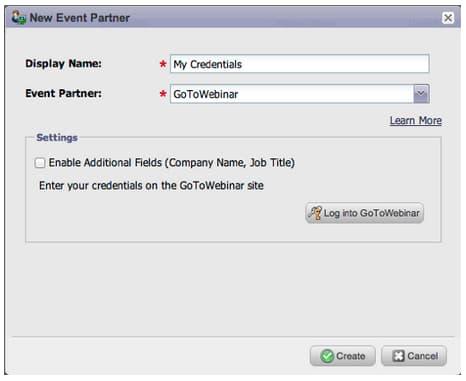
You can sync Company Name and Job Title from your Marketo form to GoToWebinar. To enable these additional fields, go to Event Partners and check “Enable Additional Fields.”
Restrict User Login to SSO only restrict-user-login-to-sso-only
Configure subscriptions to only allow Marketo Users to log in through SSO and not through the normal login screen
Virus Scan of Uploaded Files virus-scan-of-uploaded-files
Files uploaded to the Design Studio are now automatically scanned and blocked if the files contain viruses
Export Opportunity Influence Analyzer export-opportunity-influence-analyzer
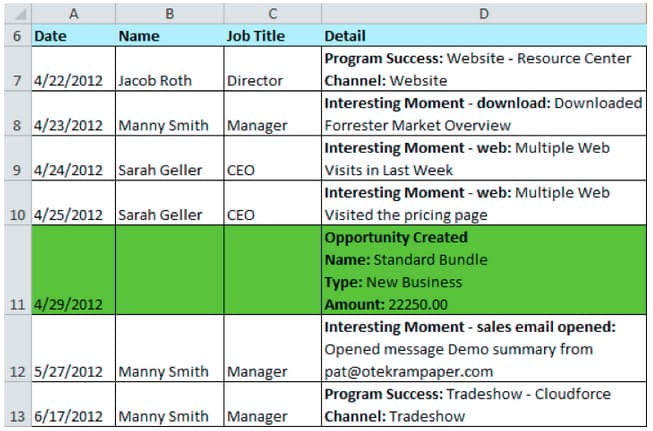
You can now export the data in the Opportunity Influence Analyzer to Excel. Each exported Excel file contains all the marketing interactions for all leads (including those without a role in the opportunity) as well all the opportunities under the selected account in the analyzer. The opportunity rows are highlighted in green. You can use Excel’s native data filtering capabilities if you need to focus on specific leads or marketing activities.
Program Attribution Settings program-attribution-settings
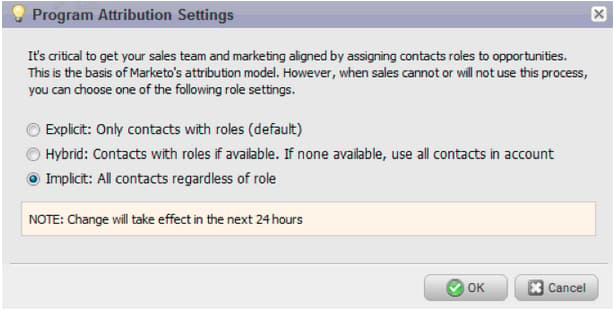
You can change the way Marketo ties contacts and opportunities for first and multi touch attribution metrics, including the ability to do account-based attribution. These settings will impact attribution metrics in Revenue Explorer reports under the Program Opportunity Analysis area and the Opportunity Analysis area. This will also affect the attribution metrics in Program Analyzer.
You can change the program attribution settings to one of three choices. Changing this setting does not modify any Marketo or CRM data; it simply changes the way your reports run and it can be reverted at any time.
The Explicit setting will only examine contacts with roles (current behavior). Implicit will examine all contacts associated to the account regardless of role. We strongly recommend using the Explicit mode if possible. Using Implicit may create false positives, people with credit for an opportunity despite having no real influence in the opportunity.
Sales Insight available in French and German (Salesforce only) sales-insight-available-in-french-and-german-salesforce-only
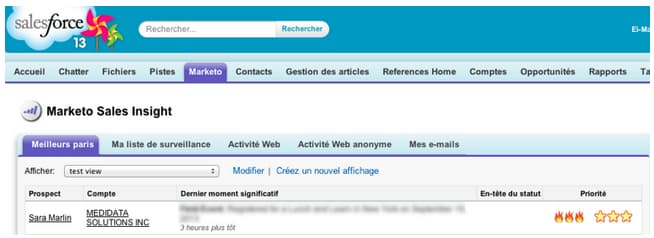
Download the latest version of Marketo Lead Management and Marketo Sales Insight from AppExchange so your French and German salespeople can see Sales Insight content in their preferred language.
Cobalt User Interface cobalt-user-interface-september
Over the next few months, a new theme is being rolled out in different parts of the application. This month, you may notice more new blue modal windows.
October 2013 october
The following features are included in the October 2013 release.
templates.marketo.com templates-marketo-com
Templates.marketo.com showcases email and landing page templates (including responsive mobile email templates) which you can download from the Marketo Program Library. We will add templates monthly, check back often!
developers.marketo.com developers-marketo-com
Developer.adobe.com is for developers who want to build integrations into Marketo. You can reference different integration options, including Munchkin JavaScript APIs, SOAP API code examples, Webhooks and email scripting. A Java SDK is also available on GitHub.
Updated BrightTALK Event Adapter updated-brighttalk-event-adapter
Sync additional fields from BrightTALK to Marketo, including Company Name, Job Title, Industry and Company Size.
Android Tablet Event Check-In App android-tablet-event-check-in-app
Check registrants into your event using our new Android-based check in app available on Google Play.
December 2013 december
The following features are included in the December release.
After the release, be sure to check out the New Release tab in the Community for detailed Knowledge Base articles for each feature!
Email Program email-program
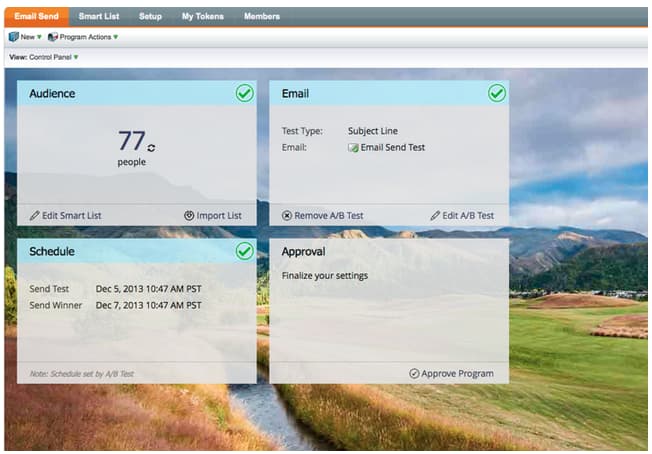
Sending an email has never been easier. Use the new email program to send a batch email, instead of the Default Program. Define the smart list, email, schedule it, and you are off!
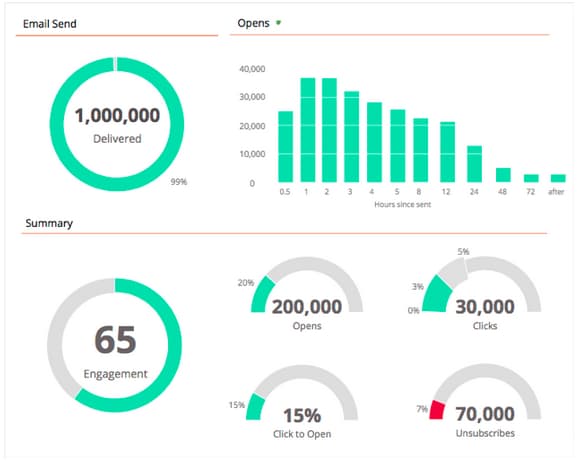
Also check out the new Email Metrics Dashboard to see how your email performed.
Email A/B Testing email-a-b-testing
In the new Email Program, run an A/B test on a percentage of the overall email send population. Choose from 4 different types of tests: Subject line, From Address, Date/Time, and Whole Email. You can even choose to manually promote the winner, or let the system promote it based on a pre-defined winning criteria. The new Email program, including A/B test, can be nested in Events and the default Program to make that email send so simple!
Email Champion/Challenger Testing email-champion-challenger-testing
Champion/Challenger testing is similar to A/B test, but the difference is that it is used for triggered emails and you don’t automatically send a winner. This test allows you to challenge an established way of doing something, called the Champion, and you test if it is still the best by introducing a Challenger. In addition, Champion/Challenger Email Tests can be used inside Engagement program streams.
Lead Details in Email Analysis lead-details-in-email-analysis
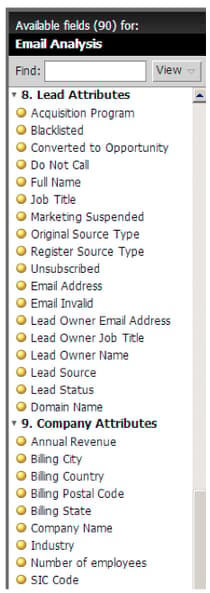
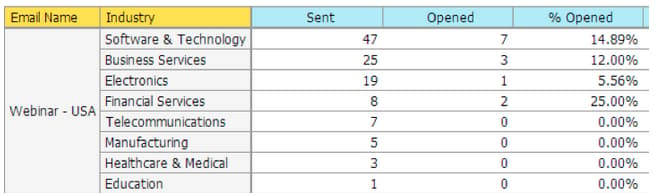
We introduced additional lead and company attributes in Email Analysis. You can now view your email stats grouped by new attributes such as Industry and Lead Source.
Enhanced BrightTALK Event Adapter enhanced-brighttalk-event-adapter
Now you can pull registrants into Marketo from your BrightTALK channel and event. You can use this information to inform other marketing campaigns!