On this page: Learn how to configure Infobip as your provider in Adobe Journey Optimizer by setting up SMS API credentials, and how to enable RCS messaging through a custom provider integration.
By integrating Infobip with Adobe Journey Optimizer, you can deliver Mobile messages to your profiles as part of your journeys and campaigns.
To configure Infobip as your SMS provider, follow the steps below:
Configure API credentials for SMS api-credential
To configure Infobip with Journey Optimizer, follow these steps:
-
In the left rail, browse to Administration
>Channels and select the API Credentials menu. Click the Create new API credentials button. -
Configure your SMS API credentials, as detailed below:
accordion List of SMS credentials for configuration table 0-row-2 1-row-2 2-row-2 3-row-2 4-row-2 5-row-2 6-row-2 7-row-2 8-row-2 Configuration fields Description SMS vendor Infobip Name Choose a name for your API Credential. API base URL and API key Access your web interface homepage or the API key management page to find your credentials. For regional or alternate domain endpoints, e.g. api-ny2.infobip.com, specify the complete base URL and verify your authorization token with Infobip support.
Learn more in Infobip DocumentationPrincipal Entity ID Enter your assigned DLT principal entity ID. Content Template ID Enter your registered DLT content template ID. Validity Period Enter the message validity period in hours. In the event that messages cannot be delivered within this timeframe, the system will make additional attempts to resend them. The default validity period is set to 48 hours. Callback Data Enter the additional client data that will be sent on the Notify URL. Inbound Number Add your unique inbound number. This allows you to use the same API credentials across different sandboxes, each with its own inbound number. -
Enable the Fuzzy Opt-out option to detect messages resembling opt-out keywords (e.g., ‘CANCIL’) and customize the confirmation reply in the Fuzzy Auto Reply field.
Fuzzy Opt-out identifies SMS messages that indicate a user wants to unsubscribe, even if the message does not exactly match a defined opt-out keyword. It can detect common opt-out phrases and certain offensive terms, helping ensure your campaigns respect user preferences and remain compliant.
-
Select Use custom dataset for inbound to route this credential’s inbound SMS to a pre-created dataset you choose from the dropdown. Learn more about using a custom dataset for inbound keywords
note NOTE The dataset schema must be XDM ExperienceEvent and include at least these field groups: - Adobe CJM ExperienceEvent - Message interaction details
- Adobe CJM ExperienceEvent - Message Execution Details
- Adobe CJM ExperienceEvent - Message Profile Details
The schema and dataset must be enabled for Profile. -
Click Submit when you finished the configuration of your API credentials.
-
In the API Credentials menu, click the bin icon to delete your API credentials.
-
To modify existing credentials, locate the desired API credentials and click the Edit option to make the necessary changes.
-
Click Verify SMS connection, from your existing API credentials, to test and verify your SMS API credentials by sending a sample message to a designated device.
-
Fill in the Number and Message fields and click Verify connection.
note important IMPORTANT The message must be structured to align with the provider’s payload format. 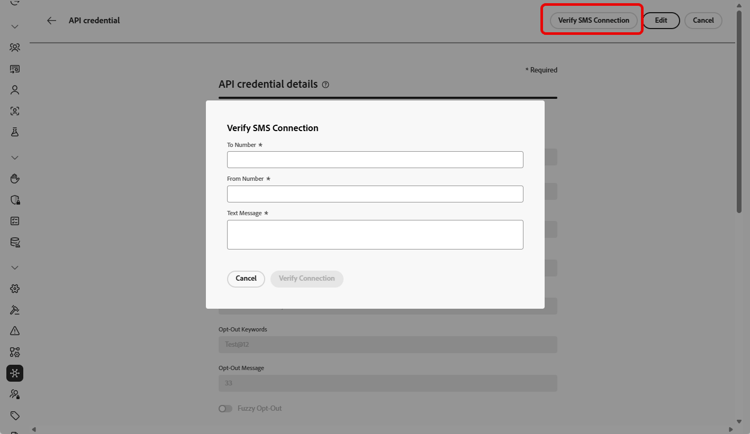
After creating and configuring your API credential, you now need to create a channel configuration for SMS and MMS messages. Learn more
Configure API credential for RCS
RCS messaging is supported in Adobe Journey Optimizer through Infobip using the Custom SMS Provider feature. This enables the delivery of rich, interactive messages via verified business profiles, incorporating elements such as carousels, buttons, and multimedia content.
➡️ Explore how Infobip supports RCS in Infobip documentation
To enable RCS messaging with Infobip, new API credentials must be configured via a Custom SMS Provider. Existing Infobip SMS credentials are not compatible, as RCS requires a distinct payload format.
To configure RCS with Infobip:
-
Register Your Business for RCS via Infobip
Begin by completing the RCS onboarding and registration process within the Infobip platform. This involves setting up your RCS sender profile and ensuring your account is RCS-enabled. Learn more in Infobip documentation
-
Create an SMS Webhook
Configure a custom SMS webhook in Journey Optimizer. This webhook will be responsible for handling delivery receipts, inbound RCS messages, and status updates from Infobip’s platform.
-
Create API Credential using Custom as SMS vendor
Create a new API credential within Journey Optimizer, selecting “Custom” as the SMS provider. Use the appropriate RCS endpoint authentication method, base URL, and headers.
After creating and configuring your API credential, you now need to create your Webhook and a channel configuration for your RCS messages. Learn more
This section contains structured knowledge intended to support interpretation, retrieval, and question answering related to this topic.
For complete understanding, this information should be combined with the documentation on this page. Neither source is intended to stand alone; the page describes the feature, while this section provides additional context that helps disambiguate terminology, intent, applicability, and constraints.
- TL;DR: This page explains how to configure Infobip as your provider in Journey Optimizer by setting up SMS API credentials, and how to enable RCS messaging with Infobip through a Custom SMS Provider integration.
Intents:
- Configure SMS API credentials with Infobip as the SMS vendor
- Set the DLT Principal Entity ID and Content Template ID and the message validity period
- Enable Fuzzy Opt-out detection and customize the Fuzzy Auto Reply confirmation
- Route a credential’s inbound SMS to a custom dataset
- Enable RCS messaging with Infobip through a Custom SMS Provider
- Verify the SMS connection by sending a sample message to a designated device
Glossary:
- Validity Period: The message validity period in hours; if messages cannot be delivered within this timeframe, the system makes additional attempts to resend them (product-specific)
- Fuzzy Opt-out: An option that detects SMS messages resembling opt-out keywords (for example, CANCIL), including common opt-out phrases and certain offensive terms (product-specific)
- Fuzzy Auto Reply: The field where the confirmation reply for a fuzzy opt-out is customized (product-specific)
- Inbound Number: A unique inbound number that allows the same API credentials to be used across different sandboxes, each with its own inbound number (product-specific)
- Custom SMS Provider: The feature used to enable RCS messaging with Infobip, requiring new API credentials with a distinct payload format (product-specific)
Guardrails:
- The default validity period is 48 hours.
- RCS with Infobip requires new API credentials configured via a Custom SMS Provider; existing Infobip SMS credentials are not compatible, as RCS requires a distinct payload format.
- The custom inbound dataset schema must be XDM ExperienceEvent, include the Adobe CJM ExperienceEvent Message interaction details, Message Execution Details, and Message Profile Details field groups, and be enabled for Profile.
- The verify-connection message must be structured to align with the provider’s payload format.
Terminology:
- Canonical name: Infobip provider — Acronym: n/a — variants: Infobip SMS provider, Infobip configuration
- Do not confuse: “Fuzzy Opt-out” (the detection option) ≠ “Fuzzy Auto Reply” (the field for the confirmation reply)
- Do not confuse: “Infobip SMS API credentials” (for SMS) ≠ “Custom SMS Provider credentials” (required for RCS with Infobip)
FAQ:
- Q: What is the default message validity period? — 48 hours; if messages cannot be delivered within this timeframe, the system makes additional attempts to resend them.
- Q: Can I use the same API credentials across sandboxes? — Yes; add a unique Inbound Number so the same API credentials can be used across different sandboxes, each with its own inbound number.
- Q: How do I enable RCS with Infobip? — RCS is supported through Infobip using the Custom SMS Provider feature; register your business for RCS via Infobip, create a custom SMS webhook, and create a new API credential selecting Custom as the SMS vendor.
- Q: Can existing Infobip SMS credentials be used for RCS? — No; existing Infobip SMS credentials are not compatible because RCS requires a distinct payload format.
- Q: What does Fuzzy Opt-out do? — It identifies SMS messages that indicate a user wants to unsubscribe even when the message does not exactly match a defined opt-out keyword, helping campaigns remain compliant.