On this page: Learn how to store inbound SMS keywords in a profile-enabled custom dataset by creating an Adobe Experience Platform schema and dataset, then referencing them in your Adobe Journey Optimizer SMS API credentials.
Inbound SMS keywords can be stored in a profile-enabled custom dataset. The configuration consists of an Adobe Experience Platform schema, a dataset created from that schema, and Journey Optimizer SMS API credentials that reference the dataset for inbound messages.
For background on schemas, field groups, and datasets, refer to the following Adobe Experience Platform documentation:
To use a custom dataset for inbound keyword, you need to:
Create a schema create-schema
A schema defines the structure and validation rules that apply to ingested data. Compose an Experience Event schema for inbound keyword collection by adding the existing field groups listed below.
➡️ Learn more about schema creation in Adobe Experience Platform documentation
-
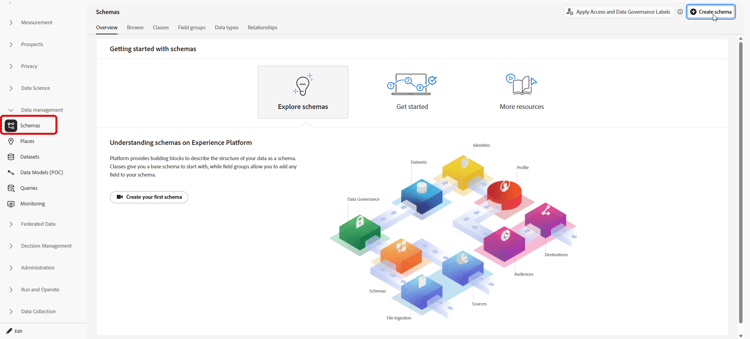
In Adobe Experience Platform, from Data management, access Schemas and select Create schema.
-
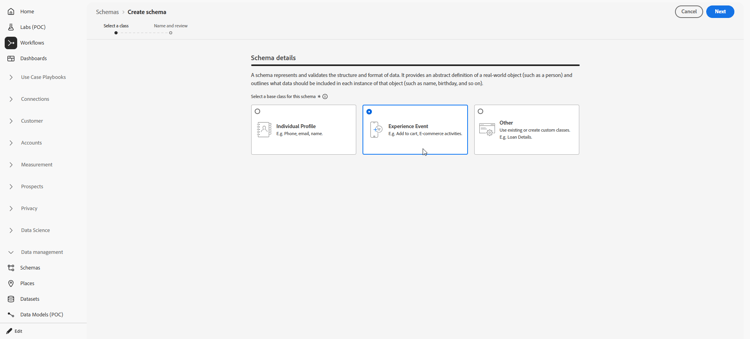
Choose Standard schema.
-
Select Experience Event.
-
Enter a Display name for the schema and click Finish.
The schema is saved and the schema editor opens.
-
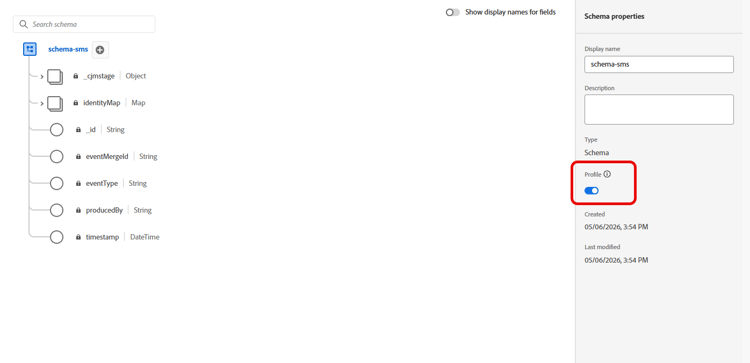
Open Schema properties and enable the schema for Profile.
-
In Field groups, add these existing field groups:
- Adobe CJM ExperienceEvent - Message interaction details
- Adobe CJM ExperienceEvent - Message Execution Details
- Adobe CJM ExperienceEvent - Message Profile Details
-
Click Save.
Create a dataset create-dataset
A dataset is the storage container for ingested data. Each dataset is associated with exactly one schema, and records written to the dataset must conform to that schema.
-
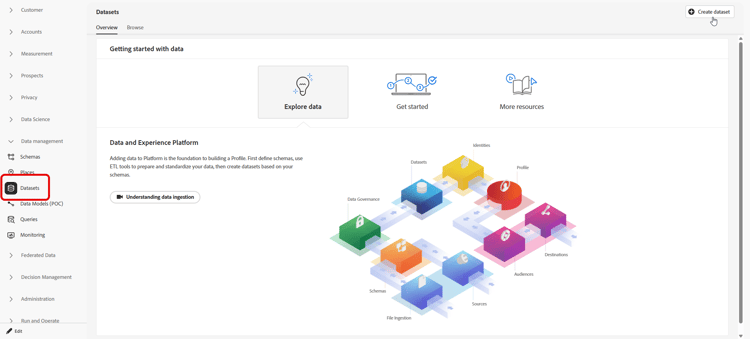
In Adobe Experience Platform, from Data management, access Datasets and select Create dataset.
-
Choose Create dataset from schema.
-
Select the schema created in the previous section and click Next.
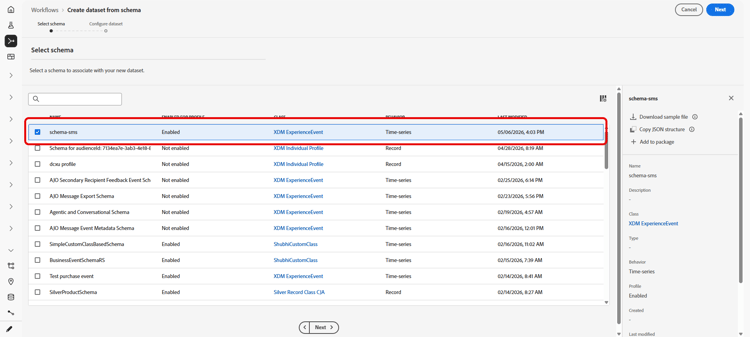
-
Enter a Name and click Finish.
-
From the Data activity tab, enable data for Profile.
Select the Data retention policy appropriate to organizational governance requirements.
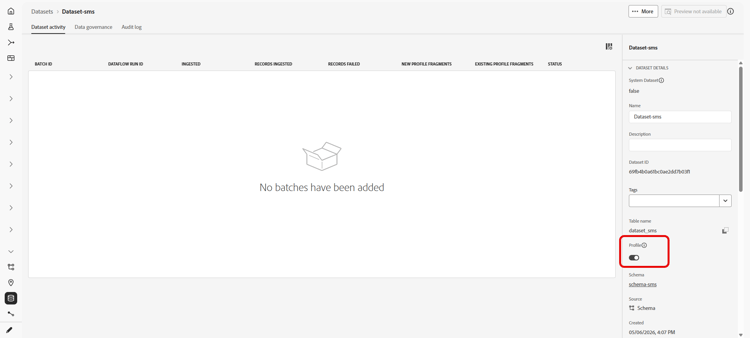
-
Click Save.
Configure API credentials configure-api-credentials
Configure credentials according to your SMS provider using Get started with SMS / MMS / RCS configuration. Then complete the steps below to select the custom inbound dataset.
-
In the left rail, browse to Administration > Channels
>SMS Settings and select the API Credentials menu. Click the Create new API credentials button. -
Create or edit credentials depending on your provider.
-
Enable the Use custom dataset for inbound option.
-
Select the Dataset created in the previous section.
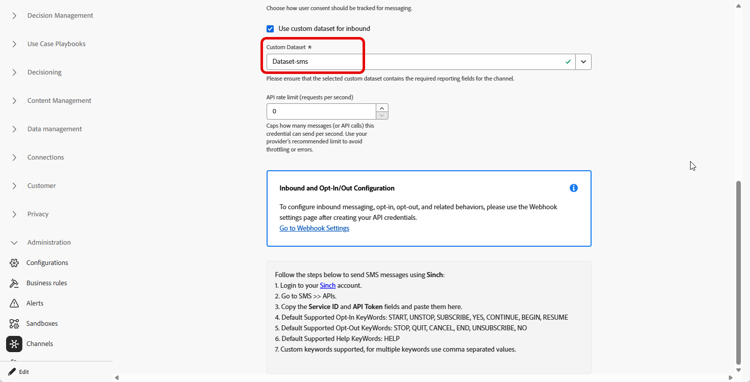
-
Complete any remaining required fields and click Save.
note NOTE Upon saving API credentials, Journey Optimizer validates that the inbound keyword dataset is configured correctly. If validation fails, an error message indicates the required correction.
After the credentials are saved, outbound and inbound messaging behavior is unchanged; inbound keywords for that credential are recorded in the selected custom dataset.
This section contains structured knowledge intended to support interpretation, retrieval, and question answering related to this topic.
For complete understanding, this information should be combined with the documentation on this page. Neither source is intended to stand alone; the page describes the feature, while this section provides additional context that helps disambiguate terminology, intent, applicability, and constraints.
- TL;DR: This page explains how to store inbound mobile message keywords in a profile-enabled custom dataset by creating an Adobe Experience Platform Experience Event schema and a dataset from it, then referencing that dataset in the Journey Optimizer SMS API credentials.
Intents:
- Create an Experience Event schema enabled for Profile with the required field groups
- Create a dataset from that schema and enable it for Profile
- Reference the custom dataset in the SMS API credentials so inbound keywords are recorded in it
- Understand where inbound keywords are stored when no custom dataset is configured
Glossary:
- Custom dataset for inbound: A profile-enabled dataset where inbound mobile message keywords for a credential are recorded, selected through the Use custom dataset for inbound option in the SMS API credentials (product-specific)
- Schema: A structure that defines the validation rules applied to ingested data; here an Experience Event schema enabled for Profile (product-specific)
- Dataset: The storage container for ingested data, associated with exactly one schema (product-specific)
- AJO Email Tracking Dataset: The system dataset where inbound keywords are stored by default when no custom dataset is configured (product-specific)
Guardrails:
- The schema must be an Experience Event schema enabled for Profile and include the field groups Adobe CJM ExperienceEvent - Message interaction details, Adobe CJM ExperienceEvent - Message Execution Details, and Adobe CJM ExperienceEvent - Message Profile Details.
- Each dataset is associated with exactly one schema, and records written must conform to that schema.
- The dataset must be enabled for Profile.
- If no custom dataset is configured, inbound keywords are stored in the system AJO Email Tracking Dataset, and a profile must have at least one message sent from Journey Optimizer before incoming messages are captured in it.
- Upon saving API credentials, Journey Optimizer validates that the inbound keyword dataset is configured correctly; if validation fails, an error message indicates the required correction.
Terminology:
- Canonical name: Use custom dataset for inbound — Acronym: n/a — variants: custom dataset for inbound keywords, custom inbound dataset
- Do not confuse: “custom dataset for inbound” (a dataset you create and select) ≠ “AJO Email Tracking Dataset” (the default system dataset used when none is configured)
FAQ:
- Q: Where are inbound keywords stored if I do not configure a custom dataset? — They are stored in the system AJO Email Tracking Dataset by default.
- Q: Which field groups must the schema include? — Adobe CJM ExperienceEvent - Message interaction details, Adobe CJM ExperienceEvent - Message Execution Details, and Adobe CJM ExperienceEvent - Message Profile Details.
- Q: How do I point a credential to the custom dataset? — In the SMS API credentials, enable the Use custom dataset for inbound option and select the dataset you created.
- Q: What happens after the credentials are saved? — Journey Optimizer validates the inbound keyword dataset; outbound and inbound messaging behavior is unchanged and inbound keywords for that credential are recorded in the selected custom dataset.