On this page: Define the audience, identity type, automatic profile creation, and webhooks so your API triggered campaign reaches the right individuals and returns real-time delivery status.
Use the Audience tab to define the campaign audience.
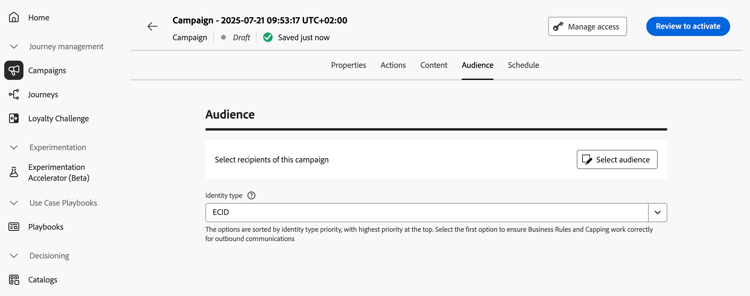
Select the audience
For Marketing API triggered campaigns, click the Select audience button to display the list of available Adobe Experience Platform audiences. Learn more about audiences.
For Transactional API triggered campaigns, the targeted profiles need to be defined in the API call. A single API call supports up to 20 unique recipients. Each recipient must have a unique user ID, duplicate user IDs are not permitted. Learn more in the Interactive Message Execution API documentation
Select the identity type
In the Identity type field, choose the type of key to use to identify the individuals from the selected audience. You can either use an existing identity type or create a new one using the Adobe Experience Platform Identity Service. Standard Identity namespaces are listed on this page.
Only one identity type is allowed per campaign. Individuals belonging to a segment that does not have the selected identity type among their different identities cannot be targeted by the campaign. Learn more about identity types and namespaces in the Adobe Experience Platform documentation.
Activate profile creation at campaign execution
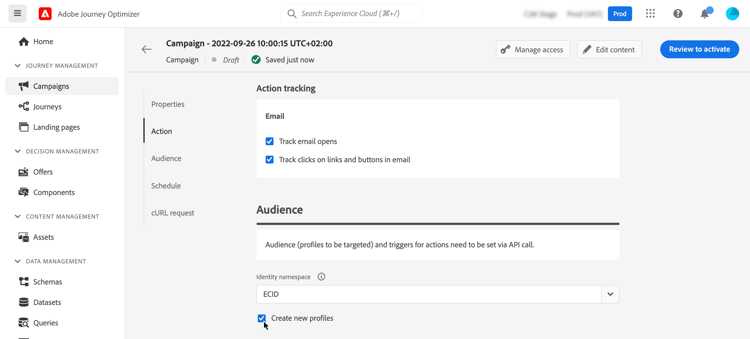
In some cases, you may need to send transactional messages to profiles that do not exist in the system. For example if an unknown user tries to reset password on your website. When a profile does not exist in the database, Journey Optimizer allows you to automatically create it when executing the campaign to allow sending the message to this profile.
To activate profile creation at campaign execution, toggle the Create new profiles option on. If this option is disabled, unknown profiles will be rejected for any sending and the API call will fail.
Enable webhooks webhook
For Transactional API triggered campaigns, you can enable webhooks to receive real-time feedback on the execution status of your messages. To do this, toggle the Enable webhooks option to send delivery status events to a configured webhook.
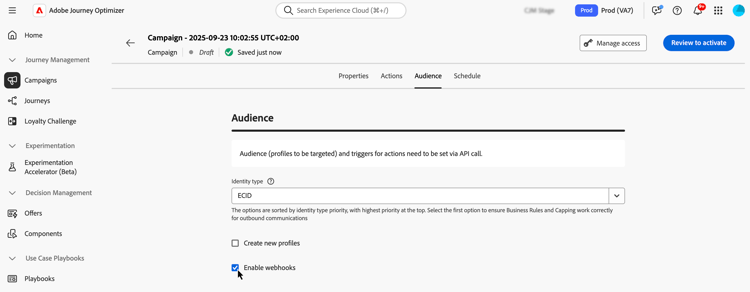
Webhook configurations are managed centrally in the Administration / Channels / Feedback Webhook menu. From there, administrators can create and edit webhook endpoints. Learn how to create Feedback Webhooks
Next steps next
Once your campaign configuration and content are ready, you can schedule its execution. Learn more
This section contains structured knowledge intended to support interpretation, retrieval, and question answering related to this topic.
For complete understanding, this information should be combined with the documentation on this page. Neither source is intended to stand alone; the page describes the feature, while this section provides additional context that helps disambiguate terminology, intent, applicability, and constraints.
- TL;DR: This page explains how to define the audience of an API triggered campaign, including the identity type, automatic profile creation at campaign execution, and webhooks for delivery status.
Intents:
- Select the audience of a Marketing API triggered campaign
- Understand how recipients are defined for a Transactional API triggered campaign
- Select the identity type used to identify individuals
- Activate profile creation at campaign execution for unknown profiles
- Enable webhooks to receive delivery status events for Transactional API triggered campaigns
Glossary:
- Marketing API triggered campaigns: The audience is selected from the list of available Adobe Experience Platform audiences with Select audience (product-specific)
- Transactional API triggered campaigns: The targeted profiles are defined in the API call (product-specific)
- Identity type: The type of key used to identify the individuals from the selected audience; an existing identity type or a new one created with the Adobe Experience Platform Identity Service
- Create new profiles: Option that automatically creates a profile that does not exist in the database when the campaign is executed
- Enable webhooks: Option that sends delivery status events to a configured webhook
- Feedback Webhook: Menu under Administration / Channels where webhook configurations are managed centrally
Guardrails:
- A single API call supports up to 20 unique recipients, for Transactional API triggered campaigns.
- Each recipient must have a unique user ID; duplicate user IDs are not permitted.
- Only one identity type is allowed per campaign.
- Individuals belonging to a segment that does not have the selected identity type among their different identities cannot be targeted by the campaign.
- The use of audiences and attributes from audience composition is currently unavailable for use with Healthcare Shield or Privacy and Security Shield.
- If Create new profiles is disabled, unknown profiles are rejected for any sending and the API call fails.
- Create new profiles is provided for very small volume profile creation in a large volume transactional sending use case, with the bulk of profiles already existing in Platform.
- Unknown profiles are created in the AJO Interactive Messaging Profile Dataset dataset, in three default namespaces (email, phone and ECID) respectively for each outbound channel (Email, Mobile and Push). With a custom namespace, the identity is created with the same custom namespace.
- Profile creation at execution is not available for High Throughput campaigns, as this mode does not rely on Adobe profiles. The system does not check whether the profiles exist or not.
Applicability:
- Audience selection with Select audience: Marketing API triggered campaigns
- Targeted profiles defined in the API call: Transactional API triggered campaigns
- Enable webhooks: Transactional API triggered campaigns
Terminology:
- Canonical name: API triggered campaign audience
- Acronym: AEP — Adobe Experience Platform
- Short name: Platform — Adobe Experience Platform
- Do not confuse: “Marketing API triggered campaigns” (audience selected with Select audience) ≠ “Transactional API triggered campaigns” (profiles defined in the API call)
FAQ:
- Q: How are recipients defined for a Transactional API triggered campaign? — The targeted profiles need to be defined in the API call. A single API call supports up to 20 unique recipients, each with a unique user ID.
- Q: How many identity types can a campaign use? — Only one identity type is allowed per campaign.
- Q: What happens to an unknown profile? — If Create new profiles is on, the profile is created when the campaign is executed. If it is disabled, unknown profiles are rejected for any sending and the API call fails.
- Q: Can I create profiles at execution in High Throughput campaigns? — No. Profile creation at execution is not available for High Throughput campaigns.
- Q: Where are webhook configurations managed? — In the Administration / Channels / Feedback Webhook menu, where administrators can create and edit webhook endpoints.
Related pages:
- Audiences available for Marketing campaigns: Learn more about audiences (audience/about-audiences.md)
- Audience composition: audience composition (audience/get-started-audience-orchestration.md)
- Transactional recipients in the API call: Interactive Message Execution API documentation (https://developer.adobe.com/journey-optimizer-apis/references/messaging#operation/postIMUnitaryMessageExecution)
- Standard Identity namespaces: this page (https://experienceleague.adobe.com/en/docs/experience-platform/identity/features/namespaces#standard)
- Identity types and namespaces: Adobe Experience Platform documentation (https://experienceleague.adobe.com/docs/experience-platform/identity/home.html)
- High Throughput campaigns: High Throughput campaigns (campaigns/api-triggered-high-throughput.md)
- Creating Feedback Webhooks: Learn how to create Feedback Webhooks (configuration/feedback-webhooks.md)
- Next step, scheduling: Learn more (campaigns/api-triggered-campaign-schedule.md)
Personas:
- developer: Can define recipients for a Transactional API triggered campaign directly in the API call. The page states that a single API call supports up to 20 unique recipients, each with a unique user ID, and duplicate user IDs are not permitted. Where: “Select the audience”.
Onboarding:
- Level: Experienced
- First minimal step: Use the Audience tab to define the campaign audience.
- Success check: Delivery status events are sent to the configured webhook.
- Previous: Selecting an Adobe Experience Platform audience for a Marketing API triggered campaign: About Adobe Experience Platform audiences (audience/about-audiences.md)
- Next: Scheduling the API triggered campaign after audience configuration is complete: Schedule an API triggered campaign (campaigns/api-triggered-campaign-schedule.md); Enabling webhooks to receive delivery status events for a Transactional API triggered campaign: Create feedback webhooks for API triggered campaigns in Journey Optimizer (configuration/feedback-webhooks.md)