[AEM Forms]{class="badge positive" title="Applies to AEM Forms)."}
Text Field component in Interactive Communication Editor
1. Introduction
The Text Field component in the Interactive Communication (IC) editor enables authors to display information such as names, addresses, comments, or numeric IDs. The value shown in the text field is either predefined (static) or filled dynamically using data binding. It supports single-line entries, validation rules, and flexible formatting, making it one of the most widely used and versatile elements in personalized communications.
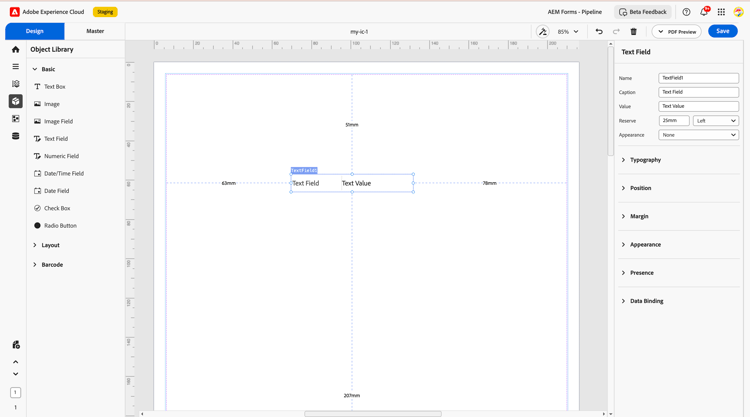
2. Properties
2.1 Basic Field
-
Name: Define a unique identifier for the field, used in data models, rules, and scripts.
-
Caption: Display the onscreen label shown to users (e.g., “First Name”).
-
Value: Display text such as names, addresses, remarks, or other details. The value is either static or derived from data binding.
-
Reserve: Set the alignment of the value, left, right, top, or bottom or specify a custom position using units like millimeters (e.g., 20 mm).
-
Appearance: Set the appearance of the value box as None, Solid Box, or Underline based on the desired visual layout.
2.2 Typography
Controls the visual style of the typed characters:
-
Font Validation: Apply optional constraints to validate the format of the displayed value, such as allowing only alphabets, numbers, or specific custom patterns.
-
Font Size: Adjust the size of the text within the field using point values like 10 pt, 12 pt, 20 pt, etc., to ensure readability and alignment with design standards.
2.3 Position
Defines the field’s placement within the layout:
-
X / Y coordinates
-
Width and Height (mm, px, or %)
2.4 Margin
Specifies spacing around the field container:
-
Top (Up)
-
Bottom (Down)
-
Left
-
Right
2.5 Appearance
Styles the field container itself:
-
Fill: Set the background color of the text box. This helps distinguish input areas or align them with brand colors.
-
Stroke: Add borders around the text box with the following customizable properties:
-
Width: Define the thickness of the border.
-
Style: Choose from solid, dashed, or dotted border styles.
-
Edge: Select the shape of the corners—either rounded or sharp.
-
Radius: Adjust the corner curvature using radius values (e.g., 4 px, 10 px) for a softer or more angular look.
2.6 Presence
Determines visibility at runtime:
-
Visible: Shown and occupies space
-
Hidden (keeps space): Invisible but layout space is reserved
2.7 Data Binding
Links the text field to a data source to display values dynamically or statically within the communication.
-
Data Binding Type: Specifies how the field connects to a data source or schema.
-
Use Name: Binds the text field using the field name defined in the data model or schema, allowing dynamic text display based on external data.
-
Use Global Data: Connects the field to global data that is shared across the entire communication for consistent information display.
-
No Data Binding: Keeps the field unlinked from any backend source. It is used to display static values or text meant for visual context only.
3. Usage
Common scenarios include:
-
Capturing personal details (names, addresses, phone numbers)
-
Accepting comments or feedback (multiline)
-
Entering policy numbers or account IDs
-
Collecting short numeric values such as PIN codes or OTPs
Authors can place the field in subforms or layout grids for alignment and attach validation rules (length limits, regex patterns) to ensure clean input.
4. Best Practices
-
Apply validation (mandatory flags, pattern checks) for immediate feedback.
-
Provide meaningful Reserve text for printed or read-only views.
-
Keep typography consistent with brand guidelines.
-
Reduce field width on mobile layouts to fit smaller screens.
-
Bind directly to the data model whenever possible for simpler maintenance.
The Text Field component in the IC editor is a versatile building block that streamlines data capture. When configured thoughtfully, with well-chosen typography, clear labels, proper validation, and solid data binding, it delivers a seamless, user-friendly experience and reliable data for downstream processing.