B2B shared catalog projection
The Adobe Commerce Optimizer Connector for B2B projects Adobe Commerce shared catalogs and company assignments into protected Adobe Commerce Optimizer catalog views.
Base synchronization and B2B projection
The base Adobe Commerce Optimizer Connector synchronizes catalog and pricing feeds, mapping store views to catalog sources, websites to price books, and customer groups to price books.
The Adobe Commerce Optimizer Connector for B2B projects each custom shared catalog’s assortment and prices into a protected view. Adobe Commerce selects the view using the buyer’s company assignment. The restricted access key verifies signed requests but does not determine catalog access. Adobe Commerce is the system of record for connector-managed catalog, pricing, and B2B projection data. Manage product discovery and recommendations in the Adobe Commerce Optimizer configuration.
Data mapping
The B2B projection combines synchronized catalog content and pricing with Shared Catalog assortment and company assignment context.
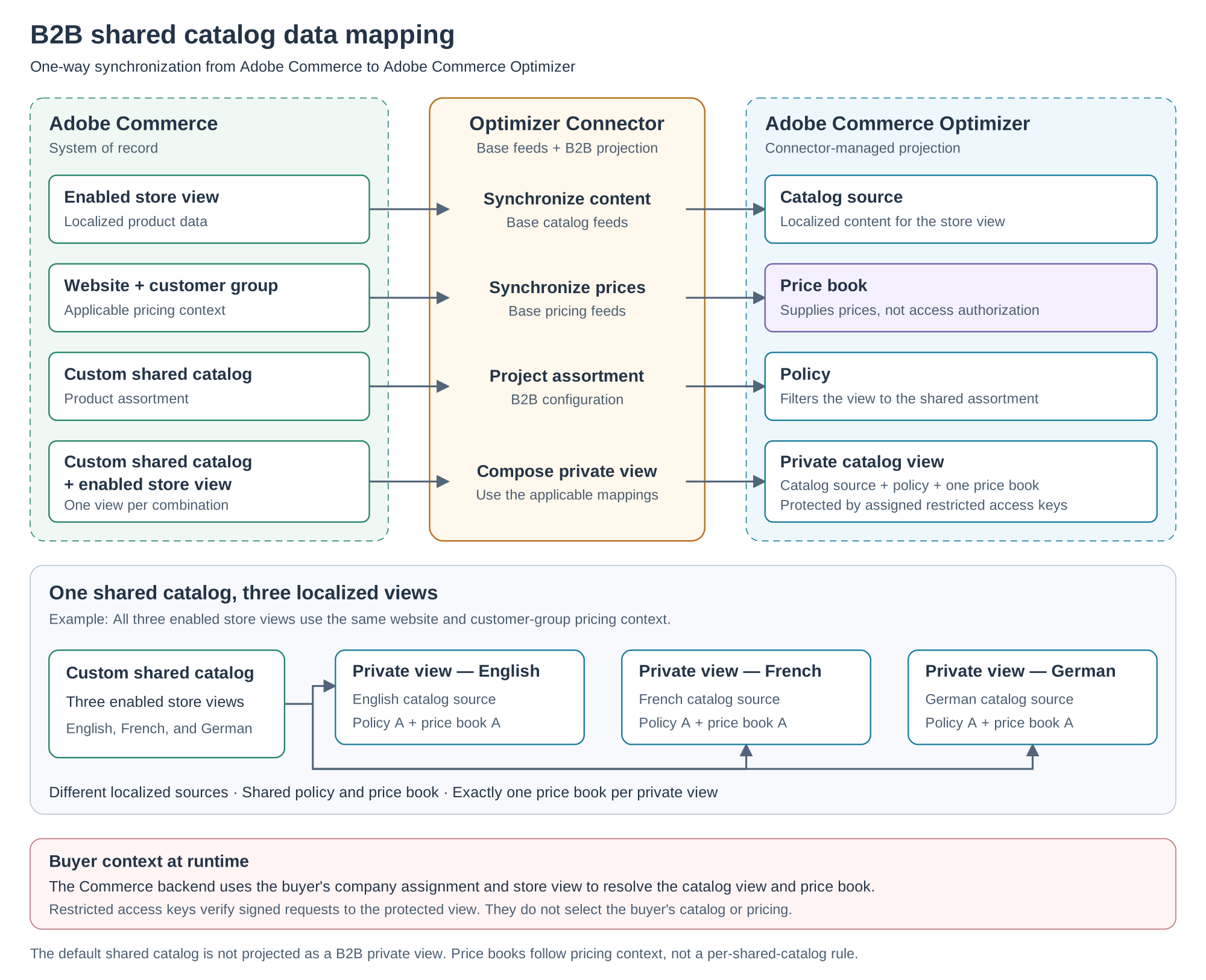
Each private catalog view can reference only one price book. Store views with the same website and customer-group pricing context can share a price book while using different localized catalog sources. The connector does not create a price book per shared catalog.
The default shared catalog is not projected as a B2B private catalog view.
Runtime authorization
After a buyer signs in, the Commerce backend authenticates the session and uses the buyer’s company assignment and store view to resolve the appropriate catalog view and price book.
The storefront sends the catalog view ID, price book ID, and signed token with each Merchandising API request. Adobe Commerce Optimizer verifies the RS256 signature for the JWT against the restricted access keys assigned to the catalog view. It returns catalog data only when the token and key are valid and unexpired.
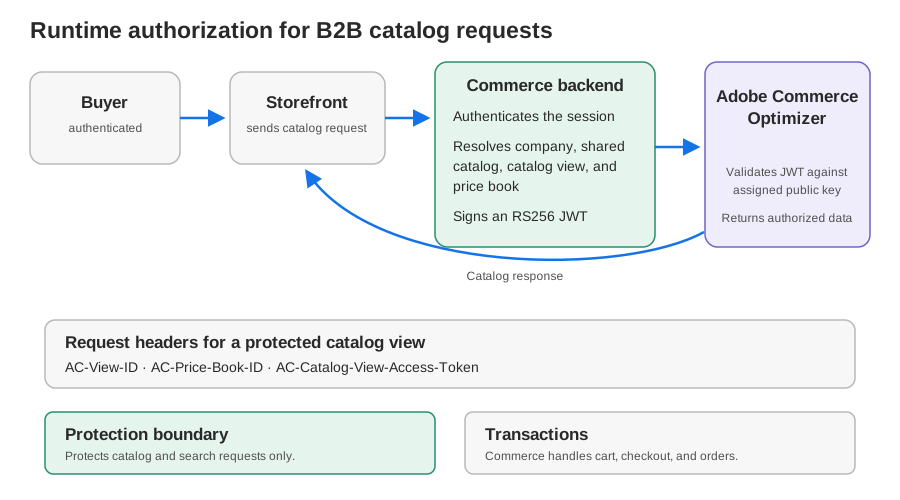
For private catalog requests, send these headers:
AC-View-IDAC-Price-Book-IDAC-Catalog-View-Access-TokenFor the full request and token requirements, see Merchandising API authentication and Verify access to a private catalog view.
Protection boundary
Catalog protection covers catalog and search requests only. It does not secure cart, checkout, or order operations. Enforce purchase eligibility in Adobe Commerce or the connected transaction system.
Projection setup and monitoring
The B2B connector projects private catalog views, policies, price book references, and restricted access key configuration from Adobe Commerce. You do not need to create those connector-managed projection objects manually. For setup instructions, see Get started with the B2B connector.
To monitor projected catalog views and reconcile configuration drift, see Monitor catalog view synchronization. To manage the assigned keys, see Manage restricted access keys for B2B shared catalogs.