在此頁面上:瞭解如何建立任何人都可以從共用URL開啟的公開登陸頁面,並使用這些頁面從啟用非設定檔的資料集中的匿名訪客擷取資料。
登入頁面通常會向按一下個人化連結(例如來自電子郵件)的訪客顯示,以便在頁面載入時可識別訪客的設定檔。 透過公用登陸頁面,您也可以在任何人都可以開啟的 公用URL 上發佈登陸頁面。 接著,訪客即可在頁面上填寫表單並提交資料。
您可以在任何地方共用公開URL,例如在電子郵件、SMS訊息或您的網站上,並將其用於外部行銷活動。
主要特性 lp-anonymous-characteristics
開始之前 lp-anonymous-prerequisites
在建立公開登入頁面之前,請確定:
- 您要用於登入頁面的子網域已移轉至Cloudflare。 當您重複使用已設定的登入頁面子網域時,即適用。
建立公開登陸頁面 lp-anonymous-create
公用登陸頁面的建立方式與任何其他登陸頁面一樣,具有幾項特定設定:匿名訪客必須可存取頁面,且該頁面所包含的表單應會將資料儲存在未啟用設定檔的資料集中。 若要建立帳戶,請遵循下列步驟。
-
從左側功能表瀏覽至內容管理 > 登陸頁面,然後按一下建立登陸頁面。
-
新增標題和(選用)說明。
-
選取預設集。 瞭解如何建立登陸頁面預設集
-
選取 資料擷取 做為登陸頁面的型別。
note NOTE 只有資料擷取登入頁面可讓您內嵌特定表單。 -
按一下「建立」。 主要頁面及其屬性隨即顯示。
-
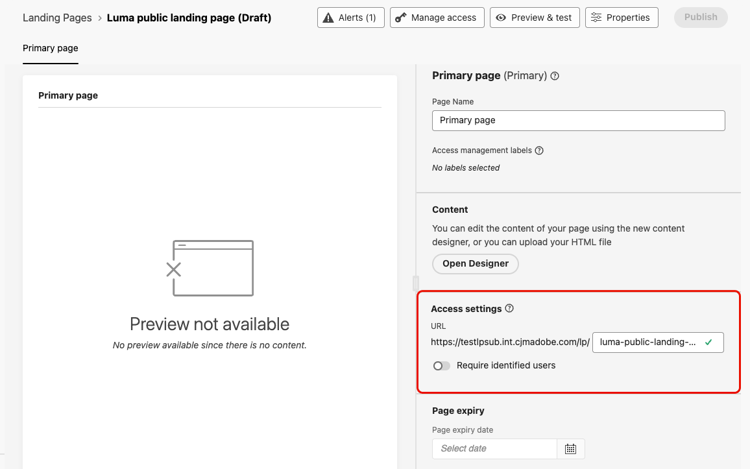
在 存取設定 區段中,定義登入頁面URL。 URL的第一個部分是預設集中定義的子網域。 在URL旁邊的欄位中輸入URL的唯一結尾。
-
請確定 需要已識別的使用者 選項已停用。 啟用此選項後,只有已識別的設定檔才能存取頁面。 停用時,匿名訪客可存取頁面。
-
按一下 開啟Designer 以設計您的頁面內容。 進一步瞭解登入頁面設計工具
-
將 Structure 元件拖放至您的內容中,然後將 Form 元件拖放至該結構中。
-
在 內嵌表單 區段中,選取已發佈的表單,最好連結至未啟用設定檔的資料集。
note NOTE Adobe不建議使用連結至已啟用設定檔之資料集的表單,因為它可能會建立不必要的設定檔並損毀資料。 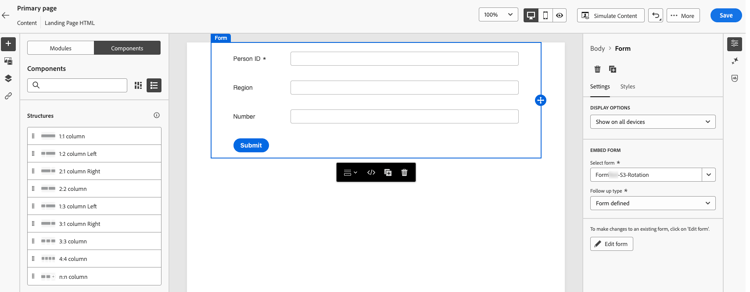
-
在 後續追蹤型別 區段中,定義訪客提交表單時會發生什麼事情。 了解更多
-
(可選)定義頁面到期日以及頁面到期時發生的動作。 了解更多
-
按一下儲存,然後使用 預覽和測試 來測試您的頁面。 了解做法
-
按一下發佈。 發佈可能需要一些時間。 登入頁面發佈時您會收到通知。
共用登入頁面 lp-anonymous-share
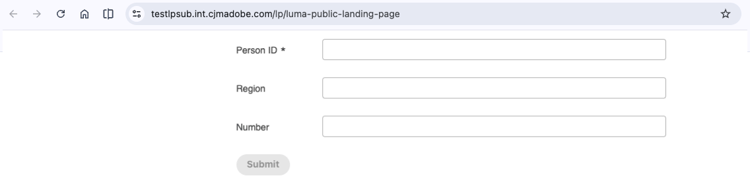
發佈登入頁面後,任何人都可以從其URL存取該頁面。 若要確認這是公開的,請複製URL並貼到瀏覽器視窗中。
隨處新增URL,例如電子郵件、簡訊或網站上的URL。 若要追蹤訊息的點按,請將追蹤引數新增至URL。
訪客提交表單時,資料會傳送至表單預設集中定義的資料集。 資料最多只需15分鐘處理即可供使用。
護欄與限制 lp-anonymous-limitations
-
將表單資料儲存在 啟用非設定檔 資料集中。 公開登陸頁面的用途並非建立或擴充設定檔,啟用設定檔的資料集可能會發生這種情況,並導致意外建立設定檔和資料損毀。
-
公開登陸頁面不支援報告功能。
-
如同其他登陸頁面,公用登陸頁面不能使用沙箱工具複製到另一個沙箱。
-
由於未識別匿名訪客,因此請勿在公開登陸頁面的內容中根據設定檔資料使用個人化。
相關主題 lp-anonymous-related
This section contains structured knowledge intended to support interpretation, retrieval, and question answering related to this topic.
For complete understanding, this information should be combined with the documentation on this page. Neither source is intended to stand alone; the page describes the feature, while this section provides additional context that helps disambiguate terminology, intent, applicability, and constraints.
- TL;DR: This page explains how to create and publish public landing pages, which are public landing pages that anyone can open from a shared URL and use to submit form data stored in a non-profile enabled dataset, without identifying the visitor.
Intents
- Publish a landing page on a public URL that anonymous visitors can open without being identified.
- Capture data from anonymous visitors with a form, in a non-profile enabled dataset.
- Check the prerequisites before creating a public landing page.
- Create, test, and publish a public landing page.
- Share the public URL of a public landing page in emails, SMS messages, or on a website.
- Identify the limitations that apply to public landing pages.
Glossary
- Public landing page: a Data Capture landing page published on a public URL that anyone can open, without being identified. Visitors can fill in a form on the page and submit data.
- Data Capture landing page: the only type of landing page that lets you embed a specific form, and therefore the type used for public landing pages.
- Non-profile enabled dataset: the type of dataset that is strongly recommended to store data submitted through a public landing page. With a profile-enabled dataset, many lead profiles might be created unnecessarily and existing profiles might be corrupted.
- Require identified users (product-specific): the option that restricts access to identified profiles when enabled. It must be disabled for the page to be accessible to anonymous visitors.
- Cloudflare migration: the migration of a landing page subdomain to Cloudflare, required to use public landing pages when you reuse a landing page subdomain that you already configured.
- Landing page preset: the configuration object, linked to a subdomain, from which a landing page is created.
- Form preset: the configuration object, linked to a non-profile enabled dataset for public landing pages, from which a form is created and published.
Guardrails
- Public landing pages are available in Limited Availability; contact your Adobe representative to request access.
- The landing page subdomain must be migrated to Cloudflare, a landing page preset must exist for that subdomain, and a form, preferably linked to a non-profile enabled dataset, must be created and published from a form preset.
- Form data should be stored in non-profile enabled datasets; public landing pages are not meant to create or enrich profiles, which can happen with a profile-enabled dataset.
- Reporting is not supported for public landing pages.
- Managing allowed IPs is not supported for subdomains used for public landing pages.
- Public landing pages cannot be copied to another sandbox using Sandbox tooling.
- Personalization based on profile data should not be used in the content of a public landing page, because visitors are not identified.
- Submitted data can take up to 15 minutes to be processed and available for use.
Terminology
- Do not confuse a public landing page with a Data Capture landing page for known profiles: the latter is usually opened from a personalized link so that the visitor’s profile can be identified, and the former is opened from a public URL without identification.
- Data submitted through a public landing page is stored in a dataset, not in a profile.
FAQ
- Who can open a public landing page? Anyone with the URL.
- Which type of landing page must I select? Data Capture, as only Data Capture landing pages let you embed a specific form.
- Where is the data submitted by visitors stored? In the non-profile enabled dataset defined in the form preset, not in a profile.
- Do submissions create or enrich profiles? Not with a non-profile enabled dataset, which is strongly recommended. With a profile-enabled dataset, lead profiles might be created unnecessarily and existing profiles might be corrupted.
- Which option must be disabled so that anonymous visitors can access the page? The Require identified users option.
- Do I need to migrate my landing page subdomain to Cloudflare? Yes, when you reuse a landing page subdomain that you already configured.
- Can I use allowed IPs with a public landing page? No, managing allowed IPs is not supported for subdomains used for public landing pages.
- Is reporting available for public landing pages? No.
- How long before submitted data is available? Up to 15 minutes.