在此頁面上:將Journey Optimizer連線至Adobe Campaign Standard,讓您的歷程能透過其異動訊息功能傳送電子郵件、推播通知及行動訊息。
如果您有Adobe Campaign Standard,則可使用內建動作來允許連線至Adobe Campaign Standard。 您可以使用Adobe Campaign Standard的「交易訊息」功能來傳送電子郵件、推播通知和行動訊息。
必須發佈Campaign Standard交易式訊息及其相關事件,才能在Journey Optimizer中使用。 如果事件已發佈,但訊息尚未發佈,將無法在Journey Optimizer介面中看見。 如果訊息已發佈,但其關聯事件尚未發佈,則會顯示在Journey Optimizer介面中,但將無法使用。
護欄與限制 important-notes
-
系統會自動為Adobe Campaign Standard動作定義每5分鐘4,000次呼叫的上限規則。 在Adobe Campaign Standard產品說明中進一步瞭解異動訊息SLA。
-
Adobe Campaign Standard整合是透過動作清單中的專屬內建動作來設定。 必須針對每個沙箱進行此設定。
-
Campaign Standard動作無法與對象資格或讀取對象活動搭配使用。
-
歷程不能同時使用內建頻道動作和Campaign Standard動作。
設定動作 configure-action
在Journey Optimizer中,您必須為每個異動訊息設定一個動作。
若要設定Campaign Standard動作,請遵循下列步驟:
-
在[管理]功能表區段中選取組態。
-
在 動作 區段中,按一下管理。 畫面隨即顯示動作清單。
-
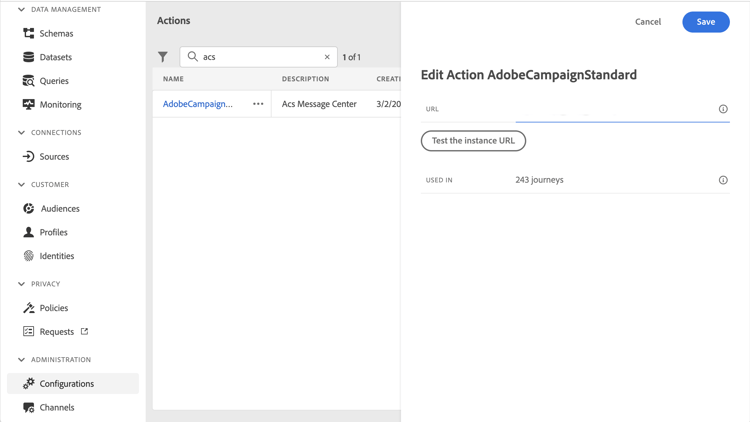
選取內建 AdobeCampaignStandard 動作。 動作設定窗格會在畫面右側開啟。
-
複製您的Adobe Campaign Standard執行個體URL,並將其貼到 URL 欄位中。
-
按一下 測試執行個體URL 以測試執行個體的有效性。
note NOTE 此測試會驗證: -
主機為「.campaign.adobe.com」、「.campaign-sandbox.adobe.com」、「.campaign-demo.adobe.com」、「.ats.adobe.com」或「.adls.adobe.com」
-
URL以https開頭
-
與此Adobe Campaign Standard例項相關聯的組織與Journey Optimizer組織相同
-
完成此設定後,在設計歷程時,動作類別中有三個動作可用: 電子郵件、推播、行動訊息。 瞭解如何使用它們。
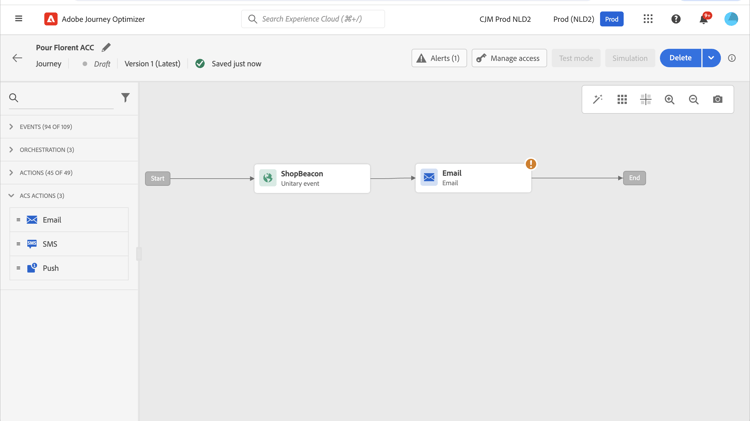
使用 回應 事件來回應與相同歷程中傳送之Campaign Standard訊息相關的追蹤資料:
-
對於推播通知,歷程可對點選、傳送或失敗的訊息做出反應。
-
對於行動訊息,歷程可對已傳送或失敗的訊息做出反應。
-
對於電子郵件,歷程可對點按、傳送、開啟或失敗的訊息做出反應。 進一步瞭解回應事件。
使用協力廠商系統傳送訊息時,您必須新增並設定自訂動作。 進一步瞭解自訂動作組態。
This section contains structured knowledge intended to support interpretation, retrieval, and question answering related to this topic.
For complete understanding, this information should be combined with the documentation on this page. Neither source is intended to stand alone; the page describes the feature, while this section provides additional context that helps disambiguate terminology, intent, applicability, and constraints.
- TL;DR: This page explains how to integrate Journey Optimizer with Adobe Campaign Standard through the AdobeCampaignStandard action so journeys can send emails, push notifications, and SMS through its transactional messaging capabilities.
Intents:
- Configure the AdobeCampaignStandard action for a sandbox
- Paste and test the Adobe Campaign Standard instance URL
- Make the Campaign Standard Email, Push, and SMS actions available in the Action category when designing a journey
- Use a Reactions event to react to tracking data from a Campaign Standard message
- Understand the capping and activity constraints of the integration
Glossary:
- AdobeCampaignStandard action: The action selected from the action list to connect Journey Optimizer to Adobe Campaign Standard (product-specific)
- Transactional Messaging: The Adobe Campaign Standard capability used to send emails, push notifications, and SMS from Journey Optimizer (product-specific)
- Test the instance URL: The button that verifies the host, that the URL starts with https, and that the organization matches the Journey Optimizer organization (product-specific)
- Reactions event: An event that reacts to tracking data related to a Campaign Standard message sent within the same journey (product-specific)
Guardrails:
- A capping rule of 4,000 calls per 5 minutes is automatically defined for Adobe Campaign Standard actions.
- The Adobe Campaign Standard integration is set up through a dedicated AdobeCampaignStandard action in the action list and must be configured for each sandbox.
- You cannot use a Campaign Standard action with an Audience qualification or Read audience activity.
- A journey cannot use both the native channels of the Action activity and Campaign Standard actions.
- The transactional message and its associated event must both be published: if only the event is published the message is not visible, and if only the message is published it is visible but not usable.
Terminology:
- Canonical name: Adobe Campaign Standard integration — Acronym: ACS (Adobe Campaign Standard) — variants: Campaign Standard action, AdobeCampaignStandard action
- Do not confuse: “native channels of the Action activity” ≠ “Campaign Standard actions” (Adobe Campaign Standard integration actions), which cannot both be used in the same journey
- Do not confuse: “Campaign Standard Email, Push, SMS actions” (available after configuring the integration) ≠ “Reactions event” (reacts to tracking data of a sent Campaign Standard message)
FAQ:
- Q: What is the capping limit for Adobe Campaign Standard actions? — A capping rule of 4,000 calls per 5 minutes is automatically defined.
- Q: Why is a Campaign Standard message not visible or not usable in Journey Optimizer? — If the event is published but the message is not, it is not visible; if the message is published but the event is not, it is visible but not usable.
- Q: Does the integration need to be configured once for the whole organization? — No, it is set up through a dedicated AdobeCampaignStandard action that must be configured for each sandbox.
- Q: Which tracking reactions are available per channel? — Push can react to clicked, sent, or failed; SMS to sent or failed; email to clicked, sent, opened, or failed.
- Q: Can a journey use both the native channels of the Action activity and Campaign Standard actions? — No, a journey cannot use both.