在此頁面上:瞭解如何為SMS、MMS和RCS訊息設定個別的API認證,以將Sinch設定為您的提供者。
搭配Journey Optimizer使用Sinch提供者時,您可以找到三個不同的選項:
-
SMS設定:設定您的Sinch API認證,以順暢地傳送SMS訊息。
-
MMS設定:對於多媒體訊息(MMS),請設定您的Sinch MMS API認證。 請注意,追蹤和回應傳入訊息由SMS設定處理。 MMS設定僅適用於MMS訊息的傳出傳遞。
-
RCS設定:設定您的Sinch API認證,以順暢地傳送RCS訊息。
若要設定Sinch提供者,請遵循下列步驟:
設定簡訊的API認證 create-api
若要設定您的Sinch提供者使用Journey Optimizer傳送SMS訊息和MMS,請遵循下列步驟:
-
在左側邊欄中,瀏覽至管理 > 管道
>SMS設定並選取 API認證 功能表。 按一下 建立新的API認證 按鈕。 -
設定您的SMS API認證,如下所述:
accordion 設定的SMS認證清單 table 0-row-2 1-row-2 2-row-2 3-row-2 4-row-2 5-row-2 設定欄位 說明 簡訊供應商 Sinch 名稱 選擇您的API認證名稱。 服務ID和API權杖 存取API頁面,您可以在SMS標籤下找到您的認證。 在Sinch檔案中進一步瞭解。 傳入號碼 新增您的唯一傳入號碼或短代碼。 這可讓您在不同的沙箱中使用相同的API認證,每個沙箱都有自己的傳入號碼或短程式碼。 覆寫URL 輸入您的自訂URL以取代SMS傳送報告、意見資料、傳入訊息或事件通知的預設端點。 Sinch會將所有相關更新傳送至此URL,而非預先定義的更新。
-
選取使用傳入的自訂資料集,將此認證的傳入SMS路由至您從下拉式清單中選擇的預先建立資料集。 進一步瞭解如何使用傳入關鍵字的自訂資料集
note NOTE 資料集結構描述必須是XDM ExperienceEvent,而且至少包含下列欄位群組: - Adobe CJM ExperienceEvent — 訊息互動細節
- Adobe CJM ExperienceEvent — 訊息執行詳細資料
- Adobe CJM ExperienceEvent — 訊息設定檔詳細資料
必須為設定檔啟用結構描述和資料集。 -
完成API認證的設定時,請按一下提交。
-
在 API認證 功能表中,按一下bin圖示以刪除您的API認證。
-
若要修改現有認證,請找到所需的API認證,然後按一下 編輯 選項以進行必要的變更。
-
從您現有的API認證按一下驗證SMS連線,透過傳送範例訊息至指定裝置來測試及驗證SMS API認證。
-
填寫 數字 和 訊息 欄位,然後按一下驗證連線。
note important IMPORTANT 訊息的結構必須符合提供者的裝載格式。 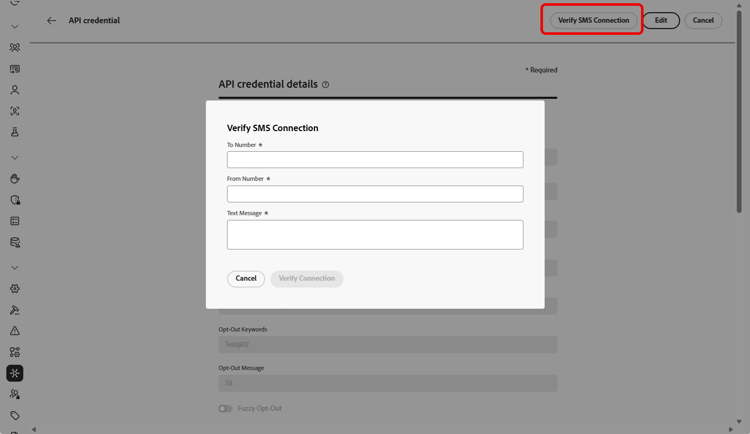
設定MMS的API認證 sinch-mms
若要設定Sinch MMS以使用Journey Optimizer傳送MMS,請遵循下列步驟:
-
在左側邊欄中,瀏覽至管理 > 管道
>SMS設定並選取 API認證 功能表。 按一下 建立新的API認證 按鈕。 -
設定您的MMS API認證,如下所述:
-
完成API認證的設定時,請按一下提交。
-
在 API認證 功能表中,按一下bin圖示以刪除您的API認證。
-
若要修改現有認證,請找到所需的API認證,然後按一下 編輯 選項以進行必要的變更。
在建立及設定您的API認證後,您現在需要建立您的Webhook以及RCS訊息的通道設定。 了解更多
設定RCS的API認證
Journey Optimizer透過Sinch支援RCS (Rich Communication Services)傳送訊息,允許使用已驗證的企業設定檔連同商標元素(例如Logos和傳送者名稱)來傳送基本訊息。
原生RCS編寫需要Sinch RCS。 Twilio、Infobip和其他提供者必須使用自訂提供者整合。
請注意,當設定檔的裝置不支援RCS或暫時無法透過RCS連線時,訊息會自動回復到簡訊。
若要使用Journey Optimizer設定Sinch RCS以傳送RCS,請遵循下列步驟:
-
在左側邊欄中,瀏覽至管理 > 管道
>SMS設定並選取 API認證 功能表。 按一下 建立新的API認證 按鈕。 -
設定您的RCS API認證,如下所述:
-
SMS廠商: Sinch RCS。
-
名稱:輸入您的API認證名稱。
-
專案識別碼、應用程式識別碼和API權杖:從您的Sinch RCS帳戶輸入專案識別碼、應用程式識別碼和API權杖。
-
服務計畫ID:輸入與您的Sinch帳戶相關聯的服務計畫ID。
-
SMS API Token:輸入您Sinch帳戶的SMS API Token。

-
-
選擇性地啟用 對傳入 使用自訂資料集選項,以將傳入RCS訊息儲存在自訂資料集中。 了解更多
-
設定 API速率限制(每秒要求數) 以限制每秒的API呼叫數上限,使用提供者的建議值以避免節流,或針對無限制的要求將其保留為0。
-
完成API認證的設定時,請按一下提交。
-
在 API認證 功能表中,按一下bin圖示以刪除您的API認證。
-
若要修改現有認證,請找到所需的API認證,然後按一下 編輯 選項以進行必要的變更。
在建立及設定您的API認證後,您現在需要建立您的Webhook以及RCS訊息的通道設定。 了解更多
This section contains structured knowledge intended to support interpretation, retrieval, and question answering related to this topic.
For complete understanding, this information should be combined with the documentation on this page. Neither source is intended to stand alone; the page describes the feature, while this section provides additional context that helps disambiguate terminology, intent, applicability, and constraints.
- TL;DR: This page explains how to configure Sinch as your provider in Journey Optimizer by setting up separate API credentials for SMS, MMS, and RCS messages.
Intents:
- Configure Sinch API credentials to send SMS messages
- Configure Sinch MMS API credentials for outbound MMS delivery
- Configure Sinch RCS API credentials to send RCS messages
- Verify the SMS connection by sending a sample message to a designated device
- Route inbound SMS or RCS messages to a custom dataset
- Set an API rate limit for RCS API requests
Glossary:
- SMS Configuration: The Sinch option used to set up API credentials for sending SMS messages (product-specific)
- MMS Configuration: The Sinch option for multimedia messaging; used only for outbound delivery of the MMS message, while tracking and responding to inbound messages are handled by the SMS configuration (product-specific)
- RCS Configuration: The Sinch option used to set up API credentials for sending RCS messages (product-specific)
- Inbound Number: A unique inbound number or short code that lets you use the same API credentials across different sandboxes, each with its own inbound number or short code (product-specific)
- Override URL: A custom URL that replaces the default endpoints for SMS delivery reports, feedback data, inbound messages, or event notifications (product-specific)
- API rate limit (requests per second): A cap on the maximum number of API calls per second for RCS (product-specific)
- Use custom dataset for inbound: An option that routes a credential’s inbound messages to a pre-created dataset selected from a dropdown (product-specific)
- Verify SMS connection: An action on existing API credentials that tests them by sending a sample message to a designated device (product-specific)
Guardrails:
- MMS setup is only for outbound delivery of the MMS message; tracking and responding to inbound messages are handled by the SMS configuration.
- Along with MMS setup, you must also create Sinch API credentials specifically for tracking inbound messages and managing consent requests.
- Native RCS authoring requires Sinch RCS; Twilio, Infobip, and other providers must use a custom provider integration.
- Messages automatically fall back to SMS when the profile’s device does not support RCS or is temporarily unreachable via RCS.
- API rate limit (requests per second) for RCS: use your provider’s recommended value to avoid throttling (recommended), or leave it at 0 for unlimited requests.
- The custom dataset for inbound schema must be XDM ExperienceEvent and include at least the Message interaction details, Message Execution Details, and Message Profile Details field groups; the schema and dataset must be enabled for Profile.
- The Verify connection sample message must be structured to align with the provider’s payload format.
Terminology:
- Canonical name: Sinch provider — Acronym: n/a — variants: Sinch configuration
- Do not confuse: “SMS Configuration” ≠ “MMS Configuration” ≠ “RCS Configuration” (three distinct Sinch options)
- Do not confuse: “Sinch” (SMS vendor value for SMS) ≠ “Sinch MMS” (SMS vendor value for MMS) ≠ “Sinch RCS” (SMS vendor value for RCS)
FAQ:
- Q: Which credentials handle inbound tracking for MMS? — The SMS configuration handles tracking and responding to inbound messages; MMS setup is only for outbound delivery, and you must also create Sinch API credentials specifically for tracking inbound messages and managing consent requests.
- Q: Can I author RCS natively with Twilio or Infobip? — No; native RCS authoring requires Sinch RCS, and Twilio, Infobip, and other providers must use a custom provider integration.
- Q: What happens when a recipient’s device does not support RCS? — Messages automatically fall back to SMS when the profile’s device does not support RCS or is temporarily unreachable via RCS.
- Q: How do I test my SMS API credentials? — Click Verify SMS connection, fill in the Number and Message fields, and click Verify connection to send a sample message to a designated device.
- Q: What does the API rate limit setting do for RCS? — It caps the maximum number of API calls per second; use your provider’s recommended value to avoid throttling, or leave it at 0 for unlimited requests.