在此頁面上:在Journey Optimizer中建立API觸發的行銷活動,以便您可從遠端啟動、更新及結束個別使用者或受眾的「上線」活動。
設定行動設定並實作Adobe Experience Platform mobile SDK後,您就可以在Journey Optimizer中開始建立「即時」活動:
-
存取 促銷活動 功能表,然後按一下建立促銷活動。
-
選取 API觸發 行銷活動型別。
-
針對客群型行銷活動選取 API 觸發的行銷
-
為個別行銷活動選取API觸發的交易式。
note important IMPORTANT 請注意,對於API觸發的交易式,不應啟用 高輸送量 選項。 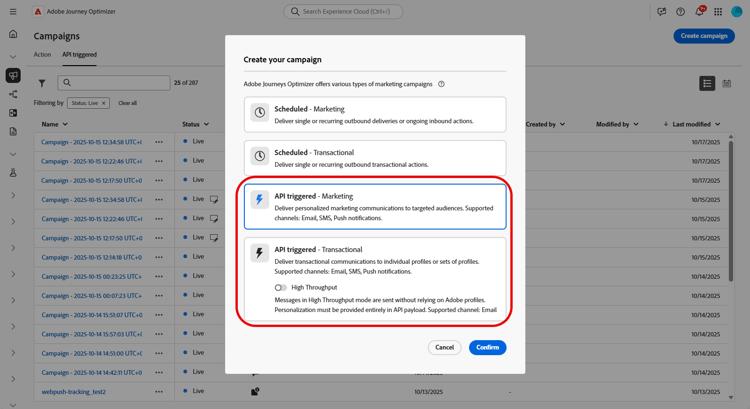
-
-
從 屬性 區段,編輯行銷活動的 標題 和描述。
-
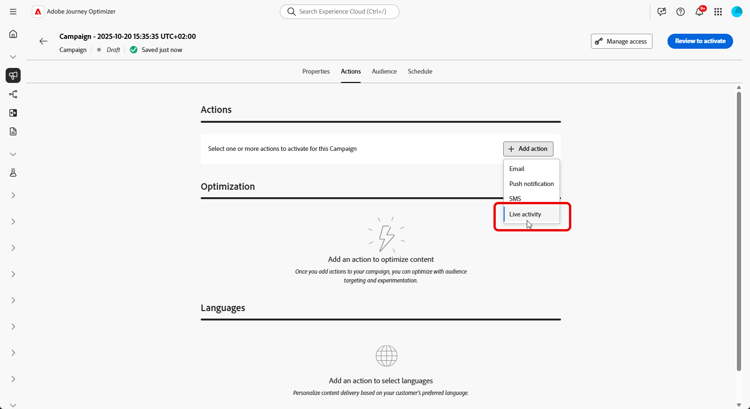
在 動作 區段中,選擇已上線活動,然後選取或建立新的設定。
在此頁面上進一步瞭解即時活動設定。
-
按一下 建立實驗 以開始設定您的內容實驗,並建立處理以測量其效能,並為您的目標對象識別最佳選項。 了解更多
-
從 對象 索引標籤,選擇您的身分型別 深入瞭解。
note NOTE 針對 API觸發的行銷 行銷活動,您可以從API裝載中檢查APNs channelID訂閱之前,選取做為第一個區段的現有對象。 -
行銷活動旨在特定日期或循環頻率執行。 在本節中瞭解如何設定行銷活動的排程。
-
設定之後,按一下檢閱以啟動,然後按一下啟動。
-
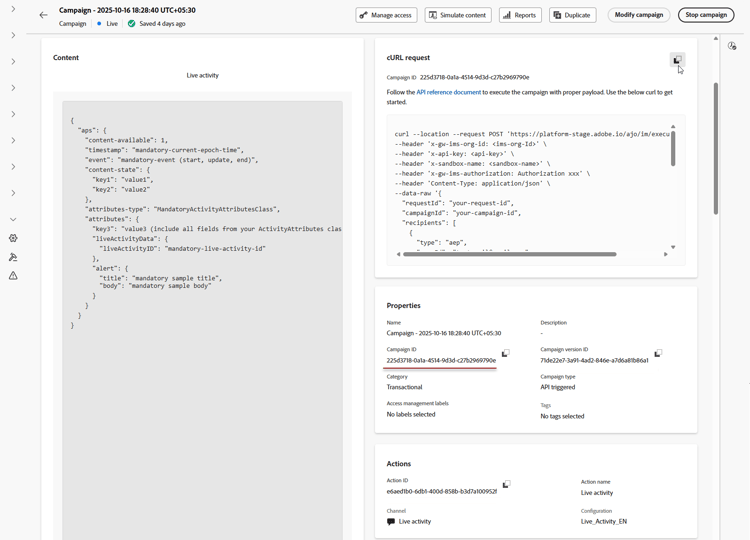
行銷活動啟動後,使用提供的 cURL請求 作為範本以觸發即時活動開始、更新或結束事件。 在執行之前,以您的特定資料更新範例裝載。
請確定您也複製 促銷活動ID 識別碼以包含在您的裝載中。
➡️請參閱API觸發的行銷活動檔案以瞭解驗證需求,包括OAuth權杖和API金鑰。
設計您的即時活動後,您可以使用內建報告來追蹤測量即時活動的影響。
裝載範例 payload
裝載結構取決於iOS使用Apple推播通知服務(APN) aps物件的平台,而Android則使用Firebase Cloud Messaging (FCM) fcm物件。 針對您的平台和行銷活動型別使用下列範例。
iOS裝載
對於iOS,請將個人化和生命週期欄位放入APN aps物件中。 請確定attributes-type符合您應用程式的LiveActivityAttributes結構名稱,且attributes符合該結構中所定義的欄位。
單一使用案例(API觸發的交易式行銷活動)
此裝載範例適用於使用 API觸發的交易式 行銷活動型別的個別行銷活動。 請注意,下列裝載範例中的大部分欄位是必填欄位,只有requestId、dismissal-date和alert是選用欄位。
| code language-json |
|---|
|
廣播使用案例(API觸發的行銷活動)
此裝載範例適用於使用 API觸發的行銷 行銷活動型別的對象型行銷活動。
| code language-json |
|---|
|
Android裝載
若為Android,請將即時活動欄位置於Firebase Cloud Messaging (FCM) fcm物件中。 使用您應用程式的樣式提供者設定為要處理的custom_key_*金鑰在content_state中定義動態值。
單一使用案例(API觸發的交易式行銷活動)
fcm物件包含兩個時間欄位,均以Epoch秒表示:timestamp控制訊息順序。 對於相同的notification_id(或廣播的topic_name),每個開始、更新和結束事件都必須使用大於上一個事件的值。 僅當更新的時間戳記大於上次處理的值時,才會顯示更新。 系統會忽略較舊或相等的時間戳記。when控制通知的顯示時間。 此選擇性欄位對應至Android的setWhen方法,不會影響訊息順序。 將其值維持在合理的最新狀態,因為過時的值可能會導致顯示問題。
將這些裝載用於 API觸發的交易式 型別的個別行銷活動。
對所有開始、更新和結束事件使用相同的notification_id,以確保其目標是相同的上線活動執行個體。
| code language-json |
|---|
|
若要更新已上線活動,請將event_type設定為update並保留notification_id不變。 視需要更新body、critical_text和content_state中的值,以反映最新狀態。
| code language-json |
|---|
|
若要結束已上線活動,請將event_type設為end。 可選擇加入dismiss_after以指定延遲時間(以秒為單位),超過此時間後,即會解除已完成的即時活動。
| code language-json |
|---|
|
廣播使用案例(API觸發的行銷活動)
將此裝載用於 API觸發的行銷 型別的對象型行銷活動。
將topic_name設為使用者裝置訂閱的FCM主題。 將所有更新和結束事件傳送至相同主題,並保留notification_id不變,以定位相同的上線活動通知。
| code language-json |
|---|
|
新增具有執行中繼資料的自訂資料 metadata
executionMetadata僅適用於 API觸發的交易式 行銷活動。使用選用的executionMetadata欄位,將您自己的 自訂資料 附加至設定檔,例如訂單ID、忠誠度等級或地區代碼。 Journey Optimizer會將此資料與執行一併儲存,以便您稍後可從 Live活動意見回饋資料集 擷取資料,並將傳遞結果與您自己的業務記錄比對。
若要透過API傳送此資料,請參閱executionMetadata欄位🔗的傳訊API參考。 若要在裝置上讀取回值,請參閱關於從API觸發程式接收執行中繼資料的Mobile SDK指南。
若要新增具有執行中繼資料的自訂資料:
-
將
executionMetadata新增到設定檔,在userId和namespace旁邊。 僅接受字串鍵和字串值,請在傳送前將任何非字串值轉換為字串。 -
這些值會與傳送時完全記錄。
executionMetadata不支援個人化運算式,因此任何{{...}}運算式都會被視為常值文字而非已解析。 您應該一律傳送最終常值。 -
每個設定檔最多可攜帶50個索引鍵/值組,所有索引鍵和值的組合大小限製為2 KB。 超過此限制的中繼資料會被捨棄,但即時活動仍會傳遞。 將裝載限製為報告所需的資訊。
在此範例中,orderId、tier、restaurant和region是您自己的值。 觸發「即時」活動後,您可以從意見資料集中將其讀回,以將傳送連結至您的訂單記錄。
| code language-json |
|---|
|
| note |
|---|
| NOTE |
在Android上擷取執行中繼資料的方式與在iOS上擷取相同:從AJO訊息回饋資料集中的message.feedback事件擷取。 如需查詢範例,請參閱 進階:透過資料集查詢偵錯 區段。 |
| Android使用適用於行動SDK的開放原始碼Adobe Experience Platform (AEP) Messaging擴充功能。 |
在此範例中,seat和type是包含您預訂詳細資料的自訂中繼資料欄位。 觸發即時活動後,請從即時活動意見資料集中擷取這些值,以將傳遞結果與您的預訂記錄相關聯。
| code language-json |
|---|
|
作法影片
探索如何使用 Adobe Journey Optimizer 設定 iOS 即時動態,以在 iPhone 鎖定畫面和動態島上提供豐富的即時更新。
This section contains structured knowledge intended to support interpretation, retrieval, and question answering related to this topic.
For complete understanding, this information should be combined with the documentation on this page. Neither source is intended to stand alone; the page describes the feature, while this section provides additional context that helps disambiguate terminology, intent, applicability, and constraints.
- TL;DR: This page explains how to build an API-triggered campaign in Journey Optimizer to remotely start, update, and end Live activities for individual users or audiences, and how to attach custom data to a profile using the optional
executionMetadatafield.
Intents:
- Create an API-triggered campaign for Live activities, selecting API-triggered Marketing for audience-based campaigns or API-triggered Transactional for individual campaigns
- Choose Live activity in the Actions section and select or create a configuration
- Create a content experiment with treatments to measure performance
- Activate the campaign and use the provided cURL request to trigger start, update, or end events
- Attach custom data to a profile using the optional
executionMetadatafield for later retrieval from the Live activity feedback dataset
Glossary:
- API-triggered Marketing: The campaign type used for audience-based campaigns (product-specific)
- API-triggered Transactional: The campaign type used for individual campaigns (product-specific)
- High Throughput: An option that should not be enabled for API-triggered Transactional Live activity campaigns (product-specific)
- Live activity: The action chosen in the Actions section, tied to a selected or newly created configuration (product-specific)
- executionMetadata: An optional field that attaches custom data to a profile, stored alongside the execution and retrievable from the Live activity feedback dataset (product-specific)
- Live activity feedback dataset: The dataset from which stored
executionMetadatavalues can be retrieved to match delivery results to your own records (product-specific) - event (iOS) / event_type (Android): The payload field whose values are
start,update, orend
Guardrails:
- For API-triggered Transactional campaigns, the High Throughput option should not be enabled.
executionMetadatais only available for API-triggered Transactional campaigns.executionMetadataaccepts only string keys and string values; convert any non-string value to a string before sending.executionMetadatadoes not support personalization expressions, so any{{...}}expression is treated as literal text rather than resolved.- Each profile can carry up to 50 key/value pairs in
executionMetadata(hard limit), with a combined size limit of 2 KB for all keys and values (hard limit). Metadata exceeding this limit is discarded, but the Live activity is still delivered. - In the iOS unitary payload example, most fields are mandatory; only
requestId,dismissal-date, andalertare optional.
Terminology:
- Canonical name: Live activity — Acronym: n/a — variants: Live activities
- Synonyms: “Unitary use cases” = “individual campaigns (API-triggered Transactional)”
- Synonyms: “Broadcast use cases” = “audience-based campaigns (API-triggered Marketing)”
- Do not confuse: “API-triggered Marketing” (audience-based campaigns) ≠ “API-triggered Transactional” (individual campaigns)
- Do not confuse: “start” ≠ “update” ≠ “end” (the values of the
eventfield in iOS payloads and theevent_typefield in Android payloads) - Do not confuse: “dismissal-date” (optional; auto-removes the activity when
eventisend) ≠ “timestamp” (current epoch time)
FAQ:
- Q: Which campaign type do I use for Live activities? — API-triggered Marketing for audience-based campaigns; API-triggered Transactional for individual campaigns.
- Q: Should High Throughput be enabled for API-triggered Transactional? — No; for API-triggered Transactional, the High Throughput option should not be enabled.
- Q: How do I trigger start, update, or end events after activation? — Use the provided cURL request as a template, update the sample payload with your specific data, and copy the Campaign ID into your payload.
- Q: What is
executionMetadatafor? — Attaching your own custom data, such as an order ID, loyalty tier, or region code, to a profile; it is stored alongside the execution and retrievable from the Live activity feedback dataset. It is only available for API-triggered Transactional campaigns. - Q: What are the
executionMetadatalimits? — Up to 50 key/value pairs per profile with a combined 2 KB size limit; only string keys and values are accepted, and personalization expressions are not resolved. Metadata exceeding the limit is discarded, but the Live activity is still delivered.