在此頁面上:瞭解如何定義傳遞層級、目標維度及執行位址,以設定「協調的行銷活動」的管道設定,以及如何將URL追蹤引數新增至連結。
設定目標Dimension後,您需要設定 通道設定 並定義適當的執行詳細資料。 這可讓您定義:
-
郵件傳遞的層級:例如,每個收件者傳送一封郵件,例如每個個人傳送一封電子郵件。
-
執行地址:用於傳送的特定連絡人欄位,例如電子郵件地址或電話號碼。
若要設定通道組態:
-
從建立和設定您的 頻道設定 開始。
您也可以更新現有的頻道設定。
-
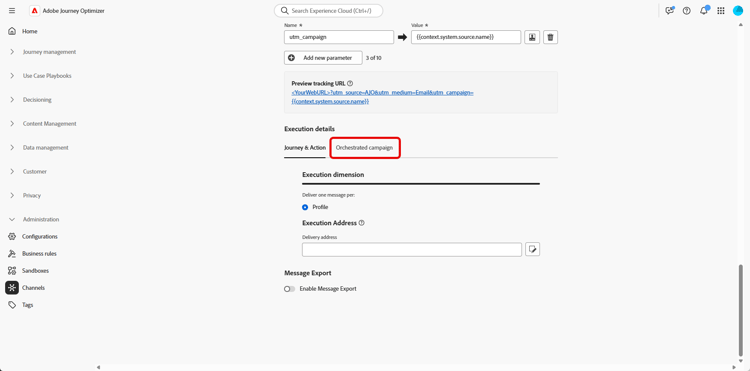
從 通道設定 的 執行詳細資料 區段,存取 協調的行銷活動 標籤。
-
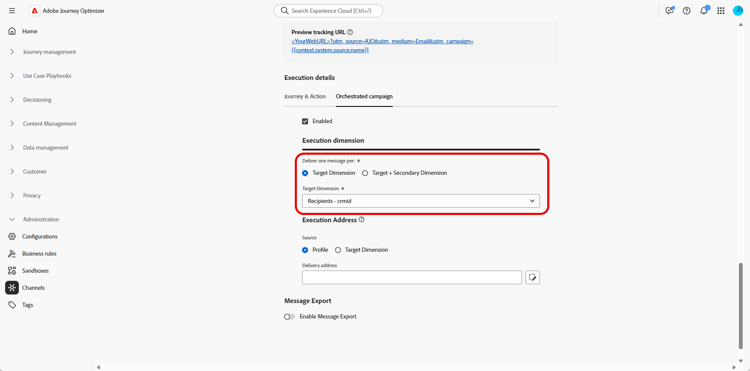
按一下已啟用,使其與協調的行銷活動相容。
-
選擇您的傳送方式:
-
目標Dimension:傳送給主要實體,例如,收件者。
-
目標+次要Dimension:使用主要和次要實體來傳送,例如,收件者+合約,或收件者+航班。
選擇此選項可支援多實體協調行銷活動,其中一個設定檔可接收數則訊息 — 在您選取為次要Dimension的連結表格中,每個合格列可接收一則訊息(例如連結至 收件者 的航班,或連結至 航班 的航班詳細資料,視您的資料模型而定)。
-
-
從下拉式清單中選取您先前建立的目標Dimension。
-
如果您選取 Target +次要Dimension 作為傳遞方法,請選擇 次要Dimension 來定義訊息傳遞的內容。
-
在 執行地址 區段下,選擇應該使用哪個 Source 來擷取傳遞地址,例如電子郵件地址或電話號碼:
-
設定檔:如果傳遞地址(例如電子郵件)直接儲存在主要客戶設定檔中,請選取此選項。
在向主要客戶傳送訊息(而非特定的關聯實體)時非常有用。
-
目標Dimension:如果傳遞地址儲存在主要實體(例如收件者)中,請選擇此專案。
當每個收件者都有自己的傳遞地址(例如不同的電子郵件或電話號碼)時,這非常有用。
-
次要Dimension:使用 Target +次要Dimension 作為傳遞方式時,請選取您先前設定的相關次要Dimension。
例如,如果次要維度代表預訂或訂閱,則可以從該層級取得執行地址,例如電子郵件。 若在預訂或訂閱服務時,設定檔使用不同的聯絡人詳細資訊,則此功能會很有用。
note NOTE 用於次要維度的結構描述必須具有主索引鍵。 次要維度不支援複合主索引鍵。
-
-
從 傳遞地址 欄位中,按一下

-
設定之後,按一下提交。
您的頻道現在已準備好搭配 協調的行銷活動 使用,將會根據選取的目標維度傳遞訊息。
URL追蹤引數 url-tracking
設定管道設定時,您可以定義URL追蹤引數,將中繼資料附加至追蹤的連結,以監控電子郵件行銷活動的效能,以用於分析和報告用途。
若要這麼做,可使用{{context.system.source.*}}語法,取得協調行銷活動的特定內容屬性:
context.system.source.id:協調的行銷活動識別碼context.system.source.name:協調的行銷活動名稱context.system.source.versionId:協調的行銷活動版本識別碼context.system.source.actionId:頻道動作節點識別碼context.system.source.actionName:頻道動作節點名稱context.system.source.channel:頻道型別(電子郵件、行動裝置、推播)context.system.IdentityNamespace:已使用身分名稱空間
例如:
www.YourLandingURL.com?utm_source=AJO&utm_campaign={{context.system.source.id}}&utm_content={{context.system.source.actionName}}
在本節中進一步瞭解URL追蹤引數。
This section contains structured knowledge intended to support interpretation, retrieval, and question answering related to this topic.
For complete understanding, this information should be combined with the documentation on this page. Neither source is intended to stand alone; the page describes the feature, while this section provides additional context that helps disambiguate terminology, intent, applicability, and constraints.
- TL;DR: This page explains how to configure a Channel configuration for Orchestrated campaigns by setting the delivery method, target dimension, and execution address, and how to add URL tracking parameters to tracked links.
Intents:
- Enable a Channel configuration for compatibility with Orchestrated campaigns.
- Choose a delivery method between Target Dimension and Target + Secondary Dimension.
- Select a previously created Target Dimension and, when applicable, a Secondary Dimension.
- Choose the source used to fetch the delivery address (Profile, Target Dimension, or Secondary Dimension) and select the specific delivery address field.
- Add URL tracking parameters using orchestrated campaign contextual attributes.
Glossary:
- Channel configuration: the configuration that defines how and to whom messages are delivered, including delivery level and execution address (product-specific)
- Execution details: the section of a Channel configuration where delivery method, target dimension, and execution address are set (product-specific)
- Target Dimension: delivery method that sends to the primary entity, e.g., recipient (product-specific)
- Target + Secondary Dimension: delivery method that sends using both primary and secondary entities, e.g., recipient + contract, or recipient + flights (product-specific)
- Secondary Dimension: the linked table selected to support multi-entity Orchestrated campaigns, where one profile can receive several messages, one per qualifying row (product-specific)
- Execution Address: the section where the Source used to fetch the delivery address (email address or phone number) is chosen (product-specific)
- Delivery address: the specific field selected to use for message delivery, chosen via the edit icon in the Delivery address field (product-specific)
Guardrails:
- The schema used for the secondary dimension must have a primary key; composite primary keys are not supported for secondary dimensions.
Terminology:
- Canonical name: Channel configuration — variants: Channel Configuration
- Do not confuse: “Target Dimension” (send to the primary entity, e.g., recipient) ≠ “Target + Secondary Dimension” (send using both primary and secondary entities, supporting one message per qualifying row in the linked Secondary Dimension table)
- Do not confuse: “Execution Address” (the section where the Source for the delivery address is chosen) ≠ “Delivery address” (the specific field selected for message delivery)
FAQ:
- Q: What must be enabled before a Channel configuration can be used with Orchestrated campaigns? — Enabled must be clicked in the Orchestrated campaigns tab of the Execution details section.
- Q: What are the two delivery methods available? — Target Dimension (primary entity only) and Target + Secondary Dimension (primary and secondary entities).
- Q: Where can the execution address be sourced from? — From Profile, Target Dimension, or Secondary Dimension, depending on where the delivery address is stored.
- Q: Are composite primary keys supported for secondary dimensions? — No, the schema used for the secondary dimension must have a primary key, and composite primary keys are not supported.
- Q: How are URL tracking parameters defined for Orchestrated campaigns? — Using contextual attributes with the
{{context.system.source.*}}syntax, such ascontext.system.source.idorcontext.system.source.actionName.
Examples:
- URL tracking parameter example for Orchestrated campaigns:
www.YourLandingURL.com?utm_source=AJO&utm_campaign={{context.system.source.id}}&utm_content={{context.system.source.actionName}}
Related pages:
- For creating and configuring the Channel configuration: Follow the steps detailed in this page (email/surface-personalization.md)
- For selecting a previously created Target Dimension: previously created Target Dimension (orchestrated/target-dimension.md)
- For learning more about URL tracking parameters: this section (email/url-tracking.md)
Personas:
- admin: Can enable a Channel configuration for Orchestrated campaigns by selecting Enabled, then choose Target Dimension or Target + Secondary Dimension as the delivery method. Can select the Source for the execution address from Profile, Target Dimension, or Secondary Dimension, then select the specific Delivery address field. The page states that the schema used for the secondary dimension must have a primary key, and composite primary keys are not supported. Where: “Configure your Channel configuration”.
Onboarding:
- Level: Intermediate
- First minimal step: Create and configure your Channel configuration.
- Success check: Your channel is ready to use with Orchestrated campaigns, and messages are delivered according to the selected target dimension.
- Previous: After setting up your Target Dimension: Create your Targeting dimension (orchestrated/target-dimension.md); To create and configure your Channel configuration: Personalize email configuration settings (email/surface-personalization.md)
- Next: To learn more about URL tracking parameters: Configure URL tracking (email/url-tracking.md)