在此頁面上:建立API觸發的行銷活動,並設定其型別、名稱、標籤和存取標籤,以便範圍設定正確且從一開始即可輕鬆找到。
若要建立新的API觸發行銷活動,請遵循下列步驟:
-
瀏覽至 行銷活動 功能表,並選取 觸發的API 標籤。
-
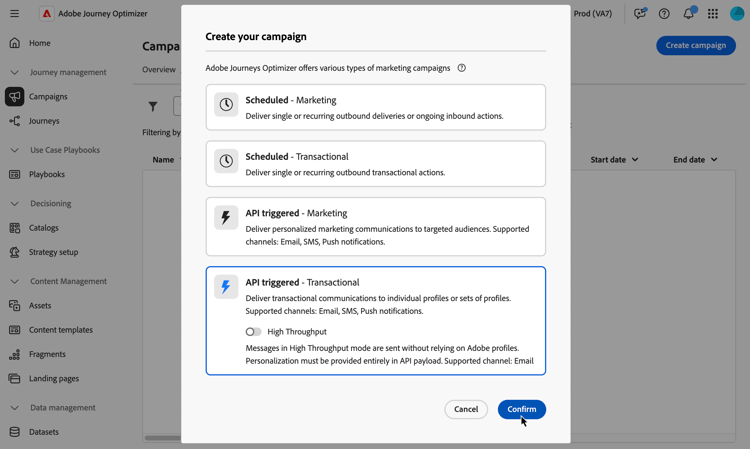
按一下 建立行銷活動 按鈕並選取行銷活動型別:
-
API觸發 — 行銷 — 選取此型別的API觸發行銷活動,將個人化行銷通訊傳送給目標對象。
-
已觸發API — 異動 — 異動行銷活動的目標是傳送異動訊息,也就是在個人執行動作後傳送的訊息:密碼重設要求、購物車購買等。
accordion 高輸送量模式 對於異動API觸發的行銷活動,您可以啟用 高輸送量 模式。 此模式專為大規模即時傳訊(每秒最多5000筆交易)而設計,可提供更高的可用性並降低延遲。 瞭解如何使用Highthrouput模式
note availability AVAILABILITY 目前,高輸送量模式僅適用於除瑞士以外的所有地區的電子郵件管道。 啟用「高輸送量」模式時,只能選取「高輸送量」通道設定。 瞭解如何設定高輸送量資源 此功能僅適用於已購買Adobe 高輸送量異動訊息附加產品的組織。 請聯絡您的 Adobe 代表以取得更多資訊。
-
-
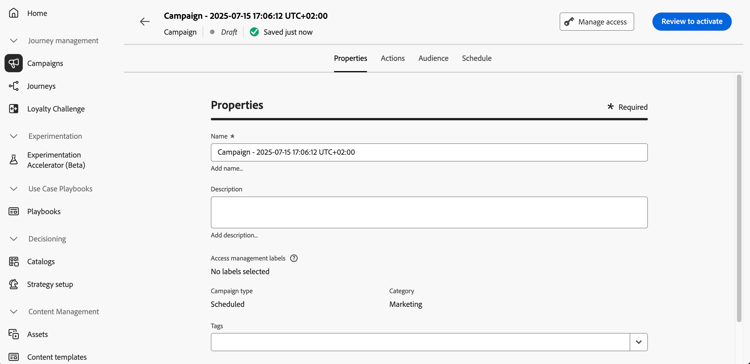
在 屬性 索引標籤中,輸入行銷活動的名稱和說明。
-
使用 標籤 欄位將Adobe Experience Platform統一標籤指派給您的行銷活動。 這可讓您輕鬆分類這些行銷活動,並改進行銷活動清單的搜尋。 了解如何使用標籤
-
您可以根據存取標籤限制對此行銷活動的存取。 若要新增存取限制,請瀏覽至此頁面最上方的「管理存取」按鈕。 請確定只選取您具有許可權的標籤。 進一步瞭解物件層級存取控制。
後續步驟 next
準備好行銷活動設定和內容後,您就可以設定其動作。 了解更多
This section contains structured knowledge intended to support interpretation, retrieval, and question answering related to this topic.
For complete understanding, this information should be combined with the documentation on this page. Neither source is intended to stand alone; the page describes the feature, while this section provides additional context that helps disambiguate terminology, intent, applicability, and constraints.
- TL;DR: This page explains how to create an API triggered campaign by choosing its type (Marketing or Transactional), and how to set its name, description, tags, and access labels in the Properties tab.
Intents:
- Create an API triggered campaign from the API triggered tab of the Campaigns menu
- Choose between API triggered - Marketing and API triggered - Transactional
- Enable High Throughput mode for a transactional API triggered campaign
- Assign Unified Tags to the campaign
- Limit access to the campaign with access labels using Manage access
Glossary:
- API triggered - Marketing: Campaign type used to send personalized marketing communications to targeted audiences
- API triggered - Transactional: Campaign type used to send transactional messages, that is messages sent out following an action performed by an individual, such as a password reset request or a cart purchase
- High Throughput mode: Mode designed for large-scale, real-time messaging (up to 5000 transactions per second) that provides higher availability with lower latency (product-specific)
- Tags: Adobe Experience Platform Unified Tags assigned to a campaign to classify it and improve search from the campaigns list
- Access labels: Labels used to limit access to the campaign, set with Manage access
Guardrails:
- Make sure to select only access labels you have permission for.
Prerequisites and permissions:
- High Throughput mode is only available for organizations that have purchased the Adobe High throughput transactional messaging add-on offering.
Applicability:
- High Throughput mode: transactional API triggered campaigns only; currently available only for the email channel and in the US region
Terminology:
- Canonical name: API triggered campaign
- Acronym: OLAC — Object level access control
- Acronym: AEP — Adobe Experience Platform
- Short name: Platform — Adobe Experience Platform
- Do not confuse: API triggered - Marketing (marketing communications to targeted audiences) ≠ API triggered - Transactional (messages sent following an action performed by an individual)
FAQ:
- Q: How do I create an API triggered campaign? — Browse to the Campaigns menu, select the API triggered tab, click Create campaign, and select the campaign type.
- Q: Which campaign types are available? — API triggered - Marketing and API triggered - Transactional.
- Q: What is required for High Throughput mode? — The Adobe High throughput transactional messaging add-on offering; it is currently available only for the email channel and in the US region.
- Q: How do I limit access to a campaign? — Use the Manage access button to add access labels, selecting only labels you have permission for.
Related pages:
- High Throughput mode: Learn how to work with the Highthrouput mode (campaigns/api-triggered-high-throughput.md)
- Tags: Learn how to work with tags (start/search-filter-categorize.md#tags)
- Access labels: Learn more about Object Level Access Control (administration/object-based-access.md)
- Next step, configuring the action: Learn more (campaigns/api-triggered-campaign-action.md)
Personas:
- developer: Can create an API triggered campaign and choose between API triggered - Marketing and API triggered - Transactional types. Can enable High Throughput mode for transactional campaigns, supporting up to 5000 transactions per second. The page states that access labels limit campaign access and only labels with permission can be selected. Where: “FAQ”.
Onboarding:
- Level: Experienced
- First minimal step: Browse to the Campaigns menu and select the API triggered tab.
- Success check: The campaign configuration and content are ready for its action to be configured.
- Next: Once your campaign configuration and content are ready: Configure the API triggered campaign action (campaigns/api-triggered-campaign-action.md)